
nginx实现文件上传和下载
nginx实现文件上传和下载
发布时间:2020-06-05 16:45:27 来源:亿速云 阅读:156 作者:Leah 栏目:系统运维
这篇文章给大家分享的是nginx实现文件上传和下载的方法。小编觉得挺实用的,因此分享给大家学习。如下资料是关于实现文件上传和下载的方法的内步骤。
系统版本:
[root@vhost8 local]# cat /etc/redhat-release
CentOS Linux release 7.5.1804 (Core)
用户准备:
useradd -s /sbin/nologin -M nginx
目录及权限准备
[root@vhost8 local]#
mkdir -p /export/share/upload/
mkdir -p /export/tmp/upload/
cd /export/tmp/upload/
mkdir 0 1 2 3 4 5 6 7 8 9 state
chown -R nginx:nginx /export/
[root@vhost8 export]# tree
.
├── share
│ └── upload
│ ├── eclipse-cpp-2019-09-R-win32-x86_64.zip
└── tmp
└── upload
├── 0
│ ├── 0001559170
├── 1
│ ├── 0000000001
├── 2
├── 3
├── 4
├── 5
├── 6
├── 7
├── 8
├── 9
└── state
15 directories, 26 files
[root@vhost8 local]#
nginx 安装:
yum remove nginx
yum -y install gcc gcc-c++ autoconf automake gd gd-devel zlib zlib-devel openssl openssl-devel pcre-devel
mkdir /root/thb
cd /root/thb
wget http://nginx.org/download/nginx-1.17.7.tar.gz
git clone https://github.com/hongzhidao/nginx-upload-module.git
git clone https://github.com/masterzen/nginx-upload-progress-module.git
tar -xzvf nginx-1.17.7.tar.gz
cd nginx-1.17.7/
./configure --with-debug --prefix=/etc/nginx --sbin-path=/usr/sbin/nginx --conf-path=/etc/nginx/nginx.conf --error-log-path=/var/log/nginx/error.log --http-log-path=/var/log/nginx/access.log --pid-path=/var/run/nginx.pid --lock-path=/var/run/nginx.lock --http-client-body-temp-path=/var/cache/nginx/client_temp --http-proxy-temp-path=/var/cache/nginx/proxy_temp --http-fastcgi-temp-path=/var/cache/nginx/fastcgi_temp --http-uwsgi-temp-path=/var/cache/nginx/uwsgi_temp --http-scgi-temp-path=/var/cache/nginx/scgi_temp --user=nginx --group=nginx --add-module=/root/thb/nginx-upload-module --add-module=/root/thb/nginx-upload-progress-module --with-stream --with-http_image_filter_module --with-http_ssl_module --with-http_realip_module --with-http_addition_module --with-http_sub_module --with-http_dav_module --with-http_flv_module --with-http_mp4_module --with-http_gunzip_module --with-http_gzip_static_module --with-http_random_index_module --with-http_secure_link_module --with-http_stub_status_module --with-http_auth_request_module --with-file-aio --with-cc-opt='-Wno-format-security -Wno-unused-but-set-variable -Wno-unused-result -D NGX_HAVE_OPENSSL_MD5_H=1 -D NGX_OPENSSL_MD5=1 -D NGX_HAVE_OPENSSL_SHA1_H=1 -O2 -g -pipe -Wp,-D_FORTIFY_SOURCE=2 -fexceptions -fstack-protector --param=ssp-buffer-size=4 -m64 -mtune=generic'
make && make install
修改nginx配置:
cd /etc/nginx/
vi nginx.conf
[root@vhost8 nginx]# cat nginx.conf
worker_processes 4;
#error_log logs/error.log;
#error_log logs/error.log notice;
#error_log logs/error.log info;
#pid logs/nginx.pid;
events {
worker_connections 1024;
}
http {
include mime.types;
default_type application/octet-stream;
#log_format main '$remote_addr - $remote_user [$time_local] "$request" '
# '$status $body_bytes_sent "$http_referer" '
# '"$http_user_agent" "$http_x_forwarded_for"';
#access_log logs/access.log main;
sendfile on;
#tcp_nopush on;
#keepalive_timeout 0;
keepalive_timeout 65;
upload_progress proxied 8m;
#gzip on;
server {
listen 80;
auth_basic "Please input password"; #这里是验证时的提示信息
auth_basic_user_file /etc/nginx/passwd/testpwd;
# upload
client_max_body_size 100g; # 这个配置表示最大上传大小,但是我没有验证过是否能传 100g 的文件
# Upload form should be submitted to this location
location /upload {
# Pass altered request body to this location
upload_pass /upload.php;
# 开启resumable
upload_resumable on;
# Store files to this directory
# The directory is hashed, subdirectories 0 1 2 3 4 5 6 7 8 9 should exist
# 记得修改目录的读写权限
upload_store /export/tmp/upload 1;
upload_state_store /export/tmp/upload/state;
# Allow uploaded files to be read by all
upload_store_access all:r;
# Set specified fields in request body
upload_set_form_field "${upload_field_name}_name" $upload_file_name;
upload_set_form_field "${upload_field_name}_content_type" $upload_content_type;
upload_set_form_field "${upload_field_name}_path" $upload_tmp_path;
# Inform backend about hash and size of a file
upload_aggregate_form_field "${upload_field_name}_md5" $upload_file_md5;
upload_aggregate_form_field "${upload_field_name}_size" $upload_file_size;
upload_pass_form_field "^submit$|^description$";
}
location ~ \.php$ {
# fastcgi_pass unix:/run/php-fpm/php-fpm.sock;
fastcgi_pass 127.0.0.1:9000;
fastcgi_index index.php;
# fastcgi_param SCRIPT_FILENAME /scripts$fastcgi_script_name;
fastcgi_param SCRIPT_FILENAME $document_root$fastcgi_script_name;
include fastcgi_params;
}
location /myfiles {
alias /export/share/upload/; # 文件存放目录,注意要以 '/' 结尾;
index index.html; # 如果文件存放目录有 index.html,会跳转到 index.html;
autoindex on; # 自动列出目录下的文件;
autoindex_exact_size off; # 文件大小按 G、M 的格式显示,而不是 Bytes;
}
}
}
[root@vhost8 local]#
编辑上传文件
[root@vhost8 local]#
cd /etc/nginx/html
vi upload.php
[root@vhost8 html]# cat upload.php
<?php
$header_prefix = 'file';
$slots = 6;
?>
<html>
<head>
<title>Test upload</title>
</head>
<body>
<?php
if ($_POST){
echo "<h3>Uploaded files:</h3>";
echo "<table border=\"2\" cellpadding=\"2\">";
echo "<tr><td>Name</td><td>Location</td><td>Content type</td><td>MD5</td><td>Size</td><td>Scp Command</td><td>Wget Command</tr>";
for ($i=1;$i<=$slots;$i++){
$key = $header_prefix.$i;
if (array_key_exists($key."_name", $_POST) && array_key_exists($key."_path",$_POST)) {
$tmp_name = $_POST[$key."_path"];
$name = $_POST[$key."_name"];
$content_type = $_POST[$key."_content_type"];
$md5 = $_POST[$key."_md5"];
$size = $_POST[$key."_size"];
$final_path = "/export/share/upload";
if (copy($tmp_name, "$final_path/$name")) {
echo "SUCCESS!";
} else {
echo "FAIL!";
}
$scp_cmd = "scp team@***:/export/share/upload/$name .";
$wget_cmd = "wget http://***/files/upload/$name";
echo "<tr><td>$name</td><td>$final_path</td><td>$content_type</td><td>$md5</td><td>$size</td><td>$scp_cmd</td><td>$wget_cmd</td>";
}
}
echo "</table>";
}else{?>
<h3>Select files to upload</h3>
<form name="upload" method="POST" enctype="multipart/form-data" action="/upload">
<input type="file" name="file1"><br>
<input type="file" name="file2"><br>
<input type="file" name="file3"><br>
<input type="file" name="file4"><br>
<input type="file" name="file5"><br>
<input type="file" name="file6"><br>
<input type="submit" name="submit" value="Upload">
<input type="hidden" name="test" value="value">
</form>
<?php
}
?>
</body>
</html>
[root@vhost8 local]#
增加nginx 网页登录验证
yum -y install httpd-tools
mkdir -p /etc/nginx/passwd/
htpasswd -c /etc/nginx/passwd/testpwd user1
输入2遍user1 登录密码
增加nginx启动文件
[root@vhost8 local]#
vi /lib/systemd/system/nginx.service
[root@vhost8 local]# cat /lib/systemd/system/nginx.service
[Unit]
Description=The nginx HTTP and reverse proxy server
After=network.target remote-fs.target nss-lookup.target
[Service]
Type=forking
PIDFile=/run/nginx.pid
# Nginx will fail to start if /run/nginx.pid already exists but has the wrong
# SELinux context. This might happen when running `nginx -t` from the cmdline.
# https://bugzilla.redhat.com/show_bug.cgi?id=1268621
ExecStartPre=/usr/bin/rm -f /run/nginx.pid
ExecStartPre=/usr/sbin/nginx -t
ExecStart=/usr/sbin/nginx
ExecReload=/bin/kill -s HUP $MAINPID
KillSignal=SIGQUIT
TimeoutStopSec=5
KillMode=process
PrivateTmp=true
[Install]
WantedBy=multi-user.target
[root@vhost8 local]#
php安装
[root@vhost8 nginx]#
yum -y install gcc automake autoconf libtool make
yum -y install gcc gcc-c++ glibc
yum -y install libmcrypt libmcrypt-devel mhash-devel libxslt-devel libjpeg libjpeg-devel libpng libpng-devel freetype freetype-devel libxml2 libxml2-devel zlib zlib-devel glibc glibc-devel glib2 glib2-devel bzip2 bzip2-devel ncurses ncurses-devel curl curl-devel e2fsprogs e2fsprogs-devel krb5 krb5-devel libidn libidn-devel openssl openssl-devel
cd ~
wget https://museum.php.net/php5/php-5.4.7.tar.gz
tar -xzvf php-5.4.7.tar.gz
cd php-5.4.7
./configure --prefix=/usr/local/php --enable-fpm --with-mcrypt --enable-mbstring --disable-pdo --with-curl --disable-debug --disable-rpath --enable-inline-optimization --with-bz2 --with-zlib --enable-sockets --enable-sysvsem --enable-sysvshm --enable-pcntl --enable-mbregex --with-mhash --enable-zip --with-pcre-regex --with-mysql --with-Mysqli --with-gd --with-jpeg-dir
make all install
cd /usr/local/php
cp etc/php-fpm.conf.default etc/php-fpm.conf
vi etc/php-fpm.conf
修改
user = nginx
group = nginx
启动php-fpm服务:
cd /usr/local/php
./sbin/php-fpm &
启动nginx:
[root@vhost8 local]#
systemctl enable nginx.service
systemctl start nginx
systemctl status nginx
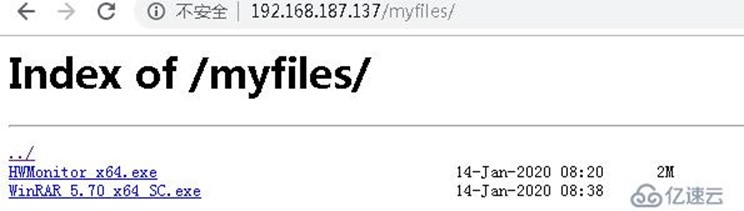
文件浏览:
http://192.168.187.137/myfiles/
文件上传:
http://192.168.187.137/upload.php


关于nginx实现文件上传和下载的方法就分享到这里了,希望以上内容可以对大家有一定的帮助,可以学到更多知识。如果觉得文章不错,可以把它分享出去让更多的人看到
nginx实现文件上传和下载的更多相关文章
- Nginx集群之WCF大文件上传及下载(支持6G传输)
目录 1 大概思路... 1 2 Nginx集群之WCF大文件上传及下载... 1 3 BasicHttpBinding相关配置解析... 2 4 编写 ...
- 七、springBoot 简单优雅是实现文件上传和下载
前言 好久没有更新spring Boot 这个项目了.最近看了一下docker 的知识,后期打算将spring boot 和docker 结合起来.刚好最近有一个上传文件的工作呢,刚好就想起这个脚手架 ...
- 全网最简单的大文件上传与下载代码实现(React+Go)
前言 前段时间我需要实现大文件上传的需求,在网上查找了很多资料,并且也发现已经有很多优秀的博客讲了大文件上传下载这个功能. 我的项目是个比较简单的项目,并没有采用特别复杂的实现方式,所以我这篇文章的目 ...
- java web学习总结(二十四) -------------------Servlet文件上传和下载的实现
在Web应用系统开发中,文件上传和下载功能是非常常用的功能,今天来讲一下JavaWeb中的文件上传和下载功能的实现. 对于文件上传,浏览器在上传的过程中是将文件以流的形式提交到服务器端的,如果直接使用 ...
- (转载)JavaWeb学习总结(五十)——文件上传和下载
源地址:http://www.cnblogs.com/xdp-gacl/p/4200090.html 在Web应用系统开发中,文件上传和下载功能是非常常用的功能,今天来讲一下JavaWeb中的文件上传 ...
- JavaWeb学习总结,文件上传和下载
在Web应用系统开发中,文件上传和下载功能是非常常用的功能,今天来讲一下JavaWeb中的文件上传和下载功能的实现. 对于文件上传,浏览器在上传的过程中是将文件以流的形式提交到服务器端的,如果直接使用 ...
- java文件上传和下载
简介 文件上传和下载是java web中常见的操作,文件上传主要是将文件通过IO流传放到服务器的某一个特定的文件夹下,而文件下载则是与文件上传相反,将文件从服务器的特定的文件夹下的文件通过IO流下载到 ...
- 使用jsp/servlet简单实现文件上传与下载
使用JSP/Servlet简单实现文件上传与下载 通过学习黑马jsp教学视频,我学会了使用jsp与servlet简单地实现web的文件的上传与下载,首先感谢黑马.好了,下面来简单了解如何通过使用 ...
- JavaWeb学习总结(五十)——文件上传和下载
在Web应用系统开发中,文件上传和下载功能是非常常用的功能,今天来讲一下JavaWeb中的文件上传和下载功能的实现. 对于文件上传,浏览器在上传的过程中是将文件以流的形式提交到服务器端的,如果直接使用 ...
随机推荐
- 【Oracle】查看表或视图的创建语句
这里用到的是Oracle的DDL语句的用法 用于获得某个schema下所有的表.索引.视图.存储过程.函数的DDL set pagesize 0 set long 90000 set feedback ...
- ctfshow——web_AK赛
签到_观己 从题目描述中没发现什么有用的信息 发现文件包含 尝试使用PHP伪协议执行命令,发现无法执行 尝试使用远程文件包含,发现也未开启 尝试使用日志注入 记录了UA值,抓包写入一句话木马 使用蚁剑 ...
- oracle 12C单实例打PSU
前提: oracle不管打什么样的补丁,readme都是很好的参考资料. Oracle每季度都会更新一个最新的PSU,现在12.1.0.2.0的最新的PSU是Patch 26925311. 由于今天白 ...
- spring boot 集成 websocket 实现消息主动
来源:https://www.cnblogs.com/leigepython/p/11058902.html pom.xml 1 <?xml version="1.0" en ...
- mongodb简单运用
mongodb NoSQL(Not Only SQL),意思是"不仅仅是 SQL",指的是非关系型数据库,是对不同于传统的关系型数据库的数据库管理系统的统称. NoSQL 用于超大 ...
- 配置Charles 设置手机代理并允许https请求
前言: 在h5开发调试时,为实现手机app访问localhost地址,可以使用ip地址的方式,但一般公司app出于安全考虑,会限制只能访问其自有域名.因此,使用charles代理的方式 步骤 用手机代 ...
- 关于Vue v-model你需要知道的一切
v-model是Vue的一个指令,它提供了input和form数据之间或两个组件之间的双向数据绑定. 这在Vue开发中是一个简单的概念,但是v-model的真正威力需要一些时间才能理解. 到本教程结 ...
- jQuery 页面滚动 吸顶 和 吸底
<!DOCTYPE html> <html> <head> <meta charset="UTF-8"> <title> ...
- calc, support, media各自的含义及用法?
@support主要是用于检测浏览器是否支持CSS的某个属性,其实就是条件判断,如果支持某个属性,你可以写一套样式,如果不支持某个属性,你也可以提供另外一套样式作为替补. calc() 函数用于动态计 ...
- python基础(int,str,bool,list)
1数字int. 数字主要是用于计算用的,使用方法并不是很多,就记住一种就可以: bit_length() #bit_length() 当十进制用二进制表示时,最少使用的位数 v = 11 1 ...