
js console.log all in one
js console.log all in one
this & arguments
"use strict";

/**

 *

 * @author xgqfrms

 * @license MIT

 * @copyright xgqfrms

 * @created 2020-10-16

 * @modified

 *

 * @description js console.log all in one

 * @difficulty Easy Medium Hard

 * @complexity O(n)

 * @augments

 * @example

 * @link

 * @solutions

 *

 * @best_solutions

 *

 */

const log = console.log;

const obj = {

  length: 1,

  output: function() {

    log(`this.length =`, this.length, this);

    (() => {

      log(`iife =`, this.length, this);

    })();

  },

  // 箭头函数 iife

  output2: () => {

    // 箭头函数 this 绑定只与执行的上下文有关,与定义的位置无关!

    log(`arrow =`, this.length, this);

    const test = () => {

      log(`test =`, this.length, this);

    }

    test();

  },

  // arguments ??? this

  output3: function (f) {

    log(`\n`)

    f();

    log(`\n`)

    log(`arguments =`, arguments);

    log(`arguments[0] =`, arguments[0], this);

    log(`\n`)

    arguments[0]();

  },

}

obj.output();

obj.output2();

function f() {

  log(`f =`, this, typeof f);

  log(`f.length =`, f.length);

  // log(`f =`, this.length);

  // TypeError: Cannot read property 'length' of undefined

}

f();

obj.output3(f);

log(`this.length =`, this.length);

// log(`this =`, this);

// this = {}

// log(`global =`, global);

// Object

/*

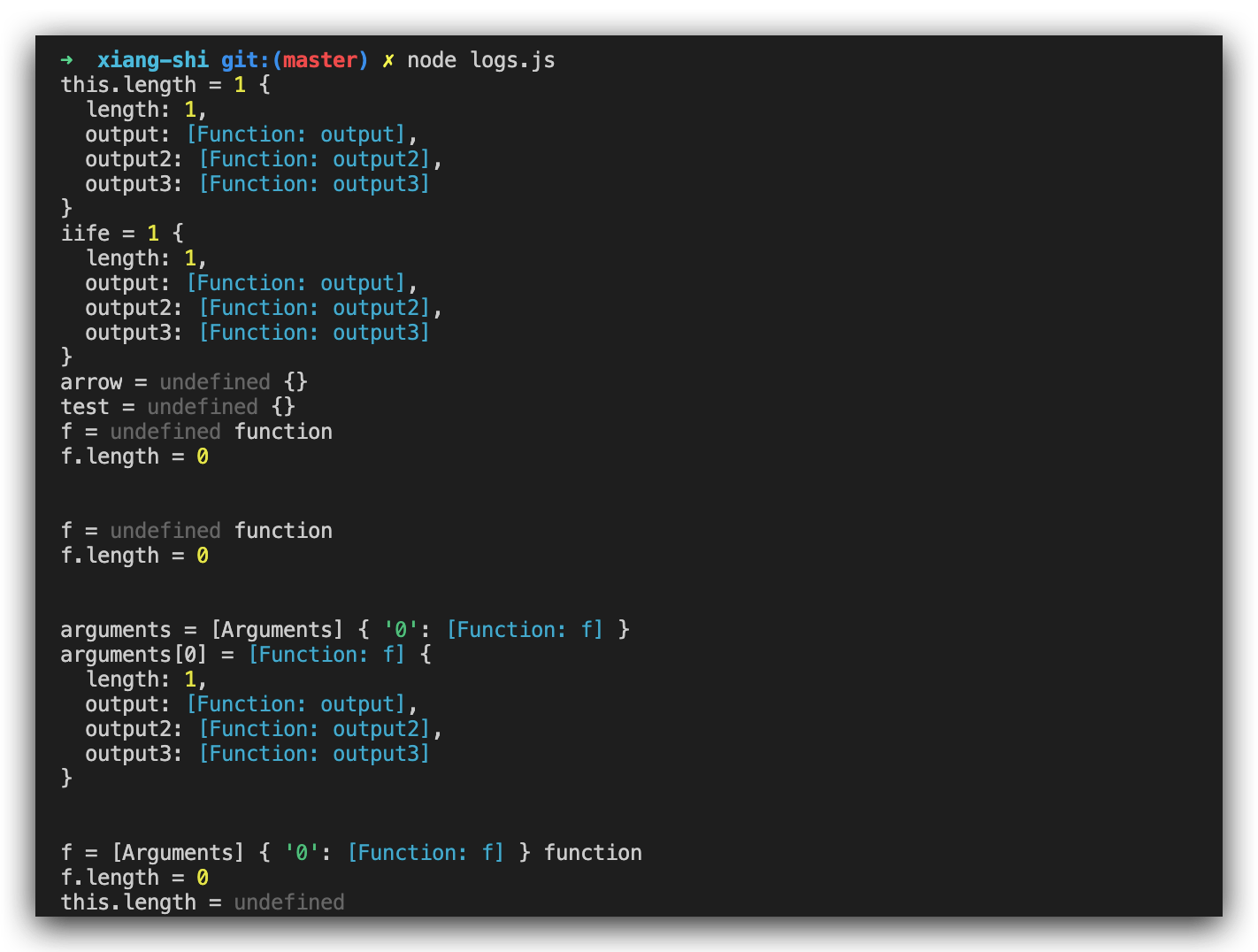
$ node logs.js

this.length = 1 {

  length: 1,

  output: [Function: output],

  output2: [Function: output2],

  output3: [Function: output3]

}

iife = 1 {

  length: 1,

  output: [Function: output],

  output2: [Function: output2],

  output3: [Function: output3]

}

arrow = undefined {}

test = undefined {}

f = undefined function

f.length = 0

f = undefined function

f.length = 0

arguments = [Arguments] { '0': [Function: f] }

arguments[0] = [Function: f] {

  length: 1,

  output: [Function: output],

  output2: [Function: output2],

  output3: [Function: output3]

}

f = [Arguments] { '0': [Function: f] } function

f.length = 0

this.length = undefined

*/

/*

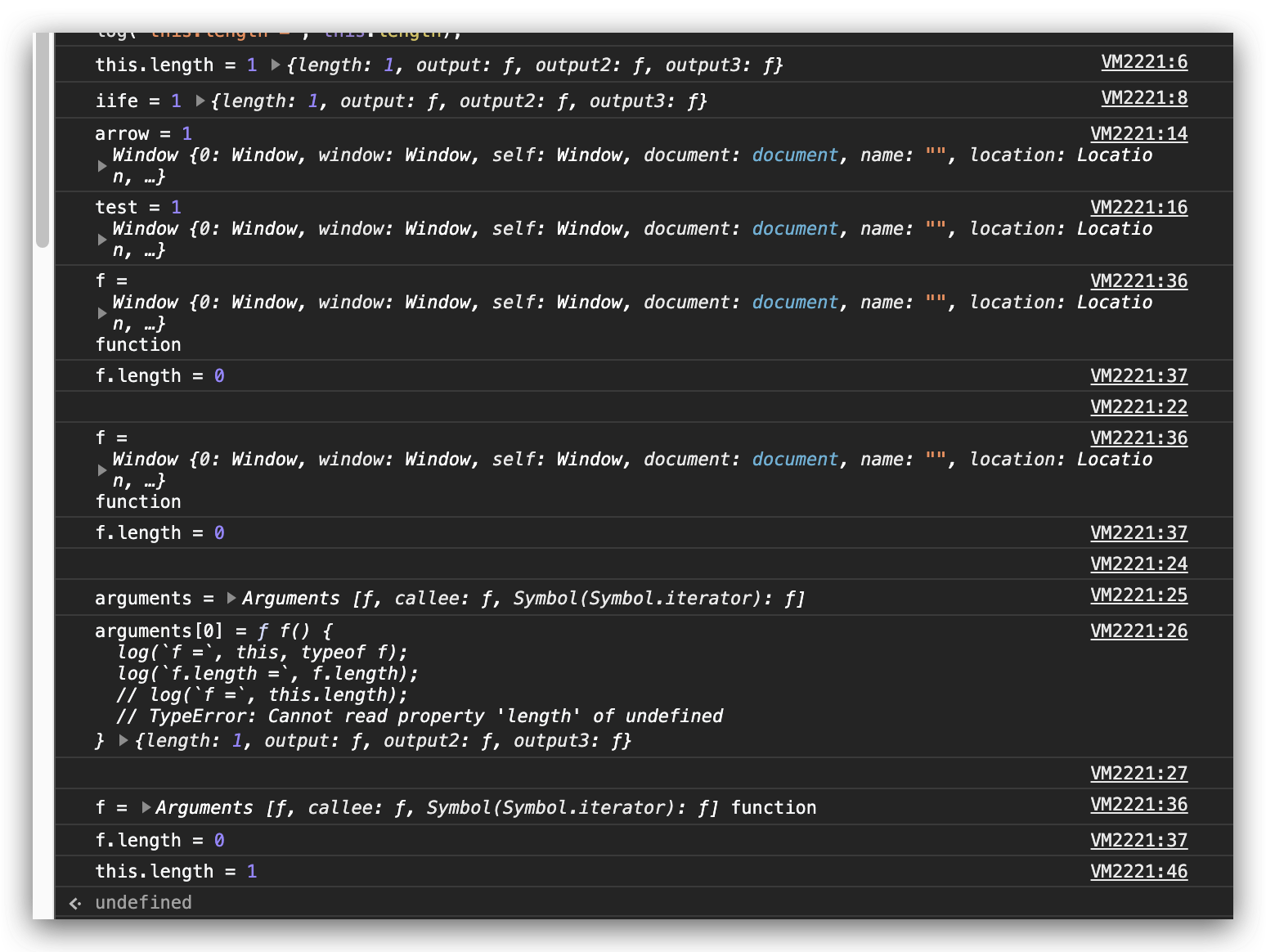
// browser / window

this.length = 1 {length: 1, output: ƒ, output2: ƒ, output3: ƒ}

iife = 1 {length: 1, output: ƒ, output2: ƒ, output3: ƒ}

 arrow = 1 Window {0: global, window: Window, self: Window, document: document, name: "", location: Location, …}

 test = 1 Window {0: global, window: Window, self: Window, document: document, name: "", location: Location, …}

 f = Window {0: global, window: Window, self: Window, document: document, name: "", location: Location, …} function

 f.length = 0

 f = Window {0: global, window: Window, self: Window, document: document, name: "", location: Location, …} function

 f.length = 0

 arguments = Arguments [ƒ, callee: ƒ, Symbol(Symbol.iterator): ƒ]

 arguments[0] = ƒ f() {

  log(`f =`, this, typeof f);

  log(`f.length =`, f.length);

  // log(`f =`, this.length);

  // TypeError: Cannot read property 'length' of undefined

} {length: 1, output: ƒ, output2: ƒ, output3: ƒ}

 f = Arguments [ƒ, callee: ƒ, Symbol(Symbol.iterator): ƒ] function

 f.length = 0

 this.length = 1

*/
js 环境 bug
node.js 与浏览器不一致
1.
- browser
- node.js
2. arrow function
"use strict";

/**

 *

 * @author xgqfrms

 * @license MIT

 * @copyright xgqfrms

 * @created 2020-10-01

 * @modified

 *

 * @description 浏览器 env

 * @difficulty Easy Medium Hard

 * @complexity O(n)

 * @augments

 * @example

 * @link

 * @solutions

 *

 * @best_solutions

 *

 */

const log = console.log;

var a = 10;

var obj = {

  a: 20,

  b: function() {

    var a = 30;

    log(`b this`, this)

    // b this {a: 20, b: ƒ, c: ƒ}

    log(`b`, this.a)

    return this.a;

  },

  c: () => {

    var a = 40;

    log(`c this`, this)

    // {}

    log(`c`, this.a)

    return this.a;

  },

}

// var test = new obj();

var test = obj;

log(`\ntest.a`, test.a);

// 20

log(`\ntest.b()`, test.b());

// 20

log(`\ntest.c()`, test.c());

// 10

// test.a 20

// b this {a: 20, b: ƒ, c: ƒ}

// b 20

// test.b() 20

// c this Window {window: Window, self: Window, document: document, name: "", location: Location, …}

// c 10

// test.c() 10
"use strict";

/**

 *

 * @author xgqfrms

 * @license MIT

 * @copyright xgqfrms

 * @created 2020-10-01

 * @modified

 *

 * @description Node.js env

 * @difficulty Easy Medium Hard

 * @complexity O(n)

 * @augments

 * @example

 * @link

 * @solutions

 *

 * @best_solutions

 *

 */

const log = console.log;

var a = 10;

var obj = {

  a: 20,

  b: function() {

    var a = 30;

    log(`b this`, this)

    // { a: 20, b: [Function: b], c: [Function: c] }

    log(`b`, this.a)

    return this.a;

  },

  c: () => {

    var a = 40;

    log(`c this`, this)

    // {}

    log(`c`, this.a)

    return this.a;

  },

}

// var test = new obj();

var test = obj;

log(`\ntest.a`, test.a);

// 20

log(`\ntest.b()`, test.b());

// 20

log(`\ntest.c()`, test.c());

// undefined

/*

test.a 20

b this { a: 20, b: [Function: b], c: [Function: c] }

b 20

test.b() 20

c this {}

c undefined

test.c() undefined

*/
refs
xgqfrms 2012-2020
www.cnblogs.com 发布文章使用:只允许注册用户才可以访问!
js console.log all in one的更多相关文章
- js console.log color all in one
js console.log color all in one console.log color Chrome console.log 语法 / grammar %c, %s, css style ...
- js console.log 打印 对像 数组 详解
console.log是什么东西,其实就是一个打印js数组和对像的函数而已,就像是php的print_r,var_dump.console.log这个函数本身没什么好说的,这篇博客告诉大家怎么去用这个 ...
- js console.log打印变量注意事项
如果是基本类型变量是没有异常的 let str = 'string' console.log(str) // string str = '改变了str变量' 如果是引用类型,打印就要注意了 let o ...
- [Node.js] 關於 console.log 的格式化輸出
Node.js 當中的 console.log,除了基本字串的輸出之外,還可以利用 %s.%d.%j 格式化的輸出,就讓我們來看些例子吧! 一.範例1 (字串輸出):console.js consol ...
- js的线程和同步异步以及console.log机制
项目上线了,闲下来就写写东西吧.积累了好多东西都没有做笔记~挑几个印象深刻的记录一下吧. js的同步异步以及单线程问题: 都知道单线程是js的一大特性.但是通常io(ajax获取服务器数据).用户/浏 ...
- Chrome & console.log & color & js
Chrome & console.log & color & js console.log & color // OK log(`%cchat_list =\n%c${ ...
- JS高级群的日常!写一个从10到0的倒计时,用console.log打印,不可以用 setInterval!本来说好的研究avalonJS最后演变成了看着大神在那边互相比拼实力。。
JS高级群的日常!写一个从10到0的倒计时,用console.log打印,不可以用 setInterval!本来说好的研究avalonJS最后演变成了看着大神在那边互相比拼实力.. 小森执行一 ...
- 从window.console&&console.log(123)浅谈JS的且运算逻辑(&&)
一.JS的且运算记得最开始看到window.console&&console.log(123),当时知道能起什么作用但是没有深入研究,最近在研究后总算弄明白了.要理解这个,首先得明白三 ...
- JS之console.log详解以及兄弟姐们邻居方法扩展
console.log() 基本用法 console.log,前端常用它来调试分析代码,你可以在任何的js代码中调用console.log(),然后你就可以在浏览器控制台看到你刚才打印的常量,变量,数 ...
随机推荐
- JavaScript中创建数组的方式!
JavaScript中创建数组的方式! 利用数组字面量 // 1 直接量 console.log(Array.prototype); var arr = [1, 2, 4, 87432]; // 注意 ...
- detect data races The cost of race detection varies by program, but for a typical program, memory usage may increase by 5-10x and execution time by 2-20x.
小结: 1. conflicting access 2.性能危害 优化 The cost of race detection varies by program, but for a typical ...
- SpringMVC听课笔记(十:处理JSON: 使用HttpMessageConverter)
1. 处理JSON 2. 原理 流程图 3. 看个应用吧 -- 上传 ①jsp ②handler -- 下载 ① jsp ② handler
- Eslint错误提示
"Missing semicolon." : "缺少分号.","Use the function form of \"use strict\ ...
- Vue3.0短视频+直播|vue3+vite2+vant3仿抖音界面|vue3.x小视频实例
基于vue3.0构建移动端仿抖音/快手短视频+直播实战项目Vue3-DouYin. 5G时代已来,短视频也越来越成为新一代年轻人的娱乐方式,在这个特殊之年,又将再一次成为新年俗! 基于vue3.x+v ...
- Spring Cloud与Eureka
Spring Cloud与Eureka 一.使用SpringCloud注册中心Eureka 1.1 Eureka和Zookeeper对比 1.1.1 Zookeeper保证CP 1.1.2 Eurek ...
- Cookie (设置与读取、超时设置、指定路径、显示用户上次登录时间)
Cooike简介 Cookie 是在 HTTP 协议下,服务器或脚本可以维护客户工作站上信息的一种方式.Cookie 是由 Web 服务器保存在用户浏览器(客户端)上的小文本文件,它可以包含有关用户的 ...
- 绿盟UTS综合威胁探针管理员任意登录
绿盟UTS综合威胁探针管理员任意登录 漏洞详情: 绿盟全流量威胁分析解决方案针对原始流量进行采集和监控,对流量信息进行深度还原.存储.查询和分析,可以及时掌握重要信息系统相关网络安全威胁风险,及时检测 ...
- HBase 数据迁移方案介绍(转载)
原文链接:https://www.cnblogs.com/ballwql/p/hbase_data_transfer.html 一.前言 HBase数据迁移是很常见的操作,目前业界主要的迁移方式主要分 ...
- [WPF 学习] 18. 摄像头(肢解DirectShow)
公司的产品需要人脸比对,摄像头相关的需求如下(突然发现除了英文不太好外,实际上中文也不太好,所以直接上一个接口) using System; using System.Drawing; using S ...