
zsh & for loop bug
zsh & for loop bug
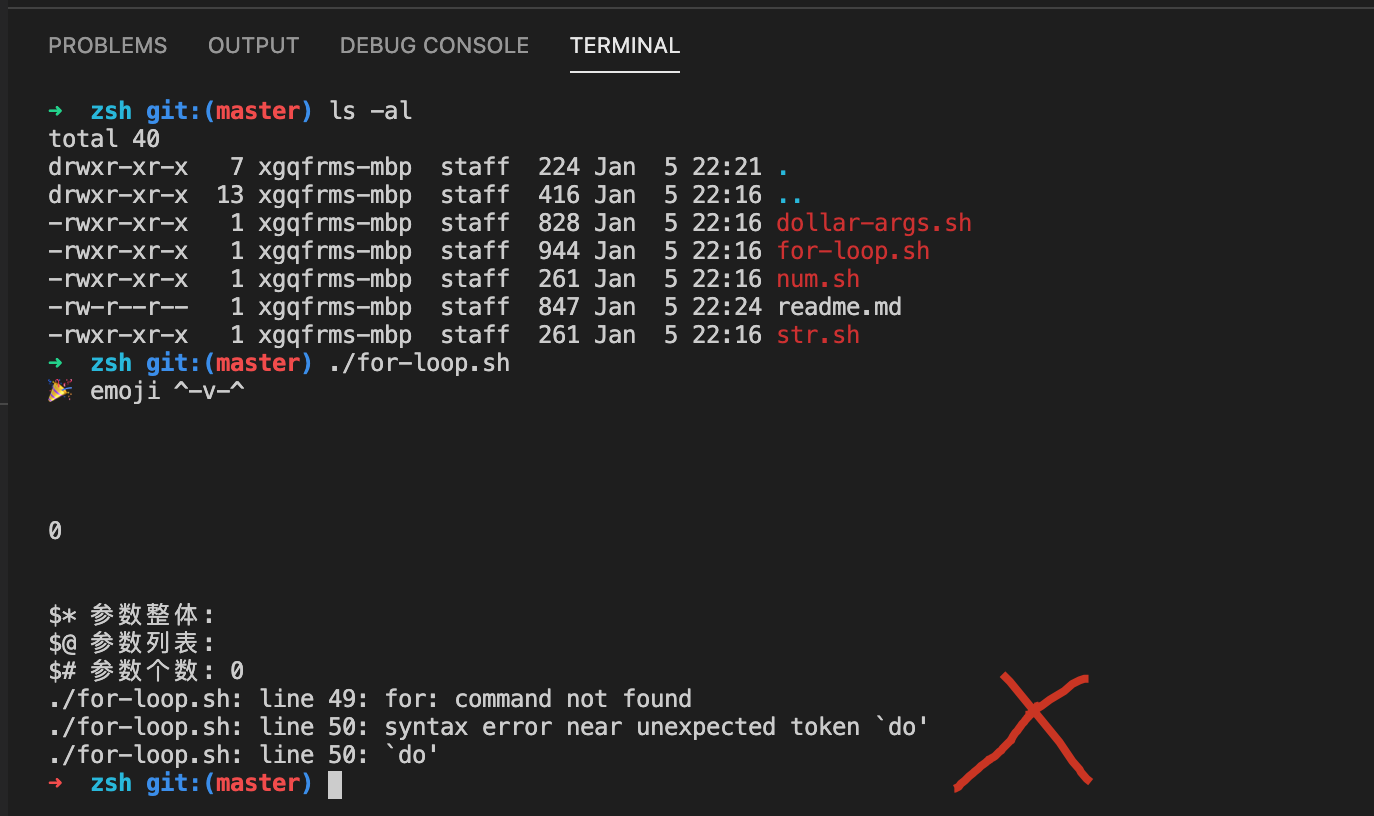
for: command not found
syntax error near unexpected token do' do'
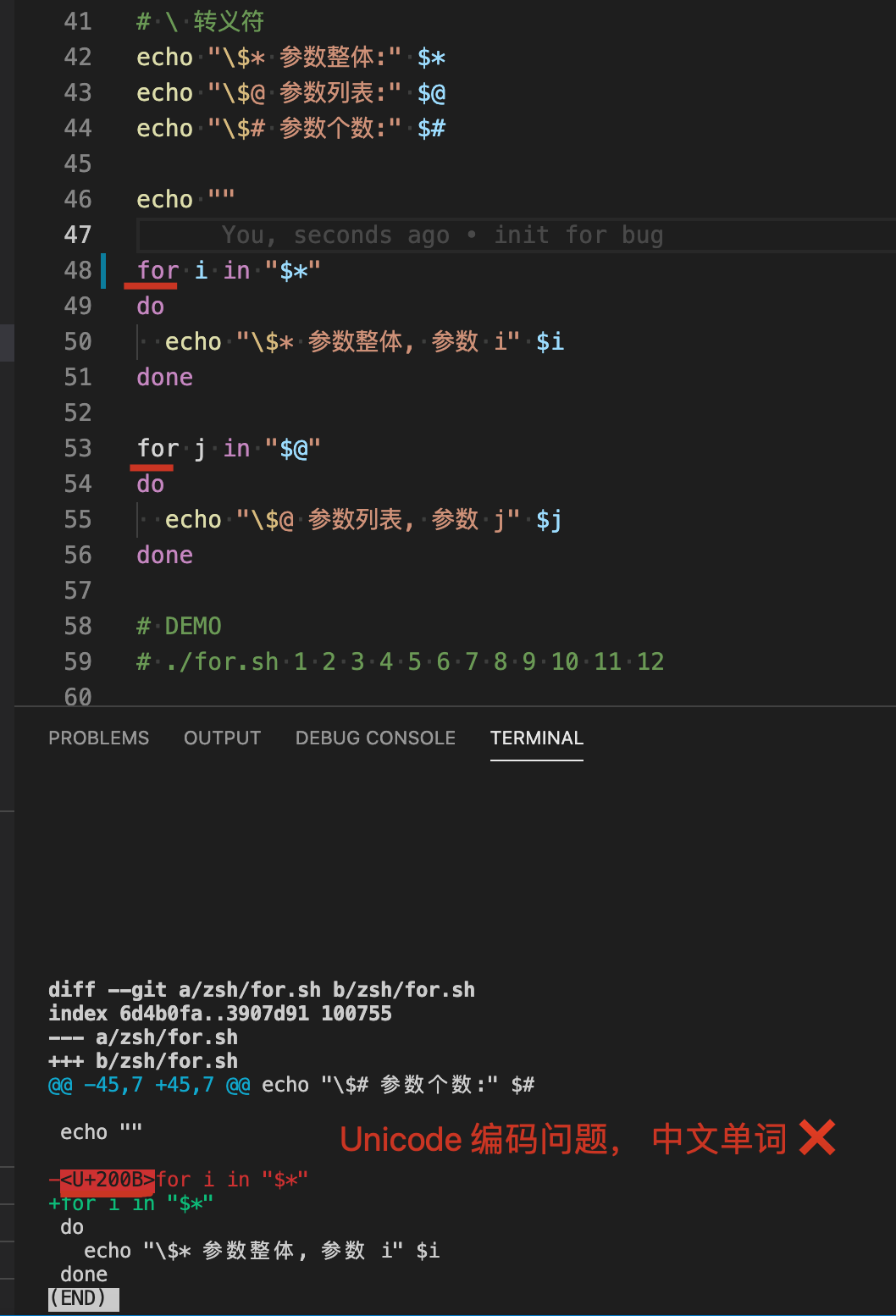
Unicode 编码问题
Error
#!/usr/bin/env bash
echo emoji ^-v-^
# -e 换行
echo -e "\n"
arg1=$1
arg2=$2
arg3=$3
arg4=$4
arg5=$5
arg6=$6
arg7=$7
arg8=$8
arg9=$9
# >= 10, $n => ${n}
arg10=${10}
arg11=${11}
arg12=${12}
# echo $arg1
# echo $arg2
# echo $arg3
# echo $arg4
# echo $arg5
# echo $arg6
# echo $arg7
# echo $arg8
# echo $arg9
# echo $arg10
# echo $arg11
# echo $arg12
# , 参数可以为空
all=$((arg1 + arg2 + arg3 + arg4 + arg5 + arg6 + arg7 + arg8 + arg9 + arg10 + arg11 + arg12))
# -e 换行
echo -e "\n"
echo $all
# -e 换行
echo -e "\n"
# \ 转义符
echo "\$* 参数整体:" $*
echo "\$@ 参数列表:" $@
echo "\$# 参数个数:" $#
for i in "$*"
do
echo "\$* 参数整体, 参数 i" $i
done
for j in "$@"
do
echo "\$@ 参数列表, 参数 j" $j
done
# DEMO
# ./for-loop.sh 1 2 3 4 5 6 7 8 9 10 11 12
# 55 + 23 = 78
# const arr = [1, 2, 3, 4, 5, 6, 7, 8, 9, 10, 11, 12];
# arr.reduce((acc, item) => acc += item, 0);
solutions
#!/usr/bin/env bash
echo emoji ^-v-^
# -e 换行
echo -e "\n"
arg1=$1
arg2=$2
arg3=$3
arg4=$4
arg5=$5
arg6=$6
arg7=$7
arg8=$8
arg9=$9
# >= 10, $n => ${n}
arg10=${10}
arg11=${11}
arg12=${12}
# echo $arg1
# echo $arg2
# echo $arg3
# echo $arg4
# echo $arg5
# echo $arg6
# echo $arg7
# echo $arg8
# echo $arg9
# echo $arg10
# echo $arg11
# echo $arg12
# , 参数可以为空
all=$((arg1 + arg2 + arg3 + arg4 + arg5 + arg6 + arg7 + arg8 + arg9 + arg10 + arg11 + arg12))
# -e 换行
echo -e "\n"
echo $all
# -e 换行
echo -e "\n"
# \ 转义符
echo "\$* 参数整体:" $*
echo "\$@ 参数列表:" $@
echo "\$# 参数个数:" $#
# 终止,结束,闭合 echo
echo ""
# for i in "$*" do echo "\$* 参数整体, 参数 i = $i" done
# for j in "$@" do echo "\$@ 参数列表, 参数 j" $j done
for i in "$*"
do
echo "\$* 参数整体, 参数 i = $i"
done
for j in "$@"
do
echo "\$@ 参数列表, 参数 j" $j
done
# DEMO
# ./for-loop.sh 1 2 3 4 5 6 7 8 9 10 11 12
# 55 + 23 = 78
# const arr = [1, 2, 3, 4, 5, 6, 7, 8, 9, 10, 11, 12];
# arr.reduce((acc, item) => acc += item, 0);
#!/usr/bin/env bash
echo " emoji ^-v-^"
# -e 换行, \n\r 两行 bug
# echo -e "\n"
# 换一行
echo ""
arg1=$1
arg2=$2
arg3=$3
arg4=$4
arg5=$5
arg6=$6
arg7=$7
arg8=$8
arg9=$9
# >= 10, $n => ${n}
arg10=${10}
arg11=${11}
arg12=${12}
# echo $arg1
# echo $arg2
# echo $arg3
# echo $arg4
# echo $arg5
# echo $arg6
# echo $arg7
# echo $arg8
# echo $arg9
# echo $arg10
# echo $arg11
# echo $arg12
# , 参数可以为空
all=$((arg1 + arg2 + arg3 + arg4 + arg5 + arg6 + arg7 + arg8 + arg9 + arg10 + arg11 + arg12))
echo $all
# -e 换行, \n\r 两行 bug
# echo -e "\n"
# 换一行
echo ""
# \ 转义符
echo "\$* 参数整体:" $*
echo "\$@ 参数列表:" $@
echo "\$# 参数个数:" $#
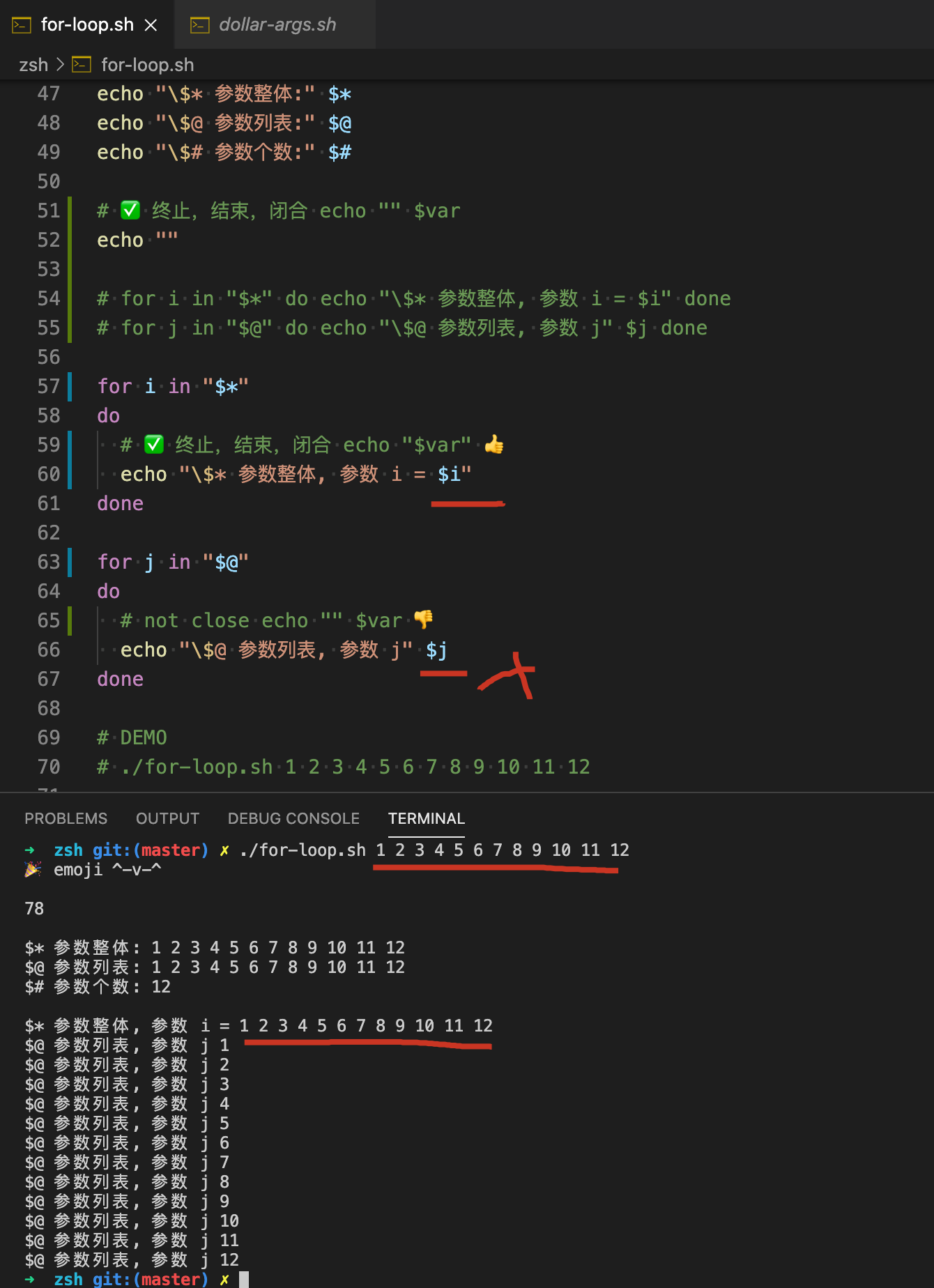
# 终止,结束,闭合 echo "" $var
# echo ""
# for i in "$*" do echo "\$* 参数整体, 参数 i = $i" done
# for j in "$@" do echo "\$@ 参数列表, 参数 j" $j done
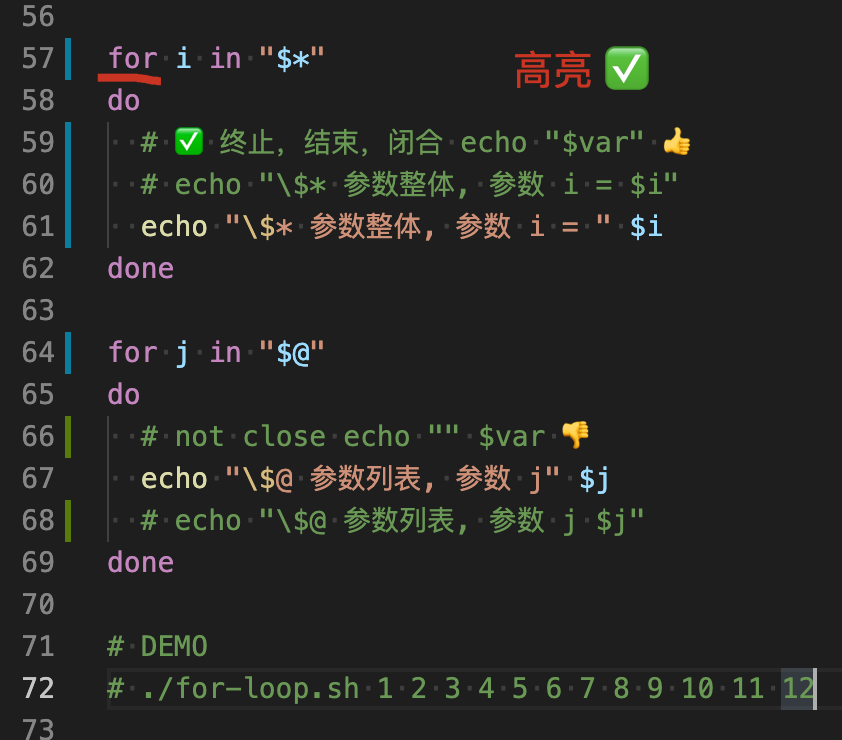
for i in "$*"
do
# 终止,结束,闭合 echo "$var"
# echo "\$* 参数整体, 参数 i = $i"
echo "\$* 参数整体, 参数 i = " $i
done
for j in "$@"
do
# not close echo "" $var
echo "\$@ 参数列表, 参数 j" $j
# echo "\$@ 参数列表, 参数 j $j"
done
# DEMO
# ./for-loop.sh 1 2 3 4 5 6 7 8 9 10 11 12
# 55 + 23 = 78
# const arr = [1, 2, 3, 4, 5, 6, 7, 8, 9, 10, 11, 12];
# arr.reduce((acc, item) => acc += item, 0);
语法错误
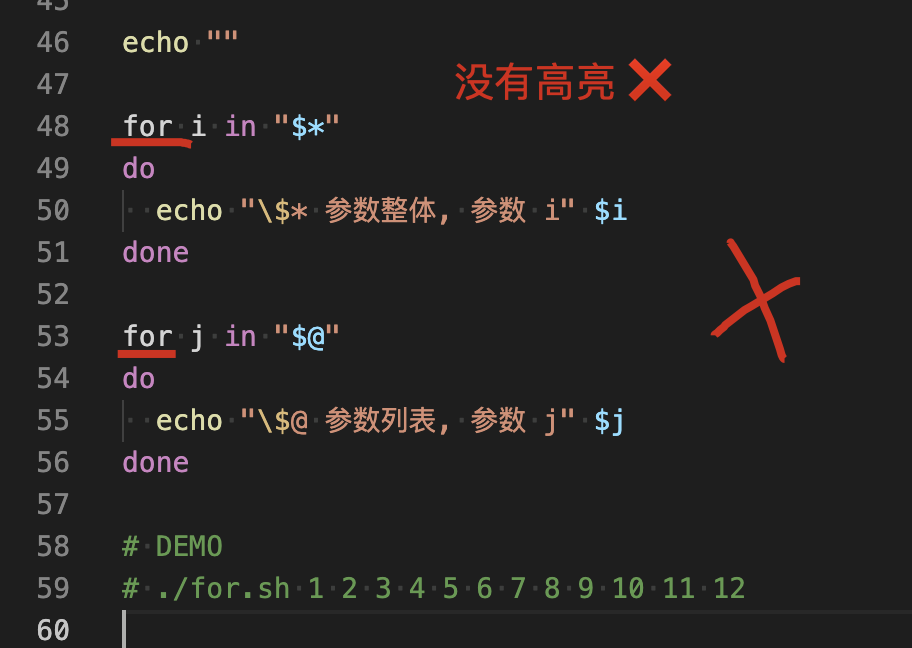
关键字高亮
refs
xgqfrms 2012-2020
www.cnblogs.com 发布文章使用:只允许注册用户才可以访问!
zsh & for loop bug的更多相关文章
- 基于 Equinox 的 OSGi Console 的研究和探索
自定制 OSGi Console 进行组建和服务生命周期管理模块化编程的好处已经很好地被理解了约 40 年,但在 OSGi 之前,开发人员不得不自己发明模块化设计和系统.随着软件应用体系结构的不断发展 ...
- 用Hashcat每秒计算1.4亿个密码,破解隔壁WIFI密码
Hashcat是啥 Hashcat是什么呢?Hashcat是当前最强大的开源密码恢复工具,你可以访问Hashcat.net网站来了解这款工具的详细情况.本质上,Hashcat 3.0是一款高级密码恢复 ...
- PO核准通知界面修改
想在notification頁面把供應商的稅捐代碼帶出來,添在如下紅框中 PO_WF_PO_NOTIFICATION head information:get_po_approve_msg line ...
- luogu2761 软件补丁问题 状态压缩最短路径
关键词:状态压缩 最短路径 想不出快速办法,就先考虑考虑暴力.枚举每一种错误分布的情况,然后通过可用的补丁转化为另多种情况,这些情况又转化为更多种情况……我们可以用图来表示这种关系! 状态压缩:每个错 ...
- [20200211]使用DBMS_SHARED_POOL.MARKHOT与sql_id的计算.txt
[20200211]使用DBMS_SHARED_POOL.MARKHOT与sql_id的计算.txt --//以前写的,使用DBMS_SHARED_POOL.MARKHOT标记热的sql_id,这样相 ...
- memcached空指针内存错误与死循环问题分析(memcached dead loop and crash bug! issue #260 and issue #370)
(由于这是发在memcached邮件列表的,所以只能用一下蹩脚的英文了) (you should read the discuss about issue #260 first: https://g ...
- Bug搬运工-CSCvg37458:ISR4K goes into booting loop with "flash:" in boot statement
ISR4K升级的时候要注意了! 很可能会碰到如下的问题: ISR4K goes into booting loop with "flash:" in boot statement ...
- Debian Bug report logs - #724721 zsh: Tab completion error with vi
Hi Ludovic, Ludovic Lebègue wrote: > While using zsh shell trying to autocomplete with tab key di ...
- Eclipse Bug: Unhandled event loop exception No more handles
我的解决方法如下: I had the same problem, turned out that TeamViewer was causing this. In your TeamViewer go ...
随机推荐
- 【Redis系列】Spring boot实现监听Redis key失效事件
talk is cheap, show me the code. 一.开启Redis key过期提醒 方式二:修改配置文件 redis.conf # 默认 notify-keyspace-events ...
- 使用Jmeter对SHA1加密接口进行性能测试
性能测试过程中,有时候会遇到需要对信息头进行加密鉴权,下面我就来介绍如何针对SHA1加密鉴权开发性能测试脚本1.首先了解原理,就是需要对如下三个参数进行SHA1加密,(AppSecret + Nonc ...
- 一次sql server实战
前言:朋友在做授权项目的时候,遇到一个sql server数据库的注入点,没办法解决,让我帮忙看看,因为是授权项目,所以就可以帮助测试下. 内容如下: 单引号,很明显的错误,因为是时间格式:2020- ...
- kubenetes 相关命令(转载)
版权声明:本文为博主原创文章,未经博主允许不得转载. https://blog.csdn.net/xingwangc2014/article/details/51204224好久没写博客了,前段时间公 ...
- GeoMesa命令行,索引概述
GeoMesa 一.GeoMesa命令行 查看classpath 创建表 描述表 批量导入数据 解释查询 统计分析 导出feature 删除feature 获取目录中的全部表的名称 删除表 删除目录 ...
- VMware虚拟机串口与宿主机进行传输验证
一.验证目的 1.验证VMWARE虚拟机(Windows或Linux)上的程序,是否可以读取宿主服务器的物理串口中的数据. 二.验证过程 1.验证条件及工具, 宿主机:Windows 10 x64 V ...
- 整理我的Git常见问题和命令
整理我的Git常见问题和命令 目录 整理我的Git常见问题和命令 提交注释规范 合并分支 clone & 切换分支 支持中文路径显示 账户及密码 基于远程分支创建本地分支 提交注释规范 举例: ...
- linux(7)top命令详细解释
top命令 Linux top命令用于实时显示 process 的动态. top参数详解 第一行,任务队列信息 系统当前时间:13:52:56 系统开机后到现在的总运行时间:up 66 days,8m ...
- shell脚本的使用该熟练起来了,你说呢?(篇四)
继续前一篇的文章: shell脚本的使用该熟练起来了,你说呢?(篇一) shell脚本的使用该熟练起来了,你说呢?(篇二) shell脚本的使用该熟练起来了,你说呢?(篇三) 文章里面测试的命令脚本文 ...
- 翻译:《实用的Python编程》01_01_Python
目录 | 下一节 (1.2 第一个程序) 1.1 Python Python 是什么? Python 是一种解释型(译者注:区别于编译型)的高级语言, 通常被归类为 "脚本语言" ...