
操作属性、操作样式 - DOM编程
1. 操作属性
1.1 HTML 属性与 DOM 属性的对应
<div>

  <label for="username">User Name: </label>

  <input type="input" name="username" id="username" class="text" value="">

</div>
var input = document.getElementsByTagName('input')[0];

console.log(input.id); // 'username'

console.log(input.type); // 'text'

console.log(input.className); // 'text'

console.log(document.getElementsByTagName('label')[0].htmlFor); // 'username'
1.2 属性操作方式
1.2.1 Property Accessor
// 读取属性

input.className; // 'text'

input[id]; // 'username'

// 写入属性(可增加新的属性或改写已有属性)。

input.value = 'newValue';

input[id] = 'newId';
1.2.2 getAttribute / setAttribute
// 读取属性(获取到的均为属性的字符串)

var attribtue = element.getAttribute('attributeName');

// 写入属性(可增加新的属性或改写已有属性)

element.setAttribute('attributeName', value);
1.2.3 dataset
自定义属性,其为HTMLElement上的属性也是data-*的属性集。
主要用于在元素上保存数据。获取的均为属性字符串。
<div id='user' data-id='1234' data-username='x' data-email='mail@gmail.com'></div>
var div = document.getElementById('user');

console.log(div.dataset.id); // '1234'

console.log(div.dataset.username); // 'x'

console.log(div.dataset.email); // 'mail@gmail.com'
2. 操作样式
2.1 CSS 对应 DOM 对象
<!DOCTYPE html>

<html>

	<head>

		<link rel="stylesheet" type="text/css" href="sample.css">

		<style>

			body {

				margin: 30px;

			}

		</style>

		<script src="https://cdn.staticfile.org/jquery/1.10.2/jquery.min.js"></script>

		<script>

		$(function(){

			var link = document.querySelector('link');

			console.log(link);

			var style = document.querySelector('style');

			console.log(style);

			console.log(document.styleSheets); // 整个页面的全部样式(不包括行内样式)

		});

		</script>

	</head>

	<body>

		<p style="font-size:1rem;">Hello</p>

	</body>

</html>
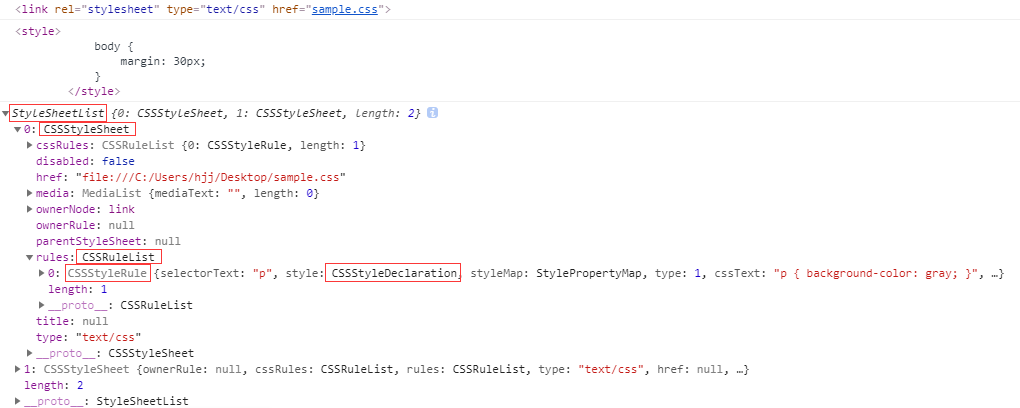
样式表的位置:
- 行内样式(比如
<p style="font-size:1rem;"></p>) - 内部样式表(比如
<style>body {margin: 30px;}</style>) - 外部样式表(比如
<link rel="stylesheet" type="text/css" href="sample.css">)
2.2 内部样式表
<!DOCTYPE html>

<html>

	<head>

		<link rel="stylesheet" type="text/css" href="sample.css">

		<style>

			body {

				margin: 30px;

			}

		</style>

		<script src="https://cdn.staticfile.org/jquery/1.10.2/jquery.min.js"></script>

		<script>

		$(function(){

			var style = document.querySelector('style');

			console.log(style.sheet.cssRules); // CSSRuleList {0: CSSStyleRule, length: 1}

			console.log(style.sheet.cssRules[0]);

			// CSSStyleRule {selectorText: "body", style: CSSStyleDeclaration, styleMap: StylePropertyMap, type: 1, cssText: "body { margin: 30px; }", …}

			console.log(style.sheet.cssRules[0].selectorText); // body

			console.log(style.sheet.cssRules[0].style);

			// CSSStyleDeclaration {0: "margin-top", 1: "margin-right", 2: "margin-bottom", 3: "margin-left", alignContent: "", alignItems: "", alignSelf: "", alignmentBaseline: "", all: "", …}

			console.log(style.sheet.cssRules[0].style.margin); // 30px

		});

		</script>

	</head>

	<body>

		<p style="font-size:1rem;">Hello</p>

	</body>

</html>
2.3 行内样式
var p = document.getElementsByTagName('p')[0];

console.log(p.style['font-size']); // 1rem
注意:这里不能用p.style.font-size,而只能写成p.style['font-size']。
2.4 更改样式
2.4.1 element.style
<!DOCTYPE html>

<html>

	<head>

		<link rel="stylesheet" type="text/css" href="sample.css">

		<style>

			body {

				margin: 30px;

			}

		</style>

		<script src="https://cdn.staticfile.org/jquery/1.10.2/jquery.min.js"></script>

		<script>

		$(function(){

			var p = document.getElementsByTagName('p')[0];

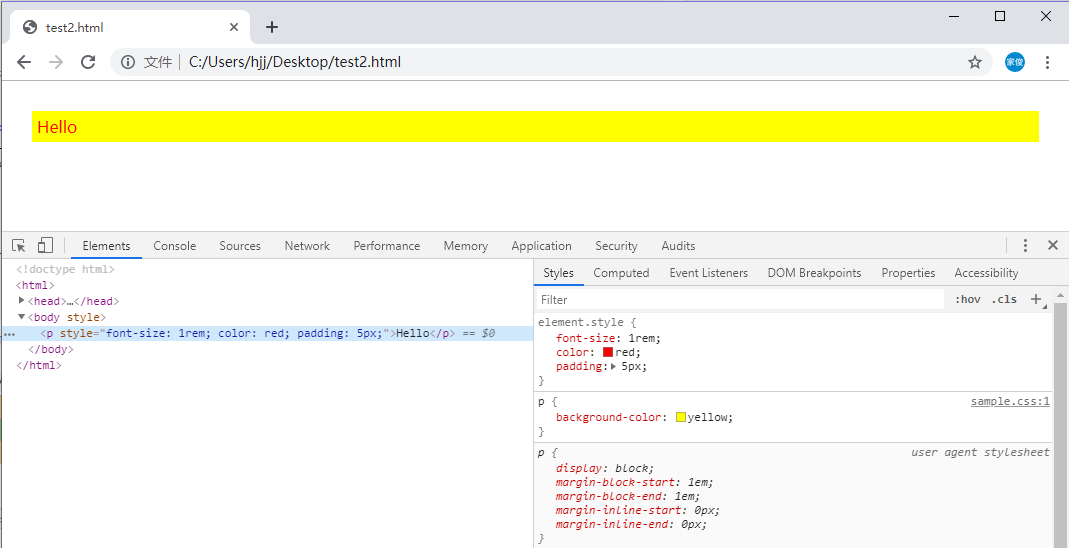
			p.style.color = 'red';

			p.style['padding'] = '5px';

		});

		</script>

	</head>

	<body>

		<p style="font-size:1rem;">Hello</p>

	</body>

</html>
2.4.2 element.style.cssText
使用element.style.cssText一次同时设置多个行内样式。
var p = document.getElementsByTagName('p')[0];

p.style.cssText = 'color:blue;padding:10px';

2.4.3 更改class
.add {

	color:green;

	padding:20px;

}
var p = document.getElementsByTagName('p')[0];

p.className += ' add';

2.4.3 更换样式表
var link = document.querySelector('link');

link.setAttribute('href', 'sample2.css');
2.5 获取样式
2.5.1 element.style
<p style="font-size:1rem;color:blue;">Hello</p>
var p = document.querySelector('p');

console.log(p.style.color); // blue

console.log(p.style['font-size']); // 1rem
注意:这种方式只能获取行内样式表的样式,不能获取内部样式表和外部样式表的样式。
2.5.2 window.getComputedStyle()
<!DOCTYPE html>

<html>

	<head>

		<link rel="stylesheet" type="text/css" href="sample.css">

		<style>

			body {

				margin: 30px;

			}

			p {

				font-size:1rem;

			}

		</style>

		<script src="https://cdn.staticfile.org/jquery/1.10.2/jquery.min.js"></script>

		<script>

		$(function(){

			var p = document.querySelector('p');

			console.log(window.getComputedStyle(p).color); // rgb(0, 0, 255)

			console.log(window.getComputedStyle(p)['font-size']); // 16px

			console.log(window.getComputedStyle(p)['background-color']); // rgb(255, 255, 0)

		});

		</script>

	</head>

	<body>

		<p style="color:blue;">Hello</p>

	</body>

</html>
/* sample.css */

p {

	background-color:yellow;

}
注意:这里获取的样式为只读属性不可修改。
参考:
操作属性、操作样式 - DOM编程的更多相关文章
- jQuery 选择器 筛选器 样式操作 文本操作 属性操作 文档处理 事件 动画效果 插件 each、data、Ajax
jQuery jQuery介绍 1.jQuery是一个轻量级的.兼容多浏览器的JavaScript库. 2.jQuery使用户能够更方便地处理HTML Document.Events.实现动画效果.方 ...
- jQuery-介绍 加载 选择器 样式操作 属性操作 绑定click事件
jQuery - 介绍 加载 选择器 样式操作 属性操作 绑定click事件 注意:以下部分问题不能实现效果,因该是单词拼写错误(少个t)或者没有加引号(“swing”)... jquery介绍 jQ ...
- jquery 与javascript关系 ①取元素 ②操作内容 ③操作属性 ④操作 样式 ⑤ 事件 点击变色
jQuery的min版本和原版功能是一样的,min版主要应用于已经开发成的网页中,而非min版 的文件比较大,里面有整洁的代码书写规范和注释,主要应用于脚本开发过程当中. JQuery是继protot ...
- 2016/4/1 jquery 与javascript关系 ①取元素 ②操作内容 ③操作属性 ④操作 样式 ⑤ 事件 点击变色
jQuery的min版本和原版功能是一样的,min版主要应用于已经开发成的网页中,而非min版 的文件比较大,里面有整洁的代码书写规范和注释,主要应用于脚本开发过程当中. JQuery是继protot ...
- Dom样式操作-属性操作
1. 对样式进行操作: 1) 以样式(C1,C2等)为最小单位进行修改. className, classList, (以列表形式获得) classList.add("C2"), ...
- dom操作 属性操作 样式操作
jQuery DOM操作 1 插入子元素 append('<img>') 插后面 被插入元素调用 appendTo('<img scr="...">') 新 ...
- 4月12日学习笔记——jQuery操作属性和样式
区分 DOM 属性和元素属性 <img src="images/image.1.jpg" id="hibiscus" alt="Hibiscus ...
- JQuery操作属性、样式、风格(attr、class、css)
样式操作 <p class="myclass" title="选择喜欢的水果">你最喜欢的水果是?</p> 在上面代码中,class也是 ...
- jQuery-对标签元素 文本操作-属性操作-文档的操作
一.对标签元素文本操作 1.1 对标签中内容的操作 // js var div1 = document.getElementById("div1"); div1.innerText ...
随机推荐
- python面试题七: mysql数据库
---------------------------------------------------------------------------------------------------- ...
- Mysql基础(九):MySQL 事务
一.含义事务:一条或多条sql语句组成一个执行单位,一组sql语句要么都执行要么都不执行二.特点(ACID)A 原子性:一个事务是不可再分割的整体,要么都执行要么都不执行C 一致性:一个事务可以使数据 ...
- L1和L2正则化。L1为什么能产生稀疏值,L2更平滑
参考博客:https://zhuanlan.zhihu.com/p/35356992 https://zhuanlan.zhihu.com/p/25707761 https://www.zhihu.c ...
- web前端 javascript 兼容低版本 IE 6 7 8复合写法
1. 返回检测屏幕宽度(可视区域) function client() { if(window.innerWidth != null) // ie9 + 最新浏览器 { return { width: ...
- three.js 曲线
上几篇说了three.js的曲线,这篇来郭先生来说说three.js曲线,在线案例点击郭先生的博客查看. 1. 了解three.js曲线 之前已经说了一些three.js的几何体,这篇说一说three ...
- Bash 脚本编程
概述 Bash (GNU Bourne-Again Shell) 是许多Linux发行版的默认Shell. shell语法 变量 定义:your_name="hellohhy" 使 ...
- 消除win10桌面图标的右下方小箭头
很容易的小东西,在这里简单提一下 新建一个记事本,写下以下代码,改为.bat后缀,双击运行,然后箭头消失 reg add "HKEY_LOCAL_MACHINE\SOFTWARE\Micro ...
- [jvm] -- 类加载过程篇
类加载过程 系统加载 Class 类型的文件主要三步 加载 通过全类名获取定义此类的二进制字节流 将字节流所代表的静态存储结构转换为方法区的运行时数据结构 在内存中生成一个代表该类的 Class对象, ...
- 05 ES6模块化规范基础详解
ES6模块规范 1.1 ES6规范说明 历史上,JavaScript 一直没有模块(module)体系,无法将一个大程序拆分成互相依赖的小文件,再用简单的方法拼装起来.其他语言都有这项功能,比如 Ru ...
- vue学习(十六) 自定义私有过滤器 ES6字符串新方法 填充字符串
<div id="app"> <p>{{data | formatStr('yyyy-MM-dd')}}</p></div> //s ...