
vue-awesome-swiper ---移动端h5 swiper 和 tab 栏选项联动效果实现
很久之前做小程序时有个类似每日优鲜里储值卡充值界面里的 卡轮播和价格tab栏联动效果,当时觉得新鲜做出来之后也没当回事。直到今天又遇到了一个类似的功能,所以想着总结经验。
实现效果如下图:
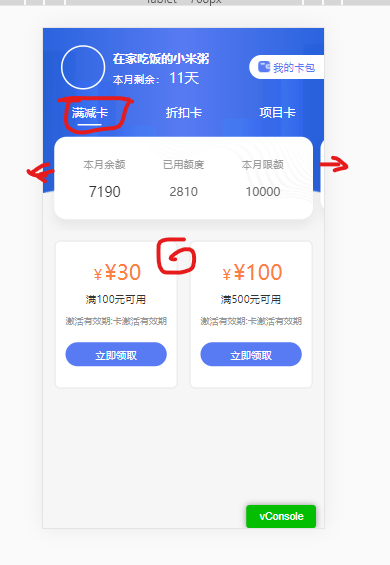
图解:点击tab菜单 三个选项时,下面的轮播会随之滑动,下面的商品列表也会根据上面的tab选项变化。反之,当左右滑动切换swiper时,tab选择会随之选中高亮,下面的商品列表也会跟着变化。
实现思路:tab选项的个数跟swiper 滑块数量一致。可以根据当前选中/滑块获取索引值,展现相应的选中项/滑块。下面要展示的商品列表,因为有下拉加载更多的需求,需要另一个接口完成实现。根据当前选中项的状态值作为参数,去请求相对应得列表。
实现代码如下:
1、首先在项目里 npm install swiper vue-awesome-swiper --save
2、在main.js全局引入
import Vue from 'vue'

import VueAwesomeSwiper from 'vue-awesome-swiper'

// import style

import 'swiper/css/swiper.css'

Vue.use(VueAwesomeSwiper, /* { default options with global component } */)
3、或者在当前页面局部引入
import { Swiper, SwiperSlide } from 'vue-awesome-swiper'

import 'swiper/css/swiper.css'

export default {

  components: {

    Swiper,

    SwiperSlide

  }

}
4、页面上使用如下:
<div class="coupon_bot">

                <ul class="coupon_b_name">

                    <li v-for="(item,index) in cardList"

                        :key="index"

                        :class="{'actived':index == isActiveIndex}"

                        @click="handlerClick('cardChange',index)">

                       {{item.cardTypeName}}

                    </li>

                </ul>

                <swiper class="coupon_swiper swiper-container"  :options="swiperOption" ref="mySwiper">

                    <swiperSlide v-for="(item,index) in cardList" :key="index" class="coupon_s_slider">

                        <div class="conpon_swiper_bg">

                            <ul class="con_swiper_content">

                                <li>

                                    <span class="conpon_s_t">{{item.cardType == 1?'本月余额':'本月剩余'}}</span>

                                    <span class="conpon_s_c" :class="{'conpon_price':item.cardType == 1}">{{item.notGet}}</span>

                                    <i class="conpon_unit conpon_unit_ft" v-show="item.cardType != 1">张</i>

                                </li>

                                <li>

                                    <span class="conpon_s_t">{{item.cardType == 1?'已用额度':'本月已用'}}</span>

                                    <span :class="{'conpon_s_rprice':item.cardType == 1}" >{{item.isGet}}</span>

                                    <i class="conpon_unit"  v-show="item.cardType != 1">张</i>

                                </li>

                                <li>

                                    <span class="conpon_s_t">{{item.cardType == 1?'本月限额':'本月总数'}}</span>

                                    <span  :class="{'conpon_s_rprice':item.cardType == 1}">{{item.ttlGet}}</span>

                                    <i class="conpon_unit"  v-show="item.cardType != 1">张</i>

                                </li>

                            </ul>

                        </div>

                    </swiperSlide>

                </swiper>

            </div>
5、data里初始化swiper
 swiperOption: {

                autoplay: false,

                loop: false,

                spaceBetween : 10,

                observer: true,

                observeParents: true,

                on: {

                        slideChangeTransitionEnd: function(){

                            _this.isActiveIndex = this.realIndex;//切换结束时,告诉我现在是第几个slide

                            _this.type = _this.cardList[_this.isActiveIndex].cardType;

                            _this.cardInfoList = [];

                            _this.pageNo = 1;

                            _this.isScroll = true;

                            _this.loading = true;

                            _this.getListData();

                        },

                }

            },
6、计算属性获取swiperDOM
 computed:{

        swiper(){

            return this.$refs.mySwiper.swiper

        }

    },
7、tab点击事件实现
handlerClick(action,data){

            if(action == 'cardChange'){

                //tab切换

                this.loading = true;

                this.isActiveIndex = data;

                this.swiper.slideTo(this.isActiveIndex); //swiper滑动到相对应的滑块

                document.documentElement.scrollTop = document.body.scrollTop = 0;

            }

}
8、相对应的swiper scss样式如下
<style lang="scss" scoped>

@function rem($px) {

    @return $px / 75 * 1rem;

}

$bg-color: #fff;

$text-color: #587BF3;

$money-color: #FD8040;

$title-color: #999;

.coupon_bot{

            padding-top: rem(20);

            .coupon_b_name{

                display: flex;

                color: $bg-color;

                font-size: rem(32);

                li{

                    flex: 1;

                    justify-content: space-between;

                    text-align: center;

                    padding: rem(10) 0;

                }

                .actived{

                    position: relative;

                }

                .actived::before{

                    content:'';

                    display: inline-block;

                    width: rem(64);

                    height: rem(4);

                    background: $bg-color;

                    border-radius: 2px;

                    position: absolute;

                    bottom: 0;

                    left: 50%;

                    margin-left: -13%;

                }

            }

            .coupon_swiper{

                padding: rem(30);

                .coupon_s_slider{

                    width: rem(690) !important;

                    height: rem(200);

                    box-shadow: 0px rem(20) rem(30) 0px rgba(0, 0, 0, 0.06);

                    background: $bg-color;

                    border-radius: 16px;

                    .conpon_swiper_bg{

                        width: 100%;

                        height: 100%;

                        background: url('../../../static/images/coupon/swiperBg.png') no-repeat top right;

                        background-size: rem(485) rem(220);

                        .con_swiper_content{

                            padding: rem(50) rem(30);

                            display: flex;

                            justify-content: space-between;

                            li {

                                width: 33%;

                                text-align: center;

                                span{

                                    color:#666;

                                    font-weight: 500;

                                    font-size: rem(40);

                                    line-height: rem(48);

                                }

                                .conpon_s_t {

                                    display: block;

                                    color: $title-color;

                                    font-size: rem(28);

                                    line-height: rem(42);

                                    margin-bottom: rem(30);

                                }

                                .conpon_s_c{

                                    text-align: left;

                                    display: inline-block;

                                    color: #333;

                                    font-size: rem(54);

                                }

                                .conpon_price{

                                    font-size: rem(36);

                                }

                                .conpon_s_rprice{

                                    font-size: rem(32);

                                }

                                .conpon_unit{

                                    font-style: normal;

                                    font-size: rem(28);

                                }

                                .conpon_unit_ft{

                                    font-size: rem(36);

                                }

                            }

                        }

                    }

                }

                >>>.swiper-slide-active{

                    height: rem(220);

                }

            }

        }

</style>
以上就实现了联动效果了(代码仅供参考)。
vue-awesome-swiper ---移动端h5 swiper 和 tab 栏选项联动效果实现的更多相关文章
- 16.vue-cli跨域,swiper,移动端项目
==解决跨域:== 1.后台 cors cnpm i -S cors 2.前端 jsonp 3.代理 webpack: myvue\config\index.js 找 proxyTable proxy ...
- vue移动端h5页面根据屏幕适配的四种方案
最近做了两个关于h5页面对接公众号的项目,不得不提打开微信浏览器内置地图导航的功能确实有点恶心.下次想起来了的话,进行总结分享一下如何处理.在vue移动端h5页面当中,其中适配是经常会遇到的问题,这块 ...
- Swiper --移动端触摸滑动插件
Swiper使用方法 1.首先加载插件,需要用到的文件有swiper.min.js和swiper.min.css文件. <!DOCTYPE html> <html> <h ...
- 使用swiper简单的h5下滑翻页效果,
<!DOCTYPE html><html lang="en"><head> <meta charset="utf-8" ...
- vue 的组件开发,以及swiper,axios的使用
父组件<template> <div> <home-header :city="city"></home-header> //给子组 ...
- swiper移动端下不能正常轮播的解决方案-----此坑没躺过估计很难找到正确姿势
<script> var mySwiper = new Swiper('.swiper-container', { direction: 'vertical', //horizontal横 ...
- Swiper 移动端全屏轮播图效果
<!DOCTYPE html> <html lang="en"> <head> <meta charset="utf-8&quo ...
- 移动端 H5 页面注意事项
1. 单个页面内容不能过多 设计常用尺寸:750 x 1334 / 640 x 1134,包含了手机顶部信号栏的高度. 移动端H5活动页面常常需要能够分享到各种社交App中,常用的有 微信.QQ 等. ...
- 移动端H5混合开发设置复盘与总结
此篇接上一篇: 移动端H5混合开发,Touch触控,拖拽,长按, 滑屏 实现方案 https://www.cnblogs.com/buoge/p/9346699.html app 场布设置已经上线了, ...
随机推荐
- Linux rndis_host 驱动的一个BUG与解决方案
关键字 rndis_host, linux, kernel, modem 综述 rndis 是微软定义的一套通讯方案.类似的协议还有 qmi/mbim/ecm/ncm. rndis 协议足够简单,可靠 ...
- 使用Excel设计fastreport报表
最近做项目遇到一些报表设计的问题.项目的报表使用 Fast Report,然而该控件调整报表格式比较繁琐,有时候调整某一栏的宽度,整个标题栏都需要调整,且调整以后 还不一定能对齐.客户的很多报表都是基 ...
- python温度转换代码分析
将用户输入的温度信息保存在TempStr变量中 if分支条件,判断TempStr类型是否在f及F列表之中 如果用户输入的在f及F列表之中,则用户输入的是一个华氏温度值,对华氏温度进行摄氏温度的转换,e ...
- netty字符串流分包
@Override protected void decode(ChannelHandlerContext channelHandlerContext, ByteBuf in, List<Obj ...
- 1.3Hadoop版本说明
- 3.ConcurrentMap-并发Map
- IntelliJ IDEA编辑器激活码
2020-3-31 日 亲自测试有效,什么时候失效就母鸡了 激活码一: T3ACKYHDVF-eyJsaWNlbnNlSWQiOiJUM0FDS1lIRFZGIiwibGljZW5zZWVOYW1lI ...
- 简单说说Restful API
前言: 最近一段时间,一直在低头敲代码,开发平台对外交互的API接口,功能已经大体完成了,回过头来看看自己的接口设计文档,不胜感慨,想当初自己也是为"接口名称"想破了脑袋,各种百度 ...
- vue移动端记录列表滚动如何快速找到是哪个元素产生的滚动
使用下面的代码粘贴到调试工具中运行一下,然后滚动页面,就可以看到是哪个元素产生的滚动了 function findscroller(element) { element.onscroll = func ...
- Gitlab集成Sonarqube自动检测代码并发送报告给提交者
使用gitlab-ci.sonarqube.sonar-scanner 实现如下功能 1.一旦提交代码就进行代码质量检测 2. 发送检测报告邮件给提交者 先来看下最终结果,邮件中有检测报告,具体bug ...