
使用nodejs进行了简单的文件分卷工具
关键词:node fs readline generator
(在这之前需要声明的是这篇博客的应用范围应该算是相当狭隘,写出来主要也就是给自己记录一下临时兴起写的一个小工具,仅从功能需求上来说我相信是不适用于大多数读者的,欢迎有兴趣看的朋友给我做一次review)
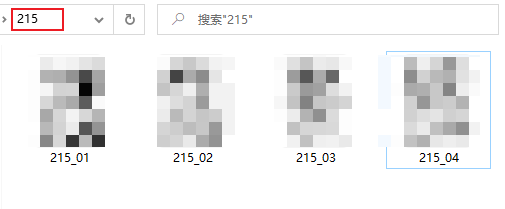
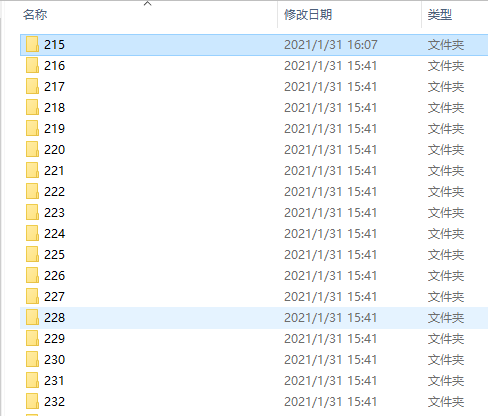
最近沉迷漫画,收集了一堆野生资源,偶尔会遇到一些四格漫画,观看体验不是很好,因为每话篇幅比较短,就独立成了一个目录,譬如这样:
const fs = require('fs');

const readline = require('readline');

/**

 * @description 获取questtion的返回

 * @param {String} question 用户提示

 * @param {Function} handler 验证用户输入

 * @returns {Promise} rl.question方法本身是通过回调来处理用户输入的,所以选择了返回promise来做阻塞,有序地抛出question并接收answer

 */

function getQuestionResult(question,handler){

    return new Promise((res)=>{

        // 创建一个可读流,用来读取在cmd中的输入

        const rl = readline.createInterface({

            input: process.stdin,

            output: process.stdout,

        });

        /**

         * 考虑到即使用户输入异常,question方法都会在监听到换行之后结束,所以把handleResult的结构设计成一个对象,

         * 由一个状态值success来表示是否通过handler的校验,success为false时应再次执行并且获取用户输入         */

        rl.question(question, async (ans)=>{

            const handleResult = handler(ans)

            if (handleResult.success){

                rl.close()

                res(handleResult.value)

            } else {

                //handleResult.success为false时,handleResult.value是handler中设置的错误提示

                rl.close()

                const rejecthandle = await getQuestionResult(handleResult.value,handler)

                res(rejecthandle)

            }

        })

    })

}

// 这里创建一个generator实例,我觉得generator的yield单向有序的特性很适合我这个需求

function*gen(){

    function getChangeSettingsFlag(ans){

        return ans==="Y"?{success:true,value:true}:{success:true,value:false}

    }

    const getPath = function (ans) {

        /**
         * @description 验证路径(是否是目录)
         * @param {String} path
         */

        const validatePath = function (path) {

            try {

                // node10.x及以下版本不支持readdirSync,需要你需要这种写法,在运行之前需要切换node版本

                const dir = fs.readdirSync(path)
                if (dir) {

                    return {success:true,value:path}

                }

            } catch(err){

                return {success:false,value:"提供的地址不合理,请重新输入:"}

            }

        }

        return validatePath(ans)

    }

    // yield并不会返回值,这里声明的changeSettingFlag的值实际上是接收的next方法的参数

    const changeSettingFlag = yield getChangeSettingsFlag

    const settings = {

        volumeSize: 10,

        dirName: "新建分卷"

    }

    // 改变预设

    if (changeSettingFlag){

        const volumeSize = yield function(volumeSize){

            return Number(volumeSize)>0&&Number(volumeSize)!==Infinity?{success:true,value:volumeSize}:{success:false,value:"输入的数字不合理,请重新输入:"}

        }

        settings.volumeSize = Number(volumeSize)||settings.volumeSize

        const dirName = yield function(dirName){

            return dirName.trim()?{success:true,value:dirName}:{success:false,value:"输入的目录名不合理,请重新输入:"}

        }

        settings.dirName = dirName.trim()||settings.dirName

    }

    // 接收路径

    const pathInfo = {
        input: "",
        output: ""
    }

    const inputPath = yield getPath

    pathInfo.input = inputPath;

    const outputPath = yield getPath

    pathInfo.output = outputPath;

    const conf = {
        pathInfo,
        settings
    }

    console.log("conf",conf)

    yield conf

}

// run it

async function workflow(generator){

    const func0 = generator.next().value

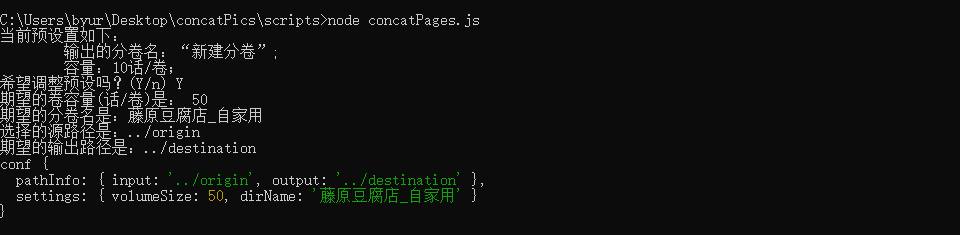
    const changeSettingFlag = await getQuestionResult("当前预设置如下:\n\t输出的分卷名:“新建分卷”;\n\t容量:10话/卷;\n希望调整预设吗?(Y/n) ",func0)

    let getvolumeSize,getdirName

    if (changeSettingFlag){

        const func1 = generator.next(changeSettingFlag).value

        getvolumeSize = await getQuestionResult("期望的卷容量(话/卷)是: ",func1)

        const func2 = generator.next(getvolumeSize).value

        getdirName = await getQuestionResult("期望的分卷名是:",func2)

    }

    const func3 = generator.next(getdirName).value

    const inputPath = await getQuestionResult("选择的源路径是:",func3)

    const func4 = generator.next(inputPath).value

    const outputPath = await getQuestionResult("期望的输出路径是:",func4)

    const conf = generator.next(outputPath).value

    // 当前计数,通过在文件名中添加count来保持排序

    let currentCount = 0;

    // 当前分卷

    let currentVolume = 0;

    /**

     * @param {String} path

     * @param {String} newFolderName

     */

    async function letsdance(path,newFolderName="") {

        const childs = fs.opendirSync(path)

        let chunkNum = 0        let newFolderPath = newFolderName

        for await (const dirent of childs) {

            if (dirent.isDirectory()) {

                // 填充满一个目录之后创建一个新目录

                if (currentVolume%conf.settings.volumeSize===0) {

                    chunkNum+=1;

                    newFolderPath = conf.pathInfo.output+"/"+conf.settings.dirName+"_"+chunkNum

                    fs.mkdirSync(newFolderPath)

                    // 如果你不希望命名后缀一直递增,也可以在新建目录之后把currentCount重新置为0

                }

                currentVolume+=1

                const nextLevelPath = path+"/"+dirent.name

                letsdance(nextLevelPath,newFolderPath)

            } else if (dirent.isFile()){

                currentCount += 1

                const extName = dirent.name.split(".").reverse()[0]

                const targetFilePath = path+"/"+dirent.name

                const newFileName = newFolderPath+"/"+currentCount+"."+extName

                fs.copyFileSync(targetFilePath,newFileName)

            }

        }

    }

    letsdance(conf.pathInfo.input)

}

const g = gen()

workflow(g)
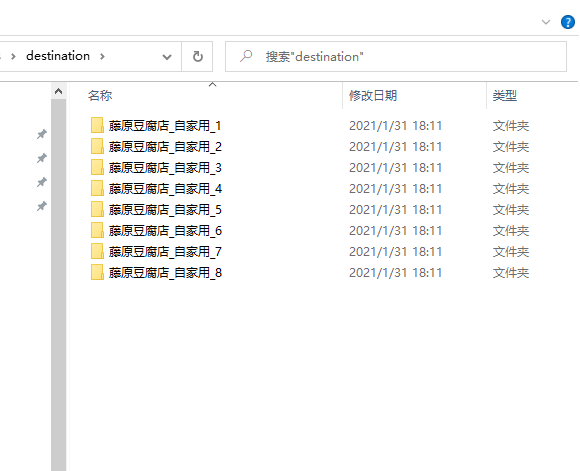
运行这个脚本,如果我有两个目录,需要将他们之中的文件复制到一个新目录来实现合并的效果的话,在讲第一个目录的文件按原顺序命名为1-n之后。第二个目录的文件则会从n+1开始命名,效果如下:
使用nodejs进行了简单的文件分卷工具的更多相关文章
- java简单的文件读写工具类
import java.io.BufferedInputStream; import java.io.BufferedOutputStream; import java.io.BufferedRead ...
- 用nodejs搭建一个简单的服务器
使用nodejs搭建一个简单的服务器 nodejs优点:性能高(读写文件) 数据操作能力强 官网:www.nodejs.org 验证是否安装成功:cmd命令行中输入node -v 如果显示版本号表示安 ...
- 拿nodejs快速搭建简单Oauth认证和restful API server攻略
拿nodejs快速搭建简单Oauth认证和restful API server攻略:http://blog.csdn.net/zhaoweitco/article/details/21708955 最 ...
- 用nodejs搭建一个简单的服务监听程序
作为一个从业三年左右的,并且从事过半年左右PHP开发工作的前端,对于后台,尤其是对以js语言进行开发的nodejs,那是比较有兴趣的,虽然本身并没有接触过相关的工作,只是自己私下做的一下小实验,但是还 ...
- 利用 nodeJS 搭建一个简单的Web服务器(转)
下面的代码演示如何利用 nodeJS 搭建一个简单的Web服务器: 1. 文件 WebServer.js: //-------------------------------------------- ...
- nodejs创建一个简单的web服务
这是一个突如其来的想法,毕竟做web服务的框架那么多,为什么要选择nodejs,因为玩前端时,偶尔想调用接口获取数据,而不想关注业务逻辑,只是想获取数据,使用java或者.net每次修改更新后还要打包 ...
- 使用jsp/servlet简单实现文件上传与下载
使用JSP/Servlet简单实现文件上传与下载 通过学习黑马jsp教学视频,我学会了使用jsp与servlet简单地实现web的文件的上传与下载,首先感谢黑马.好了,下面来简单了解如何通过使用 ...
- Mac OS环境下媒体文件分割工具mediafilesegmenter的简单使用(生成M3U8 TS文件)
mediafilesegmenter是苹果开发的一款用于分割媒体文件的工具,其功能与mediastreamsegmenter相似,但操作更简单. * 具体可以对比博客中的另一篇简介<Mac OS ...
- Spring简单的文件配置
Spring简单的文件配置 “计应134(实验班) 凌豪” 一.Spring文件配置 spring至关重要的一环就是装配,即配置文件的编写,接下来我按刚才实际过程中一步步简单讲解. 首先,要在web. ...
随机推荐
- 网络之一次http请求的完整过程
关于网络的知识平时可能真正用的比较少,但是有一些点还是需要总结的: 完成一次http请求要大致可以分为7个步骤: 一.TCP三次握手 第一次握手:建立连接.客户端发送连接请求报文段,将SYN位置为1, ...
- docker 支持systemctl start|stop|status等操作
用docker运行centos7容器时候,无法使用systemctl,官方解释是centos7的一个bug,可以有修复的办法: 在docker run的时候,加上--privileged 并且cmd使 ...
- pycharm 与 anaconda 关联
anaconda Anaconda指的是一个开源的Python发行版本,集成了许多数据分析的库. 使用tersorflow进行机器学习时常用Anaconda pycharm PyCharm是一种Pyt ...
- 手工数据结构系列-C语言模拟队列和栈 hdu1702
#include <stdio.h> #include <stdlib.h> //================= DATA STRUCTURE ============== ...
- js create Array ways All In One
js create Array ways All In One ES6 const arr = [...document.querySelectorAll(`[data-dom="^div& ...
- Vue computed props pass params
Vue computed props pass params vue 计算属性传参数 // 计算 spreaderAlias spreaderAlias () { console.log('this. ...
- CSP & CORS
CSP & CORS 内容安全策略 跨域资源共享 CSP https://developers.google.com/web/fundamentals/security/csp google ...
- setTimeout 实现原理, 机制
setTimeout 实现原理, 机制 JS 执行机制说起 浏览器(或者说 JS 引擎)执行 JS 的机制是基于事件循环. 由于 JS 是单线程,所以同一时间只能执行一个任务,其他任务就得排队,后续任 ...
- DoH & DNS over HTTPS
DoH & DNS over HTTPS DNS over HTTPS(DoH)服务 http://mozilla.com.cn/thread-422231-1-1.html https:// ...
- py 时间处理
字符串解析 如果你使用的不是isoformat string那么解析字符串就会失败,需要用strptime转换一下 import datetime datetime.datetime.strptime ...