
Django(图书管理系统)
图书管理系统
注意事项
1、models 要创建好,规划好自己的表,以及各种表关系
2、url正则要写好
3、settings的配置
4、利用bootstarp 进行布局更漂亮哦
5、注意orm 各种类型的转换还有取值。
6、模板语法
下面上菜
目录结构
G:.
├─.idea
│ ├─dataSources
│ └─inspectionProfiles
├─app01
│ ├─migrations
│ │ └─__pycache__
│ ├─static
│ │ └─css
│ └─__pycache__
├─books
│ └─__pycache__
└─templates
项目代码
settings.py
"""

Django settings for books project.

Generated by 'django-admin startproject' using Django 2.0.2.

For more information on this file, see

https://docs.djangoproject.com/en/2.0/topics/settings/

For the full list of settings and their values, see

https://docs.djangoproject.com/en/2.0/ref/settings/

"""

import os

# Build paths inside the project like this: os.path.join(BASE_DIR, ...)

BASE_DIR = os.path.dirname(os.path.dirname(os.path.abspath(__file__)))

# Quick-start development settings - unsuitable for production

# See https://docs.djangoproject.com/en/2.0/howto/deployment/checklist/

# SECURITY WARNING: keep the secret key used in production secret!

SECRET_KEY = 'm-zu@pls$#8)6njw1ar5#t#tx#fcfhe7(iaygkg(y4l^x@!!ix'

# SECURITY WARNING: don't run with debug turned on in production!

DEBUG = True

ALLOWED_HOSTS = []

# Application definition

INSTALLED_APPS = [

    'django.contrib.admin',

    'django.contrib.auth',

    'django.contrib.contenttypes',

    'django.contrib.sessions',

    'django.contrib.messages',

    'django.contrib.staticfiles',

    'app01.apps.App01Config',

]

MIDDLEWARE = [

    'django.middleware.security.SecurityMiddleware',

    'django.contrib.sessions.middleware.SessionMiddleware',

    'django.middleware.common.CommonMiddleware',

    'django.middleware.csrf.CsrfViewMiddleware',

    'django.contrib.auth.middleware.AuthenticationMiddleware',

    'django.contrib.messages.middleware.MessageMiddleware',

    'django.middleware.clickjacking.XFrameOptionsMiddleware',

]

ROOT_URLCONF = 'books.urls'

TEMPLATES = [

    {

        'BACKEND': 'django.template.backends.django.DjangoTemplates',

        'DIRS': [os.path.join(BASE_DIR, 'templates')]

        ,

        'APP_DIRS': True,

        'OPTIONS': {

            'context_processors': [

                'django.template.context_processors.debug',

                'django.template.context_processors.request',

                'django.contrib.auth.context_processors.auth',

                'django.contrib.messages.context_processors.messages',

            ],

        },

    },

]

WSGI_APPLICATION = 'books.wsgi.application'

# Database

# https://docs.djangoproject.com/en/2.0/ref/settings/#databases

# DATABASES = {

#     'default': {

#         'ENGINE': 'django.db.backends.sqlite3',

#         'NAME': os.path.join(BASE_DIR, 'db.sqlite3'),

#     }

# }

DATABASES = {

    'default': {

        'ENGINE': 'django.db.backends.mysql',

        'NAME': 'books',

        'HOST': '172.16.0.30',

        'PORT': '3306',

        'USER': 'root',

        'PASSWORD': 'zabbix',

    }

}

# Password validation

# https://docs.djangoproject.com/en/2.0/ref/settings/#auth-password-validators

AUTH_PASSWORD_VALIDATORS = [

    {

        'NAME': 'django.contrib.auth.password_validation.UserAttributeSimilarityValidator',

    },

    {

        'NAME': 'django.contrib.auth.password_validation.MinimumLengthValidator',

    },

    {

        'NAME': 'django.contrib.auth.password_validation.CommonPasswordValidator',

    },

    {

        'NAME': 'django.contrib.auth.password_validation.NumericPasswordValidator',

    },

]

# Internationalization

# https://docs.djangoproject.com/en/2.0/topics/i18n/

LANGUAGE_CODE = 'en-us'

TIME_ZONE = 'UTC'

USE_I18N = True

USE_L10N = True

USE_TZ = True

# Static files (CSS, JavaScript, Images)

# https://docs.djangoproject.com/en/2.0/howto/static-files/

STATIC_URL = '/static/'

LOGGING = {

    'version': 1,

    'disable_existing_loggers': False,

    'handlers': {

        'console': {

            'level': 'DEBUG',

            'class': 'logging.StreamHandler',

        },

    },

    'loggers': {

        'django.db.backends': {

            'handlers': ['console'],

            'propagate': True,

            'level': 'DEBUG',

        },

    }

}
urls.py
"""books URL Configuration

The `urlpatterns` list routes URLs to views. For more information please see:

    https://docs.djangoproject.com/en/2.0/topics/http/urls/

Examples:

Function views

    1. Add an import:  from my_app import views

    2. Add a URL to urlpatterns:  path('', views.home, name='home')

Class-based views

    1. Add an import:  from other_app.views import Home

    2. Add a URL to urlpatterns:  path('', Home.as_view(), name='home')

Including another URLconf

    1. Import the include() function: from django.urls import include, path

    2. Add a URL to urlpatterns:  path('blog/', include('blog.urls'))

"""

from django.contrib import admin

from django.urls import path

from app01 import views

from  django.conf.urls import url

urlpatterns = [

    path('admin/', admin.site.urls),

    path('index', views.index),

    url(r'^editbooks/(?P<nid>[0-9]*)/edit$', views.editbooks, name='editbooks'),

    url(r'^books/(?P<nid>[0-9]*)/delete$', views.delete, name='delete'),

    url(r'^books/$', views.books),

    url(r'^addbooks/', views.addbooks, name='addbooks'),

]
views.py
from  django.shortcuts import HttpResponse, render, redirect, HttpResponseRedirect

from .models import *

import decimal

from django.db.models import Avg, Sum, Count, Max, Min, F, Q

def index(request):

    return HttpResponse('ok')

def books(request):

    book_list = Book.objects.all()

    author_list = Author.objects.all()

    publish_list = Publish.objects.all()

    return render(request, 'books.html', {'book_list': book_list, 'author': author_list, 'publish_list': publish_list})

def delete(request, nid):

    book_obj = Book.objects

    print('_________________________________________________________')

    print(nid)

    book_obj.filter(nid=nid).delete()

    print('删除成功')

    return redirect('/books')

def addbooks(request):

    author_list = Author.objects.all()

    publish_list = Publish.objects.all()

    if request.method == 'GET':

        return render(request, 'addbooks.html', {'publish_list': publish_list, 'author_list': author_list})

    else:

        try:

            title = request.POST.get('title')

            price = int(request.POST.get('price'))

            pub_date = request.POST.get('pub_date')

            publish_id = request.POST.get('publish_id')

            autho_id_list = request.POST.getlist('author_id_list')  # 当获取多个数值的时候,使用getlist

            book_obj = Book.objects.create(title=title, price=price, publishDate=pub_date, publish_id=publish_id)

            book_obj.authors.add(*autho_id_list)

        except Exception as e:

            print(e, '数值郭达')

            return redirect('/addbooks')

        return redirect('/books')

def editbooks(request, nid):

    author_list = Author.objects.all()

    publish_list = Publish.objects.all()

    book_nid_obj = Book.objects.get(nid=nid)

    if request.method == 'GET':

        return render(request, 'editbooks.html',

                      {'author_list': author_list, 'book_nid_obj': book_nid_obj,

                       'publish_list': publish_list})

    else:

        # 编辑操作

        title = request.POST.get('title')

        price = int(request.POST.get('price'))

        pub_date = request.POST.get('pub_date')

        publish_id = request.POST.get('publish_id')

        author_id_list = request.POST.getlist('author_id_list')  # 当获取多个数值的时候,使用getlist

        print(request.POST)

        book_obj_ed = Book.objects.filter(nid=nid)

        print(book_nid_obj)  # Book 对象

        print('--------------------------------------------')

        print(book_obj_ed)  # QueySet

        book_obj_ed.update(title=title, price=price, publishDate=pub_date, publish_id=publish_id)

        book_nid_obj.authors.clear()

        book_nid_obj.authors.add(*author_id_list)

        return redirect('/books')
models.py
from django.db import models

# Create your models here.

class Author(models.Model):

    nid = models.AutoField(primary_key=True)

    name = models.CharField(max_length=32)

    age = models.IntegerField()

    # 与AuthorDetail建立一对一的关系

    authorDetail = models.OneToOneField(to="AuthorDetail", on_delete=models.CASCADE)

class AuthorDetail(models.Model):

    nid = models.AutoField(primary_key=True)

    birthday = models.DateField()

    telephone = models.BigIntegerField()

    addr = models.CharField(max_length=64)

class Publish(models.Model):

    nid = models.AutoField(primary_key=True)

    name = models.CharField(max_length=32)

    city = models.CharField(max_length=32)

    email = models.EmailField()

class Book(models.Model):

    nid = models.AutoField(primary_key=True)

    title = models.CharField(max_length=32)

    publishDate = models.DateField()

    price = models.DecimalField(max_digits=5, decimal_places=2)

    # 与Publish建立一对多的关系,外键字段建立在多的一方

    publish = models.ForeignKey(to="Publish", to_field="nid", on_delete=models.CASCADE)

    # 与Author表建立多对多的关系,ManyToManyField可以建在两个模型中的任意一个,自动创建第三张表

    authors = models.ManyToManyField(to='Author', )
templates
books.html
<!DOCTYPE html>

<html lang="en">

<head>

    <meta charset="UTF-8">

    <title>图书管理系统</title>

</head>

{% load staticfiles %}

<link rel="stylesheet" href="https://cdn.jsdelivr.net/npm/bootstrap@3.3.7/dist/css/bootstrap.min.css"

      integrity="sha384-BVYiiSIFeK1dGmJRAkycuHAHRg32OmUcww7on3RYdg4Va+PmSTsz/K68vbdEjh4u" crossorigin="anonymous">

<body>

<h1>添加书籍</h1>

<div class="col-md-8 col-md-offset-2 " >

    <a class="btn btn-primary" href="{% url 'addbooks' %}"> 添加书籍</a>

    <table class="table table_striped table-bordered table-hover">

        <thead>

        <tr>

            <th>编号</th>

            <th>名称</th>

            <th>价格</th>

            <th>出版社</th>

            <th>出版日期</th>

            <th>作者</th>

            <th>操作</th>

        </tr>

        </thead>

        <tbody>

        {% for book in book_list %}

            <tr>

                <td>{{ book.nid }}</td>

                <td>{{ book.title }}</td>

                <td>{{ book.price }}</td>

                <td>{{ book.publish.name }}</td>

                <td>{{ book.publishDate | date:'Y-m-d'}}</td>

                <td>

                    {% for auth in  book.authors.all.values %}

                        {% if forloop.last %}

                            <span>{{ auth.name }} </span>

                        {% else %}

                            <span>{{ auth.name }} ,</span>

                        {% endif %}

                    {% endfor %}

                </td>

                <td>

                    <a class=" btn btn-warning data-toggle='button" href="{% url 'editbooks' book.nid %}">编辑

                    </a>

                    <a type="button" class="btn btn-danger data-toggle='button"

                       href="{% url 'delete' book.nid %}">删除</a>

                </td>

            </tr>

        {% endfor %}

        </tbody>

    </table>

</div>

<script src="https://cdn.jsdelivr.net/npm/jquery@1.12.4/dist/jquery.min.js"></script>

<!-- 加载 Bootstrap 的所有 JavaScript 插件。你也可以根据需要只加载单个插件。 -->

<script src="https://cdn.jsdelivr.net/npm/bootstrap@3.3.7/dist/js/bootstrap.min.js"></script>

</body>

</html>
addbooks.html
<!DOCTYPE html>

<html lang="en">

<head>

    <meta charset="UTF-8">

    <title>添加书籍</title>

</head>

{% load staticfiles %}

<link rel="stylesheet" href="https://cdn.jsdelivr.net/npm/bootstrap@3.3.7/dist/css/bootstrap.min.css"

      integrity="sha384-BVYiiSIFeK1dGmJRAkycuHAHRg32OmUcww7on3RYdg4Va+PmSTsz/K68vbdEjh4u" crossorigin="anonymous">

<body>

<h1>添加书籍</h1>

<div class="col-md-8 col-md-offset-2 ">

    <form class="form-horizontal" role="form" method="post" action="">

        {% csrf_token %}

        <div class="form-group">

            <label>书籍名称</label>

            <input type="text" class="form-control" name="title" placeholder="书籍名称">

        </div>

        <div class="form-group">

            <label>价格</label>

            <input type="text" class="form-control" name="price" placeholder="价格">

        </div>

        <div class="form-group">

            <label for="">出版社</label>

            <select class="form-control" name="publish_id">

                {% for publish in publish_list %}

                    <option value="{{ publish.pk }}">{{ publish.name }}</option>

                {% endfor %}

            </select>

        </div>

        <div class="form-group">

            <label>出版时间</label>

            <input type="date" class="form-control" name="pub_date" placeholder="出版时间">

        </div>

        <div class="form-group">

            <label for="">作者</label>

            <select multiple class="form-control" name="author_id_list">

                {% for author in author_list %}

                    <option  value="{{ author.pk }}">{{ author.name }}</option>

                {% endfor %}

            </select>

        </div>

        <input class="btn btn-success data-toggle='button" formmethod="post" type="submit">

    </form>

</div>

</body>

</html>
editbooks.html
<!DOCTYPE html>

<html lang="en">

<head>

    <meta charset="UTF-8">

    <title>编辑书籍</title>

</head>

{% load staticfiles %}

<link rel="stylesheet" href="https://cdn.jsdelivr.net/npm/bootstrap@3.3.7/dist/css/bootstrap.min.css"

      integrity="sha384-BVYiiSIFeK1dGmJRAkycuHAHRg32OmUcww7on3RYdg4Va+PmSTsz/K68vbdEjh4u" crossorigin="anonymous">

<body>

<h1>编辑书籍</h1>

<div class="col-md-8 col-md-offset-2 ">

    <form class="form-horizontal" role="form" method="post" action="">

        {% csrf_token %}

        <div class="form-group">

            <label>书籍名称</label>

            <input type="text" class="form-control" value="{{ book_nid_obj.title }}" name="title" placeholder="书籍名称">

        </div>

        <div class="form-group">

            <label>价格</label>

            <input type="text" class="form-control" value="{{ book_nid_obj.price }}" name="price" placeholder="价格">

        </div>

        <div class="form-group">

            <label for="">出版社</label>

            <select class="form-control" name="publish_id">

                {% for publish in publish_list %}

                    <option value="{{ publish.pk }}">{{ publish.name }}</option>

                {% endfor %}

            </select>

        </div>

        <div class="form-group">

            <label>出版时间</label>

            <input type="date" class="form-control" name="pub_date" value="{{ book_nid_obj.publishDate | date:'Y-m-d' }}"

                   placeholder="出版时间">

        </div>

        <div class="form-group">

            <label for="">作者</label>

            <select multiple class="form-control" name="author_id_list">

                {% for author in author_list %}

                    <option value="{{ author.pk }}">{{ author.name }}</option>

                {% endfor %}

            </select>

        </div>

        <input class="btn btn-success data-toggle='button" formmethod="post" type="submit">

    </form>

</div>

</body>

</html>
页面效果
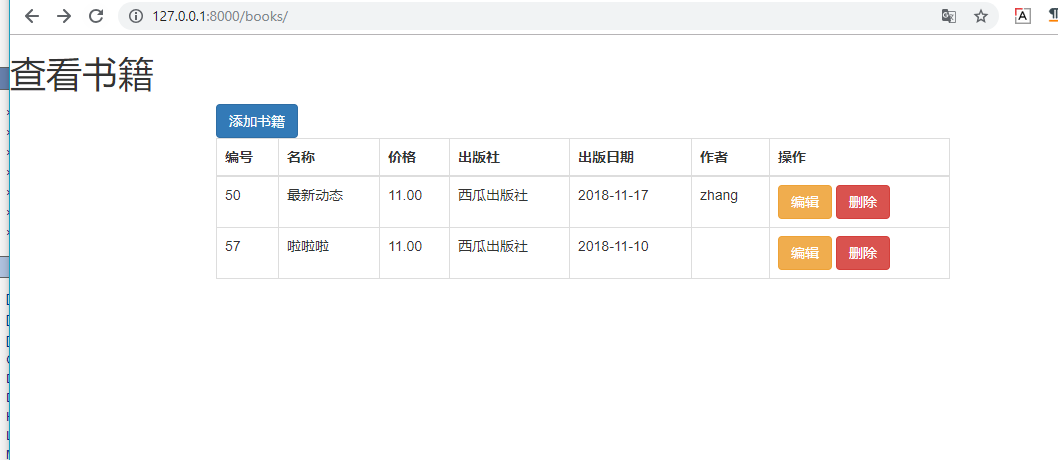
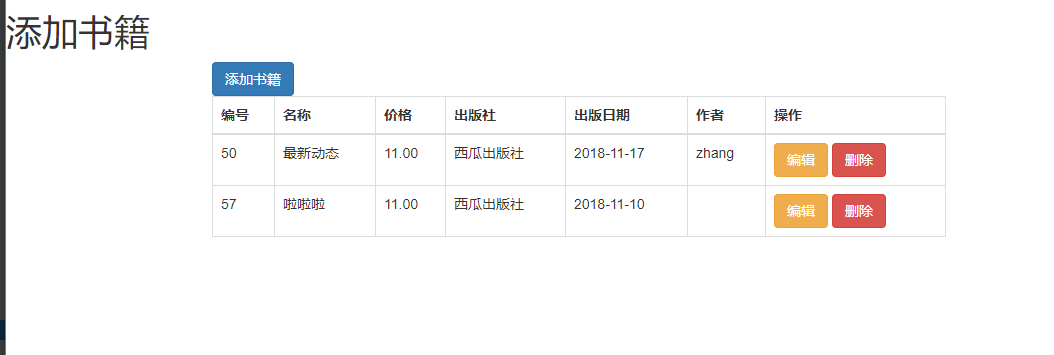
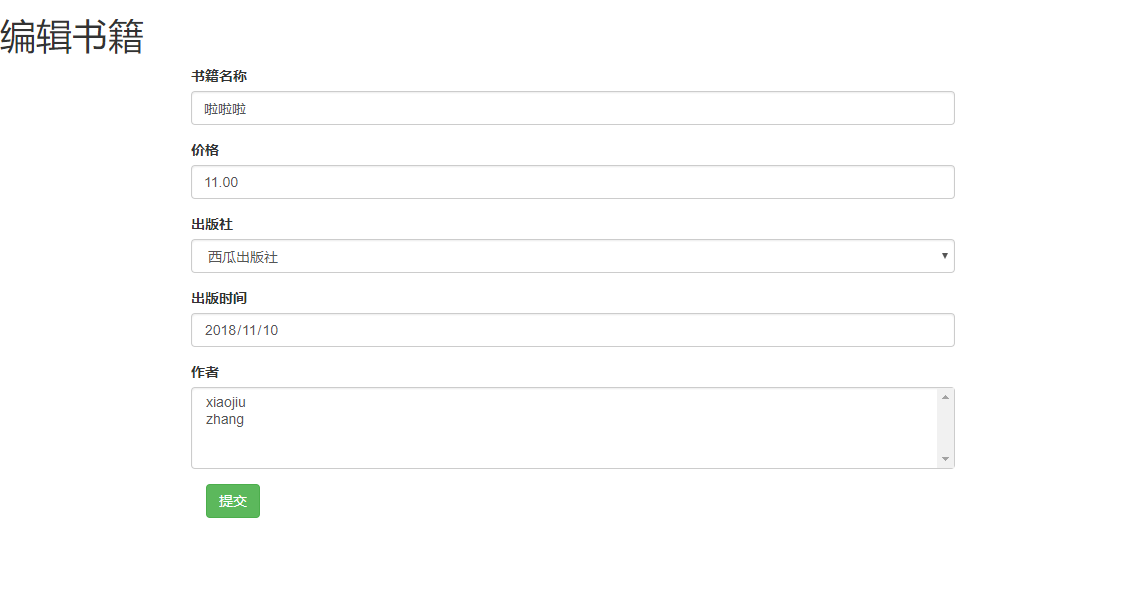
其他功能等我学会了再来
Django(图书管理系统)的更多相关文章
- Django——图书管理系统
基于Django的图书管理系统 1.主体功能 1.列出图书列表.出版社列表.作者列表 2.点击作者,会列出其出版的图书列表 3.点击出版社,会列出旗下图书列表 4.可以创建.修改.删除 图书.作者.出 ...
- Django(图书管理系统1)
day63 内容回顾 1. 单表的增删改查 1. 删和改 1. GET请求 URL传值 1. 格式 ...
- Django图书管理系统(前端对数据库的增删改查)
图书管理系统 出版社的管理 源码位置:https://gitee.com/machangwei-8/learning_materials/tree/master/%E9%A1%B9%E7%9B%AE/ ...
- django 图书管理系统
一.图书管理系统 单表的增删改查 1.创建项目 2.注释掉中间件 就可以提交post 请求 3.配置静态文件 并手动创建static 文件夹存放静态文件 二.具体的数据库配置 1.创建数据库 2. ...
- Django图书管理系统(前端对有外键的数据表增删改查)
图书管理 书籍管理 book name 项目源码位置:https://gitee.com/machangwei-8/learning_materials/tree/master/%E9%A1%B9%E ...
- django图书管理系统实例
首页,其他页面全部继承首页的上半部分 点击发布图书页面 首页点击书名,跳转到图书信息界面,该界面可删除图书 项目结构 #views.py from django.shortcuts import re ...
- Django(图书管理系统2)
day64 内容回顾 1. ORM外键操作 图书表和出版社表 多对一 的关系 # 书 class Book(models.Model): ...
- Django图书管理系统(单表操作)
以下内容需要掌握: Python3 以及前端:HTML,CSS,jQuery,BootStrap,Django,JavaScript 开启Django新项目: 1,settings.py 数据库选择: ...
- Django练习——图书管理系统
Django图书管理系统 创建一个项目 1. django-admin startproject 图书管理 2. cmd 命令终端下创建一个app python manage.py startapp ...
- 在Django中使用ORM创建图书管理系统
一.ORM(对象关系映射) 很多语言的web框架中都有这个概念 1. 为什么要有ORM? 1. 写程序离不开数据,要使用数据就需要连接数据库,但是不同的数据库在sql语句上(mysql,oracle等 ...
随机推荐
- MQ关于实现最终一致性分布式事务原理解析
本文讲述阿里云官方文档中关于通过MQ实现分布式事务最终一致性原理 概念介绍 事务消息:消息队列 MQ 提供类似 X/Open XA 的分布式事务功能,通过消息队列 MQ 事务消息能达到分布式事务的最终 ...
- Java优雅停机
Java的优雅停机通常通过注册JDK的ShootDownHook实现,当系统接受到退出指令后,首先标记系统处于退出状态,不再接受新的消息,然后将积压的消息处理完,最后调用资源回收接口将资源销毁,最后各 ...
- RocketMQ踩坑记
一.前言 现在的主流消息队列基本都是kafka.RabbitMQ和RocketMQ,只有了解各自的优缺点才能在不同的场景选择合适的MQ,对比图如下: MQ对比图 本篇文章主要介绍我自己在跑官方demo ...
- 浅谈connect,withRouter,history,useState,useEffect
1.connect in umi connect 可以链接不同的组件,从而在这个组件中使用其他组件的参数,常用于获取redux中存取的值. 2.withRouter in umi withRouter ...
- 关于一些视图的基本操作(结合YGGL.sql)
二.操作题 1.创建视图emp_view2,包含员工编号,姓名,所在部门名称和收入. mysql> create or replace view emp_view2 -> as -> ...
- 【JavaWeb】Tomcat 使用
Tomcat 使用 基础概念 JavaWeb: JavaWeb:所有通过 Java 语言编写可以通过浏览器访问的程序的总称,它是是基于请求和响应来开发的: 请求:客户端给服务器发送数据,即 Reque ...
- 【Redis3.0.x】持久化
Redis3.0.x 持久化 概述 Redis 提供了两种不同的持久化方式: RDB(Redis DataBase)持久化,可以在指定的时间间隔内生成数据集的时间点快照. AOF(Append Onl ...
- C语言中左值和右值的区别(C语言学习笔记)
重要的内容要重复强调: C语言的术语Ivalue指用于识别或定位一个存储位置的标识符.( 注意:左值同时还必须是可改变的) 其实rvalue的发明完全是为了搭配lvalue , rvalue你可以理解 ...
- 在Firefox上使用Chrome的crx扩展程序
假如你喜欢使用Firefox火狐浏览器,可是发现有个很喜欢很想用的扩展只发布了支持Chrome的crx格式--Firefox从57版以后使用了WebExtension API作为新附加组件的开发标准, ...
- nodejs中使用worker_threads来创建新的线程
目录 简介 worker_threads isMainThread MessageChannel parentPort和MessagePort markAsUntransferable SHARE_E ...