
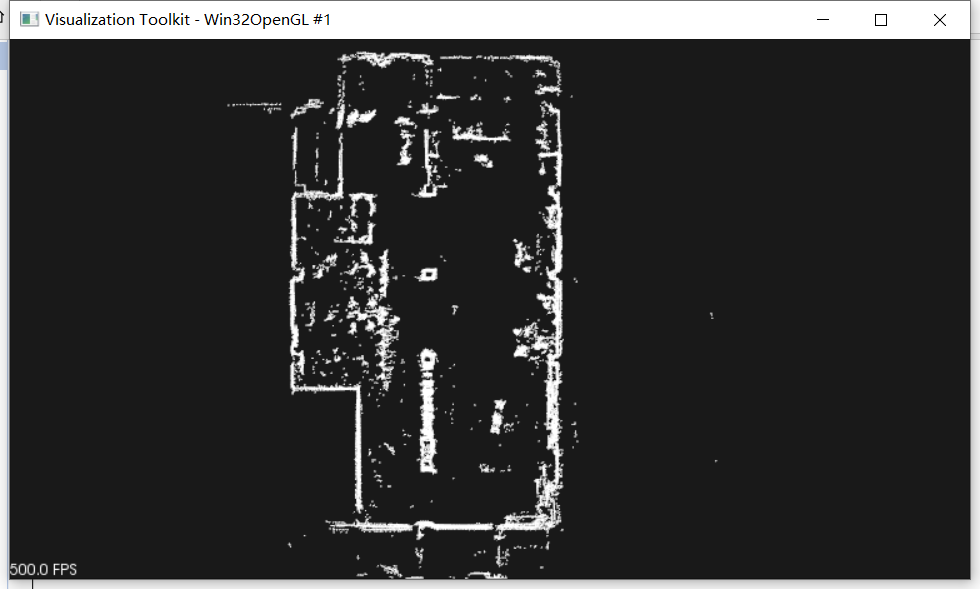
利用vs pcl库将多个PCD文件合并成一张PCD地图
主机环境:win10系统,pcl库1.11.1,
vs2019 pcl库安装以及环境配置如下连接:
https://www.jb51.net/article/190710.htm
代码很简单,主要是做个坐标转换,如下:
#include <fstream>
#include <string>
#include <vector>
#include <iostream>
#include <iostream> //标准输入输出流
#include <pcl/io/pcd_io.h> //PCL的PCD格式文件的输入输出头文件
#include <pcl/point_types.h> //PCL对各种格式的点的支持头文件
#include <pcl/visualization/pcl_visualizer.h>
#include <pcl/common/transforms.h>
#include <pcl/visualization/cloud_viewer.h>
void GetAllFiles(string path, vector<string>& files)
{
long hFile = 0;
//文件信息
struct _finddata_t fileinfo;
string p;
if ((hFile = _findfirst(p.assign(path).append("\\*").c_str(), &fileinfo)) != -1)
{
do
{
if ((fileinfo.attrib & _A_SUBDIR))
{
if (strcmp(fileinfo.name, ".") != 0 && strcmp(fileinfo.name, "..") != 0)
{
files.push_back(p.assign(path).append("\\").append(fileinfo.name));
}
}
else
{
files.push_back(p.assign(path).append("\\").append(fileinfo.name));
}
} while (_findnext(hFile, &fileinfo) == 0);
_findclose(hFile);
}
}
void GetAllFormatFiles(string path, vector<string>& files, string format)
{
//文件句柄
long long hFile = 0;
//文件信息
struct _finddata_t fileinfo;
string p;
if ((hFile = _findfirst(p.assign(path).append("\\*" + format).c_str(), &fileinfo)) != -1)
{
do
{
if ((fileinfo.attrib & _A_SUBDIR))
{
if (strcmp(fileinfo.name, ".") != 0 && strcmp(fileinfo.name, "..") != 0)
{
//files.push_back(p.assign(path).append("\\").append(fileinfo.name) );
GetAllFormatFiles(p.assign(path).append("\\").append(fileinfo.name), files, format);
}
}
else
{
files.push_back(p.assign(path).append("\\").append(fileinfo.name));
}
} while (_findnext(hFile, &fileinfo) == 0);
_findclose(hFile);
}
}
{
string filePath = "C:\\Users\\CTOS\\Desktop\\newpcd";
vector<string> files;
const char* distAll = "*.pcd";
string format = ".pcd";
GetAllFormatFiles(filePath, files, format);
ofstream ofn(distAll);
int size = files.size();
cout << size << endl;
ofn << size << endl;
pcl::PointCloud<pcl::PointXYZ>::Ptr cloud(new pcl::PointCloud<pcl::PointXYZ>); // 创建点云(指针)
pcl::PointCloud<pcl::PointXYZ>::Ptr cloud_prt(new pcl::PointCloud<pcl::PointXYZ>); // 创建点云(指针)
pcl::PointCloud<pcl::PointXYZ>::Ptr transformed_cloud(new pcl::PointCloud<pcl::PointXYZ>); // 创建点云(指针)
for (int i = 0; i < size; i++)
{
ofn << files[i] << endl;
cout << files[i] << endl;
if (pcl::io::loadPCDFile<pcl::PointXYZ>(files[i], *cloud_prt) == -1) //* 读入PCD格式的文件,如果文件不存在,返回-1
{
cout << "Couldn't read file pcd \n"<< endl; //文件不存在时,返回错误,终止程序。
return (-1);
}
Eigen::Vector4f p = cloud_prt->sensor_origin_.matrix();
Eigen::Quaternionf q;
q = cloud_prt->sensor_orientation_.matrix();
Eigen::Vector3f eulerAngle = q.matrix().eulerAngles(2, 1, 0);
Eigen::Affine3f transform = Eigen::Affine3f::Identity();
transform.translation() << p[0], p[1], p[2];
transform.rotate(q);
std::cout << transform.matrix() << std::endl;
pcl::transformPointCloud(*cloud_prt, *transformed_cloud, transform);
*cloud += *transformed_cloud;
cloud_prt->clear();
transformed_cloud->clear();
Sleep(1);
}
pcl::visualization::CloudViewer viewer("pcd viewer");
viewer.showCloud(cloud);
while (!viewer.wasStopped())
{
}
ofn.close();
return 0;
}
利用vs pcl库将多个PCD文件合并成一张PCD地图的更多相关文章
- PCL点云库中怎样读取指定的PCD文件,又一次命名,处理后保存到指定目录
我一直想把处理后的pcd文件重命名,然后放到指定的目录,尝试了好久最终做到了: 比方我想读取 "table_scene_lms400.pcd" 把它进行滤波处理,重命名为 &qu ...
- PCD文件格式详解及在PCL下读取PCD文件
一.PCD简介 1.1 PCD版本 在点云库PCL 1.0发布之前,PCD文件格式就已经发展更新了许多版本.这些新旧不同的版本用PCD_Vx来编号(例如PCD_V5.PCD_V6和PCD_V7等),分 ...
- PCL Save VTK File With Texture Coordinates 使用PCL库来保存带纹理坐标的VTK文件
我之前有一篇博客Convert PLY to VTK Using PCL 1.6.0 or PCL 1.8.0 使用PCL库将PLY格式转为VTK格式展示了如何将PLY格式文件转化为VTK格式的文件, ...
- 利用私有的库MobileCoreServices检测正在安装的应用
利用的私有库检测正在安装的app 分为两步:第一,通过placeholderApplications获得所有的正在安装的app的信息 第二,遍历正在安装的app的信息,根据名称获得你想检测的app是否 ...
- Convert PLY to VTK Using PCL 1.6.0 使用PCL库将PLY格式转为VTK格式
PLY格式是比较流行的保存点云Point Cloud的格式,可以用MeshLab等软件打开,而VTK是医学图像处理中比较常用的格式,可以使用VTK库和ITK库进行更加复杂的运算处理.我们可以使用Par ...
- c# 利用动态库DllImport("kernel32")读写ini文件(提供Dmo下载)
c# 利用动态库DllImport("kernel32")读写ini文件 自从读了设计模式,真的会改变一个程序员的习惯.我觉得嘛,经验也可以从一个人的习惯看得出来,看他的代码编写习 ...
- PCL 库安装
参考资料: http://www.cnblogs.com/newpanderking/articles/4022322.html VS2010+PCL配置 PCL共有两种安装方式 安全安装版,个人配置 ...
- Window7下手动编译最新版的PCL库
PCL简介 PCL是Point Cloud Library的缩写,是一个用于处理二维图像,三维深度图像和三维点云的C++库.该库是完全开源的,可免费用于商业和学术研究. 官方网站:http://poi ...
- Ubuntu 16.04 安装PCL库以及测试
参考链接:https://blog.csdn.net/dantengc/article/details/78446600 参考博客,官网一直安装不成功,后来参照一篇博客终于安装成功了,记录如下. 1. ...
随机推荐
- 11Linux之软件包管理
11Linux之软件包管理 目录 11Linux之软件包管理 11 软件包管理 11.1 软件包介绍 11.1.1 编程语言分类 11.1.2 三种安装包 11.2 rpm包管理 11.2.1 rpm ...
- SMTPAuthenticationError: (535, '5.7.8 authentication failed')解决办法
代码: 运行之后一直报错,SMTPAuthenticationError: (535, '5.7.8 authentication failed'). 查找半天是因为新浪邮箱的STMP的服务没有开启, ...
- 限流10万QPS、跨域、过滤器、令牌桶算法-网关Gateway内容都在这儿
一.微服务网关Spring Cloud Gateway 1.1 导引 文中内容包含:微服务网关限流10万QPS.跨域.过滤器.令牌桶算法. 在构建微服务系统中,必不可少的技术就是网关了,从早期的Zuu ...
- 详解scanf与getchar
原文: (https://www.myjinji.top/articles/2020/07/22/1595399358246.html)[https://www.myjinji.top/article ...
- js常用函数和事件
1.常规函数 javascript常规函数包括以下9个函数: (1)alert函数:显示一个警告对话框,包括一个OK按钮. (2)confirm函数:显示一个确认对话框,包括OK.Cancel按钮. ...
- [web安全原理]PHP命令执行漏洞基础
前言 PHP命令执行漏洞 应用程序的某些功能功能需要调用可以执行系统命令的函数,如果这些函数或者函数的参数被用户控制,就有可能通过命令连接符将恶意命令拼接到正常的函数中,从而随意执行系统命令,这就是命 ...
- 记一次容器内执行ansible命令卡住
1.由来 最近在使用kylin_v10系统,发现当在此系统下运行的容器内执行#ansible localhost -m setup 命令会卡住不动,于是和同事一起经过如下排查最终找到解决问题的办法. ...
- 史上最全!2020面试阿里,字节跳动90%被问到的JVM面试题(附答案)
前言:最近老是收到小伙伴的私信问我能不能帮忙整理出一份JVM相关的面试题出来,说自己在大厂去面试的时候这一块问的是特别多的,每次自己学的时候每次都学不到重点去.这不他来了,一份详细的JVM面试真题给大 ...
- FL Studio20效果器Fruity Reverb 2功能介绍
FL Studio,也就是我梦通常所说的水果音乐制作软件,是一款新手就可以用的软件.其操作简单,界面简洁大方,就算只用鼠标也可以轻松编曲. FL Studio20中有许多自带合成器是很好用的,同时也是 ...
- word-流程图
将 业务洽谈 签订合同 客户付费 发货 收获 信息反馈 制作成流程图: 插入-SmartArt-根据需要选择图形,如下图所示 点击红框选中部分,变成如下图所示,将要编辑的内容选中复制粘贴进去,一般最后 ...