
Java 实践:生产者与消费者
实践项目:生产者与消费者【经典多线程问题】
问题引出:
生产者和消费者指的是两个不同的线程类对象,操作同一个空间资源的情况。
需求引出:
—— 生产者负责生产数据,消费者负责取走数据
—— 生产者生产完一组数据之后,消费者就要取走一组数据
设置三个类:数据类、生产类、消费类;生产和消费类是线程类,同时操作同一个数据类;生产类负责每次向数据类中写入一组数据;消费类负责每次从数据类中取出一组数据。
 package hello;

 class Info {  // 数据类

     private String title ;

     private String content;

     public void setTitle(String title) {

         this.title = title ;

     }

     public String getTitle() {

         return title ;

     }

     public String getContent() {

         return content ;

     }

     public void setContent(String content) {

         this.content = content ;

     }

 }

 class Producer implements Runnable { // 生成者类(线程)

     private Info info ;

     public Producer(Info info) {

         this.info = info ;

     }

     @Override

     public void run() {

         for (int x = 0 ; x < 100 ; x ++ ) {

             try {

                 Thread.sleep(200);

             } catch (InterruptedException e) {

                 e.printStackTrace();

             }

             if ( x % 2 == 0 ) {

                 this.info.setTitle("张三");

                 this.info.setContent("男");

             } else {

                 this.info.setTitle("王五");

                 this.info.setContent("男");

             }

         }

     }

 }

 class Consumer implements Runnable {

     private Info info ;

     public Consumer(Info info) {

         this.info = info ;

     }

     @Override

     public void run() {

         for (int x = 0 ; x < 100 ; x ++) {

             try {

                 Thread.sleep(100);

             } catch (InterruptedException e) {

                 e.printStackTrace();

             }

             System.out.println(this.info.getTitle() + "——" + this.info.getContent());

         }

     }

 }

 public class TestDemo {

     public static void main(String[] args) throws Exception {

         Info info = new Info() ;

         new Thread(new Producer(info)).start();

         new Thread(new Consumer(info)).start();

     }

 }
上例程序执行后,会发现“错位的现象”;出现类似数据为取走,就存入新的数据的错误。【不同步且异步现象导致】
 package hello;

 class Info {  // 数据类

     private String title ;

     private String content;

     public synchronized void set(String title , String content) {

         this.title = title ;

         try {

             Thread.sleep(100);

         } catch (InterruptedException e) {

             e.printStackTrace();

         }

         this.content = content ;

     }

     public synchronized void get() {

         try {

             Thread.sleep(100);

         } catch (InterruptedException e) {

             e.printStackTrace();

         }

         System.out.println(this.title + "——" + this.content);

     }

 }

 class Producer implements Runnable { // 生成者类(线程)

     private Info info ;

     public Producer(Info info) {

         this.info = info ;

     }

     @Override

     public void run() {

         for (int x = 0 ; x < 100 ; x ++ ) {

             if ( x % 2 == 0 ) {

                 this.info.set("张三", "男");

             } else {

                 this.info.set("李悦", "女");

             }

         }

     }

 }

 class Consumer implements Runnable {

     private Info info ;

     public Consumer(Info info) {

         this.info = info ;

     }

     @Override

     public void run() {

         for (int x = 0 ; x < 100 ; x ++) {

             this.info.get();

         }

     }

 }

 public class TestDemo {

     public static void main(String[] args) throws Exception {

         Info info = new Info() ;

         new Thread(new Producer(info)).start();

         new Thread(new Consumer(info)).start();

     }

 }
通过“同步方法”,解决了数据不同步的问题,但是于此而来的问题就是:数据的重复操作。
针对上两例程序,我们通过Object类的支持,来解决数据重复操作的问题:
如果像上例的设计,需要在程序中加入一个等待机制;当数据未取则等待数据取出后在存入,当数据未存等待数据存入后取出。而Object类中提供有专门的“等待”。
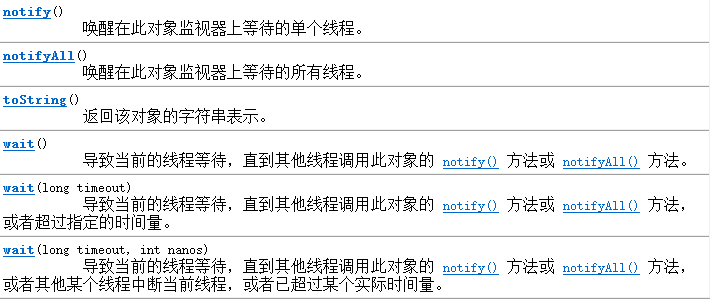
等待: public final void wait() throws InterruptedException
唤醒第一个等待线程: public final void notify() ;
唤醒全部的等待进入: public final void notifyAll(); //优先级高越有可能先唤醒
通过Object的线程等待和唤醒功能完善程序:
 package hello;

 class Info {  // 数据类

     private String title ;

     private String content;

     private boolean flag = true ;

     // true:表示可以生产,不可以取走

     // false:表示不可以生产,可以取走

     public synchronized void set(String title , String content) {

         if (this.flag == false) { // 发现不可以生产,则等待线程

             try {

                 super.wait();  // 通过super调用自己的超类(父类)Object类中的wait()方法等待线程

             } catch (InterruptedException e) {

                 e.printStackTrace();

             }

         }

         this.title = title ;

         try {

             Thread.sleep(100);

         } catch (InterruptedException e) {

             e.printStackTrace();

         }

         this.content = content ;

         this.flag = false ;// 修改标记

         super.notify(); //唤醒其他等待线程

     }

     public synchronized void get() {

         if (this.flag == true) {

             try {

                 super.wait();

             } catch (InterruptedException e) {

                 e.printStackTrace();

             }

         }

         try {

             Thread.sleep(100);

         } catch (InterruptedException e) {

             e.printStackTrace();

         }

         System.out.println(this.title + "——" + this.content);

         this.flag = true ; //修改标记

         super.notify(); // 唤醒其他线程

     }

 }

 class Producer implements Runnable { // 生成者类(线程)

     private Info info ;

     public Producer(Info info) {

         this.info = info ;

     }

     @Override

     public void run() {

         for (int x = 0 ; x < 100 ; x ++ ) {

             if ( x % 2 == 0 ) {

                 this.info.set("张三", "男");

             } else {

                 this.info.set("李悦", "女");

             }

         }

     }

 }

 class Consumer implements Runnable {

     private Info info ;

     public Consumer(Info info) {

         this.info = info ;

     }

     @Override

     public void run() {

         for (int x = 0 ; x < 100 ; x ++) {

             this.info.get();

         }

     }

 }

 public class TestDemo {

     public static void main(String[] args) throws Exception {

         Info info = new Info() ;

         new Thread(new Producer(info)).start();

         new Thread(new Consumer(info)).start();

     }

 }
我们依靠Object类中的等待唤醒机制完成了代码的要求。
------------------------
Java 实践:生产者与消费者的更多相关文章
- Windows下RabbitMQ 的下载、配置、Java实现生产者和消费者例子
RabbitMQ是一个轻量级的消息代理中间件,支持多种消息通信协议,支持分布式部署,支持运行于多个操作系统,具有灵活.高可用等特性.RabbitMQ支持多种协议,其中最为重要的是高级消息队列协议(AM ...
- java实现生产者和消费者问题
Java实现生产者和消费者问题 欢迎访问我的个人博客,获取更多有用的东西 链接一 链接二 也可以关注我的微信订阅号:CN丶Moti
- Java实现生产者和消费者
生产者和消费者问题是操作系统的经典问题,在实际工作中也常会用到,主要的难点在于协调生产者和消费者,因为生产者的个数和消费者的个数不确定,而生产者的生成速度与消费者的消费速度也不一样,同时还要实现生产者 ...
- java之生产者与消费者
package com.produce; import java.util.LinkedList; import java.util.Queue; /*@author shijin * 生产者与消费者 ...
- java线 生产者和消费者
watermark/2/text/aHR0cDovL2Jsb2cuY3Nkbi5uZXQvbGlhbmdydWkxOTg4/font/5a6L5L2T/fontsize/400/fill/I0JBQk ...
- Java实现生产者与消费者模式
生产者不断向队列中添加数据,消费者不断从队列中获取数据.如果队列满了,则生产者不能添加数据:如果队列为空,则消费者不能获取数据.借助实现了BlockingQueue接口的LinkedBlockingQ ...
- Java中生产者与消费者模式
生产者消费者模式 首先来了解什么是生产者消费者模式.该模式也称有限缓冲问题(英语:Bounded-buffer problem),是一个多线程同步问题的经典案例.该问题描述了两个共享固定大小缓冲区的线 ...
- java之生产者和消费者问题
package testThread; public class Test3 { public static void main(String[] args) { Clerk c = new Cler ...
- 菜鸡的Java笔记 生产者与消费者
生产者与消费者 代码要求知道做什么用即可 线程间的通讯问题以及 Object 类的支持 基础模型 现在希望实现一种数据的生产和取出的操作 ...
- Java 多线程-生产者、消费者
一.整体代码 ThreadDemo.java public class ThreadDemo { public static void main(String[] args) { Godown god ...
随机推荐
- Web前端基础(15):jQuery基础(二)
1. jQuery选择器 jQuery选择器是jQuery强大的体现,它提供了一组方法,让我们更加方便的获取到页面中的元素. 1.1 基本选择器 例子如下: <!DOCTYPE html> ...
- 通过 RxSwift 优雅使用 NotificationCenter
原文 纯粹的官方代码使用NotificationCenter真的很难用,但是有了RxSwift,就变得方便了很多. 修改 Podfile,通过pod引入RxSwift pod 'RxSwift' po ...
- Delphi 任务栏中不显示窗口
目的: 1. 窗口不在任务栏显示. 2. 窗口不显示在Alt+Tab的切换列表中. 3. 在任务管理器的应用程序列表中不显示. 示例: type TAppWndBrowser = class( TFo ...
- spring mvc 源码简要分析
关于web项目,运用比较多的是过滤器和拦截器 过滤器基于责任链设计模式 创建过滤器链 / Create the filter chain for this requestApplicationFilt ...
- acwing 873. 欧拉函数 模板
地址 https://www.acwing.com/problem/content/875/ 给定n个正整数ai,请你求出每个数的欧拉函数. 欧拉函数的定义 输入格式 第一行包含整数n. 接下来n行, ...
- LeetCode 307. 区域和检索 - 数组可修改
地址 https://leetcode-cn.com/problems/range-sum-query-mutable/ 题目描述给定一个整数数组 nums,求出数组从索引 i 到 j (i ≤ ...
- poj 3069 Saruman's Army 贪心 题解《挑战程序设计竞赛》
地址 http://poj.org/problem?id=3069 题解 题目可以考虑贪心 尽可能的根据题意选择靠右边的点 注意 开始无标记点 寻找左侧第一个没覆盖的点 再来推算既可能靠右的标记点为一 ...
- 在Ubuntu环境下配置Proxmark3(PM3)使用环境
参考资料:PM3官方Wiki 因为国内网络上大多是在Kali系统上使用PM3的教程(链接1.链接2.链接3),而这些教程的步骤对于Ubuntu系统并不完全适用.所以写下本文,记录我个人的安装经历. 本 ...
- POJ3974Palindrome(Manacher)
传送门 题目大意:求最长回文串 题解:Manacher 代码: #include<cstdio> #include<cstring> #include<iostream& ...
- HDUNumber Sequence(KMP)
传送门 题目大意:b在a第一次出现的位置 题解:KMP 代码: #include<iostream> #include<cstdio> #include<cstring& ...