
[Note] GNUstep on Windows
1.下载与安装
www.gnustep.org/windows/installer.html
下载
GNUstep MSYS System
GNUstep Core
GNUstep Devel
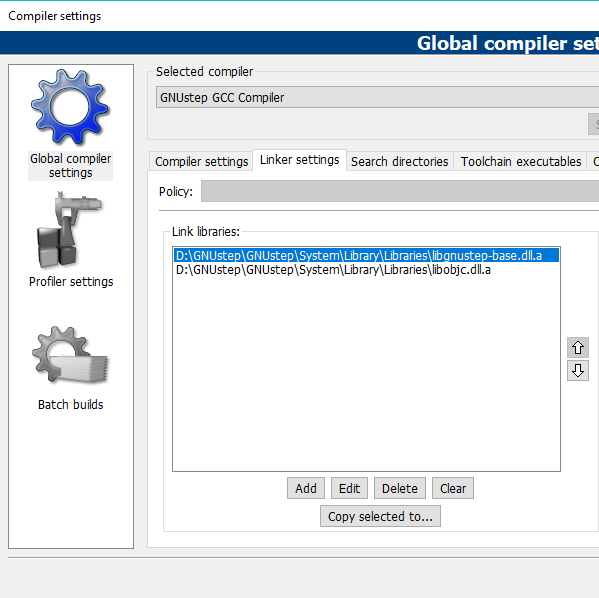
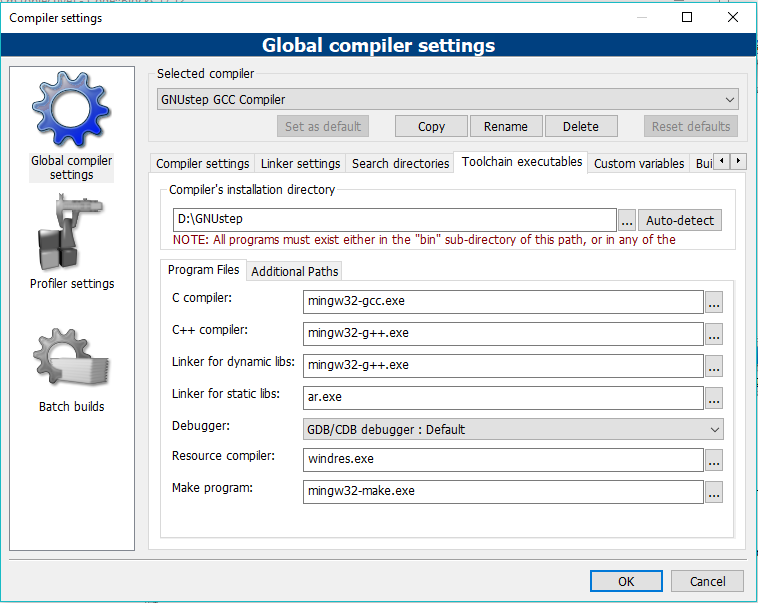
并安装,全部安装在同一个文件夹下,如D:/GNUstep
2.配置
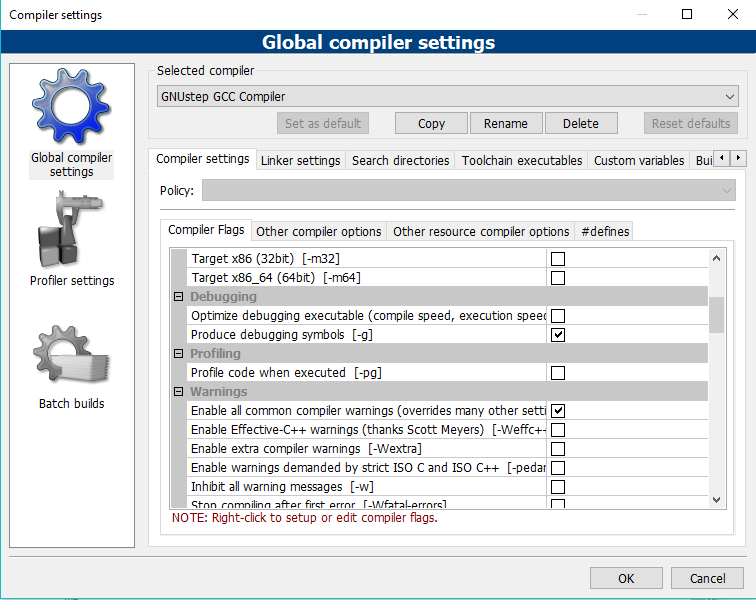
2.1 配置Compiler
Settings -> Compiler
Linker settings
Search directories

Toolchain exectables
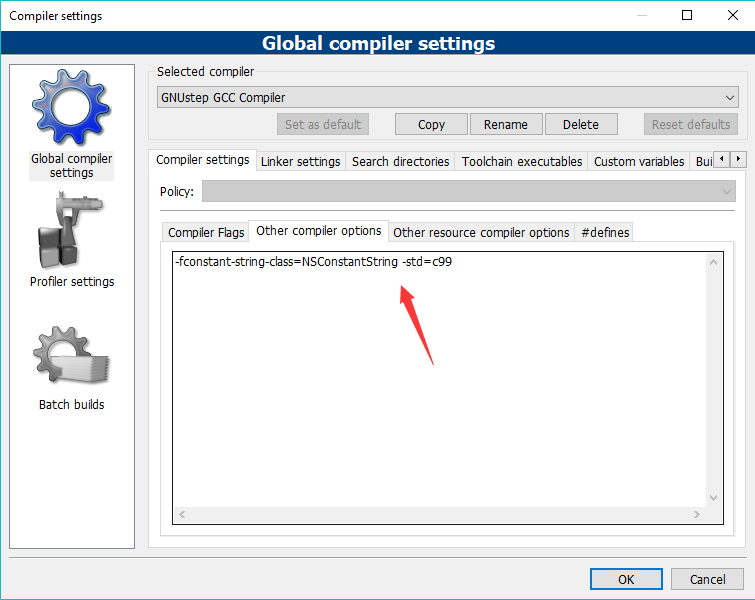
Other compiler options
-fconstant-string-class=NSConstantString -std=c99
2.2 其他配置

Editor
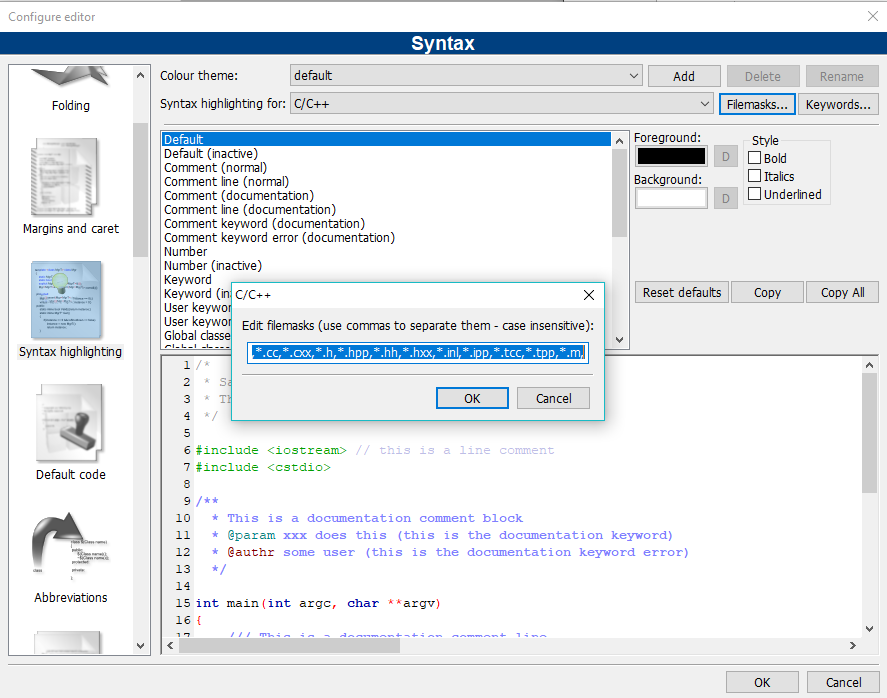
@interface @implementation @end @class @selector @protocol @public @protected @private id BOOL YES NO SEL nil NULL self
添加关键字
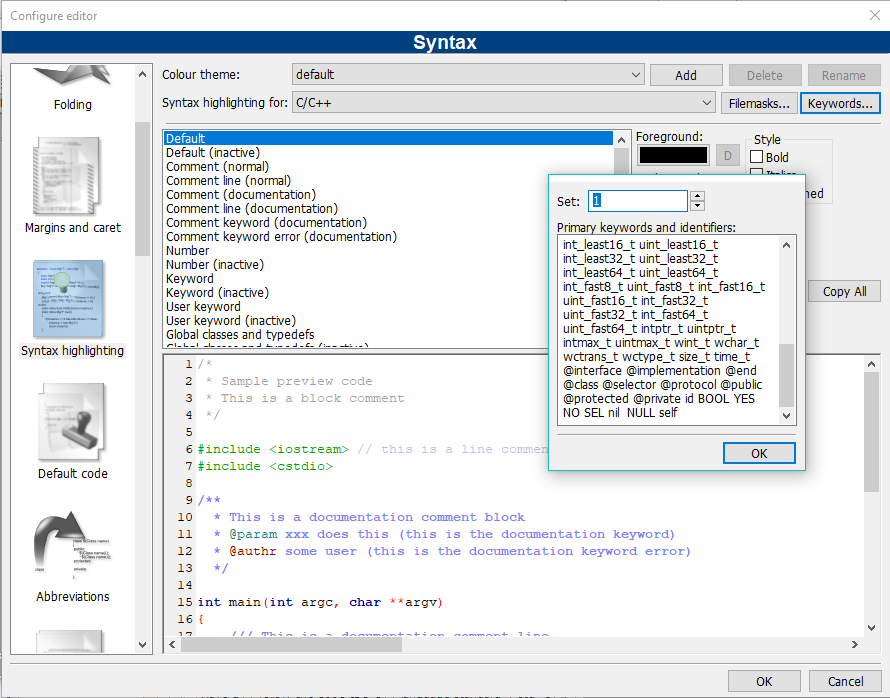
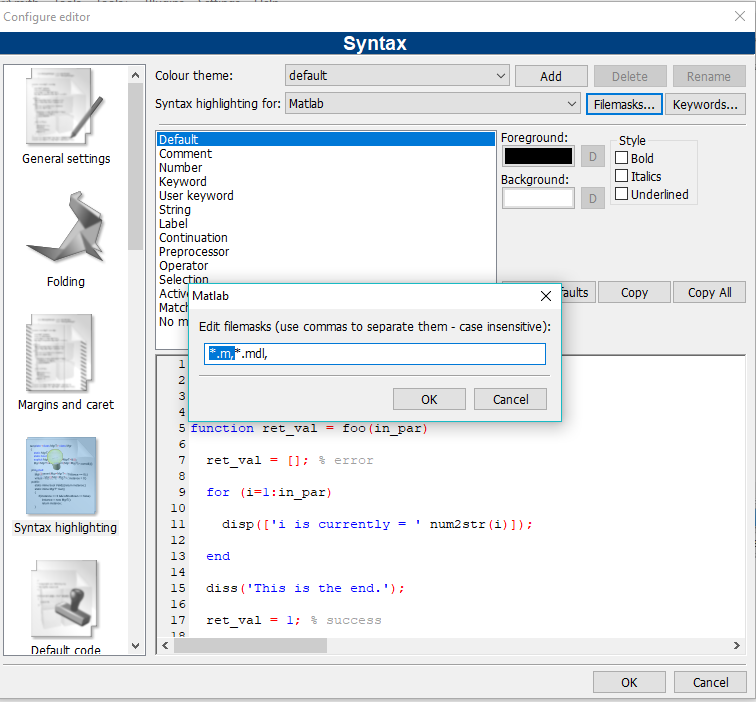
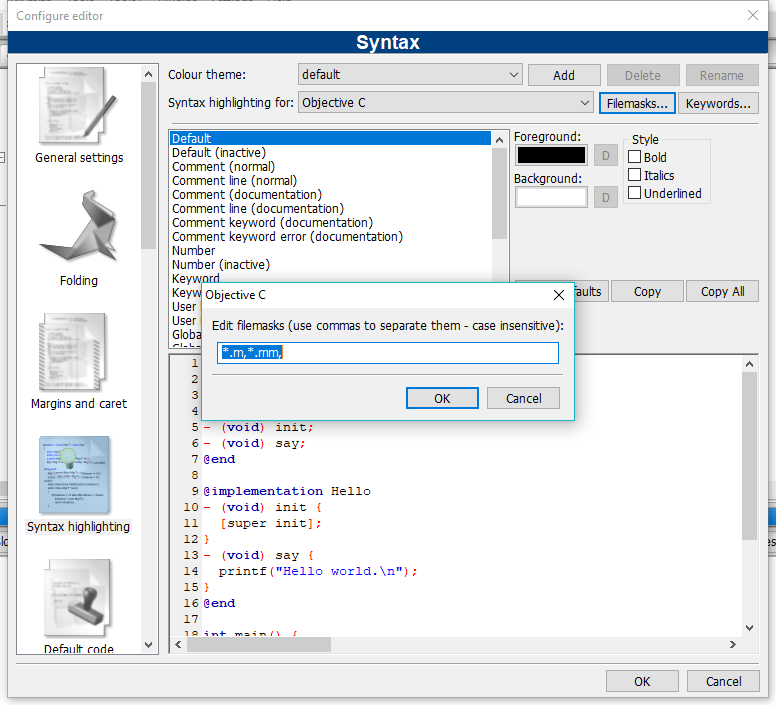
为了能objective-c代码能着色,给objective-c的Filemasks增加*.m, 删除Matlab的*.m,这样IDE就能识别出*.m是objective-c文件了
新建一个Project
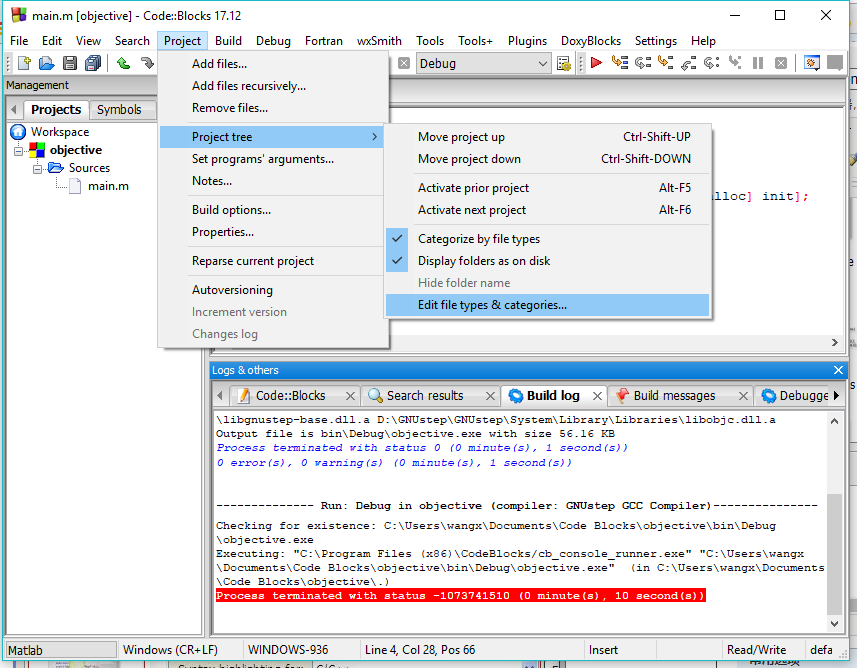
添加*.m到Source目录

3.测试
再新建一个Console Application项目,删除自带的main.c(去File Explorer里删),添加一个main.m,如果发现main.m是灰色的,点Build也没反应
-------------- Clean: Debug in objective (compiler: GNUstep GCC Compiler)---------------

Cleaned "objective - Debug"

-------------- Build: Debug in objective (compiler: GNUstep GCC Compiler)---------------

Linking stage skipped (build target has no object files to link)

Nothing to be done (all items are up-to-date).
在main.m上右键, 选中Compile file 和 Link file,再次编译
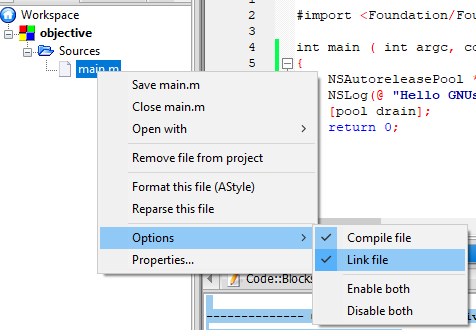
ALL CLEAR!
Updated 2018-3-26 18:47
发现新增一个Fraction.h头文件和对应的Fraction.m文件后无法通过编译
将main.m 和 Fraction.m的 Compiler variable 改成 CC或者CPP
Fraction.h 的Compiler variable 改成 OBJC
Properties-->Advanced-->Compiler variable
务必记得每个.m和.h文件都要这么做
参考链接
https://blog.csdn.net/ldl22847/article/details/7482971
http://www.programering.com/a/MTNyczMwATY.html
http://www.voidcn.com/article/p-nmxwqrlk-tz.html
[Note] GNUstep on Windows的更多相关文章
- Windows 下使用 GNUstep 编译并运行 Objective-C 程序
今晚上开始看<Objective-C 程序设计(第4版)>这本书(OSChina 正在做此书的书评活动,详情请看这里),到现在为止看到第 7 章,于是想动手试试写两简单的程序编译跑跑看. ...
- UEFI Bootable USB Flash Drive - Create in Windows(WIN7 WIN8)
How to Create a Bootable UEFI USB Flash Drive for Installing Windows 7, Windows 8, or Windows 8.1 In ...
- Creating a radius based VPN with support for Windows clients
This article discusses setting up up an integrated IPSec/L2TP VPN using Radius and integrating it wi ...
- 【软件使用】Windows下的Objective-C集成开发环境搭建(IDE)
Objective-C是苹果软件的编程语言,想要上机学习.调试,有一个集成开发环境(IDE)方便很多.有三类方法搭建Objective-C的集成开发环境: 1) 使用苹果的平台,集成开发环境使用X ...
- 【Objective-C】Windows下Objective-C开发环境配置
[Objective-C]Windows下Objective-C开发环境配置 ftp://ftpmain.gnustep.org/pub/gnustep/binaries/windows/ 最近打 ...
- Windows下编译objective-C
Windows下编译objective-C 2011-08-31 14:32 630人阅读 评论(0) 收藏 举报 windowscocoa工具objective clibraryxcode 目录 ...
- [Windows驱动]流媒体驱动开发
从Windows98开始,Windows流媒体驱动遵循Windows Driver Model(WDM)模型并使用Kernel Streaming(KS)组件.Kernel Streaming(KS) ...
- windows编译 obs-studio
github下载源码 https://github.com/jp9000/obs-studio 还需要一个开发包 http://code.fosshub.com/OBS/download/depend ...
- windows设备驱动安装指南
高观点下的设备驱动安装(overview) 一.windows是怎样安装设备的? 第一步:新设备的识别 在给一个新设备安装驱动之前,总线或集线器(hub)驱动会为连接到PC上的设备分配一个硬件ID(h ...
随机推荐
- J-Subarray_2019牛客暑期多校训练营(第二场)
题意 有一个只由1,-1组成的数组,给出所有连续的1所在位置,求满足1的个数大于-1的个数的子区间的数量 题解 参考博客:https://www.cnblogs.com/Yinku/p/1122149 ...
- poj 2828--Buy Tickets(线段树)
Description Railway tickets were difficult to buy around the Lunar New Year in China, so we must get ...
- 02 python 必知
一.变量 1.变量的定义 将程序运算的中间结果临时存在内存里,以便后续代码调用. 2.变量的使用规范 1)变量必须要有数字,字母,下划线,任意组合. 2)变量不能数字开头. 3)不能是python中的 ...
- 关于jpa的Specification自定义函数,实现oracle的decode;以及如何在静态方法中调用注入的service
如何在静态方法中调用注入的service Public class ClassA{ public static ClassA classA; @Resource private Service ser ...
- Web框架之Gin
Gin是一个用Go语言编写的web框架.它是一个类似于martini但拥有更好性能的API框架, 由于使用了httprouter,速度提高了近40倍. 如果你是性能和高效的追求者, 你会爱上Gin. ...
- springboot应用监控和管理
spring boot应用监控和管理 Spring Boot 监控核心是 spring-boot-starter-actuator 依赖,增加依赖后, Spring Boot 会默认配置一些通用的监控 ...
- Unity基础:AR(增强现实)的学习
版权申明: 本文原创首发于以下网站: 博客园『优梦创客』的空间:https://www.cnblogs.com/raymondking123 优梦创客的官方博客:https://91make.top ...
- StateListDrawable资源的使用
StateListDrawable用于组织多个Drawable对象,当使用StateListDrawable作为目标组件的 背景和前景图片时,StateListDrawable对象所显示的Drawab ...
- JAVASSM框架面试题
1.SpringMVC的工作流程? 1. 用户发送请求至前端控制器DispatcherServlet 2. DispatcherServlet收到请求调用HandlerMapping处理器映射器. 3 ...
- Spring Boot2 系列教程(七)理解自动化配置的原理
Spring Boot 中的自动化配置确实够吸引人,甚至有人说 Spring Boot 让 Java 又一次焕发了生机,这话虽然听着有点夸张,但是不可否认的是,曾经臃肿繁琐的 Spring 配置确实让 ...