
【Demo 1】基于object_detection API的行人检测 3:模型训练并在OpenCV调用模型
训练准备
模型选择
选择ssd_mobilenet_v2_coco模型,下载地址(https://github.com/tensorflow/models/blob/master/research/object_detection/g3doc/detection_model_zoo.md),解压到./Pedestrian_Detection/ssd_mobilenet_v2_coco_2018_03_29.
修改object_detection配置文件
进入目录./Pedestrian_Detection/models/research/object_detection/samples/configs 找到对应的模型配置文件ssd_mobilenet_v2_coco.config修改配置文件。
根据提示信息:
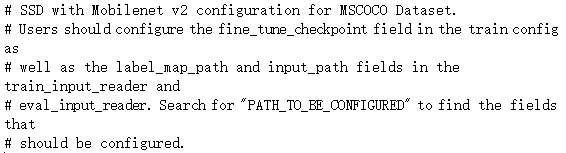
1、第9行,检测类别把90改为1,因为我们只检测行人,只有一个类别。
2、修改除提示外所有的
2.1、第一个(156行)是我们所需模型的路径,即上一步下载好的:./Pedestrian_Detection/ssd_mobilenet_v2_coco_2018_03_29/model.ckpt
2.2、第二个(175行)是train.record文件的路径,上一篇中我们准备好的record文件:./Pedestrian_Detection/project/pedestrian_train/data/pascal_train.record
2.3、第三个(177行)是上一篇准备好的label_map.pbtxt的路径:./Pedestrian_Detection/project/pedestrian_train/data/label_map.pbtxt
2.4、第四个(189行)是eval.record文件的路径,上一篇中我们准备好的record文件:./Pedestrian_Detection/project/pedestrian_train/data/pascal_eval.record
2.5、第五个(191行)同2.3
这样config文件就修改完成了。然后把它放到:./Pedestrian_Detection/project/pedestrian_train/models目录下。最后在该目录下创建两个文件夹:train 和 eval,用于储存训练和验证的记录。
开始训练
打开命令行窗口
在research目录下输入:
(dl) D:\Study\dl\Pedestrian_Detection\models\research>python object_detection/legacy/train.py --train_dir=D:\Study\dl\Pedestrian_Detection\project\pedestrian_train\models\train --pipeline_config_path=D:\Study\dl\Pedestrian_Detection\project\pedestrian_train\models\ssd_mobilenet_v2_coco.config --logtostderr
即可开始训练。
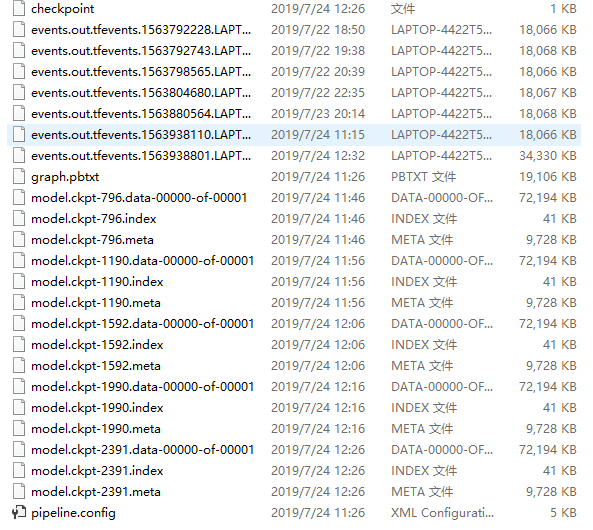
这里我们选择2000次之后,按ctrl+c结束训练。训练的详细信息可通过tensorboard来进行查看(这里不再赘述)。
查看我们的训练记录:
导出模型
这里我们选择第2391次的训练数据来生成模型。
把下图4个文件放到:./Pedestrian_Detection/pedestrian_data/model 目录下

在命令行窗口下输入命令:
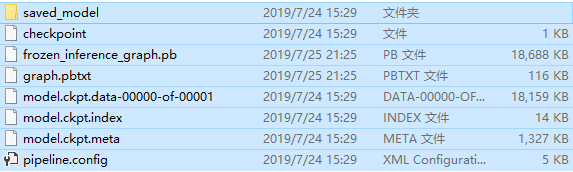
(dl) D:\Study\dl\Pedestrian_Detection\models\research>python object_detection/export_inference_graph.py --input_type=image_tensor --pipeline_config_path=D:\Study\dl\Pedestrian_Detection\project\pedestrian_train\models\ssd_mobilenet_v2_coco.config --trained_checkpoint_prefix=D:\Study\dl\Pedestrian_Detection\pedestrian_data\model\model.ckpt-2391 --output_directory=D:\Study\dl\Pedestrian_Detection\pedestrian_data\test
查看发现对应的目录下已经生成了一系列的模型文件:
测试模型
测试代码:
 import os

 import sys

 import cv2

 import numpy as np

 import tensorflow as tf

 sys.path.append("..")

 from object_detection.utils import label_map_util

 from object_detection.utils import visualization_utils as vis_util

 ##################################################

 ##################################################

 # Path to frozen detection graph

 PATH_TO_CKPT = 'D:/Study/dl/Pedestrian_Detection/pedestrian_data/test/frozen_inference_graph.pb'

 # List of the strings that is used to add correct label for each box.

 PATH_TO_LABELS = os.path.join('D:/Study/dl/Pedestrian_Detection/project/pedestrian_train/data', 'label_map.pbtxt')

 NUM_CLASSES = 1

 detection_graph = tf.Graph()

 with detection_graph.as_default():

     od_graph_def = tf.GraphDef()

     with tf.gfile.GFile(PATH_TO_CKPT, 'rb') as fid:

         serialized_graph = fid.read()

         od_graph_def.ParseFromString(serialized_graph)

         tf.import_graph_def(od_graph_def, name='')

 label_map = label_map_util.load_labelmap(PATH_TO_LABELS)

 categories = label_map_util.convert_label_map_to_categories(label_map, max_num_classes=NUM_CLASSES, use_display_name=True)

 category_index = label_map_util.create_category_index(categories)

 def load_image_into_numpy_array(image):

     (im_width, im_height) = image.size

     return np.array(image.getdata()).reshape(

       (im_height, im_width, 3)).astype(np.uint8)

 with detection_graph.as_default():

     with tf.Session(graph=detection_graph) as sess:

         image_np = cv2.imread("D:/Study/dl/Pedestrian_Detection/project/test_images/3600.jpg")

         # image_np = cv2.imread("D:/images/pedestrain.png")

         cv2.imshow("input", image_np)

         print(image_np.shape)

         # image_np == [1, None, None, 3]

         image_np_expanded = np.expand_dims(image_np, axis=0)

         image_tensor = detection_graph.get_tensor_by_name('image_tensor:0')

         boxes = detection_graph.get_tensor_by_name('detection_boxes:0')

         scores = detection_graph.get_tensor_by_name('detection_scores:0')

         classes = detection_graph.get_tensor_by_name('detection_classes:0')

         num_detections = detection_graph.get_tensor_by_name('num_detections:0')

         # Actual detection.

         (boxes, scores, classes, num_detections) = sess.run(

             [boxes, scores, classes, num_detections],

             feed_dict={image_tensor: image_np_expanded})

         # Visualization of the results of a detection.

         vis_util.visualize_boxes_and_labels_on_image_array(

               image_np,

               np.squeeze(boxes),

               np.squeeze(classes).astype(np.int32),

               np.squeeze(scores),

               category_index,

               use_normalized_coordinates=True,

               min_score_thresh=0.5,

               line_thickness=1)

         cv2.imshow('object detection', image_np)

         cv2.imwrite("D:/run_result.png", image_np)

         cv2.waitKey(0)

         cv2.destroyAllWindows()
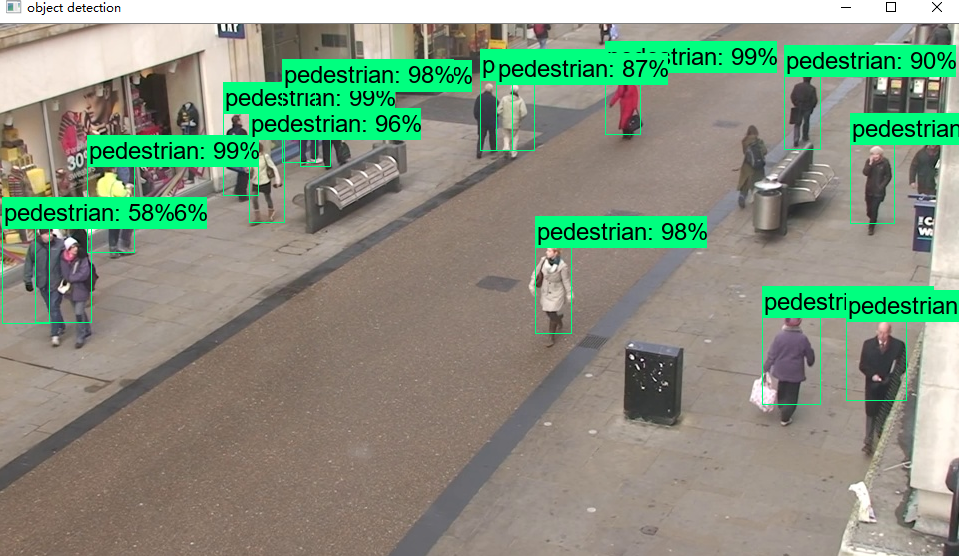
测试效果:
【Demo 1】基于object_detection API的行人检测 3:模型训练并在OpenCV调用模型的更多相关文章
- 【Demo 1】基于object_detection API的行人检测 2:数据制作
项目文件结构 因为目录太多又太杂,而且数据格式对路径有要求,先把文件目录放出来.(博主目录结构并不规范) 1.根目录下的models为克隆下来的项目.2.pedestrian_data目录下的路径以及 ...
- 【Demo 1】基于object_detection API的行人检测 1:环境与依赖
环境 系统环境: win10.python3.6.tensorflow1.14.0.OpenCV3.8 IDE: Pycharm 2019.1.3.JupyterNotebook 依赖 安装objec ...
- OpenCV中基于HOG特征的行人检测
目前基于机器学习方法的行人检测的主流特征描述子之一是HOG(Histogram of Oriented Gradient, 方向梯度直方图).HOG特征是用于目标检测的特征描述子,它通过计算和统计图像 ...
- 基于YOLO-V2的行人检测(自训练)附pytorch安装方法
声明:本文是别人发表在github上的项目,并非个人原创,因为那个项目直接下载后出现了一些版本不兼容的问题,故写此文帮助解决.(本人争取在今年有空的时间,自己实现基于YOLO-V4的行人检测) 项目链 ...
- opencv+树莓PI的基于HOG特征的行人检测
树莓PI远程控制摄像头请参考前文:http://www.cnblogs.com/yuliyang/p/3561209.html 参考:http://answers.opencv.org/questio ...
- 基于虚拟数据的行人检测研究(Expecting the Unexpected: Training Detectors for Unusual Pedestrians with Adversarial Imposters)
Paper Link : https://arxiv.org/pdf/1703.06283 Github: https://github.com/huangshiyu13/RPNplus 摘要: 这篇 ...
- paper 87:行人检测资源(下)代码数据【转载,以后使用】
这是行人检测相关资源的第二部分:源码和数据集.考虑到实际应用的实时性要求,源码主要是C/C++的.源码和数据集的网址,经过测试都可访问,并注明了这些网址最后更新的日期,供学习和研究进行参考.(欢迎补充 ...
- 行人检测(Pedestrian Detection)资源
一.论文 综述类的文章 [1]P.Dollar, C. Wojek,B. Schiele, et al. Pedestrian detection: an evaluation of the stat ...
- 目标检测之行人检测(Pedestrian Detection)---行人检测之简介0
一.论文 综述类的文章 [1]P.Dollar, C. Wojek,B. Schiele, et al. Pedestrian detection: an evaluation of the stat ...
随机推荐
- mybatis链接数据库
DBTools类 public class DBTools { // 加载mybatis文件 public static SqlSession getSession() { //加载配置文件 Inpu ...
- python网络编程(转)
本文代码转自廖雪峰老师的python教程 网络编程底层其实就是一个socket,代表两台机器之间的一个连接. s = socket.socket(socket.AF_INET, socket.SOCK ...
- 03、MySQL—数据表操作
1.创建数据表 基本语法:create table 表名(字段名 字段类型 [字段属性], 字段名 字段类型 [字段属性],…) [表选项] 范例:创建数据表 以上错误说明:表必须放到对应的数据库下: ...
- Jenkins+Python+GitLab持续集成
创建任务 登录Jenkins,点击左侧列表的新建选项.输入任务名称,选择构建一个自由风格的软件项目,点击确定. 配置 在任务配置界面,可以设置General标签中的丢弃旧的构建选项,设置保持构建的天数 ...
- 建设DevOps统一运维监控平台,全面的系统监控 Zabbix VS Nagios VS Open-Falcon OR Prometheus
前言 随着Devops.云计算.微服务.容器等理念的逐步落地和大力发展,机器越来越多,应用越来越多,服务越来越微,应用运行基础环境越来多样化,容器.虚拟机.物理机不一而足.面对动辄几百上千个虚拟机.容 ...
- python函数之 range()
Python range() 函数用法 python range() 函数可创建一个整数列表,一般用在 for 循环中. 函数语法 range(start, stop[, step]) 参数说明: ...
- HDU 4461:The Power of Xiangqi(水题)
http://acm.hdu.edu.cn/showproblem.php?pid=4461 题意:每个棋子有一个权值,给出红方的棋子情况,黑方的棋子情况,问谁能赢. 思路:注意“ if a play ...
- 使用JavaScript实现量化策略并发执行——封装Go函数
在实现量化策略时,很多情况下,并发执行可以降低延时提升效率.以对冲机器人为例,需要获取两个币的深度,顺序执行的代码如下: 请求一次rest API存在延时,假设是100ms,那么两次获取深度的时间实际 ...
- flask模板语言 jinja2 以及render_template 深度用法
是时候开始写个前端了,Flask中默认的模板语言是Jinja2 现在我们来一步一步的学习一下 Jinja2 捎带手把 render_template 中留下的疑问解决一下 首先我们要在后端定义几个字符 ...
- 影音播放器 Daum Potplayer v1.7.14804 美化便携版
PotPlayer 是一款由世界老牌的著名多媒体影音播放器软件 KMPlayer 的原创作者姜龙喜先生进入韩国多音软件公司后开发的新一代多媒体播放器作品.前者的优势在于内置了功能强大的视频及音频解码器 ...