
spark通过JDBC读取外部数据库,过滤数据
官网链接:
http://spark.apache.org/docs/latest/sql-programming-guide.html#jdbc-to-other-databases
http://spark.apache.org/docs/latest/sql-data-sources-jdbc.html
1. 过滤数据
情景:使用spark通过JDBC的方式读取postgresql数据库中的表然后存储到hive表中供后面数据处理使用,但是只读取postgresql表中的某些字段,并且做一下数据上的过滤
根据平常的方式,基本都是读取整张表,感觉不应该这么不友好的,于是去官网翻了翻,如下:
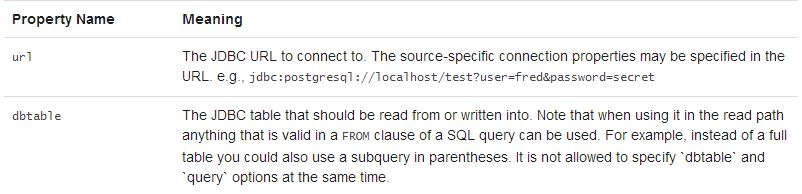
指定dbtable参数时候可以使用子查询的方式,不单纯是指定表名
测试代码如下:
package com.kong.test.test;

import java.util.Properties;

import org.apache.spark.sql.SaveMode;
import org.apache.spark.sql.SparkSession;
import org.apache.spark.sql.types.DataTypes;

public class SparkHiveTest {

	public static void main(String[] args) {
		SparkSession spark = SparkSession
				.builder()
				.appName("SparkCalibration")
				.master("local")
				.enableHiveSupport()
				.getOrCreate();
		spark.sparkContext().setLogLevel("ERROR");
		spark.sparkContext().setLocalProperty("spark.scheduler.pool", "production");

		String t2 = "(select id, name from test1) tmp";//这里需要有个别名
		String createSql = "create table if not exists default.test1 (\r\n" +
				"id string,\r\n" +
				"name string\r\n" +
				")ROW FORMAT DELIMITED FIELDS TERMINATED BY ',' stored as TEXTFILE";
		spark.sql(createSql);
		spark.read().format("jdbc")
		.option("url", "jdbc:postgresql://ip address/database")
		.option("dbtable", t2).option("user", "login user").option("password", "login passwd")
		.option("fetchsize", "1000")
		.load()
		.createOrReplaceTempView("test1_tmp");

		spark.sql("insert overwrite table default.test1 select * from test1_tmp").show();

	}

}
另外:如果对于hive表的存储格式没有要求,可以更简洁,如下:
		spark.read().format("jdbc")
		.option("url", "jdbc:postgresql://ip address/database")
		.option("dbtable", t2).option("user", "login user").option("password", "login passwd")
		.option("fetchsize", "1000")
		.load().write().mode(SaveMode.Overwrite).saveAsTable("default.test");
至于基于哪种保存模式(SaveMode.Overwrite)可以结合实际场景;另外spark saveAsTable()默认是以parquet+snappy的形式写数据(生成的文件名.snappy.parquet),当然,也可以通过format()传入参数,使用orc等格式,并且可以指定其他压缩方式。
2. spark通过JDBC读取外部数据库的源码实现
2.1 最简洁的api,单分区
源码如下:
  /**
   * Construct a `DataFrame` representing the database table accessible via JDBC URL
   * url named table and connection properties.
   *
   * @since 1.4.0
   */
  def jdbc(url: String, table: String, properties: Properties): DataFrame = {
    assertNoSpecifiedSchema("jdbc")
    // properties should override settings in extraOptions.
    this.extraOptions ++= properties.asScala
    // explicit url and dbtable should override all
    this.extraOptions += (JDBCOptions.JDBC_URL -> url, JDBCOptions.JDBC_TABLE_NAME -> table)
    format("jdbc").load()
  }
2.2 指定表某个字段的上下限值(数值类型),生成相对应的where条件并行读取,源码如下:
/**
   * Construct a `DataFrame` representing the database table accessible via JDBC URL
   * url named table. Partitions of the table will be retrieved in parallel based on the parameters
   * passed to this function.
   *
   * Don't create too many partitions in parallel on a large cluster; otherwise Spark might crash
   * your external database systems.
   *
   * @param url JDBC database url of the form `jdbc:subprotocol:subname`.
   * @param table Name of the table in the external database.
   * @param columnName the name of a column of integral type that will be used for partitioning.
   * @param lowerBound the minimum value of `columnName` used to decide partition stride.
   * @param upperBound the maximum value of `columnName` used to decide partition stride.
   * @param numPartitions the number of partitions. This, along with `lowerBound` (inclusive),
   *                      `upperBound` (exclusive), form partition strides for generated WHERE
   *                      clause expressions used to split the column `columnName` evenly. When
   *                      the input is less than 1, the number is set to 1.
   * @param connectionProperties JDBC database connection arguments, a list of arbitrary string
   *                             tag/value. Normally at least a "user" and "password" property
   *                             should be included. "fetchsize" can be used to control the
   *                             number of rows per fetch.
   * @since 1.4.0
   */
  def jdbc(
      url: String,
      table: String,
      columnName: String,
      lowerBound: Long,
      upperBound: Long,
      numPartitions: Int,
      connectionProperties: Properties): DataFrame = {
    // columnName, lowerBound, upperBound and numPartitions override settings in extraOptions.
    this.extraOptions ++= Map(
      JDBCOptions.JDBC_PARTITION_COLUMN -> columnName,
      JDBCOptions.JDBC_LOWER_BOUND -> lowerBound.toString,
      JDBCOptions.JDBC_UPPER_BOUND -> upperBound.toString,
      JDBCOptions.JDBC_NUM_PARTITIONS -> numPartitions.toString)
    jdbc(url, table, connectionProperties)
  }
2.3 通过predicates: Array[String],传入每个分区的where子句中的谓词条件,并行读取,比如 :
String[] predicates = new String[] {"date <= '20180501'","date > '20180501' and date <= '20181001'","date > '20181001'"};
/**
   * Construct a `DataFrame` representing the database table accessible via JDBC URL
   * url named table using connection properties. The `predicates` parameter gives a list
   * expressions suitable for inclusion in WHERE clauses; each one defines one partition
   * of the `DataFrame`.
   *
   * Don't create too many partitions in parallel on a large cluster; otherwise Spark might crash
   * your external database systems.
   *
   * @param url JDBC database url of the form `jdbc:subprotocol:subname`
   * @param table Name of the table in the external database.
   * @param predicates Condition in the where clause for each partition.
   * @param connectionProperties JDBC database connection arguments, a list of arbitrary string
   *                             tag/value. Normally at least a "user" and "password" property
   *                             should be included. "fetchsize" can be used to control the
   *                             number of rows per fetch.
   * @since 1.4.0
   */
  def jdbc(
      url: String,
      table: String,
      predicates: Array[String],
      connectionProperties: Properties): DataFrame = {
    assertNoSpecifiedSchema("jdbc")
    // connectionProperties should override settings in extraOptions.
    val params = extraOptions.toMap ++ connectionProperties.asScala.toMap
    val options = new JDBCOptions(url, table, params)
    val parts: Array[Partition] = predicates.zipWithIndex.map { case (part, i) =>
      JDBCPartition(part, i) : Partition
    }
    val relation = JDBCRelation(parts, options)(sparkSession)
    sparkSession.baseRelationToDataFrame(relation)
  }
spark通过JDBC读取外部数据库,过滤数据的更多相关文章
- 读取mysql数据库的数据,转为json格式
# coding=utf-8 ''' Created on 2016-10-26 @author: Jennifer Project:读取mysql数据库的数据,转为json格式 ''' import ...
- spring(读取外部数据库配置信息、基于注解管理bean、DI)
###解析外部配置文件在resources文件夹下,新建db.properties(和数据库连接相关的信息) driverClassName=com.mysql.jdbc.Driverurl=jdbc ...
- 读取mysq数据库l数据,并使用dataview显示
来自<sencha touch权威指南>,约198页开始 通过php脚本,可以将mysql数据库的数据作为json数据格式进行读取. (1)php代码(bookinfo.php): < ...
- AndroidStudio 中查看获取MD5和SHA1值以及如何查看手机应用信息以及读取*.db数据库里面数据
查看获取MD5和SHA1值具体操作方式链接 查看获取MD5和SHA1值实际操作命令CMD语句: C:\Users\Administrator>cd .android C:\Users\Admin ...
- C# 读取Oracle数据库视图数据异常问题处理
会出现类似现在这种提示的错误 System.Data.OracleClient 需要 Oracle 客户端软件 version 8.1.7 或更高版本 情况1.开发过程中遇到这种问题解决 由于.net ...
- 在jsp页面直接读取mysql数据库显示数据
闲来无事,学学java,虽说编程语言相通,但是接触一门新知识还是有些疑惑,边学边记录,方便以后温故. 直接给出代码: <%@page import="java.sql.ResultSe ...
- Excel2003读取sqlserver数据库表数据(图)
- 使用JDBC在MySQL数据库中快速批量插入数据
使用JDBC连接MySQL数据库进行数据插入的时候,特别是大批量数据连续插入(10W+),如何提高效率呢? 在JDBC编程接口中Statement 有两个方法特别值得注意: void addBatch ...
- [原创]java使用JDBC向MySQL数据库批次插入10W条数据测试效率
使用JDBC连接MySQL数据库进行数据插入的时候,特别是大批量数据连续插入(100000),如何提高效率呢?在JDBC编程接口中Statement 有两个方法特别值得注意:通过使用addBatch( ...
随机推荐
- [Asp.net] C# 操作Excel的几种方式 优缺点比较
在项目中我们常常需要将数据库中的数据导出成Excel文件 有一次工作中我的目的就是读取Excel到内存中,整理成指定格式 整理后再导出到Excel. 因为我要处理的每个Excel表格文件很大.一个表格 ...
- MySql的数据库优化到底优啥了都??(1)
嘟嘟最不愿意做的就是翻招聘信息. 因为一翻招聘信息,工作经历你写低于两年都不好意思,前后端必须炉火纯青融汇贯通,各式框架必须如数家珍不写精通咋的你也得熟练熟练, 对了你是985吗?你是211吗??你不 ...
- MySQL 5.7和8.0性能测试
目录 背景 前提 环境 测试 双1模式下 0 2 模式下 结论 背景 测试mysql5.7和mysql8.0 分别在读写.只读.只写模式下不同并发时的性能(tps,qps) 前提 测试使用版本为mys ...
- Spring applicationContext爆出警告“Resource leak: 'applicationContext' is never closed”
ApplicationContext applicationContext = new ClassPathXmlApplicationContext(xmlPath); 此处applicationCo ...
- java - 多态实现机制
Java提供了编译时多态和运行时多态两种多态机制.前者是通过方法重载实现的,后者是通过方法的覆盖实现的. 在方法覆盖中,子类可以覆盖父类的方法,因此同类的方法会在父类与子类中有着不同的表现形式. 在J ...
- hdu多校第八场Parentheses Matrix
#include<bits/stdc++.h> using namespace std; ][]; int main() { int t; scanf("%d",&am ...
- 转发后找不到css
当在jsp中引入css时,如果其相对路径相对于当前jsp文件的,而在一个和这个jsp的路径不一样的servlet中forward这个jsp时,就会发现这个css样式根本没有起作用. 这是因为在serv ...
- 关于HTML的引入CSS文件问题
一 html代码引用外部css文件时若css文件在本文件的父目录下的其他目录下,可使用绝对路径.此时路径要写为 “ ../ ”形式,如在tomcat下建立一个test文件,在该文件中建立两个文件 夹 ...
- 2019年一半已过,这些大前端技术你都GET了吗?- 上篇
一晃眼2019年已过大半,年初信誓旦旦要学习新技能的小伙伴们立的flag都完成的怎样了?2019年对于大前端技术领域而言变化不算太大,目前三大技术框架日趋成熟,短期内不大可能出现颠覆性的前端框架(内心 ...
- 【iOS】打印方法名
为了便于追踪程序运行过程,可以在日志打印方法名,示例代码如下: NSLog(@"%@", NSStringFromSelector(_cmd)); 结果如图所示: 此外,在多个中, ...