
Windows+Qt使用gRPC
上篇文章《Windows+VS2017使用gRPC》编译出了Windows下可用的gRPC静态lib库文件,在此基础上要想在Qt上使用,需要使用MSVC2017 64bit构建组件进行构建。

grpc-server
新建基于Widget的Qt工程grpc-server
|
1
2 3 4 5 6 7 8 9 10 11 12 13 14 15 16 17 18 19 20 21 22 23 24 25 26 27 28 29 30 31 32 33 34 35 36 37 38 39 40 41 42 43 44 45 46 47 48 49 50 51 |
#ifndef WIDGET_H
#define WIDGET_H #include <QWidget> #include <iostream> #include <grpcpp/grpcpp.h> #include "../grpcSetting/helloworld.grpc.pb.h" using grpc::Server; // Logic and data behind the server's behavior. class QTextBrowser; public: private slots: private: #endif // WIDGET_H |
|
1
2 3 4 5 6 7 8 9 10 11 12 13 14 15 16 17 18 19 20 21 22 23 24 25 26 27 28 29 30 31 32 33 34 35 36 37 38 39 40 41 42 43 44 45 46 47 48 49 |
#include "Widget.h"
#include <QVBoxLayout> #include <QTextBrowser> #include <QPushButton> Widget::Widget(QWidget *parent) QVBoxLayout *layout = new QVBoxLayout(this); Widget::~Widget() } void Widget::startServer() ServerBuilder builder; // Wait for the server to shutdown. Note that some other thread must be |
grpc-client
新建基于Widget的Qt工程grpc-client
|
1
2 3 4 5 6 7 8 9 10 11 12 13 14 15 16 17 18 19 20 21 22 23 24 25 26 27 28 29 30 31 32 33 34 35 36 37 38 39 40 41 42 43 44 45 46 47 48 49 50 51 52 53 54 55 56 57 58 59 60 61 62 63 64 65 66 67 68 69 70 71 72 73 74 75 76 77 78 79 |
#ifndef WIDGET_H
#define WIDGET_H #include <QWidget> #include <iostream> #include <grpcpp/grpcpp.h> #include "../grpcSetting/helloworld.grpc.pb.h" using grpc::Channel; class GreeterClient // Assembles the client's payload, sends it and presents the response back // Container for the data we expect from the server. // Context for the client. It could be used to convey extra information to // The actual RPC. // Act upon its status. private: class QTextBrowser; public: private slots: private: #endif // WIDGET_H |
|
1
2 3 4 5 6 7 8 9 10 11 12 13 14 15 16 17 18 19 20 21 22 23 24 25 26 27 28 29 30 31 32 33 34 35 36 37 38 39 40 41 42 43 |
#include "Widget.h"
#include <QVBoxLayout> #include <QTextBrowser> #include <QPushButton> Widget::Widget(QWidget *parent) QVBoxLayout *layout = new QVBoxLayout(this); Widget::~Widget() } void Widget::req() } |
Pro文件设置
添加预处理器定义:DEFINES += _WIN32_WINNT=0x0A00
添加链接库以及包含库:这里直接复制过来了,一些冗余的内容可根据实际情况调整
|
1
2 3 4 5 6 7 8 9 10 11 12 13 14 15 16 17 18 19 20 21 22 23 24 25 26 27 28 29 30 31 32 33 34 35 36 37 38 39 40 41 42 43 44 45 46 47 48 49 50 51 52 53 |
INCLUDEPATH += $$PWD/../../../grpc_plugs/grpc/include
INCLUDEPATH += $$PWD/../../../grpc_plugs/grpc/third_party/protobuf/src DEPENDPATH += $$PWD/../../../grpc_plugs/grpc/include win32: LIBS += -L$$PWD/../../../grpc_plugs/grpc/.build/Debug/ -lgrpc++ win32: LIBS += -L$$PWD/../../../grpc_plugs/grpc/.build/Debug/ -lgrpc win32: LIBS += -L$$PWD/../../../grpc_plugs/grpc/.build/Debug/ -lgpr win32: LIBS += -L$$PWD/../../../grpc_plugs/grpc/.build/Debug/ -laddress_sorting win32: LIBS += -L$$PWD/../../../grpc_plugs/grpc/.build/third_party/protobuf/Debug -llibprotobufd win32: LIBS += -L$$PWD/../../../grpc_plugs/grpc/.build/third_party/zlib/Debug -lzlibd win32: LIBS += -L'C:/Program Files (x86)/Windows Kits/10/Lib/10.0.17763.0/um/x64/' -lWS2_32 INCLUDEPATH += 'C:/Program Files (x86)/Windows Kits/10/Lib/10.0.17763.0/um/x64' win32:!win32-g++: PRE_TARGETDEPS += 'C:/Program Files (x86)/Windows Kits/10/Lib/10.0.17763.0/um/x64/WS2_32.lib' win32: LIBS += -L'C:/Program Files (x86)/Windows Kits/10/Lib/10.0.17763.0/um/x64/' -lAdvapi32 INCLUDEPATH += 'C:/Program Files (x86)/Windows Kits/10/Lib/10.0.17763.0/um/x64' win32:!win32-g++: PRE_TARGETDEPS += 'C:/Program Files (x86)/Windows Kits/10/Lib/10.0.17763.0/um/x64/Advapi32.lib' win32: LIBS += -L$$PWD/../../../grpc_plugs/grpc/.build/third_party/cares/cares/lib/Debug/ -lcares INCLUDEPATH += $$PWD/../../../grpc_plugs/grpc/.build/third_party/cares/cares/lib/Debug win32:!win32-g++: PRE_TARGETDEPS += $$PWD/../../../grpc_plugs/grpc/.build/third_party/cares/cares/lib/Debug/cares.lib |
运行
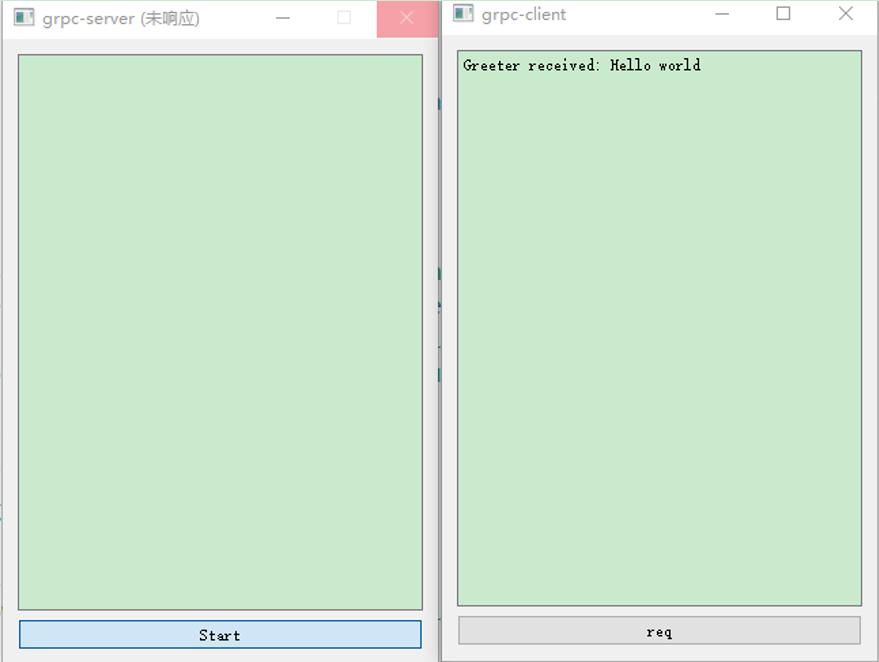
参考
- Qt使用GRPC之grpc安装(一)
- Qt使用GRPC之grpc安装(二)
- https://github.com/grpc/grpc/blob/master/BUILDING.md#user-content-windows
- grpc1.18.0 c++ windows visual studio 2017(vs2017)版本编译(入门)
- grpc1.18.0 c++ windows visual studio 2017(vs2017)版本Helloworld示例与解析
附录
MinGW使用VS生成的静态库lib文件时,编译不能通过,会提示:
error: No rule to make target '*.a', needed by '*.exe'. Stop.
可见它需要的时*.a的静态库文件,而无法使用*.lib的静态库文件。
但是,MinGW调用linux生成的静态库.a文件,无法链接成功,也无法使用。
网上流传着这样的资料:
首先,下载安装MSYS2:http://www.msys2.org/
(Download and run the installer - "x86_64" for 64-bit, "i686" for 32-bit Windows)
一路“下一步”就可以安装好MSYS2.
然后运行msys2.exe脚本,执行如下命令:
1、pacman -Syu
2、执行完后,关闭终端,重新打开终端执行:pacman -Su
3、pacman -S git
4、pacman -S mingw-w64-i686-grpc
5、pacman -S mingw-w64-i686-qt5
6、pacman -S mingw-w64-i686-qt-creator
之后就可以在安装的qt creator中添加在msys2/mingw32/lib中的grpc静态库和protobuf静态库!!!然后自己根据官网编写简单的C++工程进行测试,只要你库添加的没问题,测试可以通过。
但是,这个叫MSYS2的类Unix环境安装软件很慢,经常出现安装不成功的问题,很不好使!
Windows+Qt使用gRPC的更多相关文章
- Windows+QT+Eclipse+MinGW搭建QT开发环境详细教程
Windows+QT+Eclipse+MinGW搭建QT开发环境详细教程 一.准备工具: QT-SDK for Windows:http://get.qt.nokia.com/qtsdk/qt-sd ...
- windows qt 使用c++ posix接口编写多线程程序(真神奇)good
一.多线程是多任务处理的一种特殊形式,多任务处理允许让电脑同时运行两个或两个以上的程序.一般情况下,两种类型的多任务处理:基于进程和基于线程.基于进程的多任务处理是程序的并发执行.基于线程的多任务处理 ...
- Windows+Qt+MinGW使用gRPC
本文参考博客文章Qt gRPC 简单应用进行了亲自尝试,特此记录以下过程,为后人提供经验.我的环境:Windows10 x64需要依赖MSYS2环境(一个类Unix环境,包管理器)MSYS2 gith ...
- Windows QT 商业版 试用
You're about to evaluate Qt Enterprise - the cross-platform application and UI framework used to dev ...
- Windows+VS2017使用gRPC
gRPC官方Windows安装说明: Install Visual Studio 2015 or 2017 (Visual C++ compiler will be used). Install Gi ...
- 配置windows qt开发环境
1.解压缩MinGW-gcc440_1.zip.将解压后的文件夹复制至C盘根目录下.2.安装qt-creator-win-opensource-2.5.2.3.安装qt-win-opensource- ...
- windows qt 使用openssl API
1.下载安装openssl http://dl.pconline.com.cn/download/355862-1.html 版本: OpenSSL(Win32) 1.0.1g 2.配置QT项目文件, ...
- windows qt 编译 boost 添加 路径
win32-msvc2015: { contains(QMAKE_HOST.arch, x86):{ INCLUDEPATH += D:\3SDK\boost_1_61_0 LIBS += -LD:\ ...
- Windows Qt 项目中文乱码
在头文件中加入 #if _MSC_VER >= 1600 #pragma execution_character_set("utf-8") #endif
随机推荐
- 微信小程序访问webservice(wsdl)+ axis2发布服务端(Java)
0.主要思路:使用axis2发布webservice服务端,微信小程序作为客户端访问.步骤如下: 1.服务端: 首先微信小程序仅支持访问https的url,且必须是已备案域名.因此前期的服务器端工作需 ...
- Windows下Python3.7的安装
1.下载Python3官网地址:www.python.org当前最新版本为Python 3.7.3. Windows下有个6个下载链接Windows x86-64 embeddable zip fil ...
- 微信小程序之 catalog 切换
组件名称:catalog 组件属性:catalogData,type:String 组件描述:这是一个子组件,数据从父组件中传递 效果图: catalog 目录为多个,使用 scroll-view 容 ...
- 监控类shell脚本
1)开头加解释器:#!/bin/bash 2)语法缩进,使用四个空格:多加注释说明. 3)命名建议规则:变量名大写.局部变量小写,函数名小写,名字体现出实际作用. 4)默认变量是全局的,在函数中变量l ...
- python+requests+re匹配抓取猫眼上映电影信息
python+requests抓取猫眼中上映电影,re正则匹配获取对应电影的排名,图片地址,片名,主演及上映时间和评分 import requests import re, json def get_ ...
- 【BZOJ2437】[Noi2011]兔兔与蛋蛋(博弈+二分图)
传送门 题意: 给出一个\(n*m\)的棋盘,上面有若干个黑色棋子,若干个白色棋子,还有一个空格. 每次先手选择一个空格,将它与相邻的某个白色棋子交换:后手则选择一个空格,与相邻的某个黑色棋子交换. ...
- alertmanager
alertmanager主要用于接收prometheus发送的告警信息: wget下载,解压, 配置alertmanager.yml,内容如下: 在prometheus文件下添加rules.yml内容 ...
- c 和 c++ 啊 Make
- web-综合题2
地址 http://cms.nuptzj.cn/ 0x01 很有意思的一题综合题,确实包含的内容比较多 打开页面 把能打开的都打开,能看的都看一下 几个重点的信息 一段hash e045e454c1 ...
- python 2.7 操作mysql数据库 实例
create table msg(id int primary key auto_increment,title varchar(20),name varchar(60),content varcha ...