
WPF 精修篇 DataGrid 数据源排序
效果
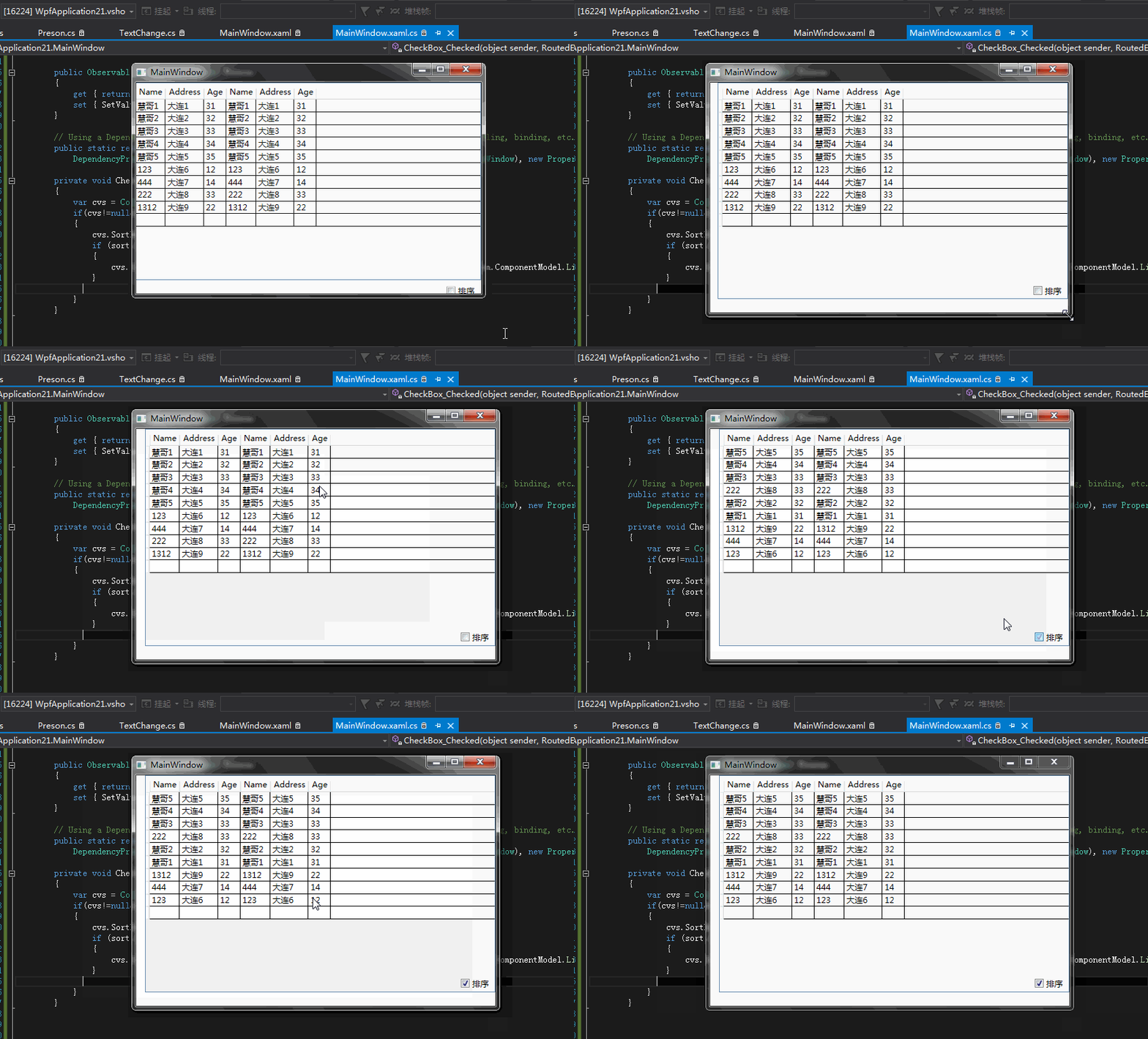
-
<DataGrid x:Name="datagrid" ItemsSource="{Binding ElementName=Mwindow, Path=Preson}" Margin="0,0,0,20">
-
<DataGrid.Columns>
-
<DataGridTextColumn Binding="{Binding Name}" Header="Name"></DataGridTextColumn>
-
<DataGridTextColumn Binding="{Binding Address}" Header="Address"></DataGridTextColumn>
-
<DataGridTextColumn Binding="{Binding Age}" Header="Age"></DataGridTextColumn>
-
</DataGrid.Columns>
-
</DataGrid>
-
<CheckBox x:Name="sort" Content="排序" HorizontalAlignment="Left" Margin="466,300,0,0" VerticalAlignment="Top" Checked="CheckBox_Checked"/>
-
public partial class MainWindow : Window
-
{
-
public MainWindow()
-
{
-
InitializeComponent();
-
-
Preson = new ObservableCollection<Preson>() {
-
new Preson() { Name = "慧哥1", Address = "大连1", Age = 31 },
-
new Preson() { Name = "慧哥2", Address = "大连2", Age = 32 },
-
new Preson() { Name = "慧哥3", Address = "大连3", Age = 33 },
-
new Preson() { Name = "慧哥4", Address = "大连4", Age = 34 },
-
new Preson() { Name = "慧哥5", Address = "大连5", Age = 35 },
-
new Preson() { Name = "123", Address = "大连6", Age = 12 },
-
new Preson() { Name = "444", Address = "大连7", Age = 14 },
-
new Preson() { Name = "222", Address = "大连8", Age = 33 },
-
new Preson() { Name = "1312", Address = "大连9", Age = 22 }
-
};
-
-
-
-
}
-
-
-
-
public ObservableCollection<Preson> Preson
-
{
-
get { return (ObservableCollection<Preson>)GetValue(PresonProperty); }
-
set { SetValue(PresonProperty, value); }
-
}
-
-
// Using a DependencyProperty as the backing store for Preson. This enables animation, styling, binding, etc...
-
public static readonly DependencyProperty PresonProperty =
-
DependencyProperty.Register("Preson", typeof(ObservableCollection<Preson>), typeof(MainWindow), new PropertyMetadata(null));
-
-
private void CheckBox_Checked(object sender, RoutedEventArgs e)
-
{
-
var cvs = CollectionViewSource.GetDefaultView(datagrid.ItemsSource);
-
if(cvs!=null&&cvs.CanSort)
-
{
-
cvs.SortDescriptions.Clear();
-
if (sort.IsChecked == true)
-
{
-
cvs.SortDescriptions.Add(new System.ComponentModel.SortDescription("Age", System.ComponentModel.ListSortDirection.Descending));
-
}
-
-
}
-
}
-
-
-
-
-
-
-
}
留作记录
WPF 精修篇 DataGrid 数据源排序的更多相关文章
- WPF 精修篇 DataGrid 筛选
原文:WPF 精修篇 DataGrid 筛选 DataGrid也可以分组 但是用的地方不多 就没写 筛选还是可以的 比如Datagrid数据量比较大 要做数据筛选 贴码 <DataGrid x: ...
- WPF 精修篇 数据触发器
原文:WPF 精修篇 数据触发器 数据触发器 可以使用Binding 来绑定控件 或者数据源 来触发相关动作 举栗子 <Window.Resources> <Style Target ...
- WPF 精修篇 属性触发器
原文:WPF 精修篇 属性触发器 属性触发器是通过 某个条件触发改变属性 通过无代码实现功能 <Style TargetType="{x:Type Label}"> ...
- WPF 精修篇 样式继承
原文:WPF 精修篇 样式继承 这个 是新知识 样式可以继承 <Style x:Key="TextBlockStyleBase" TargetType="{x:Ty ...
- WPF 精修篇 自定义控件
原文:WPF 精修篇 自定义控件 自定义控件 因为没有办法对界面可视化编辑 所以用来很少 现在实现的是 自定义控件的 自定义属性 和自定义方法 用VS 创建自定义控件后 会自动创建 Themes 文件 ...
- WPF 精修篇 用户控件
原文:WPF 精修篇 用户控件 增加用户控件 数据绑定还是用依赖属性 使用的事件 就委托注册一下 public delegate void ButtonClick(object b,EventArgs ...
- WPF 精修篇 数据绑定到对象
原文:WPF 精修篇 数据绑定到对象 数据绑定到对象 首先 我们需要一个对象 public class Preson { private string name; public string Name ...
- WPF 精修篇 数据绑定 更新通知
原文:WPF 精修篇 数据绑定 更新通知 开始更新一点有意思的了 首先 数据绑定 其中之一 Element 绑定 看例子 <Window x:Class="WpfApplicatio ...
- WPF 精修篇 依赖属性
原文:WPF 精修篇 依赖属性 依赖属性使用场景 1. 希望可在样式中设置属性. 2. 希望属性支持数据绑定. 3. 希望可使用动态资源引用设置属性. 4. 希望从元素树中的父元素自动继承属性值. 5 ...
随机推荐
- MySQL8.0+常用命令
开启远程访问 通过以下命令开启root用户远程访问权限: CREATE USER 'root'@'%' IDENTIFIED BY 'password'; GRANT ALL ON *.* TO 'r ...
- sql server一些快捷方式和操作技巧
1.注释(ctrl+k+c) 和 取消注释(ctrl+k+u) 2.行号显示,如图:
- Os-HackNos-Report
实验主机:Os-hackerNos靶机一台/Kali linux攻击机一台 实验网络:桥接网络 实验目标:获取靶机的Root权限 难易程度:简单 前期工作: 1:下载Virtualbox虚拟化软件(也 ...
- 将Excel表结构导入到Powerdesigner
我们经常会在excel中设计整理表结构,整理完需要导入到Powerdesigner中,可以通过以下脚本来实现快速,具体操作方法: 打开PowerDesigner,新建模型,点击Tools|Execut ...
- jquery dialog的一些坑
jquery dialog工具可以方便的生成一个弹出框,但是在一些需要多个弹出框的应用场景上会有一些bug 具体场景: 当使用过一次模态框之后,使用另外的一个模态框时,已经消失不见的模态框会重新出来 ...
- 【oracle】PLS-00103: 出现符号 "end-of-file"
begin xxxxx end; 修改xxxxx为xxxxx:就好了
- 如何获取JVM堆转储文件
堆转储是诊断与内存相关的问题(例如内存泄漏缓慢,垃圾回收问题和 java.lang.OutOfMemoryError.它们也是优化内存消耗的重要工具. 有很多很不错的的工具,例如Eclipse MAT ...
- Git - Git版本库相关操作
创建Git版本库 如下命令实现在“E:\GitCode\01_TestGit”路径下,01_TestGit项目的Git版本库. $ cd E: #将当前目录转到E盘下 $ cd GitCode ...
- Sql sever DateDiff 函数
函数: DATEDIFF(datepart,startdate,enddate) 具体实例: --相差年数 结果0 SELECT DATEDIFF(yy,'2008-12-29','2008-12-1 ...
- Ubuntu Server中安装keepalived
场景 Keepalived的作用是检测web服务器的状态,如果有一台web服务器死机,或工作出现故障,Keepalived将检测到,并将有故障的web服务器从系统中剔除,当web服务器工作正常后Kee ...