
Dynamics 365 Portal 修改注册页面及Profile页面
一,Profile页面
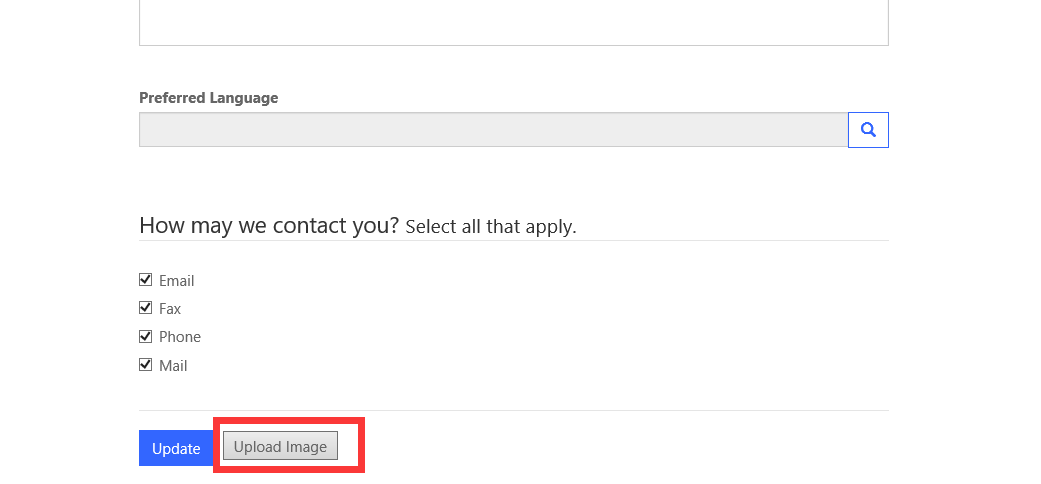
客户要求在Portal Profile页面上添加性别字段,通过查看源代码发现,中间的联系人信息部分是引用的CRM中Contact实体的Portal Web Form表单,直接把性别字段添加至相应表单即可

同时,可以通过修改页面源代码或者添加Custom Snippet的方式修改页面内容
二,注册页面
找了一篇别人写的定制注册页面的文章,可供参考
Customise Portal Login Page
Visit : http://arpitmscrmhunt.blogspot.in/2017/05/edit-stylelayout-of-login-page-in-crm.html
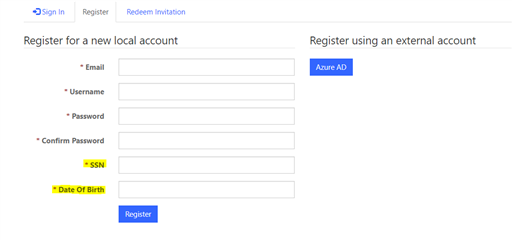
In this example, I am adding two additional fields (Date of Birth and SSN) on Portal Registration Page.
$('#ContentContainer_MainContent_MainContent_ShowUserName').next().next().after('<div class="form-group"><label class="col-sm-4 control-label required"><span id="ContentContainer_MainContent_MainContent_dob"><span class="xrm-editable-text xrm-attribute"><span class="xrm-attribute-value">Date Of Birth</span></span></span></label><div class="col-sm-8"><input id="ContentContainer_MainContent_MainContent_dob" class="form-control" aria-required="true"></div></div>');
$('#ContentContainer_MainContent_MainContent_ShowUserName').next().next().after('<div class="form-group"><label class="col-sm-4 control-label required"><span id="ContentContainer_MainContent_MainContent_ssn"><span class="xrm-editable-text xrm-attribute"><span class="xrm-attribute-value">SSN</span></span></span></label><div class="col-sm-8"><input id="ContentContainer_MainContent_MainContent_ssn" class="form-control" aria-required="true"></div></div>');
{
if(all validation pass)
{
}
else
{
alert('throw error');
}
});
$(document).ready(function(){
});
Dynamics 365 Portal 修改注册页面及Profile页面的更多相关文章
- Dynamics 365 Portal Onpremise缓存问题
最近被Dynamics 365 Portal的缓存问题折腾得不轻,Portal的配置进行缓存也就算了,连CRM中的记录也进行了长达15分钟到2小时的缓存,这是完全无法接受的 试想,我们有一个Porta ...
- Dynamics 365 Portal 多语言
Dynamics 365 Portal 的多语言分两种情况: 1.通过定义两套记录来实现,如Web Link Set.Snippet Content,都是定义两套记录,分别关联不同的语言来实现 Web ...
- 做了面向互联网部署的Dynamics 365 CE更改AD FS的登录页面
摘要: 微软动态CRM专家罗勇 ,回复306或者20190307可方便获取本文,同时可以在第一间得到我发布的最新博文信息,follow me!我的网站是 www.luoyong.me . 默认情况下A ...
- 定制Dynamics 365 Portal 界面
1.通过Portal Designer直接进行定制 以管理员用户登录Portal后会出现Portal Designer,可以进行对homepage的部分元素及Navigation直接进行定制 2.通过 ...
- 为做了面向互联网部署(IFD)的Dynamics 365定制登录账号格式
我是微软Dynamics 365 & Power Platform方面的工程师罗勇,也是2015年7月到2018年6月连续三年Dynamics CRM/Business Solutions方面 ...
- Dynamics 365中自定义工作流活动获取的上下文分析及注意事项
关注本人微信和易信公众号: 微软动态CRM专家罗勇 ,回复244或者20170306可方便获取本文,同时可以在第一间得到我发布的最新的博文信息,follow me!我的网站是 www.luoyong. ...
- Dynamics 365触发Microsoft Flow自动生成PDF并作为附件送邮件
我是微软Dynamics 365 & Power Platform方面的工程师罗勇,也是2015年7月到2018年6月连续三年Dynamics CRM/Business Solutions方面 ...
- Dynamics 365 CE命令栏按钮点击后刷新表单页面方法
微软动态CRM专家罗勇 ,回复326或者20190428可方便获取本文,同时可以在第一间得到我发布的最新博文信息,follow me! Dynamics 365 Customer Engagement ...
- 利用Fiddler修改请求信息通过Web API执行Dynamics 365操作(Action)实例
本人微信和易信公众号: 微软动态CRM专家罗勇 ,回复261或者20170724可方便获取本文,同时可以在第一间得到我发布的最新的博文信息,follow me!我的网站是 www.luoyong.me ...
随机推荐
- 【Java实例】使用Thumbnailator生成缩略图(缩放、旋转、裁剪、水印)
1 需求 表哥需要给儿子报名考试,系统要求上传不超过30KB的图片,而现在的手机随手一拍就是几MB的,怎么弄一个才30KB的图片呢? 一个简单的办法是在电脑上把图片缩小,然后截屏小图片,但现在的电脑屏 ...
- 架构师成长之路5.2-Saltstack远程执行
点击架构师成长之路 架构师成长之路5.2-Saltstack远程执行 配置管理工具: Pupper:1. 采用ruby编程语言:2. 安装环境相对较复杂:3.不支持远程执行,需要FUNC工具配置才可以 ...
- Linux(CentOS7)修改默认yum源为国内的阿里云、网易yum源
修改方式: echo 备份当前的yum源 mv /etc/yum.repos.d /etc/yum.repos.d.backup4comex echo 新建空的yum源设置目录 mkdir /etc/ ...
- [书籍]值得纪念的第100篇博客,推荐一些看过的UI书籍
1. 前言 来到博客园11年,这两年闲下来了才有时间写写博客,不知不觉终于写到第100篇博客了.回顾过去发表的博客,居然大部分都与UI相关.明明我本来从事的是Oracle的相关开发,明明我当初的目标是 ...
- 【新手向】如何学习Java集合
前言 只有光头才能变强. 文本已收录至我的GitHub精选文章,欢迎Star:https://github.com/ZhongFuCheng3y/3y 如果认识我的同学可能就知道,我已经写过很多系列级 ...
- 新手学分布式 - Envoy Proxy XDS Server动态配置的一点使用心得
Envoy Proxy 动态API的使用总结 Envoy Proxy和其它L4/L7反向搭理工具最大的区别就是原生支持动态配置. 首先来看一下Envoy的大致架构 从上图可以简单理解:Listener ...
- jenkins 如何让job对应一个节点
1.配置job:如图,在label expression 里面填写[节点标签名]或者是[节点名称]. 2.配置节点: 3.构建:第一个红线,表明使用哪个节点进行构建. 第二个红线,表明工作目录.
- PHP随机生成中国人姓名的类
PHP随机生成类 <?php /*rndChinaName.class.php*/ Class rndChinaName { private $arrXing,$numbXing; privat ...
- PTA 1140 1141 1142 1143
1140 Look-and-say Sequence 思路:模拟 #include<bits/stdc++.h> using namespace std; typedef long lon ...
- PyCharm 2019.3激活破解教程(永久)
2019.12.02 jetbrains公司发布了Python的最强编辑器PyCharm 2019.3版本.本次大版本主要对Jupyter notebooks .MongoDB.Python3.8功能 ...