
微服务-springboot+websocket在线聊天室
一.引入依赖
<dependency>

            <groupId>org.springframework.boot</groupId>

            <artifactId>spring-boot-starter-websocket</artifactId>

        </dependency>
二.注入ServerEndpointExporter
编写一个WebSocketConfig配置类,注入对象ServerEndpointExporter,
这个bean会自动注册使用了@ServerEndpoint注解声明的Websocket endpoint
import org.springframework.context.annotation.Bean;

import org.springframework.context.annotation.Configuration;

import org.springframework.web.socket.server.standard.ServerEndpointExporter;

/**

 * @Description: 编写一个WebSocketConfig配置类,注入对象ServerEndpointExporter,

 *      这个bean会自动注册使用了@ServerEndpoint注解声明的Websocket endpoint

 */

@Configuration

public class WebSocketConfig {

    @Bean

    public ServerEndpointExporter serverEndpointExporter() {

        return new ServerEndpointExporter();

    }

}
三.websocket的具体实现类
使用springboot的唯一区别是要@Component声明下,而使用独立容器是由容器自己管理websocket的,
但在springboot中连容器都是spring管理的。
虽然@Component默认是单例模式的,但springboot还是会为每个websocket连接初始化一个bean,
所以可以用一个静态set保存起来。
import org.springframework.stereotype.Component;

import javax.websocket.*;

import javax.websocket.server.ServerEndpoint;

import java.util.concurrent.CopyOnWriteArraySet;

/**

 *  * @Description: websocket的具体实现类

 *  * 使用springboot的唯一区别是要@Component声明下,而使用独立容器是由容器自己管理websocket的,

 *  * 但在springboot中连容器都是spring管理的。

 *     虽然@Component默认是单例模式的,但springboot还是会为每个websocket连接初始化一个bean,

 *     所以可以用一个静态set保存起来。

*/

@ServerEndpoint(value = "/websocket")

@Component

public class MyWebSocket {

    //用来存放每个客户端对应的MyWebSocket对象。

    private static CopyOnWriteArraySet<MyWebSocket> webSocketSet = new CopyOnWriteArraySet<MyWebSocket>();

    //与某个客户端的连接会话,需要通过它来给客户端发送数据

    private Session session;

    /**

     * 连接建立成功调用的方法

     */

    @OnOpen

    public void onOpen(Session session) {

        this.session = session;

        webSocketSet.add(this);     //加入set中

        System.out.println("有新连接加入!当前在线人数为" + webSocketSet.size());

        //群发消息,告诉每一位

        broadcast(session.getId()+"连接上WebSocket-->当前在线人数为:"+webSocketSet.size());

    }

    /**

     * 连接关闭调用的方法

     */

    @OnClose

    public void onClose() {

        webSocketSet.remove(this);  //从set中删除

        System.out.println("有一连接关闭!当前在线人数为" + webSocketSet.size());

        //群发消息,告诉每一位

        broadcast(session.getId()+"下线,当前在线人数为:"+webSocketSet.size());

    }

    /**

     * 收到客户端消息后调用的方法

     *

     * @param message 客户端发送过来的消息

     * */

    @OnMessage

    public void onMessage(String message, Session session) {

        System.out.println("来自客户端的消息:" + message);

        //群发消息

        broadcast(message);

    }

    /**

     * 发生错误时调用

     *

     */

    @OnError

    public void onError(Session session, Throwable error) {

        System.out.println("发生错误");

        error.printStackTrace();

    }

    /**

     * 群发自定义消息

     * */

    public  void broadcast(String message){

        for (MyWebSocket item : webSocketSet) {

            //同步异步说明参考:http://blog.csdn.net/who_is_xiaoming/article/details/53287691

            //this.session.getBasicRemote().sendText(message);

            item.session.getAsyncRemote().sendText(message);//异步发送消息.

        }

    }

}
四.编写index.ftl
<!DOCTYPE html>

<html>

<head lang="en">

    <title>Spring Boot Demo - FreeMarker</title>

    <link href="/css/index.css" rel="stylesheet" />

    <script src="/js/index.js"></script>

</head>

<body>

    <button onclick="connectWebSocket()">连接WebSocket</button>

    <button onclick="closeWebSocket()">断开连接</button>

    <hr />

    <br />

    消息:<input id="text" type="text" />

    <button onclick="send()">发送消息</button>

    <div id="message"></div>

</body>

</html>
五.编写index.js
var websocket = null;

function connectWebSocket(){

    //判断当前浏览器是否支持WebSocket

    //判断当前浏览器是否支持WebSocket

    if ('WebSocket'in window) {

        websocket = new WebSocket("ws://localhost:8080/websocket");

    } else {

        alert('当前浏览器不支持websocket');

    }

    //连接发生错误的回调方法

    websocket.onerror = function() {

        setMessageInnerHTML("error");

    };

    //接收到消息的回调方法

    websocket.onmessage = function(event) {

        setMessageInnerHTML(event.data);

    }

    //连接关闭的回调方法

    websocket.onclose = function() {

        setMessageInnerHTML("Loc MSG:关闭连接");

    }

    //监听窗口关闭事件,当窗口关闭时,主动去关闭websocket连接,防止连接还没断开就关闭窗口,server端会抛异常。

    window.onbeforeunload = function() {

        websocket.close();

    }

}

//将消息显示在网页上

function setMessageInnerHTML(innerHTML) {

    document.getElementById('message').innerHTML += innerHTML + '<br/>';

}

//关闭连接

function closeWebSocket() {

    websocket.close();

}

//发送消息

function send() {

    var message = document.getElementById('text').value;

    websocket.send(message);

}
六.index.css
#message{

    margin-top:40px;

    border:1px solid gray;

    padding:20px;

}
七.controller
import org.springframework.stereotype.Controller;

import org.springframework.web.bind.annotation.RequestMapping;

@Controller

@RequestMapping("web")

public class WebController {

    @RequestMapping("index")

    public String index(){

        return "index";

    }

}
测试:http://localhost:8080/web/index
点击【连接WebSocket】,然后就可以发送消息了。

打开另外一个浏览器或者直接打开一个TAB访问地址http://localhost:8080/web/index
点击【连接WebSocket】,然后就可以发送消息了。
观察两边的信息打印,看是否可以接收到消息。
源码:下载地址
单聊
一.创建消息对象socketMsg
public class SocketMsg {

    private int type;//聊天类型0:群聊,1:单聊

    private String fromuUser://发送者

    private String toUser;//接收者

    private String msg;//发送的消息

    public int getType() {

        return type;

    }

    public void setType(int type) {

        this.type = type;

    }

    public String getFromuUser() {

        return fromuUser;

    }

    public void setFromuUser(String fromuUser) {

        this.fromuUser = fromuUser;

    }

    public String getToUser() {

        return toUser;

    }

    public void setToUser(String toUser) {

        this.toUser = toUser;

    }

    public String getMsg() {

        return msg;

    }

    public void setMsg(String msg) {

        this.msg = msg;

    }
二.调整建立连接的方法(MyWebSocket):
这里主要是要使用一个map对象保存频道号和session之前的关系,之后就可以通过频道号获取session,然后使用session进行消息的发送。
//用来记录sessionId和该session进行绑定

    private static ConcurrentHashMap<String,Session> map = new ConcurrentHashMap<String, Session>();
三.修改连接的方法onOpen:
在建立连接的时候,就保存频道号(这里使用的是session.getId()作为频道号)
/**

     * 连接建立成功调用的方法

     */

    @OnOpen

    public void onOpen(Session session) {

        this.session = session;

        map.put(session.getId(),session);

        webSocketSet.add(this);     //加入set中

        System.out.println("有新连接加入:"+session.getId()+"!当前在线人数为" + webSocketSet.size());

        //群发消息,告诉每一位

        broadcast(session.getId()+"连接上WebSocket-->当前在线人数为:"+webSocketSet.size());

    }
三.修改消息发送的方法onMessage:
 /**

     * 收到客户端消息后调用的方法

     *

     * @param message 客户端发送过来的消息

     * */

    @OnMessage

    public void onMessage(String message, Session session) {

        System.out.println("来自客户端的消息:" + session.getId() + ":" + message);

        //从客户端传过来的数据是json数据,所以这里使用jackson进行转换为SocketMsg对象,

        // 然后通过socketMsg的type进行判断是单聊还是群聊,进行相应的处理:

        ObjectMapper objectMapper = new ObjectMapper();

        SocketMsg socketMsg;

        try {

            socketMsg = objectMapper.readValue(message, SocketMsg.class);

            if(socketMsg.getType() == 1){

                //单聊

                socketMsg.setFromUser(session.getId());//发送者.

                Session fromSession = map.get(socketMsg.getFromUser());

                Session toSession = map.get(socketMsg.getToUser());

                if(toSession != null){

                    //发送给发送者和接受者.

                    fromSession.getAsyncRemote().sendText(session.getId()+":"+socketMsg.getMsg());

                    toSession.getAsyncRemote().sendText(session.getId()+":"+socketMsg.getMsg());

                }else{

                    //发送给发送者

                    fromSession.getAsyncRemote().sendText("系统消息:对方已下线");

                }

            }else{

                //群聊

                broadcast(message);

            }

        } catch (IOException e) {

            e.printStackTrace();

        }

    }
四.页面调整
消息:<input id="text" type="text" />

    接收者:<input id="toUser" type="text" />

    <button onclick="send()">发送消息</button>
五.js调整
//发送消息

function send() {

    var message = document.getElementById('text').value;

    var toUser = document.getElementById('toUser').value;

    var socketMsg = {msg:message,toUser:toUser};

    if(toUser == ''){

        //群聊.

        socketMsg.type = 0;

    }else{

        //单聊.

        socketMsg.type = 1;

    }

    websocket.send(JSON.stringify(message));

}
运行测试:
2的消息:
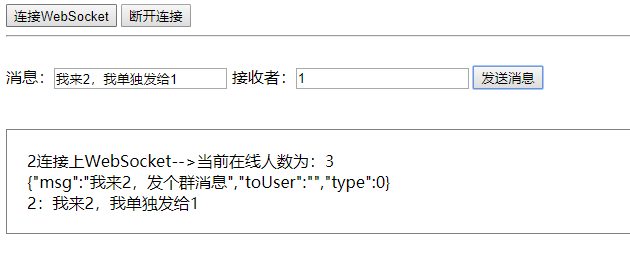
1的消息:

0的消息:

源码:下载地址
微服务-springboot+websocket在线聊天室的更多相关文章
- 基于WebSocket和SpringBoot的群聊天室
引入 普通请求-响应方式:例如Servlet中HttpServletRequest和HttpServletResponse相互配合先接受请求.解析数据,再发出响应,处理完成后连接便断开了,没有数据的实 ...
- 在线聊天室的实现(1)--websocket协议和javascript版的api
前言: 大家刚学socket编程的时候, 往往以聊天室作为学习DEMO, 实现简单且上手容易. 该Demo被不同语言实现和演绎, 网上相关资料亦不胜枚举. 以至于很多技术书籍在讲解网络相关的编程时, ...
- 使用WebSocket实现简单的在线聊天室
前言:我自已在网上找好了好多 WebSocket 制作 在线聊天室的案列,发现大佬们写得太高深了 我这种新手看不懂,所以就自已尝试写了一个在线简易聊天室 (我只用了js 可以用jq ) 话不多说,直接 ...
- 基于Server-Sent Event的简单在线聊天室
Web即时通信 所谓Web即时通信,就是说我们可以通过一种机制在网页上立即通知用户一件事情的发生,是不需要用户刷新网页的.Web即时通信的用途有很多,比如实时聊天,即时推送等.如当我们在登陆浏览知乎时 ...
- 基于WebSocket实现聊天室(Node)
基于WebSocket实现聊天室(Node) WebSocket是基于TCP的长连接通信协议,服务端可以主动向前端传递数据,相比比AJAX轮询服务器,WebSocket采用监听的方式,减轻了服务器压力 ...
- Ext JS学习第十六天 事件机制event(一) DotNet进阶系列(持续更新) 第一节:.Net版基于WebSocket的聊天室样例 第十五节:深入理解async和await的作用及各种适用场景和用法 第十五节:深入理解async和await的作用及各种适用场景和用法 前端自动化准备和详细配置(NVM、NPM/CNPM、NodeJs、NRM、WebPack、Gulp/Grunt、G
code&monkey Ext JS学习第十六天 事件机制event(一) 此文用来记录学习笔记: 休息了好几天,从今天开始继续保持更新,鞭策自己学习 今天我们来说一说什么是事件,对于事件 ...
- JAVA实现webSocket网页聊天室
一.什么是webSocket WebSocket 是一种网络通信协议,是持久化协议.RFC6455 定义了它的通信标准. WebSocket 是 HTML5 开始提供的一种在单个 TCP 连接上进行全 ...
- swoole中websoket创建在线聊天室(php)
swoole中websoket创建在线聊天室(php) swoole现仅支持Linix,macos 创建websocket服务器 首先现在服务器创建一个websocket服务器 <?php // ...
- 基于JQuery+JSP的无数据库无刷新多人在线聊天室
JQuery是一款非常强大的javascript插件,本文就针对Ajax前台和JSP后台来实现一个无刷新的多人在线聊天室,该实现的数据全部存储在服务端内存里,没有用到数据库,本文会提供所有源程序,需要 ...
随机推荐
- xmarin live player 连接 IOS以及安卓实现实时效果查看
原文:xmarin live player 连接 IOS以及安卓实现实时效果查看 在之前有介绍过xamarin 单独IOS项目开发的运行环境搭建,但是这段时间我看到了xmarin forms 3.0 ...
- InitializeComponent无法识别的问题
学习Xamarin官方文档的时候,Xamarin.Forms的开始篇一直在用ContentPage讲解自己一直是创建Page,然后手动修改成继承于ContentPage,然后InitializeCom ...
- WPF自定义窗口最大化显示任务栏
原文:WPF自定义窗口最大化显示任务栏 当我们要自定义WPF窗口样式时,通常是采用设计窗口的属性 WindowStyle="None" ,然后为窗口自定义放大,缩小,关闭按钮的样式 ...
- miniui autocomplete支持放大镜按钮(data-grid)
<style type="text/css"> html body .searchbox .mini-buttonedit-close { background:url ...
- 图像滤镜艺术--PS平均(滤镜-模糊-平均)效果
原文:图像滤镜艺术--PS平均(滤镜-模糊-平均)效果 本文介绍PS中滤镜-模糊-平均模糊的效果实现: 这个效果很简单,原理如下: 1,统计全图像素的R,G,B值得和sumR,sumG,sumB; 2 ...
- Win10《芒果TV》商店版更新v3.1.3.0:优化应用速度,支持会员卡兑换
在微软秋季Win10/Surface新品发布会热潮之后,<芒果TV>UWP版迅速更新v3.1.3版,优化应用启动速度,支持会员卡券兑换,新增全网搜索.记忆播放.消息推送等功能. 芒果TV ...
- Qt for windows消息循环、libqxt分析和wince快捷键处理
Qt for windows消息循环.libqxt分析和wince快捷键处理 利用Qt做windows图形界面开发和MFC相比,个人感觉还是比较简单好用的:首先利用Designer工具搞个ui文件:然 ...
- VS2010调试X86汇编程序
今天突然无聊了一下,想起之前想的用VS来调试汇编程序.之前只是想了一下,没有去做,好吧,今天搜索一下,找到了一个教程,相当的详细具体,我喜欢 按照http://blog.csdn.net/jinson ...
- 零元学Expression Blend 4 - Chapter 45 ListBox里的物件不能换行吗?
原文:零元学Expression Blend 4 - Chapter 45 ListBox里的物件不能换行吗? ListBox里的排列不是垂直就是水平,觉得这样的排列很枯燥乏味吗? 想要它变聪明吗? ...
- NAudio的使用说明
官方网站:http://naudio.codeplex.com/ 源码:https://github.com/naudio/NAudio NuGet安装: Install-Package NAudio ...