
C# winfrom调用摄像头扫描二维码(完整版)
前段时间看到一篇博客,是这个功能的,参考了那篇博客写了这个功能玩一玩,没有做商业用途。发现他的代码给的有些描述不清晰的,我就自己整理一下发出来记录一下。
参考博客链接:https://www.cnblogs.com/geeking/p/4181450.html
好了 进入正题。
项目环境
项目代码的版本是.NET4.0的
主要采用的插件是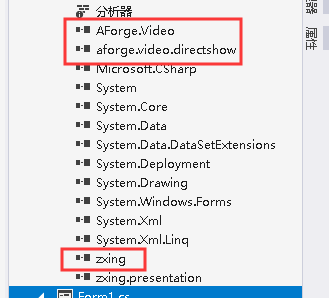
都是我在网上找的资源插件 版本的话 随意吧 我也不知道哪个版本最适用了。
AForge主要是调用摄像头的
zxing是调用解析二维码的 其实还有生成二维码的功能。
前台界面
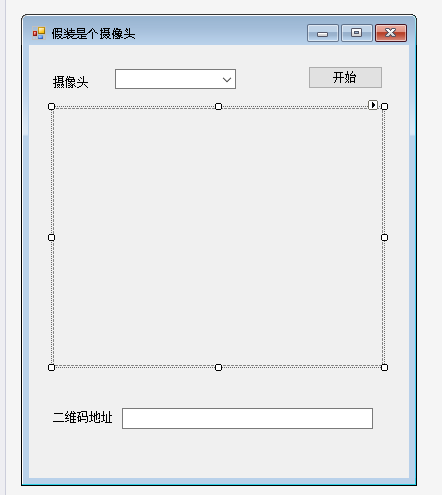
这里的窗体只是放了一个列表标签,存储电脑上面的摄像头设备(如果没有就不能用这个功能了) 另外的一个开启关闭按钮,一个图片控件控制显示图片。一个文本框展示解析出来的二维码地址。
另外还有两个time控件完成图片的刷新,控制图片刷新的频率。
代码部分
后台代码如下:(不想看解析的直接划到最后 有全部的源码展示)
首先是加载部分的代码,主要用于调用插件获取摄像头设备。
   private void Form1_Load(object sender, EventArgs e)

         {

             //获取摄像头列表

             getCamList();

         }
   /// <summary>

         /// 获取摄像头列表

         /// </summary>

         private void getCamList()

         {

             try

             {

                 //AForge.Video.DirectShow.FilterInfoCollection 设备枚举类

                 videoDevices = new FilterInfoCollection(FilterCategory.VideoInputDevice);

                 //清空列表框

                 comboBox1.Items.Clear();

                 if (videoDevices.Count == )

                     throw new ApplicationException();

                 DeviceExist = true;

                 //加入设备

                 foreach (FilterInfo device in videoDevices)

                 {

                     comboBox1.Items.Add(device.Name);

                 }

                 //默认选择第一项

                 comboBox1.SelectedIndex = ;

             }

             catch (ApplicationException)

             {

                 DeviceExist = false;

                 comboBox1.Items.Add("未找到可用设备");

             }

         }
下一步 是声明的全局变量代码
        FilterInfoCollection videoDevices; //所有摄像头

        VideoCaptureDevice videoSource; //当前摄像头

        public int selectedDeviceIndex = ;

        /// <summary>

        /// 全局变量,标示设备摄像头设备是否存在

        /// </summary>

        bool DeviceExist;

        /// <summary>

        /// 全局变量,记录扫描线距离顶端的距离

        /// </summary>

        int top = ;

        /// <summary>

        /// 全局变量,保存每一次捕获的图像

        /// </summary>

        Bitmap img = null;
然后是点击开始按钮的代码
  private void start_Click(object sender, EventArgs e)

         {

             if (start.Text == "开始")

             {

                 if (DeviceExist)

                 {

                     //视频捕获设备

                     videoSource = new VideoCaptureDevice(videoDevices[comboBox1.SelectedIndex].MonikerString);

                     //捕获到新画面时触发

                     videoSource.NewFrame += new NewFrameEventHandler(video_NewFrame);

                     //先关一下,下面再打开。避免重复打开的错误

                     CloseVideoSource();

                     //设置画面大小

                     videoSource.DesiredFrameSize = new Size(, );

                     //启动视频组件

                     videoSource.Start();

                     start.Text = "结束";

                     //启动定时解析二维码

                     timer1.Enabled = true;

                     //启动绘制视频中的扫描线

                     timer2.Enabled = true;

                 }

             }

             else

             {

                 if (videoSource.IsRunning)

                 {

                     timer2.Enabled = false;

                     timer1.Enabled = false;

                     CloseVideoSource();

                     start.Text = "开始";

                 }

             }

         }
两个timer控件的代码
  private void timer1_Tick(object sender, EventArgs e)

         {

             if (img == null)

             {

                 return;

             }

             #region 将图片转换成byte数组

             MemoryStream ms = new MemoryStream();

             img.Save(ms, System.Drawing.Imaging.ImageFormat.Bmp);

             byte[] bt = ms.GetBuffer();

             ms.Close();

             #endregion

             #region 不稳定的二维码解析端口

             LuminanceSource source = new RGBLuminanceSource(bt, img.Width, img.Height);

             BinaryBitmap bitmap = new BinaryBitmap(new ZXing.Common.HybridBinarizer(source));

             Result result;

             MultiFormatReader multiFormatReader = new MultiFormatReader();

             try

             {

                 //开始解码

                 result = multiFormatReader.decode(bitmap);//(不定期暴毙)

             }

             catch (Exception ex)

             {

                 return;

             }

             finally

             {

                 multiFormatReader.reset();

             }

             if (result != null)

             {

                 textBox1.Text = result.Text;

             }

             #endregion

         }

         private void timer2_Tick(object sender, EventArgs e)

         {

             if (img == null)

             {

                 return;

             }

             Bitmap img2 = (Bitmap)img.Clone();

             Pen p = new Pen(Color.Red);

             Graphics g = Graphics.FromImage(img2);

             Point p1 = new Point(, top);

             Point p2 = new Point(pictureBox1.Width, top);

             g.DrawLine(p, p1, p2);

             g.Dispose();

             top += ;

             top = top % pictureBox1.Height;

             pictureBox1.Image = img2;

         }
以及关闭摄像头的方法:
  /// <summary>

         /// 关闭摄像头

         /// </summary>

         private void CloseVideoSource()

         {

             if (!(videoSource == null))

                 if (videoSource.IsRunning)

                 {

                     videoSource.SignalToStop();

                     videoSource = null;

                 }

         }
基本的操作都是在DLL方法里面封装的,zxing代码好像是用java写的吧 ,我自己的电脑上运行这里的代码 有时候会报错,所以对于源代码改了一下,现在至少跑起来应该还行,此文章只是为了自己总结知识点用的,如果涉及侵权,请通知,会立即删除。
另附所有代码内容
  public partial class Form1 : Form

     {

         FilterInfoCollection videoDevices; //所有摄像头

         VideoCaptureDevice videoSource; //当前摄像头

         public int selectedDeviceIndex = ;

         public Form1()

         {

             InitializeComponent();

         }

         /// <summary>

         /// 全局变量,标示设备摄像头设备是否存在

         /// </summary>

         bool DeviceExist;

         /// <summary>

         /// 全局变量,记录扫描线距离顶端的距离

         /// </summary>

         int top = ;

         /// <summary>

         /// 全局变量,保存每一次捕获的图像

         /// </summary>

         Bitmap img = null;

         private void video_NewFrame(object sender, NewFrameEventArgs eventArgs)

         {

             img = (Bitmap)eventArgs.Frame.Clone();

         }

         /// <summary>

         /// 关闭摄像头

         /// </summary>

         private void CloseVideoSource()

         {

             if (!(videoSource == null))

                 if (videoSource.IsRunning)

                 {

                     videoSource.SignalToStop();

                     videoSource = null;

                 }

         }

         /// <summary>

         /// 获取摄像头列表

         /// </summary>

         private void getCamList()

         {

             try

             {

                 //AForge.Video.DirectShow.FilterInfoCollection 设备枚举类

                 videoDevices = new FilterInfoCollection(FilterCategory.VideoInputDevice);

                 //清空列表框

                 comboBox1.Items.Clear();

                 if (videoDevices.Count == )

                     throw new ApplicationException();

                 DeviceExist = true;

                 //加入设备

                 foreach (FilterInfo device in videoDevices)

                 {

                     comboBox1.Items.Add(device.Name);

                 }

                 //默认选择第一项

                 comboBox1.SelectedIndex = ;

             }

             catch (ApplicationException)

             {

                 DeviceExist = false;

                 comboBox1.Items.Add("未找到可用设备");

             }

         }

         private void start_Click(object sender, EventArgs e)

         {

             if (start.Text == "开始")

             {

                 if (DeviceExist)

                 {

                     //视频捕获设备

                     videoSource = new VideoCaptureDevice(videoDevices[comboBox1.SelectedIndex].MonikerString);

                     //捕获到新画面时触发

                     videoSource.NewFrame += new NewFrameEventHandler(video_NewFrame);

                     //先关一下,下面再打开。避免重复打开的错误

                     CloseVideoSource();

                     //设置画面大小

                     videoSource.DesiredFrameSize = new Size(, );

                     //启动视频组件

                     videoSource.Start();

                     start.Text = "结束";

                     //启动定时解析二维码

                     timer1.Enabled = true;

                     //启动绘制视频中的扫描线

                     timer2.Enabled = true;

                 }

             }

             else

             {

                 if (videoSource.IsRunning)

                 {

                     timer2.Enabled = false;

                     timer1.Enabled = false;

                     CloseVideoSource();

                     start.Text = "开始";

                 }

             }

         }

         private void timer1_Tick(object sender, EventArgs e)

         {

             if (img == null)

             {

                 return;

             }

             #region 将图片转换成byte数组

             MemoryStream ms = new MemoryStream();

             img.Save(ms, System.Drawing.Imaging.ImageFormat.Bmp);

             byte[] bt = ms.GetBuffer();

             ms.Close();

             #endregion

             #region 不稳定的二维码解析端口

             LuminanceSource source = new RGBLuminanceSource(bt, img.Width, img.Height);

             BinaryBitmap bitmap = new BinaryBitmap(new ZXing.Common.HybridBinarizer(source));

             Result result;

             MultiFormatReader multiFormatReader = new MultiFormatReader();

             try

             {

                 //开始解码

                 result = multiFormatReader.decode(bitmap);//(不定期暴毙)

             }

             catch (Exception ex)

             {

                 return;

             }

             finally

             {

                 multiFormatReader.reset();

             }

             if (result != null)

             {

                 textBox1.Text = result.Text;

             }

             #endregion

         }

         private void timer2_Tick(object sender, EventArgs e)

         {

             if (img == null)

             {

                 return;

             }

             Bitmap img2 = (Bitmap)img.Clone();

             Pen p = new Pen(Color.Red);

             Graphics g = Graphics.FromImage(img2);

             Point p1 = new Point(, top);

             Point p2 = new Point(pictureBox1.Width, top);

             g.DrawLine(p, p1, p2);

             g.Dispose();

             top += ;

             top = top % pictureBox1.Height;

             pictureBox1.Image = img2;

         }

         private void Form1_Load(object sender, EventArgs e)

         {

             //获取摄像头列表

             getCamList();

         }

     }
参考文章 https://www.cnblogs.com/geeking/p/4181450.html
C# winfrom调用摄像头扫描二维码(完整版)的更多相关文章
- 使用vue做移动app时,调用摄像头扫描二维码
现在前端技术发展飞快,前端都能做app了,那么项目中,也会遇到调用安卓手机基层的一些功能,比如调用摄像头,完成扫描二维码功能 下面我就为大家讲解一下,我在项目中调用这功能的过程. 首先我们需要一个中间 ...
- h5端呼起摄像头扫描二维码并解析
2016年6月29日补充: 最近做了一些与表单相关的项目,使用了h5的input控件,在使用过程中遇到了很多的坑.也包括与这篇文章相关的. 首先我们应该知道使用h5新提供的属性getUserMedia ...
- Win10 UWP开发:摄像头扫描二维码/一维码功能
这个示例演示整合了Aran和微软的示例,无需修改即可运行. 支持识别,二维码/一维码,需要在包清单管理器勾选摄像头权限. 首先右键项目引用,打开Nuget包管理器搜索安装:ZXing.Net.Mobi ...
- 在WPF中开启摄像头扫描二维码(Media+Zxing)
近两天项目中需要添加一个功能,是根据摄像头来读取二维码信息,然后根据读出来的信息来和数据库中进行对比显示数据. 选择技术Zxing.WPFMediaKit.基本的原理就是让WPFmediaKit来对摄 ...
- c# winform调用摄像头识别二维码
首先我们需要引用两个第三方组件:AForge和zxing. Aforge是摄像头操作组件,zxing是二维码识别组件.都是开源项目.避免重复造轮子. 其实一些操作代码我也是参照别人的,若侵犯您的版权, ...
- 打开手机摄像头扫描二维码或条形码全部操作(代码写的不好,请提出指教,共同进步,我只是一个Android的小白)
(1)下载二维码的库源码 链接:http://pan.baidu.com/s/1pKQyw2n 密码:r5bv 下载完成后打开可以看到 libzxing 的文件夹,最后添加进 Android Stu ...
- Vue-cli4 唤醒摄像头扫描二维码
<template> <div class="scan"> <div id="bcid"> <div id=" ...
- Ionic2学习笔记(10):扫描二维码
作者:Grey 原文地址: http://www.cnblogs.com/greyzeng/p/5575843.html 时间:6/11/2016 说明: 在本文发表的时候(2016-06-1 ...
- uni-app开发经验分享十三:实现手机扫描二维码并跳转全过程
最近使用 uni-app 开发 app ,需要实现一个调起手机摄像头扫描二维码功能,官网API文档给出了这样一个demo: // 允许从相机和相册扫码 uni.scanCode({ success: ...
随机推荐
- Django3.0 异步通信初体验(小结)
2019年12月2日,Django终于正式发布了3.0版本.怀着无比的期待,我们来尝试一下吧! (附ASGI官方文档地址:https://asgi.readthedocs.io/en/latest/e ...
- Python与线性代数基本概念
在Python中使用Numpy创建向量: x = np.array([1, 2, 3, 4]) 创建3 x 3矩阵 B = np.array([[1, 2],[3, 4],[5, 6]]) Shape ...
- C#线程学习笔记四:线程同步
本笔记摘抄自:https://www.cnblogs.com/zhili/archive/2012/07/21/ThreadsSynchronous.html,记录一下学习过程以备后续查用. ...
- css3 伪类实现右箭头→
css3 实现右箭头→ <!DOCTYPE html> <html lang="en"> <head> <meta charset=&qu ...
- 深度学习优质学习项目大放送!-AI Studio精选开源项目合集推荐
近期 在AI Studio上发现了不少优质的开源深度学习项目,从深度学习入门到进阶,涵盖了CV.NLP.生成对抗网络.强化学习多个研究方向,还有最新的动态图,都以NoteBook的方式直接开源出来,并 ...
- PKUWC 2020 游记
由于 CSP 的暴力分太高,我来了这里. 我将告诉大家,我在暴力分不高时是个怎样的 sb 选手. Day -17 又停课啦. 旁边坐着 pb,每天刷题特别猛,然后就凸显了我有多颓. 怎么想打开个猫国都 ...
- Angular常用VSCode插件
1.Angular 8 Snippets(全家桶) 2.TSLint(ts代码规范.错误提示) 3.Material Icon Theme(文件图标) 4.One Dark Pro(主题) 5.Ang ...
- SVN异常,Previous operation has not finished; run 'cleanup' if it was interrupted
SVN在提交.更新.cleanup时报错:Problem running logsvn: Failed to run the WC DB work queue associated with 'D:\ ...
- echarts 双Y轴图表
直接代码: <!DOCTYPE html> <html lang="en"> <head> <meta charset="UTF ...
- springboot配置文件(一)
一.YAML语法 1.基本语法 k 空格 v 表示一对键值对(必须有空格),以空格的缩进来控制层级关系,只要是左对齐的一列数据,都表示同一个层级.属性和值大小写敏感 server: port: 808 ...