
用POI 3.17 导出EXECL
代码参考 https://www.cnblogs.com/bmbm/archive/2011/12/08/2342261.html
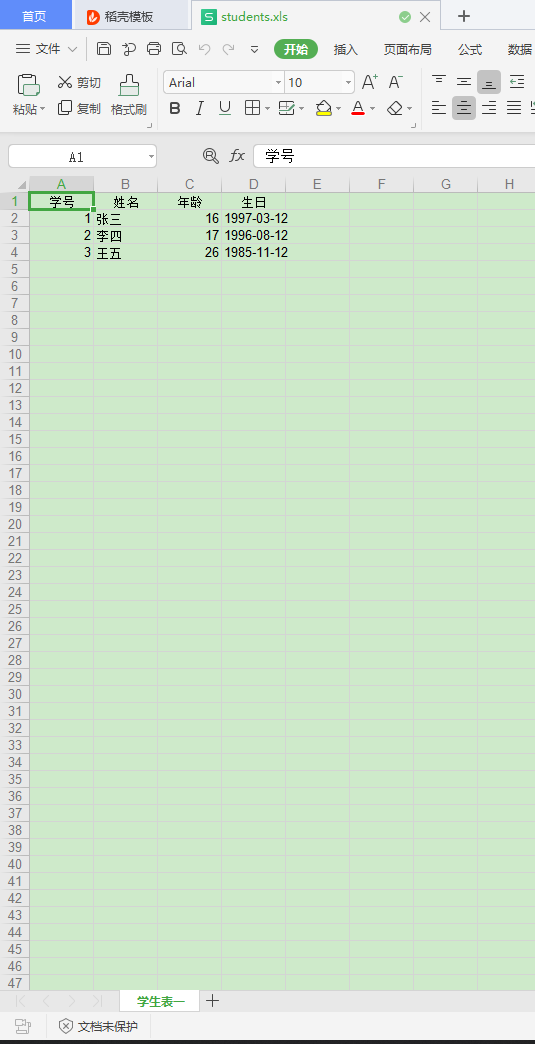
效果
导入jar包
        <dependency>

            <groupId>org.apache.poi</groupId>

            <artifactId>poi</artifactId>

            <version>3.17</version>

        </dependency>

        <dependency>

            <groupId>org.apache.poi</groupId>

            <artifactId>poi-ooxml</artifactId>

            <version>3.17</version>

        </dependency>


//准备数据类
package com.wf.zhang.test;

import java.util.Date;

public class Student

{

    private int id;

    private String name;

    private int age;

    private Date birth;

    public Student()

    {

    }

    public Student(int id, String name, int age, Date birth)

    {

        this.id = id;

        this.name = name;

        this.age = age;

        this.birth = birth;

    }

    public int getId()

    {

        return id;

    }

    public void setId(int id)

    {

        this.id = id;

    }

    public String getName()

    {

        return name;

    }

    public void setName(String name)

    {

        this.name = name;

    }

    public int getAge()

    {

        return age;

    }

    public void setAge(int age)

    {

        this.age = age;

    }

    public Date getBirth()

    {

        return birth;

    }

    public void setBirth(Date birth)

    {

        this.birth = birth;

    }

}
Student
package com.wf.zhang.test;

import java.io.FileOutputStream;

import java.text.SimpleDateFormat;

import java.util.ArrayList;

import java.util.List;

import org.apache.poi.hssf.usermodel.HSSFCell;

import org.apache.poi.hssf.usermodel.HSSFCellStyle;

import org.apache.poi.hssf.usermodel.HSSFRow;

import org.apache.poi.hssf.usermodel.HSSFSheet;

import org.apache.poi.hssf.usermodel.HSSFWorkbook;

import org.apache.poi.ss.usermodel.HorizontalAlignment;

public class ExportExcel

{

    /**

     * @功能:手工构建一个简单格式的Excel

     */

    private static List<Student> getStudent() throws Exception

    {

        List list = new ArrayList();

        SimpleDateFormat df = new SimpleDateFormat("yyyy-mm-dd");

        Student user1 = new Student(1, "张三", 16, df.parse("1997-03-12"));

        Student user2 = new Student(2, "李四", 17, df.parse("1996-08-12"));

        Student user3 = new Student(3, "王五", 26, df.parse("1985-11-12"));

        list.add(user1);

        list.add(user2);

        list.add(user3);

        return list;

    }

    public static void main(String[] args) throws Exception

    {

        // 第一步,创建一个webbook,对应一个Excel文件

        HSSFWorkbook wb = new HSSFWorkbook();

        // 第二步,在webbook中添加一个sheet,对应Excel文件中的sheet

        HSSFSheet sheet = wb.createSheet("学生表一");

        // 第三步,在sheet中添加表头第0行,注意老版本poi对Excel的行数列数有限制short

        HSSFRow row = sheet.createRow((int) 0);

        // 第四步 创建单元格样式 单元格居中

        HSSFCellStyle style = wb.createCellStyle();

        style.setAlignment(HorizontalAlignment.CENTER);;

        HSSFCell cell = row.createCell((short) 0);

        cell.setCellValue("学号");

        cell.setCellStyle(style);

        cell = row.createCell((short) 1);

        cell.setCellValue("姓名");

        cell.setCellStyle(style);

        cell = row.createCell((short) 2);

        cell.setCellValue("年龄");

        cell.setCellStyle(style);

        cell = row.createCell((short) 3);

        cell.setCellValue("生日");

        cell.setCellStyle(style);

        // 第五步,写入实体数据 实际应用中这些数据从数据库得到,

        List list = ExportExcel.getStudent();

        for (int i = 0; i < list.size(); i++)

        {

            row = sheet.createRow((int) i + 1);

            Student stu = (Student) list.get(i);

            // 第四步,创建单元格,并设置值

            row.createCell((short) 0).setCellValue((double) stu.getId());

            row.createCell((short) 1).setCellValue(stu.getName());

            row.createCell((short) 2).setCellValue((double) stu.getAge());

            cell = row.createCell((short) 3);

            cell.setCellValue(new SimpleDateFormat("yyyy-mm-dd").format(stu.getBirth()));

        }

        // 第六步,将文件存到指定位置

        try

        {

            FileOutputStream fout = new FileOutputStream("C:/Users/admin/Desktop/students.xls");

            wb.write(fout);

            fout.close();

        }

        catch (Exception e)

        {

            e.printStackTrace();

        }

    }

}
用POI 3.17 导出EXECL的更多相关文章
- Java POI 3.17导出EXCEL并下载(带进度条提示)
导出数据 共4590条 只需要 5 秒左右,性能还算可以 我们再来测试一下 50000 条的性能...
- POI导出Execl文件,使JAVA虚拟机OOM
由于在项目中使用POI导出execl,导致JAVA虚拟机OOM,采用以下方式解决问题: 原先方式: g_wb = new XSSFWorkbook(sourceFile.getInputStream( ...
- js导出execl兼容ie Chrome Firefox各种主流浏览器(js export execl)
第一种导出table布局的表格 <html> <head> <meta charset="utf-8"> <script type=&qu ...
- apache poi根据模板导出excel
需要预先新建编辑好一个excel文件,设置好样式. 编辑好输出的数据,根据excel坐标一一对应. 支持列表数据输出,列表中列合并. 代码如下: package com.icourt.util; im ...
- c#(NPOI)DataTable导出execl,execl(支持解析公式)导入DataTable
NPOI(C#)DataTable导出execl using NPOI.HSSF.UserModel; using NPOI.SS.UserModel; using NPOI.XSSF.UserMod ...
- js导出execl 兼容ie Chrome Firefox各种主流浏览器(js export execl)
第一种导出table布局的表格 1 <html> 2 3 <head> 4 <meta charset="utf-8"> 5 <scrip ...
- 当用GridView导出Execl的时候,会发生只能在执行 Render() 的过程中调用 RegisterForEventValidation的错误
当用GridView导出Execl的时候,会发生只能在执行 Render() 的过程中调用 RegisterForEventValidation的错误提示. 有两种方法可以解决以上问题: 1.修改we ...
- asp.net中导出Execl的方法
一.asp.net中导出Execl的方法: 在 asp.net中导出Execl有两种方法,一种是将导出的文件存放在服务器某个文件夹下面,然后将文件地址 输出在浏览器上:一种是将文件直接将文件输出流写给 ...
- Java中使用poi导入、导出Excel
一.介绍 当前B/S模式已成为应用开发的主流,而在企业办公系统中,常常有客户这样子要求:你要把我们的报表直接用Excel打开(电信系统.银行系统).或者是:我们已经习惯用Excel打印.这样在我们实际 ...
随机推荐
- python 2.7导入模块问题
有如下结构的python文件 base |----pkg1 |----__init__.py |----add.py |----pkg2 |----__init__.py |----call_func ...
- springboot自动装配(3)---条件注解@Conditional
之前有说到springboot自动装配的时候,都是去寻找一个XXXAutoConfiguration的配置类,然而我们的springboot的spring.factories文件中有各种组件的自动装配 ...
- Unity中文API参考手册
转载请标明原文地址:http://www.cnblogs.com/zhangyukof/p/6835582.html Unity5中文脚本手册 网页版 Unity API 执行顺序: Unity5中 ...
- django基础之day08,ajax结合sweetalert的使用
models.py文件 from django.db import models class User(models.Model): username=models.CharField(max_len ...
- 《Android项目实战--手机安全卫士》读后感
上学期在学校图书馆看到此书,觉得比较贴近实践,于是寒假研究了一番,也算是体会了一把社会培训机构的模式. 由于时间关系,最后两章还没弄完,但感觉每章节的流程相似,加之马上要回学校了,所以打算在家的最后一 ...
- Common Lisp学习资源整理
Lisp Hackers: Interviews with 100x More Productive Programmers Posted on June 26th, 2013 Lisp Hacker ...
- 【玩转SpringBoot】翻身做主人,一统web服务器
寄人篱下的日子 一直以来受传统影响,我们的web工程总是打成war包,然后放入tomcat的webapps目录下面. 如下图01: 当tomcat启动时,会去解压war包,然后运行web工程.这大家都 ...
- ES6对正则的改进(简要总结)
文章目录 正则的扩展 1. RegExp 构造函数 2. 字符串的正则方法 3. u 修饰符 4. y 修饰符 5. sticky 属性 6. flags 属性 7. s 修饰符:dotAll 模式 ...
- [译]C# 7系列,Part 4: Discards 弃元
原文:https://blogs.msdn.microsoft.com/mazhou/2017/06/27/c-7-series-part-4-discards/ 有时我们想要忽略一个方法返回的值,特 ...
- Spring cloud ——EurekaServer
Eureka作为服务注册与发现的组件,Eureka2.0已经闭源了,但是本教程还是以Eureka为核心进行展开. 1.三个模块 Spring Cloud Eureka是Spring Cloud Net ...