
Tensorflow之MNIST手写数字识别:分类问题(1)
一、MNIST数据集读取
one hot 独热编码
独热编码是一种稀疏向量,其中:一个向量设为1,其他元素均设为0.独热编码常用于表示拥有有限个可能值的字符串或标识符
优点: 1、将离散特征的取值扩展到了欧式空间,离散特征的某个取值就对应欧式空间的某个点
2、机器学习算法中,特征之间距离的计算或相似度的常用计算方法都是基于欧式空间的
3、将离散型特征使用one_hot编码,会让特征之间的距离计算更加合理
import tensorflow as tf

 #MNIST数据集读取

import tensorflow.examples.tutorials.mnist.input_data as input_data

mnist = input_data.read_data_sets("MNIST_data/",one_hot=True)

###输出结果###
#若不成功可手动到相关网站下载之后添加到文件夹中
#Extracting MNIST_data/train-images-idx3-ubyte.gz

#Extracting MNIST_data/train-labels-idx1-ubyte.gz

#Extracting MNIST_data/t10k-images-idx3-ubyte.gz

#Extracting MNIST_data/t10k-labels-idx1-ubyte.gz
二、了解MNIST手写数字识别数据集
#了解MNIST手写数字识别数据集

print('训练集 train 数量:',mnist.train.num_examples,

      ',验证集 validation 数量:',mnist.validation.num_examples,

      ',测试集 test 数量:',mnist.test.num_examples)

###输出结果###

#训练集 train 数量: 55000 ,验证集 validation 数量: 5000 ,测试集 test 数量: 10000
print(' train images shape:',mnist.train.images.shape,

      'labels shape:',mnist.train.labels.shape)

###输出### #train images shape: (55000, 784) labels shape: (55000, 10)

#28*28=784,10分类One Hot编码
三、可视化image
#可视化image

import matplotlib.pyplot as plt

def plot_image(image):

    plt.imshow(image.reshape(28,28),cmap='binary')

    plt.show()

plot_image(mnist.train.images[1])
输出结果:

#进一步了解reshape()

import numpy as np

int_array = np.array([i for i in range(64)])

print(int_array)
输出结果:
[ 0  1  2  3  4  5  6  7  8  9 10 11 12 13 14 15 16 17 18 19 20 21 22 23 24

 25 26 27 28 29 30 31 32 33 34 35 36 37 38 39 40 41 42 43 44 45 46 47 48 49

 50 51 52 53 54 55 56 57 58 59 60 61 62 63]
int_array.reshape(8,8)
输出结果:
array([[ 0,  1,  2,  3,  4,  5,  6,  7],

       [ 8,  9, 10, 11, 12, 13, 14, 15],

       [16, 17, 18, 19, 20, 21, 22, 23],

       [24, 25, 26, 27, 28, 29, 30, 31],

       [32, 33, 34, 35, 36, 37, 38, 39],

       [40, 41, 42, 43, 44, 45, 46, 47],

       [48, 49, 50, 51, 52, 53, 54, 55],

       [56, 57, 58, 59, 60, 61, 62, 63]])
#行优先,逐列排列

int_array.reshape(4,16)
输出结果:
array([[ 0,  1,  2,  3,  4,  5,  6,  7,  8,  9, 10, 11, 12, 13, 14, 15],

       [16, 17, 18, 19, 20, 21, 22, 23, 24, 25, 26, 27, 28, 29, 30, 31],

       [32, 33, 34, 35, 36, 37, 38, 39, 40, 41, 42, 43, 44, 45, 46, 47],

       [48, 49, 50, 51, 52, 53, 54, 55, 56, 57, 58, 59, 60, 61, 62, 63]])
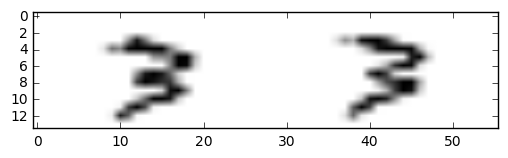
plt.imshow(mnist.train.images[20000].reshape(14,56),cmap='binary')

plt.show()
输出结果:
四、数据读取
1.采用独热编码,标签数据内容并不是直接输出值,而是输出编码
#标签数据与独热编码,

#内容并不是直接输出值,而是输出编码

mnist.train.labels[1]
输出结果:
array([ 0., 0., 0., 1., 0., 0., 0., 0., 0., 0.])
#非one_hot编码的标签值

mnist_no_one_hot = input_data.read_data_sets("MNIST_data/",one_hot=False)

print(mnist_no_one_hot.train.labels[0:10])      #onr_hot = False,直接返回值
输出结果:
Extracting MNIST_data/train-images-idx3-ubyte.gz

Extracting MNIST_data/train-labels-idx1-ubyte.gz

Extracting MNIST_data/t10k-images-idx3-ubyte.gz

Extracting MNIST_data/t10k-labels-idx1-ubyte.gz

[7 3 4 6 1 8 1 0 9 8]
2.读取验证集数据
#读取验证集数据

print('validation images:',mnist.validation.images.shape,'labels:',mnist.validation.labels.shape)
输出:
validation images: (5000, 784) labels: (5000, 10)
3.读取测试机数据
#读取测试机数据

print('tast images:',mnist.test.images.shape,'labels:',mnist.test.labels.shape)
输出结果:
tast images: (10000, 784) labels: (10000, 10)
4.一次批量读取多条数据
#一次批量读取多条数据

batch_image_xs,batch_labels_ys = mnist.train.next_batch(batch_size=10)        #next_batch()实现内部会对数据集先做shuffle

print(mnist.train.labels[0:10])

print("\n")

print(batch_labels_ys)
输出结果:
[[ 0.  0.  0.  1.  0.  0.  0.  0.  0.  0.]

 [ 0.  0.  0.  0.  0.  0.  1.  0.  0.  0.]

 [ 0.  0.  0.  0.  0.  0.  0.  1.  0.  0.]

 [ 0.  0.  0.  0.  0.  0.  0.  1.  0.  0.]

 [ 0.  0.  0.  0.  0.  0.  0.  1.  0.  0.]

 [ 0.  0.  0.  0.  0.  0.  0.  0.  0.  1.]

 [ 0.  0.  0.  0.  1.  0.  0.  0.  0.  0.]

 [ 0.  0.  0.  0.  0.  0.  0.  0.  1.  0.]

 [ 0.  0.  0.  0.  0.  0.  0.  0.  0.  1.]

 [ 0.  0.  0.  0.  0.  0.  0.  0.  0.  1.]]

[[ 0.  0.  0.  0.  0.  0.  1.  0.  0.  0.]

 [ 0.  0.  0.  0.  0.  1.  0.  0.  0.  0.]

 [ 0.  0.  0.  0.  0.  0.  0.  1.  0.  0.]

 [ 0.  1.  0.  0.  0.  0.  0.  0.  0.  0.]

 [ 0.  0.  0.  0.  0.  0.  0.  0.  0.  1.]

 [ 0.  0.  0.  1.  0.  0.  0.  0.  0.  0.]

 [ 0.  1.  0.  0.  0.  0.  0.  0.  0.  0.]

 [ 0.  0.  0.  0.  0.  0.  0.  0.  1.  0.]

 [ 1.  0.  0.  0.  0.  0.  0.  0.  0.  0.]

 [ 0.  0.  0.  0.  0.  0.  0.  1.  0.  0.]]
5.argmax()用法
argmax返回的是最大数的索引
import numpy as np

np.array(mnist.train.labels[1])

np.argmax(mnist.train.labels[1])     #argmax返回的是最大数的索引
#argmax详解

arr1 = np.array([1,3,2,5,7,0])

arr2 = np.array([[1,2,3],[3,2,1],[4,7,2],[8,3,2]])

print("arr1=",arr1)

print("arr2=",arr2)

argmax_1 = tf.argmax(arr1)

argmax_20 = tf.argmax(arr2,0)      #指定第二个参数为0,按第一维(行)的元素取值,即同列的每一行取值   以行为基准,每列取最大值的下标

argmax_21 = tf.argmax(arr2,1)       #指定第二个参数为1,则第二维(列)的元素取值,即同行的每一列取值   以列为基准,每行取最大值的下标

argmax_22 = tf.argmax(arr2,-1)     #指定第二个参数为-1,则第最后维的元素取值

with tf.Session() as sess:

    print(argmax_1.eval())

    print(argmax_20.eval())

    print(argmax_21.eval())

    print(argmax_22.eval())
输出结果:
arr1= [1 3 2 5 7 0]

arr2= [[1 2 3]

 [3 2 1]

 [4 7 2]

 [8 3 2]]

4

[3 2 0]

[2 0 1 0]

[2 0 1 0]
五、可视化
#定义可视化函数

import matplotlib.pyplot as plt

import numpy as np

def plot_images_labels_prediction(images,labels,prediction,index,num=10):  #参数: 图形列表,标签列表,预测值列表,从第index个开始显示,缺省一次显示10幅

    fig = plt.gcf()             #获取当前图表,Get Current Figure

    fig.set_size_inches(10,12)    #1英寸等于2.45cm

    if num > 25 :      #最多显示25个子图

        num = 25

    for i in range(0,num):

        ax = plt.subplot(5,5,i+1)   #获取当前要处理的子图

        ax.imshow(np.reshape(images[index],(28,28)), cmap = 'binary')              #显示第index个图像

        title = "labels="+str(np.argmax(labels[index]))              #构建该图上要显示的title信息

        if len(prediction)>0:

            title += ",predict="+str(prediction[index])

        ax.set_title(title,fontsize=10)    #显示图上的title信息

        ax.set_xticks([])           #不显示坐标轴

        ax.set_yticks([])

        index += 1

    plt.show()

#可视化预测结果

# plot_images_labels_prediction(mnist.test.images,mnist.test.labels,prediction_result,10,10)

plot_images_labels_prediction(mnist.test.images,mnist.test.labels,prediction_result,10,25)
六、评估与应用
#评估模型

#完成训练后,在测试集上评估模型的准确率

accu_test = sess.run(accuracy,feed_dict={x:mnist.test.images,y:mnist.test.labels})

print("Test Accuracy:",accu_test)

#完成训练后,在验证集上评估模型的准确率

accu_validation = sess.run(accuracy,feed_dict={x:mnist.validation.images,y:mnist.validation.labels})

print("Test Accuracy:",accu_validation)

#完成训练后,在训练集上评估模型的准确率

accu_train = sess.run(accuracy,feed_dict={x:mnist.train.images,y:mnist.train.labels})

print("Test Accuracy:",accu_train)
#应用模型

#在建立模型并进行训练后,若认为准确率可以接受,则可以使用此模型进行预测

#由于pred预测结果是one_hot编码格式,所以需要转换成0~9数字

prediction_result = sess.run(tf.argmax(pred,1),feed_dict={x:mnist.test.images})

#查看预测结果中的前10项

prediction_result[0:10]
七、tf.random_normal()介绍
#tf.random_normal()介绍

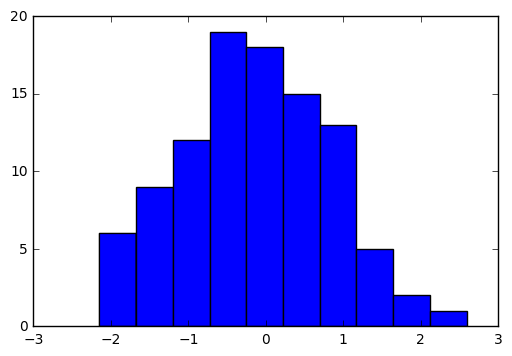
norm = tf.random_normal([100])    #生成100个随机数

with tf.Session() as sess:

    norm_data = norm.eval()

print(norm_data[:10])

import matplotlib.pyplot as plt

plt.hist(norm_data)

plt.show()
输出结果:
[-1.20503342 -0.40912333  1.02314627  0.91239542 -0.44498116  1.46095467

  1.71958613 -0.02297023 -0.04446657 -1.58943892]
———网易云课堂《深度学习应用开发Tensorflow实践》学习记录
Tensorflow之MNIST手写数字识别:分类问题(1)的更多相关文章
- Android+TensorFlow+CNN+MNIST 手写数字识别实现
Android+TensorFlow+CNN+MNIST 手写数字识别实现 SkySeraph 2018 Email:skyseraph00#163.com 更多精彩请直接访问SkySeraph个人站 ...
- 基于tensorflow的MNIST手写数字识别(二)--入门篇
http://www.jianshu.com/p/4195577585e6 基于tensorflow的MNIST手写字识别(一)--白话卷积神经网络模型 基于tensorflow的MNIST手写数字识 ...
- 基于TensorFlow的MNIST手写数字识别-初级
一:MNIST数据集 下载地址 MNIST是一个包含很多手写数字图片的数据集,一共4个二进制压缩文件 分别是test set images,test set labels,training se ...
- Tensorflow实现MNIST手写数字识别
之前我们讲了神经网络的起源.单层神经网络.多层神经网络的搭建过程.搭建时要注意到的具体问题.以及解决这些问题的具体方法.本文将通过一个经典的案例:MNIST手写数字识别,以代码的形式来为大家梳理一遍神 ...
- Tensorflow之MNIST手写数字识别:分类问题(2)
整体代码: #数据读取 import tensorflow as tf import matplotlib.pyplot as plt import numpy as np from tensorfl ...
- 基于TensorFlow的MNIST手写数字识别-深入
构建多层卷积神经网络时需要多组W和偏移项b,我们封装2个方法来产生W和b 初级MNIST中用0初始化W和b,这里用噪声初始化进行对称打破,防止产生梯度0,同时用一个小的正值来初始化b避免dead ne ...
- TensorFlow——MNIST手写数字识别
MNIST手写数字识别 MNIST数据集介绍和下载:http://yann.lecun.com/exdb/mnist/ 一.数据集介绍: MNIST是一个入门级的计算机视觉数据集 下载下来的数据集 ...
- mnist手写数字识别——深度学习入门项目(tensorflow+keras+Sequential模型)
前言 今天记录一下深度学习的另外一个入门项目——<mnist数据集手写数字识别>,这是一个入门必备的学习案例,主要使用了tensorflow下的keras网络结构的Sequential模型 ...
- mnist 手写数字识别
mnist 手写数字识别三大步骤 1.定义分类模型2.训练模型3.评价模型 import tensorflow as tfimport input_datamnist = input_data.rea ...
随机推荐
- Linux-3.14.12内存管理笔记【伙伴管理算法(3)】
前面分析了伙伴管理算法的初始化,在切入分析代码实现之前,例行先分析一下其实现原理. 伙伴管理算法(也称之为Buddy算法),该算法将所有空闲的页面分组划分为MAX_ORDER个页面块链表进行管理,其中 ...
- mysql语法总结及例子
1. DDL相关 a. -- 查询所有数据库 show databases;-- 删除数据库drop database ladeng; b. -- use `数据库名称`; 表示使用此数据库 use ...
- Fiddler应用——使用Fiddler修改指定request/response报文
Fiddler是一个http协议调试代理工具,它能够记录并检查所有你的电脑和互联网之间的http通讯,分析数据,设置断点,修改请求/响应数据,查看所有的“进出”Fiddler的数据(指cookie,h ...
- 从公司实际沟通中-得知bug的描述与为什么要bug留痕
从公司实际沟通中-得知bug的描述与为什么要bug留痕 最近在做的一个实际项目.下图为我们的聊天记录,仔细看图,领悟: 从中预期可以学习到的: 1)实际公司--Bug描述的另一个方法: 2)实际公司- ...
- 失败的一天(找bug)
前天早上来到实验室,准备抓紧时间写写代码,毕竟第二天就是组会了.点了一下鼠标,发现显示屏无法唤醒,然后就准备强制关机再开机(我一般不关机,以前遇到过几次无法唤醒),低头发现主机不亮,然后按了开关也不亮 ...
- sed命令总结
目录 1.概述 2.查 1.打印整行(一或多) 2.正则打印包含关键字的行 2.增 3.删 4.改 5.后向引用 6.结合 7.练习 我叫张贺,贪财好色.一名合格的LINUX运维工程师,专注于LINU ...
- ora-12505报错解决方法(转)
用oracle数据库新建连接时遇到ora-12505,此问题解决后又出现ora-12519错误,郁闷的半天,经过一番折腾问题解决,下面小编把我的两种解决方案分享给大家,仅供参考. 解决方案一: 今天工 ...
- ROS Tricks
Gazebo 第一次进入 Gazebo 会卡在开始界面,此时是在加载模型文件,为保证模型顺利加载,可以提前将模型文件下载并放在本地路径 ~/.gazebo/models 下,模型文件下载地址: htt ...
- 分布式SQL数据库中部分索引的好处
在优锐课的java学习分享中,探讨了分布式SQL数据库中部分索引的优势,并探讨了性能测试,结果等. 如果使用局部索引而不是常规索引,则在可为空的列上(其中只有一小部分行的该列不具有空值),然后可以大大 ...
- MySQL数据库查询所有表名
查找指定库中所有表名 select table_name from information_schema.tables where table_schema='db_name'; 注:替换db_nam ...