
EAC3 Spectral Extension Process
1.overview
当使用Spectral extension时,channel中的高频部分的transform coefficients由低频部分合成。
transform coefficients合成包括:copy低频部分的transform coefficients insert到高频部分,作为高频部分的transform coefficients. inserted transform coefficients与pseudo-random noise做blending, scaling blended transform coefficients,使得blended transform coefficients match原始信号的spectral evelop, scale factor在encoder端基于spectral extension band计算,并传送到decoder.
spxbegf和spxendf标识spectral extension的起始和结束频率。
2.Sub-Band Structure
transform coefficients #25到#228 组合成17个subband,每个subband包含12个transform coefficients.
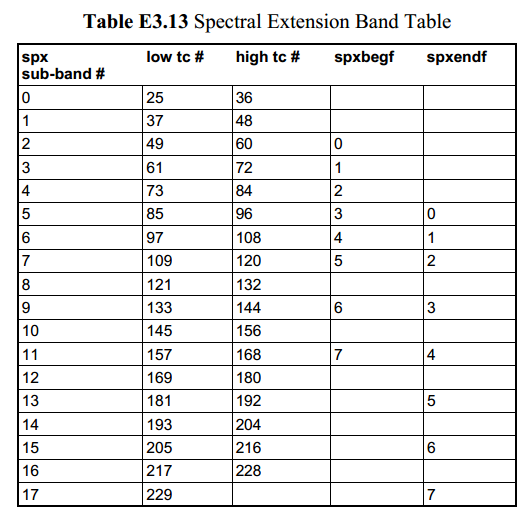
spx_begin_subbnd通过spxbegf得到,标识第一个spctral extension subband的index.
spx_end_subbnd通过spxendf得到,标识最后一个spctral extension subband的index.
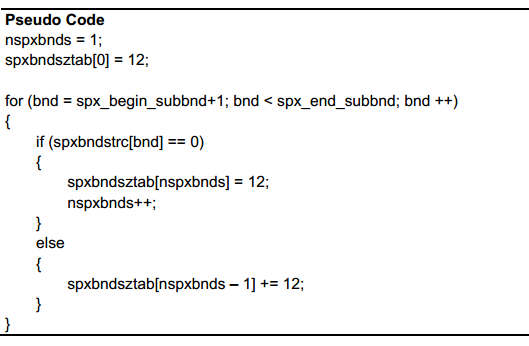
几个连续的spectral extension subband可以组合成一个spectral extenssion bands,每个spectral extension band产生一个spectral extension coordinate.
spectral extension bands的个数和size由spectral extension band structure array(spxbndstrc[])决定。
如果spxbndstr[bnd]为0表示当前subband是一个新的spectral extension band的开始。
如果spxbndstr[bnd]为1表示当前subband是属于前一个spectral extension band。
3. Spectral extension coordinate
当使用spectral extension(chinspx[ch] == 1)时,spectral extension coordinate存在于每个channel的每个spectral extension band中。
spxcoe[ch] ==0,则当前channel 的spectral coordinates不包含在bitstream中,复用前面的spectral coordiantes.
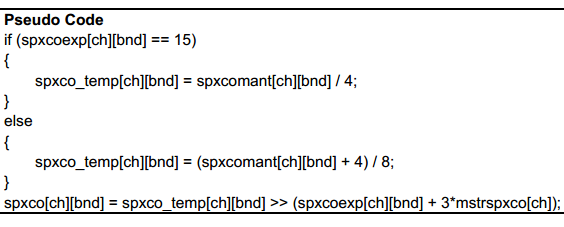
spectral coordinate以浮点形式表示,包含4bit的spxcoexp[ch][bnd]和2bit的spxcomant[ch][bnd]。
spectral coordinate的mantissa是无符号的。当exponent 等于15时,mantissa的范围为0.5~1,当exponent小于15时,mantissa的MSB总是1所以不传送只传送接下来的2bit。
spectral coordinate的计算方法如下:
4.High Frequency Transform Coefficient Synthesis
1) Transform Coefficient Translation
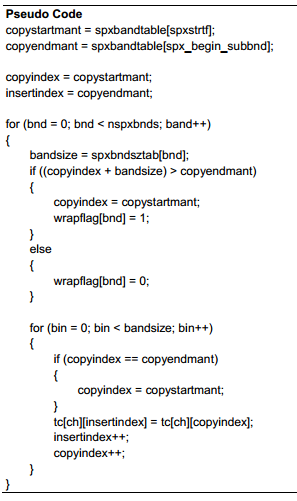
Transform coefficient translation 主要是copy 低频的transform coefficients并insert作为高频的transform coefficients.
spxstrtf是一个table中的index,用来决定被copy的第一个transform coefficients.
spx_begin_subbnd通过spxbegf得到,是一个table的index,用来决定insert的第一个transform coefficients.
spx_end_subbnd通过spxendf得到,是一个table的index,用来决定insert的最后一个transform coefficients.
tranform coefficient translation基于band进行,copy动作从copyindex处的transform coefficients,到copyindex+ bandsize– 1处的transform coefficients结束.
insert动作从insertindex处的transform coefficients,到insertindex+ bandsize– 1处的transform coefficients结束.
在每个band做copy之前,copyindex+ bandsize– 1与copyendmant比较,如果大于等于copyendmant,那么将copyindex reset成copyendmant,并将wrapflag[bnd]设置为1.
2)Transform Coefficient Noise Blending
translated transform coefficients需要与pseudo-random noise做blending使得audio signal 听起来更自然。
2.1)Blending Factor Calculation
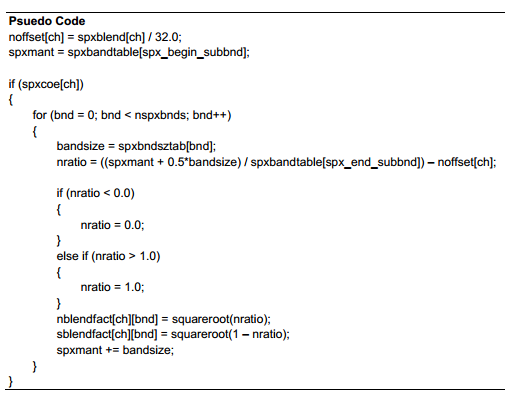
首先需要计算pseudo-random noise与translated transform coefficients的blending factor.每个band的blending factor是基于spxblend和该band的mid-point frequecy进行计算。
某一个block存在新的spectral extension coordinates,那么当前block也存在spxblend参数,其他block可能会复用spectral extension coordinates.
blending factor计算如下:
2.2)Banded RMS Energy Calculation
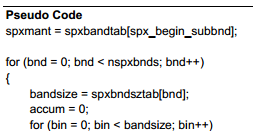
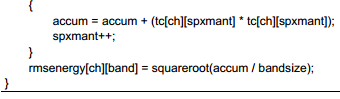
下一步计算translated coefficients的RMS energy. RMS energy用来在blending前scale pesudo-random noise sample。
RMS energy计算方法如下:
2.3)Transform Coefficient Band Border Filtering
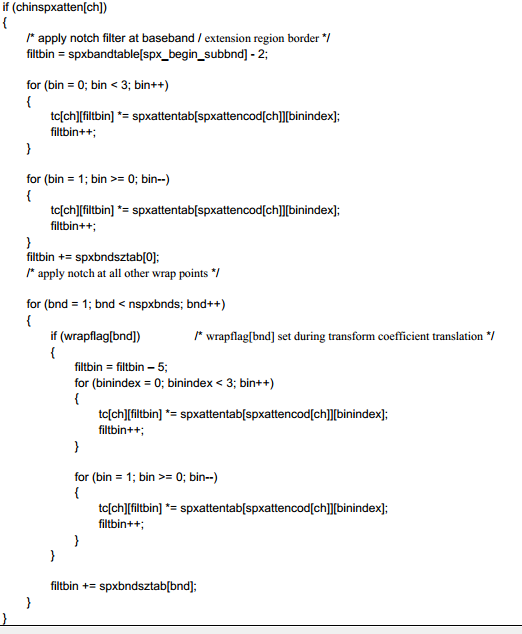
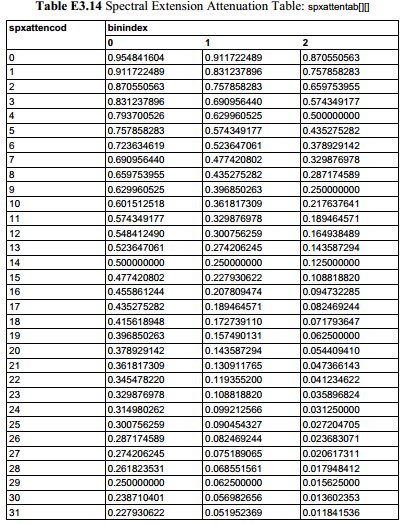
当spectral extension attenuation 在某个channel enabled时,notch filter作用于base band和extension region的边界周围。
notch filter在extension region的第一个bin处是对称的,总共cover 5个bin。filter的前3个attenuation values 通过spxattencod[ch]作为index查找table得到,后面2个attenuation values由于对称并不存在于table中。
notch filter也作用于在transorm coefficient translation时某个band处发生了wrap,即wrapflag[band]等于1时。
notch filter在transform coefficient translation和计算banded RMS energy之后,在noise scaling和transform coefficients blending之前。
2.4)Noise Scaling and Transform Coefficient Blending Calculation
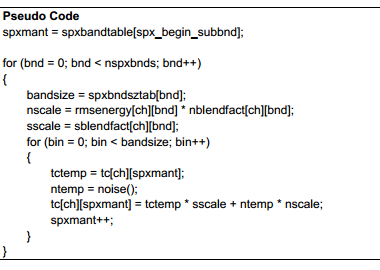
为了更合适的进行pesudo-random noise和translated transform coefficients的blending.每个band的noise需要进行scale来match 每个band中translated transform coefficients的RMS energy.
noise scaling和translated transform coefficients blending过程如下:
2.5)Blended Transform Coefficient Scaling
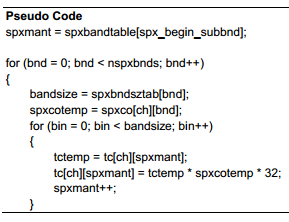
最后一步是将blended transform coefficients用spectral extension coordinates进行scale来形成最终的高频transform coefficients.
EAC3 Spectral Extension Process的更多相关文章
- EAC3 spectral extension原理
1.Spectral extension简介 Spectral extension是通过低频的transform coefficients合成高频transform coefficients的过程. ...
- 用于PHP的Gearman Worker管理工具GearmanManager
项目地址:https://github.com/brianlmoon/GearmanManager PHP环境要求 PHP 5.5.9 POSIX extension Process Control ...
- Python爬取CSDN博客文章
0 url :http://blog.csdn.net/youyou1543724847/article/details/52818339Redis一点基础的东西目录 1.基础底层数据结构 2.win ...
- suffix tree
文章出处:http://www.cnblogs.com/snowberg/archive/2011/10/21/2468588.html 3 What is a Suffix Tree Suf ...
- puppeteer(五)chrome启动参数列表API
List of Chromium Command Line Switches https://peter.sh/experiments/chromium-command-line-switches/ ...
- CEF 支持的命令行参数
参考:https://peter.sh/experiments/chromium-command-line-switches/ List of Chromium Command Line Switch ...
- Capabilities & ChromeOptions
https://sites.google.com/a/chromium.org/chromedriver/capabilities http://stackoverflow.com/questions ...
- List of Chromium Command Line Switches(命令行开关集)——官方指定命令行更新网址
转自:http://peter.sh/experiments/chromium-command-line-switches/ There are lots of command lines which ...
- 谷歌扩展程序--------------Message
转载:https://developer.chrome.com/extensions/messaging#external-webpage Message Passing Since content ...
随机推荐
- 解决shell 报错:syntax error: unexpected end of file
debug shell:执行 sh -x test.sh vi test.sh :set fileformat=unix :wq解决问题原因是我在windows pycharm 写的格式不符合uni ...
- 通过设置iis在局域网中访问网页
0.准备工作:IIS6.0镜像包,自制的网页文件夹(路径不能是桌面,否则其他电脑将因为没有权限访问系统桌面而不能访问你的网页) 1.进入添加或删除程序,勾上Internet信息服务(IIS),点击下一 ...
- springboot~集成DataSource 与 Druid监控配置
介绍 Druid首先是一个数据库连接池.Druid是目前最好的数据库连接池,在功能.性能.扩展性方面,都超过其他数据库连接池,Druid已经在阿里巴巴部署了超过600个应用,经过一年多生产环境大规模部 ...
- php文件操作(最后进行文件常用函数封装)
文件信息相关API $filename="./1-file.php"; //filetype($filename):获取文件的类型,返回的是文件的类型 echo '文件类型为:', ...
- ECMAScript基本语法——⑤运算符 算数运算符
+-*/%
- centos因为安装花生壳而无法登录系统的问题
服务器安装 phddns 花生壳 启动失败,一直卡在启动进度条页面. 解决办法 1.按F5查看卡在什么位置, 2.查看解决方法:程序卡住的情况下,直接备份资料后,卸载程序重启就可以了. 3.进入到si ...
- 《深入理解java虚拟机》读书笔记十一——第十二章
第十二章 Java内存模型与线程 1.硬件效率与一致性 由于计算机的存储设备与处理器的运算速度有几个数量级的差距,所以现代计算机系统都不得不加入一层读写速度尽可能接近处理器运算速度的高速缓存(Cac ...
- ZOJ1310-Robot (BFS)
The Robot Moving Institute is using a robot in their local store to transport different items. Of co ...
- 1.什么是 Docker
官网地址:https://www.docker.com/ Docker 最初是 dotCloud 公司创始人 Solomon Hykes 在法国期间发起的一个公司内部项目,它是基于 dotCloud ...
- [USACO08JAN] 手机网络 - 树形dp
经典问题系列 覆盖半径\(1\)的最小点覆盖集 \(f[i][0]\) 表示不在此处建信号塔,但\(i\)及其子树都有信号 \(f[i][1]\) 表示在此处建信号塔,但\(i\)及其子树都有信号 \ ...