
EAC3 Spectral Extension Process
1.overview
当使用Spectral extension时,channel中的高频部分的transform coefficients由低频部分合成。
transform coefficients合成包括:copy低频部分的transform coefficients insert到高频部分,作为高频部分的transform coefficients. inserted transform coefficients与pseudo-random noise做blending, scaling blended transform coefficients,使得blended transform coefficients match原始信号的spectral evelop, scale factor在encoder端基于spectral extension band计算,并传送到decoder.
spxbegf和spxendf标识spectral extension的起始和结束频率。
2.Sub-Band Structure
transform coefficients #25到#228 组合成17个subband,每个subband包含12个transform coefficients.
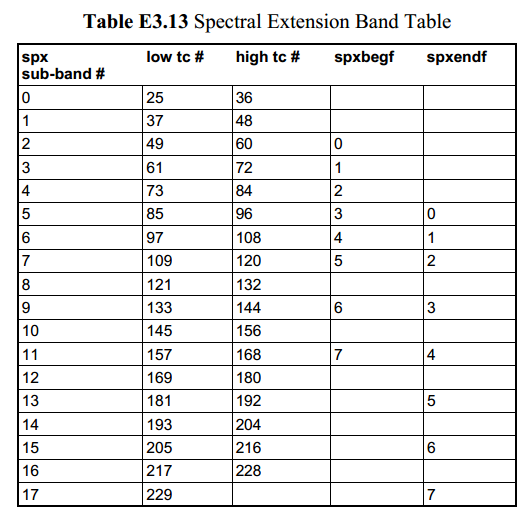
spx_begin_subbnd通过spxbegf得到,标识第一个spctral extension subband的index.
spx_end_subbnd通过spxendf得到,标识最后一个spctral extension subband的index.
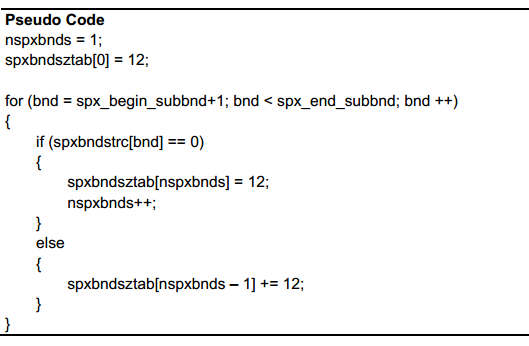
几个连续的spectral extension subband可以组合成一个spectral extenssion bands,每个spectral extension band产生一个spectral extension coordinate.
spectral extension bands的个数和size由spectral extension band structure array(spxbndstrc[])决定。
如果spxbndstr[bnd]为0表示当前subband是一个新的spectral extension band的开始。
如果spxbndstr[bnd]为1表示当前subband是属于前一个spectral extension band。
3. Spectral extension coordinate
当使用spectral extension(chinspx[ch] == 1)时,spectral extension coordinate存在于每个channel的每个spectral extension band中。
spxcoe[ch] ==0,则当前channel 的spectral coordinates不包含在bitstream中,复用前面的spectral coordiantes.
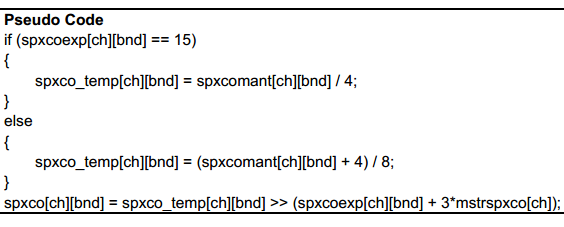
spectral coordinate以浮点形式表示,包含4bit的spxcoexp[ch][bnd]和2bit的spxcomant[ch][bnd]。
spectral coordinate的mantissa是无符号的。当exponent 等于15时,mantissa的范围为0.5~1,当exponent小于15时,mantissa的MSB总是1所以不传送只传送接下来的2bit。
spectral coordinate的计算方法如下:
4.High Frequency Transform Coefficient Synthesis
1) Transform Coefficient Translation
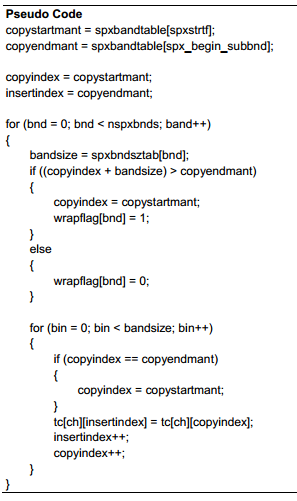
Transform coefficient translation 主要是copy 低频的transform coefficients并insert作为高频的transform coefficients.
spxstrtf是一个table中的index,用来决定被copy的第一个transform coefficients.
spx_begin_subbnd通过spxbegf得到,是一个table的index,用来决定insert的第一个transform coefficients.
spx_end_subbnd通过spxendf得到,是一个table的index,用来决定insert的最后一个transform coefficients.
tranform coefficient translation基于band进行,copy动作从copyindex处的transform coefficients,到copyindex+ bandsize– 1处的transform coefficients结束.
insert动作从insertindex处的transform coefficients,到insertindex+ bandsize– 1处的transform coefficients结束.
在每个band做copy之前,copyindex+ bandsize– 1与copyendmant比较,如果大于等于copyendmant,那么将copyindex reset成copyendmant,并将wrapflag[bnd]设置为1.
2)Transform Coefficient Noise Blending
translated transform coefficients需要与pseudo-random noise做blending使得audio signal 听起来更自然。
2.1)Blending Factor Calculation
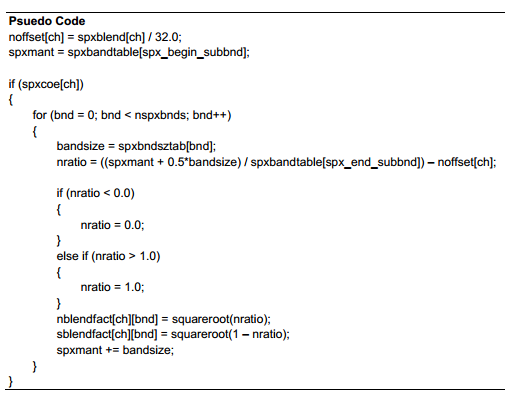
首先需要计算pseudo-random noise与translated transform coefficients的blending factor.每个band的blending factor是基于spxblend和该band的mid-point frequecy进行计算。
某一个block存在新的spectral extension coordinates,那么当前block也存在spxblend参数,其他block可能会复用spectral extension coordinates.
blending factor计算如下:
2.2)Banded RMS Energy Calculation
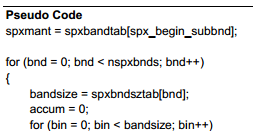
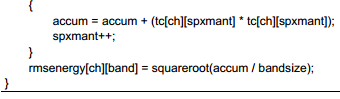
下一步计算translated coefficients的RMS energy. RMS energy用来在blending前scale pesudo-random noise sample。
RMS energy计算方法如下:
2.3)Transform Coefficient Band Border Filtering
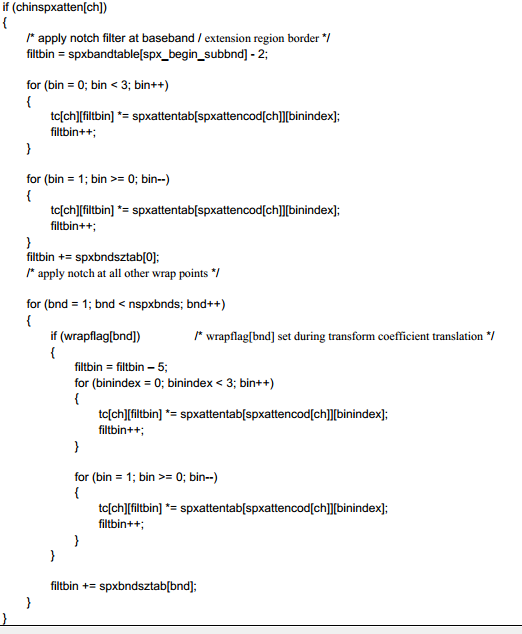
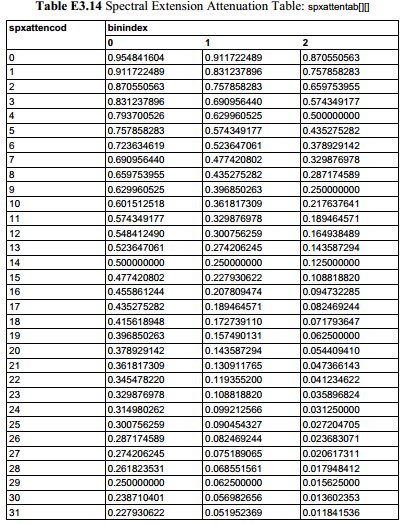
当spectral extension attenuation 在某个channel enabled时,notch filter作用于base band和extension region的边界周围。
notch filter在extension region的第一个bin处是对称的,总共cover 5个bin。filter的前3个attenuation values 通过spxattencod[ch]作为index查找table得到,后面2个attenuation values由于对称并不存在于table中。
notch filter也作用于在transorm coefficient translation时某个band处发生了wrap,即wrapflag[band]等于1时。
notch filter在transform coefficient translation和计算banded RMS energy之后,在noise scaling和transform coefficients blending之前。
2.4)Noise Scaling and Transform Coefficient Blending Calculation
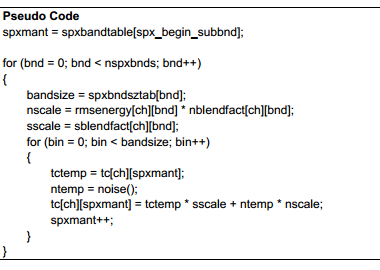
为了更合适的进行pesudo-random noise和translated transform coefficients的blending.每个band的noise需要进行scale来match 每个band中translated transform coefficients的RMS energy.
noise scaling和translated transform coefficients blending过程如下:
2.5)Blended Transform Coefficient Scaling
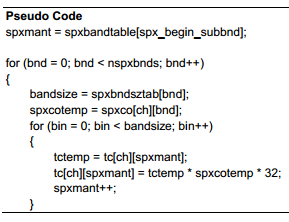
最后一步是将blended transform coefficients用spectral extension coordinates进行scale来形成最终的高频transform coefficients.
EAC3 Spectral Extension Process的更多相关文章
- EAC3 spectral extension原理
1.Spectral extension简介 Spectral extension是通过低频的transform coefficients合成高频transform coefficients的过程. ...
- 用于PHP的Gearman Worker管理工具GearmanManager
项目地址:https://github.com/brianlmoon/GearmanManager PHP环境要求 PHP 5.5.9 POSIX extension Process Control ...
- Python爬取CSDN博客文章
0 url :http://blog.csdn.net/youyou1543724847/article/details/52818339Redis一点基础的东西目录 1.基础底层数据结构 2.win ...
- suffix tree
文章出处:http://www.cnblogs.com/snowberg/archive/2011/10/21/2468588.html 3 What is a Suffix Tree Suf ...
- puppeteer(五)chrome启动参数列表API
List of Chromium Command Line Switches https://peter.sh/experiments/chromium-command-line-switches/ ...
- CEF 支持的命令行参数
参考:https://peter.sh/experiments/chromium-command-line-switches/ List of Chromium Command Line Switch ...
- Capabilities & ChromeOptions
https://sites.google.com/a/chromium.org/chromedriver/capabilities http://stackoverflow.com/questions ...
- List of Chromium Command Line Switches(命令行开关集)——官方指定命令行更新网址
转自:http://peter.sh/experiments/chromium-command-line-switches/ There are lots of command lines which ...
- 谷歌扩展程序--------------Message
转载:https://developer.chrome.com/extensions/messaging#external-webpage Message Passing Since content ...
随机推荐
- laravle中orm简单的增删改查
友情提示请在有laravel基础的情况下观看文章 1.数据库信息(user表) CREATE TABLE `user` ( `id` int(11) NOT NULL AUTO_INCREMENT, ...
- js秒数倒计时
代码 /** * 调用回调函数 * @param callback 回调函数体 * @param args 参数 */ execCallback: function (callback, args) ...
- OpenCV3.2.0+VS2015开发环境配置
vs2015安装可参考:https://www.jianshu.com/p/391e67529bd3 OpenCV3.2.0配置可参考:https://www.jianshu.com/p/026093 ...
- Laravel中使用QRcode自制二维码
一.配置 1.在项目根目录输入命令 composer require simplesoftwareio/simple-qrcode 1.3.* 2.在config/app.php 的 provider ...
- 原生js实现拖拽功能
1. 给个div,给定一些样式 <div class="drag" style="left:0;top:0;width:100px;height:100px&quo ...
- c++ STL queue:deque+优先队列
/* queue 模板类需要两个模板参数,一个是元素类型,一个容器类型,元素类型是必要的,容器类型是可选的,默认为deque队列 类型.一:定义queue(要有头文件#include <qu ...
- Python-Django学习笔记(二)-创建一个Django项目与应用
1.创建一个Django项目 打开cmd命令行,设置好工作目录(cd 目录路径),然后输入 django-admin startproject projectname #必须安装好Django才可以执 ...
- 牛客CSP-S提高组赛前集训营3 赛后总结
货物收集 二分答案.复杂度\(O(n\log n)\). 货物分组 用费用提前计算的思想,考虑用一个新的箱子来装货物会发生什么. 显然费用会加上后面的所有货物的总重. \(60\)分的\(O(n^2) ...
- C++——流类库与输入/输出
I/O流的概念 当程序与外界环境进行信息交换时,存在着两个对象,一个是程序中的对象,另一个是文件对象,流是一种抽象,它负责在数据的生产者和数据的消费者之间建立连接,并管理数据的流动.程序建立一个流对象 ...
- 安装python3.7.4时报错:Service Pack 1 is required to continue installation
python3.7.4安装失败:Service Pack 1 is required to continue installation 解决办法: 点击报错页面中的“log file”,日志最后一行显 ...