
GRE Over IPSec配置
路由器GRE over IPSec站点到站点VPN
问题分析:对于前面的经典的IPSec VPN的配置来说,兼容性较好,适合于多厂商操作的时候,但是这种经典的配置方式不适合在复杂的网路中配置,如下: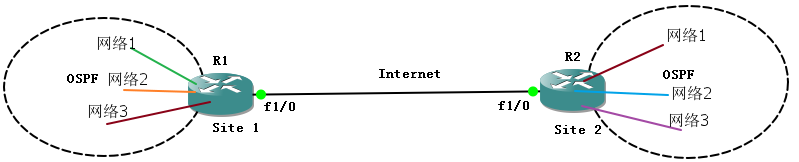
这样在site 1和site 2后面有很多的网络,这样出现的难题是:
*没有虚拟隧道接口,不能让两个站点的动态路由协议贯通
*由于没有虚拟隧道接口,所以很难对通信点之间的明文数据流进行控制(ACL、NAT、QoS)
*感兴趣流多,是两个站点的组合数,网络多的话,感兴趣流也多
——为了解决这一缺陷,那么Cisco提供两种方案,一种是GRE(IOS 12.4之前推荐),一种是SVTI(IOS 12.4以后的路由器推荐)。
分析GRE是如何解决经典配置的问题的:1、GRE上运行OSPF,这样可以实现内部互学路由;2、可以在GRE隧道接口配置ACL等控制;3、感兴趣流最终会是站点之间的GRE流量。GRE over IPSec 属于典型的传输模式的IPSec VPN(因为加密点=通信点)。
实验拓扑:
默认基本配置完成
Site1:
R1(config)#ip route 0.0.0.0 0.0.0.0 12.1.1.2
R1(config)#in tunnel 13
R1(config-if)#ip add 13.1.1.1 255.255.255.0
R1(config-if)#tunnel source 12.1.1.1
R1(config-if)#tun destination 23.1.1.3
R1(config-if)#end
R1#ping 13.1.1.3
Type escape sequence to abort.
Sending 5, 100-byte ICMP Echos to 13.1.1.3, timeout is 2 seconds:
!!!!!
Success rate is 100 percent (5/5), round-trip min/avg/max = 136/162/180 ms
R1(config)#router os 1
R1(config-router)#network 13.1.1.0 0.0.0.255 a 0
R1(config-router)#net 1.1.1.0 0.0.0.255 a 0
R1(config-router)#router-id 1.1.1.1
R1(config-router)#end
R1#sho ip ro ospf
Codes: L - local, C - connected, S - static, R - RIP, M - mobile, B - BGP
D - EIGRP, EX - EIGRP external, O - OSPF, IA - OSPF inter area
N1 - OSPF NSSA external type 1, N2 - OSPF NSSA external type 2
E1 - OSPF external type 1, E2 - OSPF external type 2
i - IS-IS, su - IS-IS summary, L1 - IS-IS level-1, L2 - IS-IS level-2
ia - IS-IS inter area, * - candidate default, U - per-user static route
o - ODR, P - periodic downloaded static route, + - replicated route
Gateway of last resort is 12.1.1.2 to network 0.0.0.0
3.0.0.0/32 is subnetted, 1 subnets
O 3.3.3.3 [110/1001] via 13.1.1.3, 00:00:08, Tunnel13
R1(config)#crypto isakmp enable
R1(config)#crypto is policy 10
R1(config-isakmp)#authentication pre-share
R1(config-isakmp)#exi
R1(config)#crypto isakmp key 0 cisco address 23.1.1.3
R1(config)#ip access-list extended vpn
R1(config-ext-nacl)#permit gre 12.1.1.0 0.0.0.255 23.1.1.0 0.0.0.255
R1(config-ext-nacl)#exi
R1(config)#crypto ipsec transform-set trans esp-des esp-md5-hmac
R1(cfg-crypto-trans)#mode transport
R1(cfg-crypto-trans)#exi
R1(config)#crypto map cisco 10 ipsec-isakmp
% NOTE: This new crypto map will remain disabled until a peer
and a valid access list have been configured.
R1(config-crypto-map)#match address vpn
R1(config-crypto-map)#set peer 23.1.1.3
R1(config-crypto-map)#set transform-set trans
R1(config-crypto-map)#int f1/0
R1(config-if)#crypto map cisco
R1#ping 3.3.3.3 so 1.1.1.1
Type escape sequence to abort.
Sending 5, 100-byte ICMP Echos to 3.3.3.3, timeout is 2 seconds:
Packet sent with a source address of 1.1.1.1
.!!!!
Success rate is 80 percent (4/5), round-trip min/avg/max = 208/243/264 ms
R1#sho crypto en connections active
Crypto Engine Connections
ID Type Algorithm Encrypt Decrypt LastSeqN IP-Address
1 IPsec DES+MD5 0 15 17 12.1.1.1
2 IPsec DES+MD5 8 0 0 12.1.1.1
1001 IKE SHA+DES 0 0 0 12.1.1.1
Site2
R3(config)#ip route 0.0.0.0 0.0.0.0 23.1.1.2
R3(config)#end
R3(config)#int tu 13
R3(config-if)#tun so 23.1.1.3
R3(config-if)#tun destination 12.1.1.1
R3(config-if)#ip add 13.1.1.3 255.255.255.0
R3(config)#ro
R3(config)#router os 1
R3(config-router)#router-id 3.3.3.3
R3(config-router)#net 3.3.3.0 0.0.0.255 a 0
R3(config-router)#net 13.1.1.0 0.0.0.255 a 0
R3(config-router)#end
R3(config)#crypto is enable
R3(config)#crypto isakmp po 10
R3(config-isakmp)#authentication pre-share
R3(config-isakmp)#exi
R3(config)#crypto isakmp key 0 cisco address 12.1.1.1
R3(config)#ip access-list extended vpn
R3(config-ext-nacl)#permit gre 23.1.1.0 0.0.0.255 12.1.1.0 0.0.0.255
R3(config-ext-nacl)#exi
R3(config)#crypto ipsec transform-set trans esp-des esp-md5-hmac
R3(cfg-crypto-trans)#mode transport
R3(cfg-crypto-trans)#exi
R3(config)#crypto map cisco 10 ipsec-isakmp
% NOTE: This new crypto map will remain disabled until a peer
and a valid access list have been configured.
R3(config-crypto-map)#set peer 12.1.1.1
R3(config-crypto-map)#set transform-set trans
R3(config-crypto-map)#match address vpn
R3(config-crypto-map)#int f1/0
R3(config-if)#crypto map cisco
除此之外,可以直接使用下面的配置来代替crypto map。解释一下,注意这个IPSec profile的运用位置,是隧道接口,并且使用的关键字是tunnel protection,显然使用这个IPSec profile来保护隧道的,那隧道中的流量自然就得以保护,而这流量就是感兴趣流,那么流量而动另一端肯定是对等体的目的地址,那么就不需要设置peer和match address了
Site1(config)#crypto ipsec profile IPSecPro //名字
Site1(ipsec-profile)#set transform-set trans
Site1(ipsec-profile)#int tun 13
Site1(config-if)#tunnel protection ipsec profile IPSecPro
Site2(config)#crypto ipsec profile IPSecPro
Site2(ipsec-profile)#set transform-set trans
Site2(ipsec-profile)#int tun 13
Site2(config-if)#tunnel protection ipsec profile IPSecPro
GRE Over IPSec配置的更多相关文章
- 动态的GRE OVER IPSEC的实验模拟与分析
此篇博客正在介绍的是下图中的Dynamic P2P GRE OVER IPSEC VPN: 为什么出现这种动态的GRE OVER IPSEC VPN技术呢? 首先在前面几篇博客中已经介绍过了,动态是为 ...
- netsh导入导出IPSec配置策略
首先提一句: ipsec规则中,filter action为允许的比拒绝的优先级要高,其它的没有顺序关系,经测试验证! 参考:http://tech.techweb.com.cn/thread-354 ...
- ipsec配置strongswan.conf和ipsec.conf
配置strongswan.conf vi /usr/local/etc/strongswan.conf # strongswan.conf - strongSwan configuration fil ...
- 思科CISCO ASA 5521 防火墙 Ipsec 配置详解
版本信息: Cisco Adaptive Security Appliance Software Version 9.9(2) Firepower Extensible Operating Syste ...
- 为何GRE可以封装组播报文而IPSEC却不行?
Author : Email : vip_13031075266@163.com Date : 2021.01.24 Copyright : 未经同意不得 ...
- 华为路由器GRE配置
1. 协议简介 gre(generic routing encapsulation,通用路由封装)协议是对某些网络层协议(如ip 和ipx)的数据报进行封装,使这些被封装的数据报能够在另一个网络层协议 ...
- openwrt配置strongswan对接hillstone ipsec的笔记
一.主要参考资料: https://openwrt.org/docs/guide-user/services/vpn/ipsec/strongswan/roadwarrior https://open ...
- 华三F100系列防火墙 、华为USG6300系列防火 GRE 隧道配置
GRE概述: 通用路由封装(GRE: Generic Routing Encapsulation)是通用路由封装协议,可以对某些网络层协议的数据报进行封装,使这些被封装的数据报能够在IPV4网络中传输 ...
- gre tunnel
http://searchenterprisewan.techtarget.com/tip/GRE-tunnel-vs-IPsec-tunnel-What-is-the-difference Enca ...
随机推荐
- CentOS 7 如何设置为eth0网卡
参考文章https://www.linuxidc.com/Linux/2017-06/144973.htm 主要方法 1) 安装的时候,在内核选项中加上net.ifnames=0 biosdevnam ...
- [HDU5382]GCD?LCM!
Description HDU5382 会吗?不会! 设\(F(n)=\sum\limits_{i = 1}^{n}\sum\limits_{j=1}^{n}[lcm(i,j)+gcd(i,j)\ge ...
- C#对字典Dictionary 的添加,遍历,移除系列操作
C#对字典Dictionary 的添加,遍历,移除系列操作: //一.创建泛型哈希表,然后加入元素 Dictionary<string, string> oscar = new Dicti ...
- android关闭屏幕时不锁屏实现
所需权限: <uses-permission android:name="android.permission.DISABLE_KEYGUARD"/> 关闭系统锁屏服务 ...
- python开发基础04-列表、元组、字典操作练习
练习1: # l1 = [11,22,33]# l2 = [22,33,44]# a. 获取内容相同的元素列表# b. 获取 l1 中有, l2 中没有的元素列表# c. 获取 l2 中有, l1 中 ...
- ModelSerializer,序列化与反序列化整合
复习 """ 1.解析模块:全局局部配置 REST_FRAMEWORK = { # 全局解析类配置 'DEFAULT_PARSER_CLASSES': [ 'rest_f ...
- 关于反射中如何剔除实体类中serialVersionUID字段
Field[] fields = t.getClass().getDeclaredFields(); //这里为了剔除serialVersionUID Field[] tempArr = new Fi ...
- 数据库程序接口——JDBC——API解读第一篇——建立连接的核心对象
结构图 核心对象 Driver Java通过Driver接口表示驱动,每种类型的数据库通过实现Driver接口提供自己的Driver实现类. Driver由属性,操作,事件三部分组成. 属性 公共属性 ...
- python面向对象封装案例2
封装 封装 是面向对象编程的一大特点 面向对象编程的 第一步 —— 将 属性 和 方法 封装 到一个抽象的 类 中 外界 使用 类 创建 对象,然后 让对象调用方法 对象方法的细节 都被 封装 在 类 ...
- flask 2 进阶
# 创建项目 jinja2 语法基础 # pycharm 里面 创建 new project -->pure python 之后选择路径 选择解释器 以及虚拟环境问题 from flask im ...