
十四、制作优美的div弹框
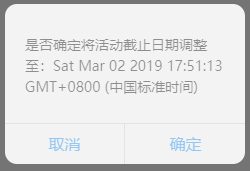
功能描述:确认【调整按钮】弹出精美div弹框
1、jsp页面:perfectAlertDiv.jsp
<%@ page contentType="text/html;charset=UTF-8" language="java" %>
<html>
<head>
<title>确认调整按钮弹出精美弹框</title>
<script type="text/javascript" src="../../js/common/jquery.min.js"></script>
<script type="text/javascript" src="../../js/common/jquery.easyui.min.js"></script>
<script type="text/javascript" src="../../js/common/jquery.form.js"></script>
<link rel="stylesheet" type="text/css" href="../../css/perfectAlertDiv.css">
<script type="text/javascript" src="../../js/divFunction/perfectAlertDiv.js"></script>
</head>
<body>
<!--模块1 -->
<div class="mainDiv">
<div class="div-inline">
<select class="selectCategory commonClass">
<option value ="activityMainId">活动1</option>
<option value ="id">活动2</option>
</select>
<input type="text" class="commonClass">
</div>
<div class="div-inline">
<label> 设置活动截止日期:</label>
<input type="text" style="width:152px" id="activityEndTime" class="commonClass" value = ""/>
</div>
<div class="div-inline">
<button class="confirmModifyBtn" id="confirmModifyBtn" type="button">确认调整</button>
</div>
</div> <!--弹框div -->
<div class="layerDiv" id="layerDiv">
<div class="layer-content" id="first-layer">
<div class="content-title" id="first-content-title">
</div>
<div class="content-btn">
<span class="btn-lt confirmLeft cancleLayer">取消</span>
<span class="btn-rt confirmRight closelayer" id="firstConfirmBtn">确定</span>
</div>
</div>
<div class="layer-content" id="second-layer">
<div class="content-title" id="second-layer-title">
活动码无效
</div>
<div class="content-btn" id="comfirmBtn">
确定
</div>
</div>
<div class="layer-content" id="three-layer">
<div class="content-title" id="Three-layer-title">
活动码无效
</div>
<div class="content-btn" id="comfirmThreeBtn">
确定
</div>
</div>
</div>
</body>
</html>
2、perfectAlertDiv.js
 //利用正则去掉前后空格

 function spaceTrim(val){

     return val.replace(/(^\s*)|(\s*$)/g, "");

 }

 $(function(){

     //确认调整触发的事件

     $('#confirmModifyBtn').click(function () {

         var date = new Date();

         /*

         this.hour = date.getHours() < 10 ? "0" + date.getHours() : date.getHours();

         this.minute = date.getMinutes() < 10 ? "0" + date.getMinutes() : date.getMinutes();

         this.second = date.getSeconds() < 10 ? "0" + date.getSeconds() : date.getSeconds();

         */

         $("#first-content-title").text("是否确定将"+"活动截止日期调整至:"+ date);

         //弹出首次提示框:

         $("#layerDiv").show();

         $("#first-layer").show();

     });

     $("#firstConfirmBtn").click(function () {

         $("#layerDiv").hide();

         $("#first-layer").hide();

         $("#layerDiv").show();

         $("#three-layer").show();

     })

     //点击首个弹框的取消按钮

     $(".cancleLayer").click(function(){

         $("#layerDiv").hide();

         $("#first-layer").hide();

         $("#scond-layer").hide();

     })

     //点击回显弹框的取消按钮

     $("#comfirmThreeBtn").click(function(){

         $("#layerDiv").hide();

         $("#three-layer").hide();

     })

 })
3、perfectAlertDiv.css
 @charset "UTF-8";

 /*1、设置筛选模块样式*/

 .mainDiv {

     width: 100%;

     height: 100%;

     background: #E8E8E8;

     padding-top: 70px;

     padding-left: 70px;

     box-sizing: border-box;

 }

 /*实现多个div在同一行*/

 .mainDiv .div-inline{

     display:inline;

 }

 /*设置选择下拉列表的宽度*/

 .mainDiv .selectCategory {

     width: 120px;

 }

 /*设置:下拉列表、输入框、确认调整按钮的边线带有弧度*/

 .mainDiv .commonClass {

     border: 1px;

     border-radius: 5px;

     height: 28px;

     font-size: 16px;

 }

 /*设置确认调整按钮:字体为白色(#fff)、蓝色背景、带有弧度 */

 .mainDiv .confirmModifyBtn{

     width: 102px;

     height: 28px;

     line-height: 28px;

     background: #169BD5;

     border-radius: 5px;

     color: #fff;

 }

 /*2、设置弹框模块样式*/

 .layerDiv{

     width:100%;

     height:100%;

     background:#000;

     position:fixed;

     opacity:0.5;

     top:0px;

     left:0px;

     z-index:;

     display:none;

 }

 /*设置三层div弹框都是隐藏的*/

 #first-layer{

     display:none;

 }

 .layerDiv .layer-content{

     width:240px;

     height:160px;

     background:#fff;

     position:absolute;

     top:;

     left:;

     bottom:;

     right:;

     margin:auto;

     border-radius:12px;

 }

 .layerDiv .layer-content .content-title{

     width:100%;

     height:119px;

     padding:20px;

     box-sizing:border-box;

     font-size:14px;

     line-height:1.5;

     color:#333;

 }

 .layerDiv .layer-content #first-content-title{

     padding-top:30px;

 }

 .layerDiv .layer-content .content-btn{

     width:100%;

     height:40px;

     border-top:1px solid #ddd;

 }

 .layerDiv .layer-content .content-btn span{

     text-align:center;

     line-height:40px;

     color:#40A5FF;

     cursor:pointer;

 }

 .layerDiv .layer-content .content-btn .btn-lt{

     display:inline-block;

     width:119px;

     height:40px;

     border-right:1px solid #ddd;

 }

 .layerDiv .layer-content .content-btn .btn-rt{

     display:inline-block;

     width:119px;

     height:40px;

 }

 #second-layer{

     display:none;

 }

 #three-layer{

     display:none;

 }

 #second-layer #comfirmBtn #three-layer{

     text-align:center;

     line-height:40px;

     color:#40A5FF;

     cursor:pointer;

 }

 #second-layer #second-layer-title #three-layer-title{

     padding:0px;

     text-align:center;

     line-height:119px;

 }

 #comfirmThreeBtn{

     text-align:center;

     line-height:40px;

     color:#40A5FF;

     cursor:pointer;

 }

 .layerDiv #three-layer #Three-layer-title {

     width: 100%;

     height: 119px;

     padding: 20px;

     box-sizing: border-box;

     font-size: 14px;

     line-height: 1.5;

     color: #333;

     text-align:center;

     line-height:90px;

 }

 .confirmRight{

     float: right;

 }

 .confirmLeft{

     float: left;

 }
效果展示:

十四、制作优美的div弹框的更多相关文章
- selenium中遇到div弹框,一起引申到其他弹框
1.div弹框和DOM普通元素一样处理 2.出现一下就自动消失的弹框,也是在DOM中有描述的,可以使用xpath,用其内容定位 3.(转,其他弹框处理,包括alert和不同windows) https ...
- 简单实现弹出弹框页面背景半透明灰,弹框内容可滚动原页面内容不可滚动的效果(JQuery)
弹出弹框 效果展示 实现原理 html结构比较简单,即: <div>遮罩层 <div>弹框</div> </div> 先写覆盖显示窗口的遮罩层div.b ...
- jquery-ui弹框登录前端写法
新建一个div: <div class="container" id="loginForm" hidden> <h4 class=" ...
- 弹框插件self(动效兼容到IE9,功能兼容IE6)
<!DOCTYPE html> <html> <head lang="en"> <meta charset="UTF-8&quo ...
- js创建弹框(提示框,待确认框)
;;} html,body{text-size-adjust:none;-webkit-text-size-adjust:none;-webkit-user-select:none;} a{color ...
- 章节十四、8-javaScript弹框处理
一.javaScript弹框没有id.也没有xpath,在F12开发者选项中无法直接通过鼠标去选择弹窗来确定元素在代码中的位置. 弹窗有两种,一种实只有"确定"按钮的alert类型 ...
- 四种常见的提示弹出框(success,warning,error,loading)原生JavaScript和jQuery分别实现
原文:四种常见的提示弹出框(success,warning,error,loading)原生JavaScript和jQuery分别实现 虽然说现在官方的自带插件已经有很多了,但是有时候往往不能满足我们 ...
- .NET MVC 学习笔记(四)— 基于Bootstarp自定义弹出框
.NET MVC 学习笔记(四)—— 基于Bootstarp自定义弹出框 转载自:https://www.cnblogs.com/nele/p/5327380.html (function ($) { ...
- selenium处理div生成弹框
目前遇到的弹框有两种,一种是alert,一种是div,如果遇到div模拟的弹框,在用alert就不行了. 1. public static Alert getAlert(WebDriver dr) { ...
随机推荐
- GCC的编译过程和链接
GCC编译过程 一个C/C++文件要经过预处理(preprocessing).编译(compilation).汇编(assembly).和连接(linking)才能变成可执行文件. gcc的常用选项 ...
- Spring bean继承
Bean 定义继承 bean 定义可以包含很多的配置信息,包括构造函数的参数,属性值,容器的具体信息例如初始化方法,静态工厂方法名,等等. 子 bean 的定义继承父定义的配置数据.子定义可以根据需要 ...
- 多种语言输出helloworld
- centos 7 添加swap
[root@lab01 /]# cd / [root@lab01 /]# + records in + records out bytes ( MB/s [root@lab01 /]# free -m ...
- jmeter实现SMTP邮件协议压测
实现目的 通过jmeter的SMTP取样器,调用SMTP协议,批量进行邮件的发送,已达到压测的目的. 脚本实现 User Defined Variables定义用户变量 编辑SMTP Sampler取 ...
- JS中数组实现(倒序遍历数组,数组连接字符串)
// =================== 求最大值===================================== <script> var arr = [10,35,765 ...
- Flex布局如何实现最后一个元素右对齐(CSS)
在最后一项元素使用样式: margin-left: auto;
- Java常量/变量
1. 常量 /* 常量:在程序运行期间,固定不变的量. 常量的分类: 1. 字符串常量:凡是用双引号引起来的部分,叫做字符串常量.例如:"abc"."Hello" ...
- 巧用命令行工具 redis-cli
我们天天都在使用 Redis 内置的命令行工具 redis-cli,久而久之以为它就是一个简单的交互式 Redis 数据结构手工操作程序,但是它背后强大的功能绝大多数同学可能闻所未闻.本节我们一起来挖 ...
- go.php
<?php $t_url=$_GET['url']; if(!empty($t_url)) { preg_match('/(http|https):\/\//',$t_url,$matches) ...