
cesium1.65api版本贴地贴模型标绘工具效果(附源码下载)
前言
cesium 官网的api文档介绍地址cesium官网api,里面详细的介绍 cesium 各个类的介绍,还有就是在线例子:cesium 官网在线例子,这个也是学习 cesium 的好素材。
内容概览
1.cesium1.65api版本贴地贴模型标绘工具效果
2.源代码demo下载
效果图如下: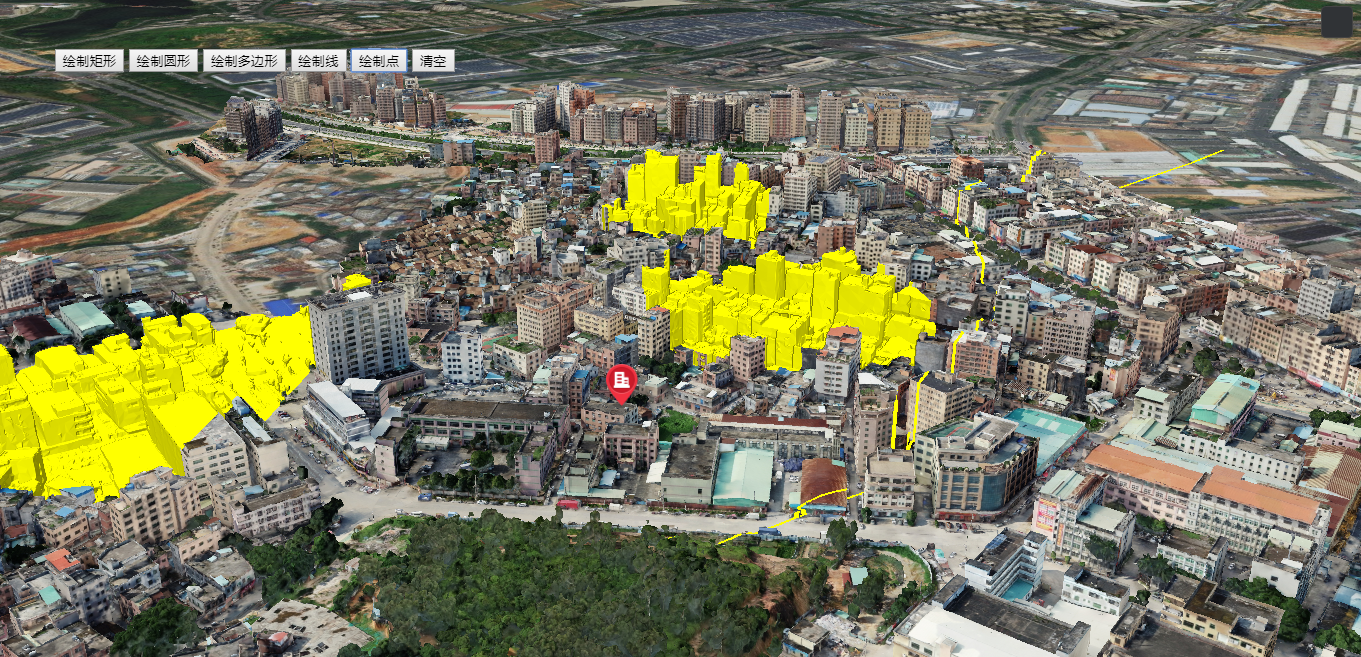
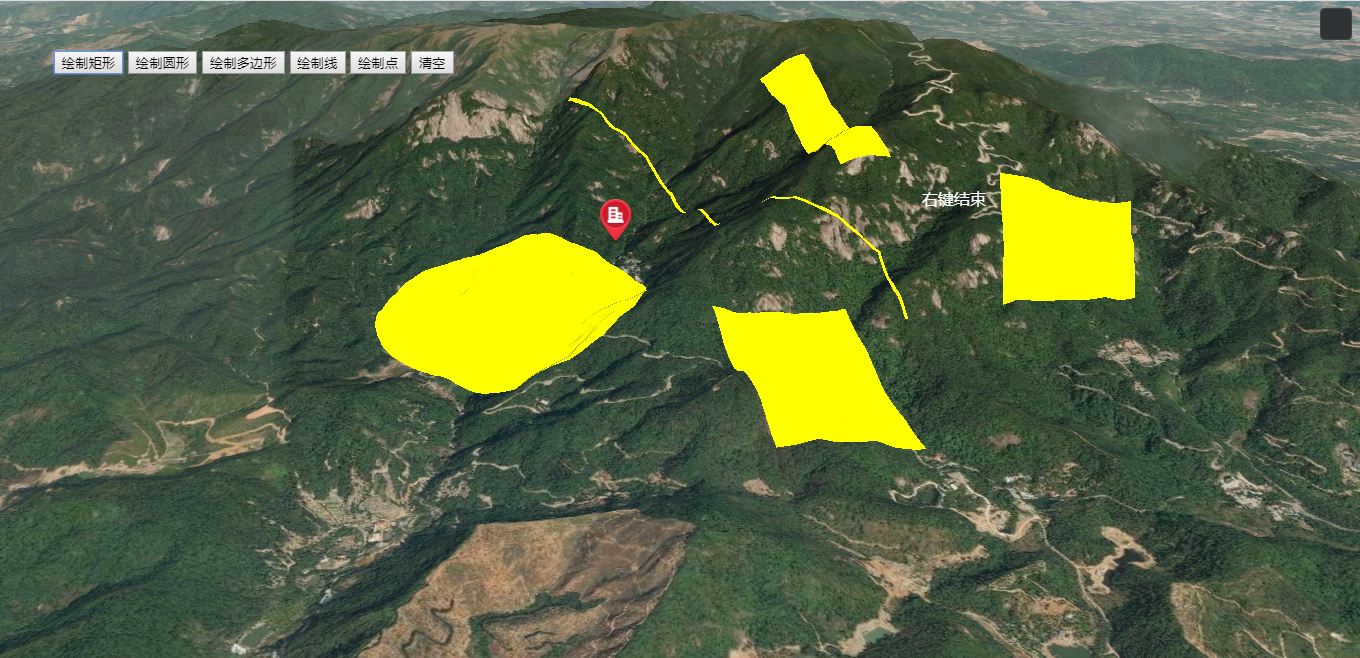
实现思路:
- 鼠标左键Cesium.ScreenSpaceEventType.LEFT_CLICK
- 鼠标移动Cesium.ScreenSpaceEventType.MOUSE_MOVE
- 鼠标右键Cesium.ScreenSpaceEventType.RIGHT_CLICK
鼠标左键事件,获取点击地图的每个坐标点;鼠标移动事件,动态扑捉鼠标移动状态,下一个坐标点位置;鼠标右键意味着标绘结束状态。
- 定义封装DrawTool标绘工具:
var DrawTool = function (obj) {

if (!obj.viewer || !obj) {

console.warn("缺少必要参数!--viewer");

return;

}

this.viewer = obj.viewer;

this.hasEdit = obj.hasEdit;

this.toolArr = [];

this.handler = new Cesium.ScreenSpaceEventHandler(this.viewer.scene.canvas);

this.show = obj.drawEndShow;

}

DrawTool.prototype = {

startDraw: function (opt) {

var that = this;

// if (this.hasEdit) {

// this.bindEdit();

// }

if (opt.type == "polyline") {

var polyline = new CreatePolyline(this.viewer, opt.style);

polyline.start(function (evt) {

if (that.hasEdit) {

that.unbindEdit();

polyline.startModify(opt.modifySuccess);

that.lastSelectEntity = polyline;

}

if (opt.success) opt.success(evt);

if (that.show == false) polyline.setVisible(false);

});

this.toolArr.push(polyline);

}

if (opt.type == "polygon") {

var polygon = new CreatePolygon(this.viewer, opt.style);

polygon.start(function () {

if (that.hasEdit) {

that.unbindEdit();

polygon.startModify();

that.lastSelectEntity = polygon;

}

if (opt.success) opt.success(polygon);

if (that.show == false) polygon.setVisible(false);

});

this.toolArr.push(polygon);

}

if (opt.type == "billboard") {

var billboard = new CreateBillboard(this.viewer, opt.style);

billboard.start(function () {

if (that.hasEdit) {

that.unbindEdit();

billboard.startModify();

that.lastSelectEntity = billboard;

}

if (opt.success) opt.success(billboard);

if (that.show == false) billboard.setVisible(false);

});

this.toolArr.push(billboard);

}

if (opt.type == "circle") {

var circle = new CreateCircle(this.viewer, opt.style);

circle.start(function () {

if (that.hasEdit) {

that.unbindEdit();

circle.startModify();

that.lastSelectEntity = circle;

}

if (opt.success) opt.success(circle);

if (that.show == false) circle.setVisible(false);

});

this.toolArr.push(circle);

}

if (opt.type == "rectangle") {

var rectangle = new CreateRectangle(this.viewer, opt.style);

rectangle.start(function () {

if (that.hasEdit) {

that.unbindEdit();

rectangle.startModify();

that.lastSelectEntity = rectangle;

}

if (opt.success) opt.success(rectangle);

if (that.show == false) rectangle.setVisible(false);

});

this.toolArr.push(rectangle);

}

//重写材质

if (opt.type == "flowPolyline") {

var polyline = new CreatePolyline(this.viewer, opt.style);

polyline.start(function () {

if (that.hasEdit) {

that.unbindEdit();

polyline.startModify();

}

if (opt.success) opt.success(polyline);

});

this.toolArr.push(polyline);

}

},

createByPositions: function (opt) {

if (this.hasEdit) {

this.bindEdit();

}

if (!opt) opt = {};

if (opt.type == "polyline") {

var polyline = new CreatePolyline(this.viewer, opt.style);

polyline.createByPositions(opt.positions, opt.success);

this.toolArr.push(polyline);

}

if (opt.type == "polygon") {

var polygon = new CreatePolygon(this.viewer, opt.style);

polygon.createByPositions(opt.positions, opt.success);

this.toolArr.push(polygon);

}

if (opt.type == "billboard") {

var billboard = new CreateBillboard(this.viewer, opt.style);

billboard.createByPositions(opt.positions, function(){

if(opt.success) opt.success(billboard)

});

this.toolArr.push(billboard);

}

},

destroy: function () {

for (var i = 0; i < this.toolArr.length; i++) {

var obj = this.toolArr[i];

obj.destroy();

}

},

lastSelectEntity: null,

bindEdit: function () {

var that = this;

this.handler.setInputAction(function (evt) { //单机开始绘制

var pick = that.viewer.scene.pick(evt.position);

if (Cesium.defined(pick) && pick.id) {

for (var i = 0; i < that.toolArr.length; i++) {

if (pick.id.objId == that.toolArr[i].objId && (that.toolArr[i].state == 1||that.toolArr[i].state == 2)) {

if (that.lastSelectEntity) {

that.lastSelectEntity.endModify();

}

that.toolArr[i].startModify();

that.lastSelectEntity = that.toolArr[i];

break;

}

}

}

}, Cesium.ScreenSpaceEventType.LEFT_CLICK);

},

unbindEdit: function () {

for (var i = 0; i < this.toolArr.length; i++) {

this.toolArr[i].endModify();

}

}

}
封装定义标绘点、线、面、矩形js类,里面涉及到细节函数,自行看对应的源码demo:

DrawTool标绘工具初始化以及调用:
更多详情见下面链接文章:
文章提供源码,对本专栏感兴趣的话,可以关注一波
cesium1.65api版本贴地贴模型标绘工具效果(附源码下载)的更多相关文章
- cesium1.63.1api版本贴地贴模型量算工具效果(附源码下载)
前言 cesium 官网的api文档介绍地址cesium官网api,里面详细的介绍 cesium 各个类的介绍,还有就是在线例子:cesium 官网在线例子,这个也是学习 cesium 的好素材.不少 ...
- arcgis api 3.x for js 入门开发系列五地图态势标绘(附源码下载)
前言 关于本篇功能实现用到的 api 涉及类看不懂的,请参照 esri 官网的 arcgis api 3.x for js:esri 官网 api,里面详细的介绍 arcgis api 3.x 各个类 ...
- Cesium专栏-裁剪效果(基于3dtiles模型,附源码下载)
Cesium Cesium 是一款面向三维地球和地图的,世界级的JavaScript开源产品.它提供了基于JavaScript语言的开发包,方便用户快速搭建一款零插件的虚拟地球Web应用,并在性能,精 ...
- 各个版本spring的jar包以及源码下载地址
各个版本spring的jar包以及源码下载地址,目前最高版本到spring4.1.2,留存备用: http://maven.springframework.org/release/org/spring ...
- Roslyn 入门:使用 .NET Core 版本的 Roslyn 编译并执行跨平台的静态的源码
Roslyn 是微软为 C# 设计的一套分析器,它具有很强的扩展性.以至于我们只需要编写很少量的代码便能够编译并执行我们的代码. 作为 Roslyn 入门篇文章之一,你将可以通过本文学习如何开始编写一 ...
- Deeplab v3+中的骨干模型resnet(加入atrous)的源码解析,以及普通resnet整个结构的构建过程
加入带洞卷积的resnet结构的构建,以及普通resnet如何通过模块的组合来堆砌深层卷积网络. 第一段代码为deeplab v3+(pytorch版本)中的基本模型改进版resnet的构建过程, 第 ...
- JS/Jquery版本的俄罗斯方块(附源码分析)
转载于http://blog.csdn.net/unionline/article/details/63250597 且后续更新于此 1.前言 写这个jQuery版本的小游戏的缘由在于我想通过从零到有 ...
- 《天龙八部》及Ogre3D模型的3ds max导入插件(源码公布)
測试UE4项目.苦于没有像样的模型和动画资源,所以想到把<天龙八部>等网游的资源导出来用. 于是做了个max导入插件. 效果还是不错的. 效果图: 上图是<斗破苍穹>的游戏资源 ...
- 从原子类和Unsafe来理解Java内存模型,AtomicInteger的incrementAndGet方法源码介绍,valueOffset偏移量的理解
众所周知,i++分为三步: 1. 读取i的值 2. 计算i+1 3. 将计算出i+1赋给i 可以使用锁来保持操作的原子性和变量可见性,用volatile保持值的可见性和操作顺序性: 从一个小例子引发的 ...
随机推荐
- Bootstrap Table的使用详解
Bootstrap Table是基于 Bootstrap 的 jQuery 表格插件,通过简单的设置,就可以拥有强大的单选.多选.排序.分页,以及编辑.导出.过滤(扩展)等等的功能.接下来我们来介绍B ...
- java自定义注解学习(注解处理器)
如果没有用来读取注解的方法和工作,那么注解也就不会比注释更有用处了.使用注解的过程中,很重要的一部分就是创建于使用注解处理器.Java SE5扩展了反射机制的API,以帮助程序员快速的构造自定义注解处 ...
- 批量解决win10图标上有两个蓝色箭头的方法
双击“此电脑”,点击“C盘”,可以看到一个”用户“文件夹,双击”用户“, 选择现在正在使用的用户名,双击用户名,找到该文件夹下的”桌面“或”Desktop“点击“属性”, 在“常规”选项卡中的属于项中 ...
- Dynamics CRM Package Deployer 部署工具
CRM 部署工具非常有用 我们可以用部署工具来做迁移,部署 等等. Package Deployer可以同时部署多个solutions. 并且也可以勾选solution的plugin也同时部署. 三 ...
- 异想家纯C语言矩阵运算库
Sandeepin最近做的项目中需要在嵌入式芯片里跑一些算法,而这些单片机性能不上不下,它能跑些简单的程序,但又还没到上Linux系统的地步.所以只好用C语言写一些在高级语言里一个函数就解决的算法了, ...
- 爬虫之协程,selenium
1.什么是代理?代理和爬虫之间的关联是什么? 2.在requests的get和post方法常用的参数有哪些?分别有什么作用?(四个参数) - url headers parmas/data proxi ...
- hadoop_2.6.5集群安装
安装hadoop2.6.5集群: 1.规划设计: JacK6:NameNode,jobtracker JacK7:secondnode,datenode,tasktracker JacK8:datan ...
- ios---运用MJRefresh组件设置下拉刷新
#import "XMGTopicViewController.h" #import <AFNetworking.h> #import <MJExtension. ...
- Docker扩展内容之容器环境变量
介绍 docker容器设置环境变量除了可以在容器层面的变量文件中加载也可以在容器运行之初进行预加载环境变量,下面介绍在Dockerfile中编写环境变量的方式 ENV TZ=Asia/Shanghai ...
- <背包>solution-CF118D_Caesar's Legions
Caesar's Legions Gaius Julius Caesar, a famous general, loved to line up his soldiers. Overall the a ...