
ASP.NET Learning Center---学习ASP.NET(1)
1,学习地址---微软官网
2,目标:学习Razor,以及建立Web应用.
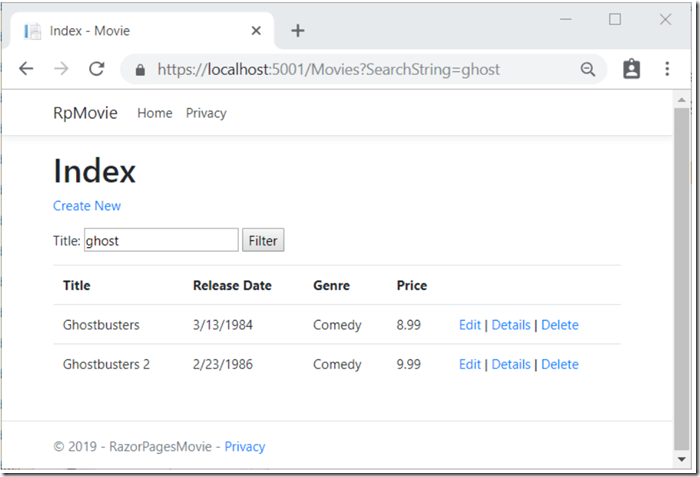
3,https://docs.microsoft.com/zh-cn/aspnet/core/tutorials/razor-pages/?view=aspnetcore-3.0
4,概念学习:
相关网站
https://www.cnblogs.com/neverc/p/4653539.html
5, 异步线程执行的几个方式:
1,创建任务并且启动:
//方法1:

Task t = new Task(

               () =>

               {

                   Thread.Sleep(1000);

                   Console.WriteLine("Hello,World1\n");

               });

             t.Start();

//方法2:

await Task.Run(

             () =>

             {

                 Thread.Sleep(1000);

                 Console.WriteLine("Hello,World1\n");

             });
//方法3:
Task<string> task2 =Task.Factory.StartNew<string>(() =>

            {

                return $"hello, task2的ID为{ Thread.CurrentThread.ManagedThreadId}";

            });
2,aysnc 和 await的组合:
Thread.Sleep(1000);
Console.WriteLine("Hello,World\n");
await Task.Run<int>(
() =>
{
Thread.Sleep(1000);
Console.WriteLine("Hello,World1\n");
return 1;
});
Console.WriteLine("Hello,World2\n");
return 1;
注意: 执行顺序 主函数---->调用aysnc函数并执行到await语句---------->回到主程序--->执行await之后的语句.
\ /
\--执行 异步函数体-----------并且返回----/
3,任务的启动,取消,回调等...
任务等待:
Task的Wait/WaitAny/WaitAll方法

Task.WaitAll(new Task[]{ task1,task2});

Task.Factory.ContinueWhenAll(new Task[] { task1, task2 }, (t) =>

            {

                Thread.Sleep(100);

                Console.WriteLine("执行后续操作");

            });
4,任务取消CancellationTokenSource
namespace CancelAListOfTasks

{

    public partial class MainWindow : Window

    {

        // Declare a System.Threading.CancellationTokenSource.

        CancellationTokenSource cts;

        public MainWindow()

        {

            InitializeComponent();

        }

        private async void startButton_Click(object sender, RoutedEventArgs e)

        {

            // Instantiate the CancellationTokenSource.

            cts = new CancellationTokenSource();

            resultsTextBox.Clear();

           try

            {

                await AccessTheWebAsync(cts.Token);

                // ***Small change in the display lines.

                resultsTextBox.Text += "\r\nDownloads complete.";

            }

            catch (OperationCanceledException)

            {

                resultsTextBox.Text += "\r\nDownloads canceled.";

            }

            catch (Exception)

            {

                resultsTextBox.Text += "\r\nDownloads failed.";

            }

            // Set the CancellationTokenSource to null when the download is complete.

            cts = null;

        }

        // Add an event handler for the Cancel button.

        private void cancelButton_Click(object sender, RoutedEventArgs e)

        {

            if (cts != null)

            {

                cts.Cancel();

            }

        }

        // Provide a parameter for the CancellationToken.

        // ***Change the return type to Task because the method has no return statement.

        async Task AccessTheWebAsync(CancellationToken ct)

        {

            // Declare an HttpClient object.

            HttpClient client = new HttpClient();

            // ***Call SetUpURLList to make a list of web addresses.

            List<string> urlList = SetUpURLList();

            // ***Add a loop to process the list of web addresses.

            foreach (var url in urlList)

            {

                // GetAsync returns a Task<HttpResponseMessage>.

                // Argument ct carries the message if the Cancel button is chosen.

                // ***Note that the Cancel button can cancel all remaining downloads.

                HttpResponseMessage response = await client.GetAsync(url, ct);

                // Retrieve the website contents from the HttpResponseMessage.

                byte[] urlContents = await response.Content.ReadAsByteArrayAsync();

                resultsTextBox.Text +=

                    $"\r\nLength of the downloaded string: {urlContents.Length}.\r\n";

            }

        }

        // ***Add a method that creates a list of web addresses.

        private List<string> SetUpURLList()

        {

            List<string> urls = new List<string>

            {

                "https://msdn.microsoft.com",

                "https://msdn.microsoft.com/library/hh290138.aspx",

                "https://msdn.microsoft.com/library/hh290140.aspx",

                "https://msdn.microsoft.com/library/dd470362.aspx",

                "https://msdn.microsoft.com/library/aa578028.aspx",

                "https://msdn.microsoft.com/library/ms404677.aspx",

                "https://msdn.microsoft.com/library/ff730837.aspx"

            };

            return urls;

        }

    }
static async void GetWebAsync1(CancellationToken ct)

        {

            try

            {

                await AccessTheWebAsync(ct);

            }

            catch (OperationCanceledException)

            {

            }

            catch (Exception)

            {

            }

        }

    }
static async Task  AccessTheWebAsync(CancellationTokenSource cts,CancellationToken ct)

        {

            HttpClient client = new HttpClient();

            List<string> urlList = SetUpURLList();

            IEnumerable<Task<int>> downloadTasksQuery =

                from url in urlList select ProcessURLAsync(url, client, ct);

            // ***Use ToArray to execute the query and start the download tasks.

            Task<int>[] downloadTasks = downloadTasksQuery.ToArray();

            // ***Call WhenAny and then await the result. The task that finishes

            // first is assigned to firstFinishedTask.

            Task<int> firstFinishedTask = await Task.WhenAny(downloadTasks);
cts.Cancel();
            // websites can finish first.

            var length = await firstFinishedTask;

            Console.WriteLine($"\r\nLength of the downloaded website:  {length}\r\n");

        }
5.1 利用 Linq语法生成枚举类型,然后再触发异步事件群.
5.2 利用WhenAny,WhenAll等方法进行堵塞
static async Task  AccessTheWebAsync(CancellationTokenSource cts,CancellationToken ct)

        {

            HttpClient client = new HttpClient();

            List<string> urlList = SetUpURLList();

            IEnumerable<Task<int>> downloadTasksQuery =

                from url in urlList select ProcessURLAsync(url, client, ct);

            // ***Use ToArray to execute the query and start the download tasks.

            Task<int>[] downloadTasks = downloadTasksQuery.ToArray();

           int[] first =await Task.WhenAll(downloadTasks);

            foreach(var x in first) Console.WriteLine(x + "\r\n");

        }

       static async Task<int> ProcessURLAsync(string url, HttpClient client, CancellationToken ct)

        {

            // GetAsync returns a Task<HttpResponseMessage>.

            HttpResponseMessage response = await client.GetAsync(url, ct);

            // Retrieve the website contents from the HttpResponseMessage.

            byte[] urlContents = await response.Content.ReadAsByteArrayAsync();

            Console.WriteLine("\r\n{urlContents}");

            return urlContents.Length;

        }
ASP.NET Learning Center---学习ASP.NET(1)的更多相关文章
- ASP.NET 开发者 开始学习ASP.NET Core 2吧
. NET Core 从2016年6月28日发布,过去了将近一年的时间,但是在工作中发现大家对.net core的接受程度并不高,这只是一个感觉,俗话说“没有调查就没有发言权”, 这两天通过微信小程 ...
- 学习ASP.NET MVC(九)——“Code First Migrations ”工具使用示例
在上一篇文章中,我们学习了如何使用实体框架的“Code First Migrations ”工具,使用其中的“迁移”功能对模型类进行一些修改,同时同步更新对应数据库的表结构. 在本文章中,我们将使用“ ...
- 学习ASP.NET MVC(七)——我的第一个ASP.NET MVC 查询页面
在本篇文章中,我将添加一个新的查询页面(SearchIndex),可以按书籍的种类或名称来进行查询.这个新页面的网址是http://localhost:36878/Book/ SearchIndex. ...
- 学习ASP.NET MVC(一)——我的第一个ASP.NET MVC应用程序
学习ASP.NET MVC系列: 学习ASP.NET MVC(一)——我的第一个ASP.NET MVC应用程序 学习ASP.NET MVC(二)——我的第一个ASP.NET MVC 控制器 学习ASP ...
- 学习ASP.NET MVC(十一)——分页
在这一篇文章中,我们将学习如何在MVC页面中实现分页的方法.分页功能是一个非常实用,常用的功能,当数据量过多的时候,必然要使用分页.在今天这篇文章中,我们学习如果在MVC页面中使用PagedList. ...
- 学习ASP.NET MVC系列 - 还有比这更简炼的吗?把复杂的事情变简单了,贡献啊!
转自
- Asp.NET之对象学习
一.总述 二.具体介绍 1.Request对象 Request对象是用来获取client在请求一个页面或传送一个Form时提供的全部信息,这包含可以标识浏览器和用户的HTTP变量,存储在client的 ...
- 学习ASP.NET Core,你必须了解无处不在的“依赖注入”
ASP.NET Core的核心是通过一个Server和若干注册的Middleware构成的管道,不论是管道自身的构建,还是Server和Middleware自身的实现,以及构建在这个管道的应用,都需要 ...
- ASP.Net WebForm温故知新学习笔记:一、aspx与服务器控件探秘
开篇:毫无疑问,ASP.Net WebForm是微软推出的一个跨时代的Web开发模式,它将WinForm开发模式的快捷便利的优点移植到了Web开发上,我们只要学会三步:拖控件→设属性→绑事件,便可以行 ...
随机推荐
- ElasticSearch系列专栏
最近我们公司因业务发展较快,不少服务遇到了一些瓶颈,影响最大的就是数据量的暴增带来的搜索效率的问题.虽然建立索引以及利用好缓存可以有效地缓解该问题,但是随着业务的发展,业务的复杂度也逐渐提升,原有的技 ...
- 第三次作业:使用Packet Tracer分析TCP连接的建立与释放过程
0 个人信息 张樱姿 201821121038 计算1812 1 实验目的 使用路由器连接不同的网络 使用命令行操作路由器 通过抓取HTTP报文,分析TCP连接建立的过程 2 实验内容 使用Packe ...
- 16、ISDN
ISDN:综合业务数据网 分类:1.宽带ISDN:基本上被淘汰2.窄带ISDN:用于备份链路,速率比较低 ISDN的起源和优点 ISDN能够提供声音.视频.数据等传输业务 ISDN的两种服务方式ISD ...
- C++ traits技法的一点理解
为了更好的理解traits技法.我们一步一步的深入.先从实际写代码的过程中我们遇到诸如下面伪码说起. template< typename T,typename B> void (T a, ...
- FPGA VGA+PLL+IP核笔记
1.实现了预定功能!整个工程,没有使用例程的25MHZ,全部统一使用50MHZ.2.分辨率使用了800*600@72HZ.3.实现了只显示白色部分,黑色部分RGB == 0,要显示背景色.VGA图形基 ...
- HDU_2191_多重背包
http://acm.hdu.edu.cn/showproblem.php?pid=2191 简单多重背包题. #include<iostream> #include<cstdio& ...
- c++中的 static 关键字
注:若没有特指是 静态成员时,默认都是普通成员: 1 类中的普通成员 类中的成员变量 和 成员函数 是分开存储的.其中, 1)每个对象都有独立的成员变量:成员变量可以存储在 栈空间.堆空间.全局数据区 ...
- 用MYSQL的存储过程创建百万级测试数据表
创建随机字符串函数,便于创建名称 DROP function if EXISTS rand_string; #创建一个指定字符个数的函数 create function rand_string(n I ...
- DG参数 LOG_ARCHIVE_DEST_n
DG参数 LOG_ARCHIVE_DEST_n This chapter provides reference information for the attributes of the LOG_AR ...
- Python3(十) 函数式编程: 匿名函数、高阶函数、装饰器
一.匿名函数 1.定义:定义函数的时候不需要定义函数名 2.具体例子: #普通函数 def add(x,y): return x + y #匿名函数 lambda x,y: x + y 调用匿名函数: ...