
Spring Security技术栈开发企业级认证与授权(一)环境搭建
本项目是基于慕课网的Spring Security技术栈开发企业级认证与授权,采用IDEA开发,本文章用来记录该项目的学习过程。
慕课网视频:https://coding.imooc.com/class/134.html
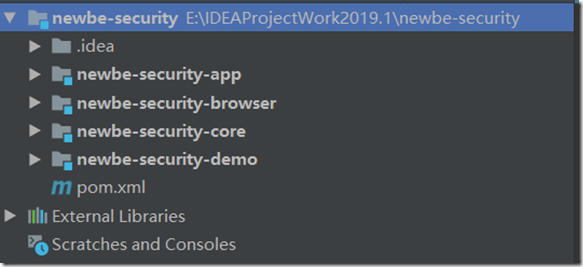
一、项目结构
newbe-security是父类,打包方式是pom,其余都是子模块,打包方式jar.
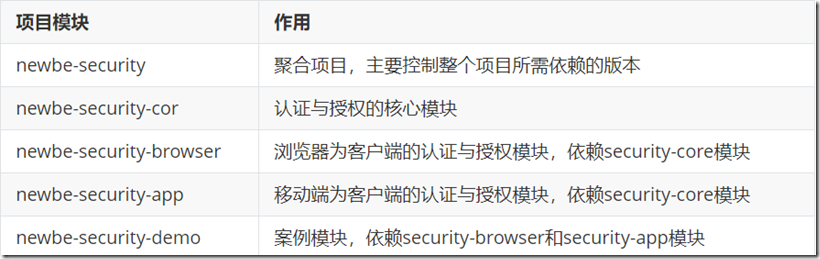
项目模块介绍:
二、项目依赖
2.1newbe-security父类依赖
<?xml version="1.0" encoding="UTF-8"?>
<project xmlns="http://maven.apache.org/POM/4.0.0"
         xmlns:xsi="http://www.w3.org/2001/XMLSchema-instance"
         xsi:schemaLocation="http://maven.apache.org/POM/4.0.0 http://maven.apache.org/xsd/maven-4.0.0.xsd">
    <modelVersion>4.0.0</modelVersion>

    <groupId>com.newbe.security</groupId>
    <artifactId>newbe-security</artifactId>
    <version>1.0-SNAPSHOT</version>
    <modules>
        <module>newbe-security-core</module>
        <module>newbe-security-demo</module>
        <module>newbe-security-browser</module>
        <module>newbe-security-app</module>
    </modules>
    <packaging>pom</packaging>

    <dependencyManagement>
        <dependencies>
            <dependency>
                <groupId>io.spring.platform</groupId>
                <artifactId>platform-bom</artifactId>
                <version>Brussels-SR7</version>
                <type>pom</type>
                <scope>import</scope>
            </dependency>
            <dependency>
                <groupId>org.springframework.cloud</groupId>
                <artifactId>spring-cloud-dependencies</artifactId>
                <version>Edgware.SR2</version>
                <type>pom</type>
                <scope>import</scope>
            </dependency>
        </dependencies>
    </dependencyManagement>

    <build>
        <plugins>
            <plugin>
                <groupId>org.apache.maven.plugins</groupId>
                <artifactId>maven-compiler-plugin</artifactId>
                <version>3.7.0</version>
                <configuration>
                    <source>1.8</source>
                    <target>1.8</target>
                    <encoding>UTF-8</encoding>
                </configuration>
            </plugin>
        </plugins>
    </build>

</project>
2.2newbe-security模块依赖
<?xml version="1.0" encoding="UTF-8"?>
<project xmlns="http://maven.apache.org/POM/4.0.0"
         xmlns:xsi="http://www.w3.org/2001/XMLSchema-instance"
         xsi:schemaLocation="http://maven.apache.org/POM/4.0.0 http://maven.apache.org/xsd/maven-4.0.0.xsd">
    <parent>
        <artifactId>newbe-security</artifactId>
        <groupId>com.newbe.security</groupId>
        <version>1.0-SNAPSHOT</version>
    </parent>
    <modelVersion>4.0.0</modelVersion>

    <artifactId>newbe-security-core</artifactId>
    <packaging>jar</packaging>

    <dependencies>
        <!-- APP安全认证的重要依赖 -->
        <dependency>
            <groupId>org.springframework.cloud</groupId>
            <artifactId>spring-cloud-starter-oauth2</artifactId>
        </dependency>

        <!-- session存储依赖,暂时用不到,先注释掉 -->
        <!--<dependency>-->
        <!--<groupId>org.springframework.boot</groupId>-->
        <!--<artifactId>spring-boot-starter-data-redis</artifactId>-->
        <!--</dependency>-->

        <dependency>
            <groupId>org.springframework.boot</groupId>
            <artifactId>spring-boot-starter-jdbc</artifactId>
        </dependency>

        <dependency>
            <groupId>mysql</groupId>
            <artifactId>mysql-connector-java</artifactId>
        </dependency>

        <!-- 第三方登录用到的重要依赖 -->
        <dependency>
            <groupId>org.springframework.social</groupId>
            <artifactId>spring-social-config</artifactId>
        </dependency>

        <dependency>
            <groupId>org.springframework.social</groupId>
            <artifactId>spring-social-core</artifactId>
        </dependency>

        <dependency>
            <groupId>org.springframework.social</groupId>
            <artifactId>spring-social-security</artifactId>
        </dependency>

        <dependency>
            <groupId>org.springframework.social</groupId>
            <artifactId>spring-social-web</artifactId>
        </dependency>

        <!-- 工具依赖 -->
        <dependency>
            <groupId>org.apache.commons</groupId>
            <artifactId>commons-lang3</artifactId>
        </dependency>

        <dependency>
            <groupId>org.apache.commons</groupId>
            <artifactId>commons-collections4</artifactId>
            <version>4.1</version>
        </dependency>

        <dependency>
            <groupId>commons-beanutils</groupId>
            <artifactId>commons-beanutils</artifactId>
        </dependency>

    </dependencies>
</project>
2.3newbe-security-browse模块依赖
<?xml version="1.0" encoding="UTF-8"?>
<project xmlns="http://maven.apache.org/POM/4.0.0"
         xmlns:xsi="http://www.w3.org/2001/XMLSchema-instance"
         xsi:schemaLocation="http://maven.apache.org/POM/4.0.0 http://maven.apache.org/xsd/maven-4.0.0.xsd">
    <parent>
        <artifactId>newbe-security</artifactId>
        <groupId>com.newbe.security</groupId>
        <version>1.0-SNAPSHOT</version>
    </parent>
    <modelVersion>4.0.0</modelVersion>

    <artifactId>newbe-security-browser</artifactId>
    <version>1.0.0-SNAPSHOT</version>
    <packaging>jar</packaging>
    <description>Spring Security技术栈开发企业级认证与授权浏览器项目</description>

    <dependencies>
    <dependency>
        <groupId>com.newbe.security</groupId>
        <artifactId>newbe-security-core</artifactId>
        <version>1.0-SNAPSHOT</version>
    </dependency>

    <!-- 浏览器端Session管理的重要依赖 -->
    <dependency>
        <groupId>org.springframework.session</groupId>
        <artifactId>spring-session</artifactId>
    </dependency>
    </dependencies>
</project>
2.4newbe-security-app模块依赖
<?xml version="1.0" encoding="UTF-8"?>
<project xmlns="http://maven.apache.org/POM/4.0.0"
         xmlns:xsi="http://www.w3.org/2001/XMLSchema-instance"
         xsi:schemaLocation="http://maven.apache.org/POM/4.0.0 http://maven.apache.org/xsd/maven-4.0.0.xsd">
    <parent>
        <artifactId>newbe-security</artifactId>
        <groupId>com.newbe.security</groupId>
        <version>1.0-SNAPSHOT</version>
    </parent>
    <modelVersion>4.0.0</modelVersion>

    <artifactId>newbe-security-app</artifactId>
    <version>1.0.0-SNAPSHOT</version>
    <packaging>jar</packaging>
    <description>Spring Security技术栈开发企业级认证与授权移动端项目</description>

    <dependencies>
        <dependency>
            <groupId>com.newbe.security</groupId>
            <artifactId>newbe-security-core</artifactId>
            <version>1.0-SNAPSHOT</version>
        </dependency>
    </dependencies>
</project>
2.5newbe-security-demo模块依赖
<?xml version="1.0" encoding="UTF-8"?>
<project xmlns="http://maven.apache.org/POM/4.0.0"
         xmlns:xsi="http://www.w3.org/2001/XMLSchema-instance"
         xsi:schemaLocation="http://maven.apache.org/POM/4.0.0 http://maven.apache.org/xsd/maven-4.0.0.xsd">
    <parent>
        <artifactId>newbe-security</artifactId>
        <groupId>com.newbe.security</groupId>
        <version>1.0-SNAPSHOT</version>
    </parent>
    <modelVersion>4.0.0</modelVersion>

    <artifactId>newbe-security-demo</artifactId>
    <version>1.0-SNAPSHOT</version>
    <packaging>jar</packaging>
    <description>Spring Security技术栈开发企业级认证与授权案例项目</description>

    <dependencies>
        <!-- 浏览器端的安全开发 -->
        <dependency>
            <groupId>com.newbe.security</groupId>
            <artifactId>newbe-security-browser</artifactId>
            <version>1.0.0-SNAPSHOT</version>
        </dependency>

        <dependency>
            <groupId>com.alibaba</groupId>
            <artifactId>druid-spring-boot-starter</artifactId>
            <version>1.1.9</version>
        </dependency>

        <dependency>
            <groupId>org.springframework.boot</groupId>
            <artifactId>spring-boot-starter-test</artifactId>
        </dependency>

    </dependencies>

    <build>
        <plugins>
            <!-- spring boot应用打包插件 -->
            <plugin>
                <groupId>org.springframework.boot</groupId>
                <artifactId>spring-boot-maven-plugin</artifactId>
                <version>1.5.10.RELEASE</version>
                <executions>
                    <execution>
                        <goals>
                            <goal>repackage</goal>
                        </goals>
                    </execution>
                </executions>
            </plugin>
        </plugins>
    </build>

</project>
三、编写Spring Boot启动程序
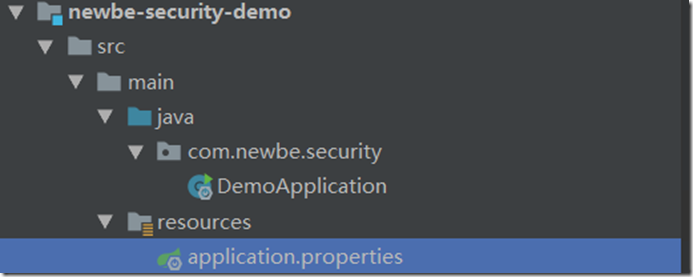
在demo新建包,新建启动类,配置application.properties
3.1DemoApplication类
package com.newbe.security;

import org.springframework.boot.SpringApplication;
import org.springframework.boot.autoconfigure.SpringBootApplication;
import org.springframework.web.bind.annotation.GetMapping;
import org.springframework.web.bind.annotation.RestController;

/**
 * @Auther: Newbe
 * @Date: 2019/11/22 00:51
 * @Description:
 */
@SpringBootApplication
@RestController
public class DemoApplication {
    public static void main(String[] args) {
        SpringApplication.run(DemoApplication.class,args);
    }
    @GetMapping("/hello")
    public String hello() {
        return "hello spring security";
    }

}
3.2配置application.properties(最初)
spring.datasource.driver-class-name = com.mysql.jdbc.Driver
spring.datasource.url= jdbc:mysql://127.0.0.1:3306/newbe-demo?useUnicode=yes&characterEncoding=UTF-8&useSSL=false
spring.datasource.username = root
spring.datasource.password = 1234567
3.3创建数据库
数据库名newbe-demo,表名User
/*
Navicat MySQL Data Transfer

Source Server         : 127.0.0.1
Source Server Version : 50640
Source Host           : 127.0.0.1:3306
Source Database       : newbe-demo

Target Server Type    : MYSQL
Target Server Version : 50640
File Encoding         : 65001

Date: 2019-11-22 16:55:10
*/

;

-- ----------------------------
-- Table structure for user
-- ----------------------------
DROP TABLE IF EXISTS `user`;
CREATE TABLE `user` (
  `username` ) DEFAULT NULL,
  `password` ) DEFAULT NULL,
  `id` ) NOT NULL AUTO_INCREMENT,
  PRIMARY KEY (`id`)
) ENGINE DEFAULT CHARSET=utf8;

-- ----------------------------
-- Records of user
-- ----------------------------
');
');
3.4启动spring Boot程序
启动 DemoApplication类,控制台报错,原因是newbe-security-core中加入了Spring Session的依赖,没有配置Session的存储方式导致出错
Caused by: java.lang.IllegalArgumentException: No Spring Session store is configured: set the 'spring.session.store-type' property
因此需要配置spring.session.store-type
spring.datasource.driver-class-name = com.mysql.jdbc.Driver
spring.datasource.url= jdbc:mysql://127.0.0.1:3306/newbe-demo?useUnicode=yes&characterEncoding=UTF-8&useSSL=false
spring.datasource.username = root
spring.datasource.password = 1234567

#Spring Session 不配置
spring.session.store-type = none
再次启动DemoApplication类,控制台没有报错启动成功,访问 127.0.0.1:8080/hello,浏览器默认弹出认证窗口,
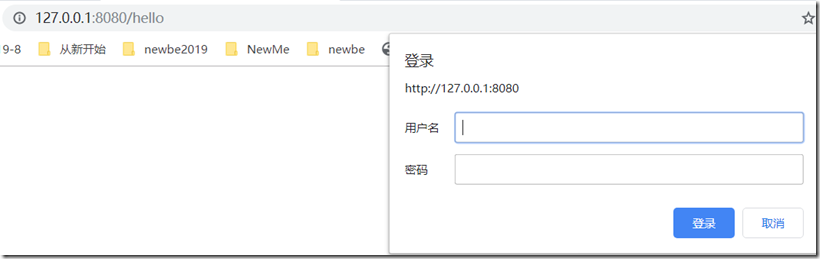
原因是由于这个org.springframework.cloud的权限依赖包默认这样
<!-- APP安全认证的重要依赖 -->
<dependency>
    <groupId>org.springframework.cloud</groupId>
    <artifactId>spring-cloud-starter-oauth2</artifactId>
</dependency>
关闭权限验证
spring.datasource.driver-class-name = com.mysql.jdbc.Driver
spring.datasource.url= jdbc:mysql://127.0.0.1:3306/newbe-demo?useUnicode=yes&characterEncoding=UTF-8&useSSL=false
spring.datasource.username = root
spring.datasource.password = 1234567

#Spring Session 不配置
spring.session.store-type = none

#关闭spring cloud spring-cloud-starter-oauth2权限认证 权限验证关闭
security.basic.enabled=false
最后启动DemoApplication类,再次访问127.0.0.1:8080/hello,浏览器显示如下图

环境配置到此结束!
Spring Security技术栈开发企业级认证与授权(一)环境搭建的更多相关文章
- 用“MEAN”技术栈开发web应用(二)express搭建服务端框架
上一篇我们讲了如何使用angular搭建起项目的前端框架,前端抽象出一个service层来向后端发送请求,后端则返回相应的json数据.本篇我们来介绍一下,如何在nodejs环境下利用express来 ...
- Spring Boot+Spring Security+JWT 实现 RESTful Api 认证(一)
标题 Spring Boot+Spring Security+JWT 实现 RESTful Api 认证(一) 技术 Spring Boot 2.Spring Security 5.JWT 运行环境 ...
- 用“MEAN”技术栈开发web应用(三)用mongodb搭建数据库
上一篇介绍了如何用express搭建起服务端MVC的开发架构,本篇我们来详细介绍一下这个Model层,也就是数据库访问层.包含如何使用mongodb搭建数据库,以及如何使用mongoose来访问数据. ...
- 用“MEAN”技术栈开发web应用(一)AngularJs前端架构
前言 不知何时突然冒出“MEAN技术栈”这个新词,听起来很牛逼的样子,其实就是我们已经熟悉了的近两年在前端比较流行的技术,mongodb.express.angularjs.nodejs,由于这几项技 ...
- “MEAN”技术栈开发web应用
“MEAN”技术栈开发web应用 上一篇我们讲了如何使用angular搭建起项目的前端框架,前端抽象出一个service层来向后端发送请求,后端则返回相应的json数据.本篇我们来介绍一下,如何在no ...
- Spring Security使用数据库数据完成认证--练气后期2
写在前面 没错,这篇文章还是练气后期!但作者我相信筑基指日可待! 在前一篇文章当中,我们简单地分析了一下Spring Security的认证流程,知道了如果想要实现对自己用户数据(账户.角色.权限)的 ...
- Spring Boot+Spring Security+JWT 实现 RESTful Api 认证(二)
Spring Boot+Spring Security+JWT 实现 RESTful Api 认证(二) 摘要 上一篇https://javaymw.com/post/59我们已经实现了基本的登录和t ...
- [转]GeoServer地图开发解决方案(一):环境搭建篇
GeoServer 是 OpenGIS Web 服务器规范的 J2EE 实现的社区开源项目,利用 GeoServer 可以方便的发布地图数据,允许用户对特征数据进行更新.删除.插入操作,通过 GeoS ...
- OAuth2.0学习(2-1)Spring Security OAuth2.0 开发指南
开发指南:http://www.cnblogs.com/xingxueliao/p/5911292.html Spring OAuth2.0 提供者实现原理: Spring OAuth2.0提供者实际 ...
随机推荐
- PHP自定义函数+系统函数库
全局变量 $n = 5; //全局变量 function fun1(){ global $n; $n++; } fun1(); echo '<hr>'; $n = 6; function ...
- Vue前端挂载对象时一些思考
最近,在Vue前端调试http请求,无论如何如何也是拦截不了某些http请求.场景是这样的:Java后端组装好Vue对象,然后送到前端,前端通过id来挂载该Vue对象,而该对象中有上传文件或者图片的控 ...
- R语言函数化学习笔记6
R语言函数化学习笔记 1.apply函数 可以让list或者vector的元素依次执行一遍调用的函数,输出的结果是list格式 2.sapply函数 原理和list一样,但是输出的结果是一个向量的形式 ...
- sqlalchemy_mptt一次调优
问题背景: 我用sqlalchemy_mptt构建了一个多级分类项目,数据库用了sqlite.随着数据条数越来越多,写入速度逐渐变慢,一棵树的插入甚至需要1分钟,远远不能满足需求 分析思路: 1. 批 ...
- 洛谷 pP2708 硬币翻转
题目描述 从前有很多个硬币摆在一行,有正面朝上的,也有背面朝上的.正面朝上的用1表示,背面朝上的用0表示.现在要求从这行的第一个硬币开始,将前若干个硬币一起翻面,问如果要将所有硬币翻到正面朝上,最少要 ...
- Xmanager6
Xmanager6企业版 6.0096 含产品秘钥: https://www.newasp.net/soft/467373.html
- navicat 连接报2059错误
原因 navicat不支持mysql新版本的加密规则,mysql8 之前的版本中加密规则是mysql_native_password, mysql8之后,加密规则是caching_sha2_passw ...
- TD - 输入框
模板1:TD - 普通输入框 <input dojoType="bootstrap.form.ValidationTextBox" dojoAttachPoint=" ...
- Java EE 7 API
学习Java必备资源,下载链接: https://pan.baidu.com/s/1P1xzuoGJCIuZlYBbPSbM_Q 提取码: dtui 复制这段内容后打开百度网盘手机App,操作更方便哦
- EF中的实体关系
导航属性的理解: 指数据库的表所对应的实体类,除了要有每个字段所对应的属性之外,还应该有一个与之有关联的表的属性,一对一的关系就是关联表的类型,一对多的关系就是关联表的类型的ICollection的泛 ...