
一、hadoop部署
一、Java环境
yum 安装方式安装
1、搜索JDK安装包
yum search java|grep jdk

2、安装
yum install java-1.8.0-openjdk-src.x86_64
3、查看安装结果
java -version 通过yum默认安装的路径为 /usr/lib/jvm 可以通过cd /usr/lib/jvm 命令 查看
4、配置环境变量
JDK默认安装路径/usr/lib/jvm
4.1 查看JDK默认安装路径/usr/lib/jvm
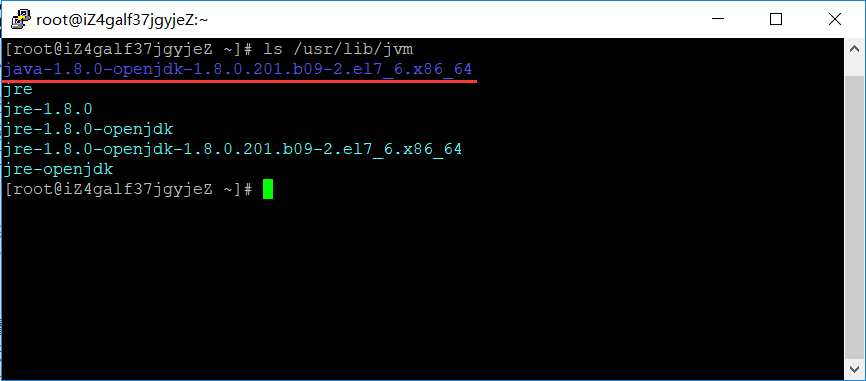
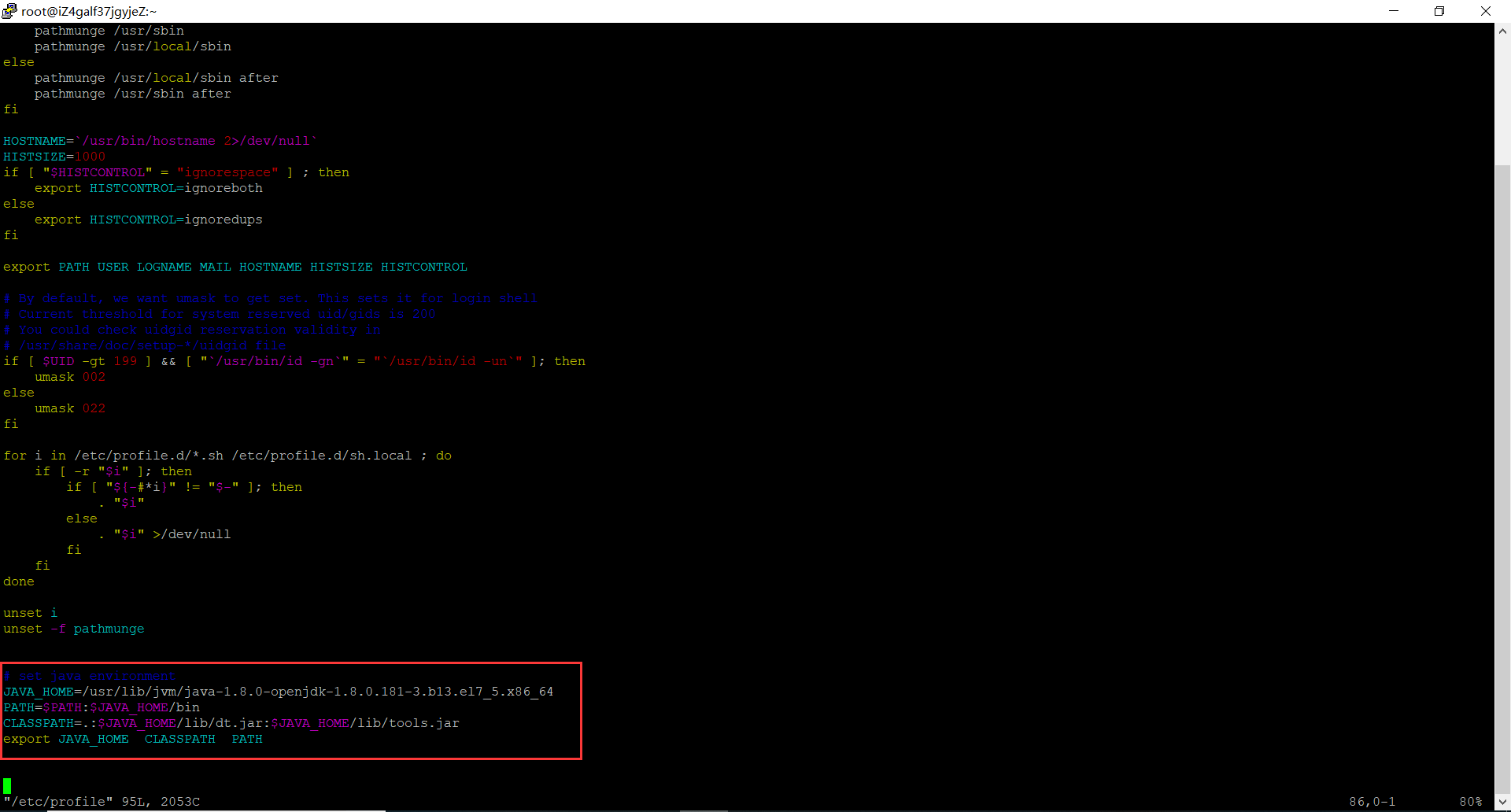
4.2在/etc/profile文件添加如下命令
# set java environment

JAVA_HOME=/usr/lib/jvm/java-1.8.0-openjdk-1.8.0.181-3.b13.el7_5.x86_64

PATH=$PATH:$JAVA_HOME/bin

CLASSPATH=.:$JAVA_HOME/lib/dt.jar:$JAVA_HOME/lib/tools.jar

export JAVA_HOME  CLASSPATH  PATH
4.3保存关闭profile文件,执行如下命令生效
source /etc/profile
4.4使用如下命令,查看JDK变量
 echo $JAVA_HOME

 echo $PATH

 echo $CLASSPATH

二、SSH 无密码验证配置
1、SSH介绍
1.1 SSH的好处:
在linux系统中,ssh是远程登录的默认工具,因为该工具的协议使用了RSA/DSA的加密算法.该工具做linux系统的远程管理是非常安全的。telnet,因为其不安全性,在linux系统中被搁置使用了。
1.2 SSH的原理:
Master(NameNode | JobTracker)作为客户端,要实现无密码公钥认证,连接到服务器Salve(DataNode | Tasktracker)上时,需要在Master上生成一个密钥对,包括一个公钥和一个私钥,而后将公钥复制到所有的Slave上。当Master通过SSH连接Salve时,Salve就会生成一个随机数并用Master的公钥对随机数进行加密,并发送给Master。Master收到加密数之后再用私钥解密,并将解密数回传给Slave,Slave确认解密数无误之后就允许Master进行连接了。这就是一个公钥认证过程,其间不需要用户手工输入密码。重要过程是将客户端Master复制到Slave上。
1.3 SSH的为什么要使用无密码验证设置:
Hadoop启动以后,NameNode是通过SSH(Secure Shell)来启动和停止各个DataNode上的各种守护进程的。
节点之间执行指令的时候是不需要输入密码的形式,故我们需要配置SSH运用无密码公钥认证的形式,这样NameNode使用SSH无密码登录并启动DataName进程,同样原理,DataNode上也能使用SSH无密码登录到NameNode。
2、配置
那么我们想要的结果是在 master 机器上能不输入密码直接登录到 slave1 和 slave2 机器上。反之在 slave1 上能不输入密码登录到 master 和 slave2 机器上。
首先我们配置从 master 机器上不输入密码登录到 slave1 机器上。
第一步:确认系统已经安装了 SSH
我们需要两个服务,ssh和rsync。可以通过下面命令查看结果显示如下:
rpm –qa | grep openssh

rpm –qa | grep rsync

则表示没安装,通过以下命令安装
master 机器上生成 秘钥对
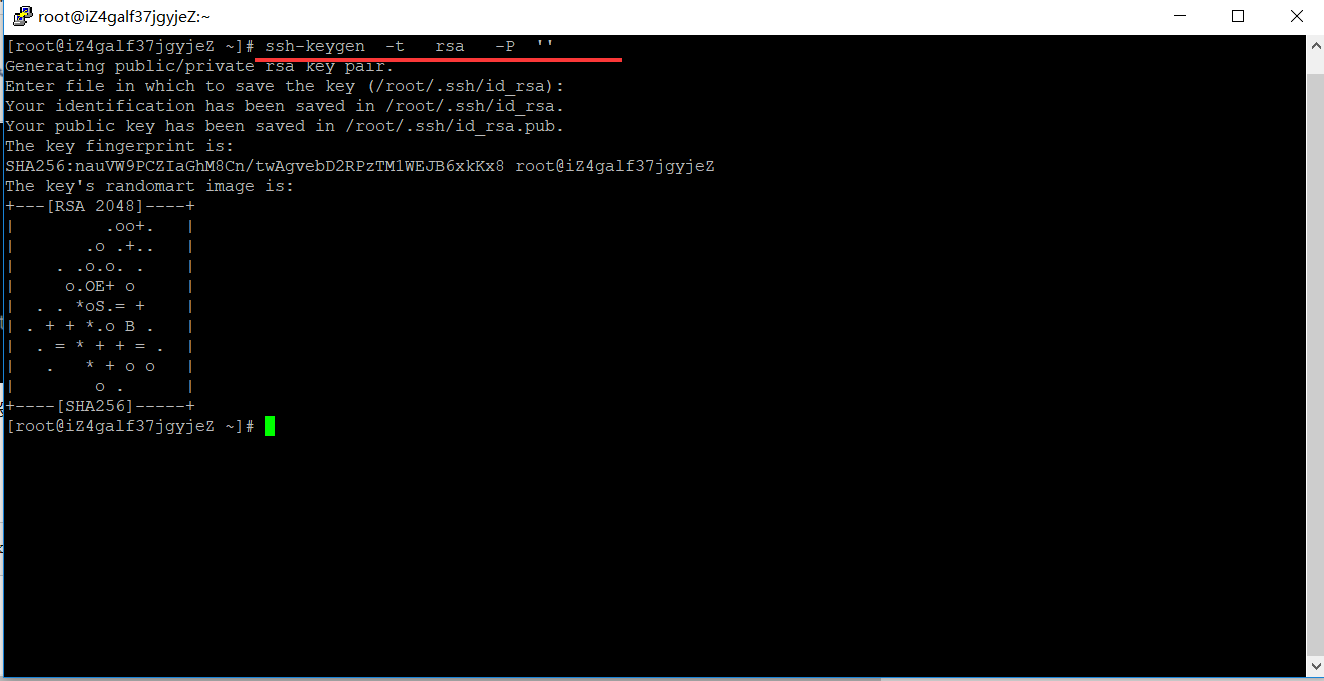
在 master 机器上输入一下命令:
ssh-keygen -t rsa -P ''
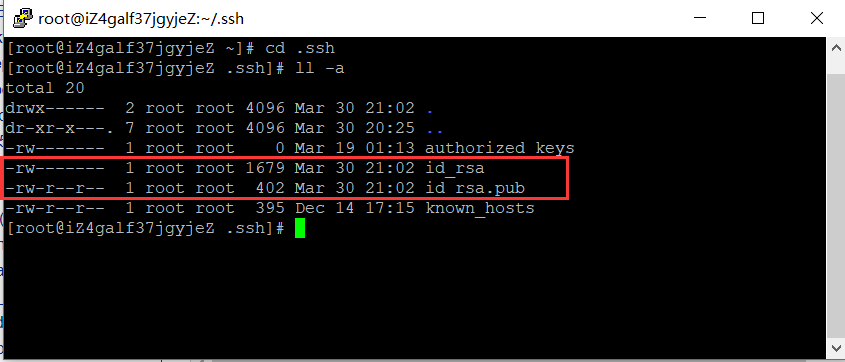
这条命令是生成无密码秘钥对,rsa 是加密算法,-P '' 表示密码为空。询问其保存路径时直接回车采用默认路径。生成的密钥对:id_rsa和id_rsa.pub,默认存储在"/root/.ssh"目录下。
查看"/home/hadoop/"下是否有".ssh"文件夹,且".ssh"文件下是否有两个刚生产的无密码密钥对。
创建authorized_keys文件并将密钥写入
touch /root/.ssh/authorized_keys
查看下,是否创建成功
[root@hadoop01 .ssh]# ls   /root/.ssh/

authorized_keys  id_rsa  id_rsa.pub

[root@hadoop01 .ssh]#
或者把公钥 id_rsa.pub追加到授权的key里面去。
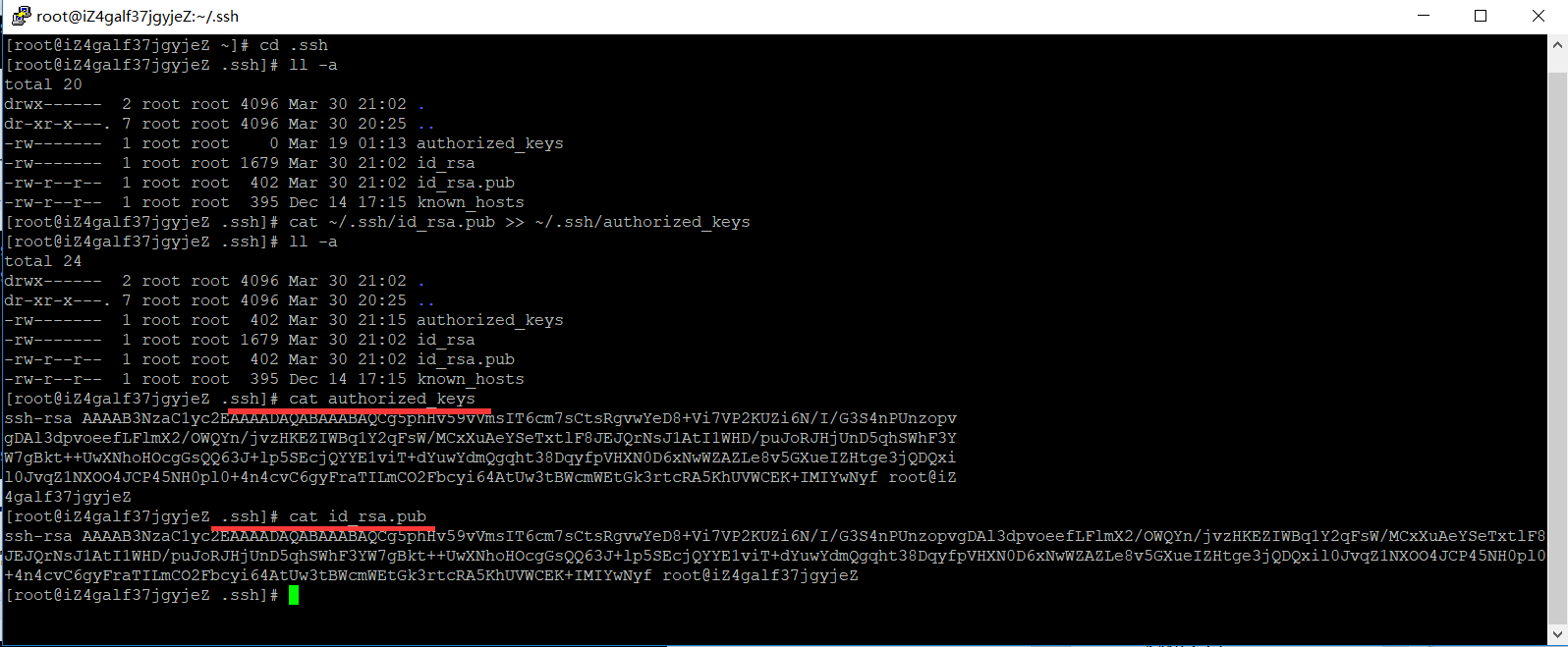
cat ~/.ssh/id_rsa.pub >> ~/.ssh/authorized_keys
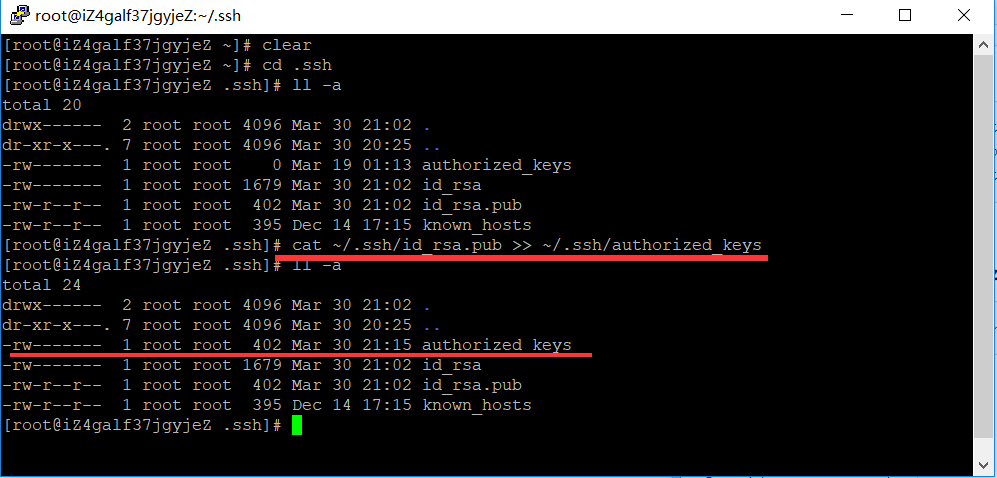
对比查看写入是否一致
授权authorized_keys文件
chmod 600 ~/.ssh/authorized_keys
三、用root用户登录服务器修改SSH配置文件
cat /etc/ssh/sshd_config
#       $OpenBSD: sshd_config,v 1.100 2016/08/15 12:32:04 naddy Exp $

# This is the sshd server system-wide configuration file.  See

# sshd_config(5) for more information.

# This sshd was compiled with PATH=/usr/local/bin:/usr/bin

# The strategy used for options in the default sshd_config shipped with

# OpenSSH is to specify options with their default value where

# possible, but leave them commented.  Uncommented options override the

# default value.

# If you want to change the port on a SELinux system, you have to tell

# SELinux about this change.

# semanage port -a -t ssh_port_t -p tcp #PORTNUMBER

#

Port 22

#AddressFamily any

#ListenAddress 0.0.0.0

#ListenAddress ::

HostKey /etc/ssh/ssh_host_rsa_key

#HostKey /etc/ssh/ssh_host_dsa_key

HostKey /etc/ssh/ssh_host_ecdsa_key

HostKey /etc/ssh/ssh_host_ed25519_key

# Ciphers and keying

#RekeyLimit default none

# Logging

#SyslogFacility AUTH

#LogLevel INFO

# Authentication:

#LoginGraceTime 2m

#PermitRootLogin yes

#StrictModes yes

#MaxAuthTries 6

#MaxSessions 10

#PubkeyAuthentication yes

# The default is to check both .ssh/authorized_keys and .ssh/authorized_keys2

# but this is overridden so installations will only check .ssh/authorized_keys

AuthorizedKeysFile      .ssh/authorized_keys

#AuthorizedPrincipalsFile none

#AuthorizedKeysCommand none

#AuthorizedKeysCommandUser nobody

# For this to work you will also need host keys in /etc/ssh/ssh_known_hosts

#HostbasedAuthentication no

# Change to yes if you don't trust ~/.ssh/known_hosts for

# HostbasedAuthentication

#IgnoreUserKnownHosts no

# Don't read the user's ~/.rhosts and ~/.shosts files

#IgnoreRhosts yes

# To disable tunneled clear text passwords, change to no here!

#PermitEmptyPasswords no

# Change to no to disable s/key passwords

#ChallengeResponseAuthentication yes

ChallengeResponseAuthentication no

# Kerberos options

#KerberosAuthentication no

#KerberosOrLocalPasswd yes

#KerberosTicketCleanup yes

#KerberosGetAFSToken no

#KerberosUseKuserok yes

# GSSAPI options

GSSAPIAuthentication yes

GSSAPICleanupCredentials no

#GSSAPIStrictAcceptorCheck yes

#GSSAPIKeyExchange no

#GSSAPIEnablek5users no

# Set this to 'yes' to enable PAM authentication, account processing,

# and session processing. If this is enabled, PAM authentication will

# be allowed through the ChallengeResponseAuthentication and

# PAM authentication via ChallengeResponseAuthentication may bypass

# the setting of "PermitRootLogin without-password".

# If you just want the PAM account and session checks to run without

# and ChallengeResponseAuthentication to 'no'.

# WARNING: 'UsePAM no' is not supported in Red Hat Enterprise Linux and may cause several

# problems.

UsePAM yes

#AllowAgentForwarding yes

#AllowTcpForwarding yes

#GatewayPorts no

X11Forwarding yes

#X11DisplayOffset 10

#X11UseLocalhost yes

#PermitTTY yes

#PrintMotd yes

#PrintLastLog yes

#TCPKeepAlive yes

#UseLogin no

#UsePrivilegeSeparation sandbox

#PermitUserEnvironment no

#Compression delayed

#ClientAliveInterval 0

#ClientAliveCountMax 3

#ShowPatchLevel no

#UseDNS yes

#PidFile /var/run/sshd.pid

#MaxStartups 10:30:100

#PermitTunnel no

#ChrootDirectory none

#VersionAddendum none

# no default banner path

#Banner none

# Accept locale-related environment variables

AcceptEnv LANG LC_CTYPE LC_NUMERIC LC_TIME LC_COLLATE LC_MONETARY LC_MESSAGES

AcceptEnv LC_PAPER LC_NAME LC_ADDRESS LC_TELEPHONE LC_MEASUREMENT

AcceptEnv LC_IDENTIFICATION LC_ALL LANGUAGE

AcceptEnv XMODIFIERS

# override default of no subsystems

Subsystem       sftp    /usr/libexec/openssh/sftp-server

# Example of overriding settings on a per-user basis

#Match User anoncvs

#       X11Forwarding no

#       AllowTcpForwarding no

#       PermitTTY no

#       ForceCommand cvs server

UseDNS no

AddressFamily inet

SyslogFacility AUTHPRIV

PermitRootLogin yes

PasswordAuthentication yes
重启服务
service sshd restart
验证

注意看我们两个箭头,说明已经无密码登录到 slave1 机器上了。那么这样就算大功告成。
一、hadoop部署的更多相关文章
- hadoop部署小结的命令
hadoop部署总结的命令 学习笔记,转自:hadoop部署总结的命令http://www.aboutyun.com/thread-5385-1-1.html(出处: about云开发)
- Hadoop 部署文档
Hadoop 部署文档 1 先决条件 2 下载二进制文件 3 修改配置文件 3.1 core-site.xml 3.2 hdfs-site.xml 3.3 mapred-site.xml 3.4 ya ...
- hadoop进阶----hadoop经验(一)-----生产环境hadoop部署在超大内存服务器的虚拟机集群上vs几个内存较小的物理机
生产环境 hadoop部署在超大内存服务器的虚拟机集群上 好 还是 几个内存较小的物理机上好? 虚拟机集群优点 虚拟化会带来一些其他方面的功能. 资源隔离.有些集群是专用的,比如给你三台设备只跑一个 ...
- Hadoop部署方式-完全分布式(Fully-Distributed Mode)
Hadoop部署方式-完全分布式(Fully-Distributed Mode) 作者:尹正杰 版权声明:原创作品,谢绝转载!否则将追究法律责任. 本博客搭建的虚拟机是伪分布式环境(https://w ...
- Hadoop部署方式-伪分布式(Pseudo-Distributed Mode)
Hadoop部署方式-伪分布式(Pseudo-Distributed Mode) 作者:尹正杰 版权声明:原创作品,谢绝转载!否则将追究法律责任. 一.下载相应的jdk和Hadoop安装包 JDK:h ...
- Hadoop部署方式-本地模式(Local (Standalone) Mode)
Hadoop部署方式-本地模式(Local (Standalone) Mode) 作者:尹正杰 版权声明:原创作品,谢绝转载!否则将追究法律责任. Hadoop总共有三种运行方式.本地模式(Local ...
- hadoop部署中遇到ssh设置的问题
尽管hadoop和一些培训视频课程上讲分布式部署比较详细,但是在部署时仍遇到了一些小问题,在此mark一下: 1.linux的namenode主机上安装了ssh,也启动了ssh,并且执行了: /etc ...
- hadoop部署工具与配置工具
https://github.com/xianglei/phpHiveAdmin 随着Hadoop的推出,大数据处理实现了技术上的落地.但是对于一般的公司和开发者而言,Hadoop依旧是一个陌生或者难 ...
- hadoop部署、启动全套过程
Hadoop是Apache基金会的开源项目,为开发者提供了一个分布式系统的基础架构,用户可以在不了解分布式系统的底层细节的情况下开发分布式的应用,充分利用集群的强大功能,实现高速运算和存储.Hadoo ...
- hadoop部署错误
hadoop的单机部署很简单也不容易出错,但是对生产环境的价值和意义不大,但是可以快速用于开发. 部署hadoop的错误原因不少,并且很奇怪. 比如,用户名不同,造成客户端和服务器通讯产生认证失败的错 ...
随机推荐
- [转]C#中基于GDI+(Graphics)图像处理系列之前言
直接给出原文链接吧: C#中基于GDI+(Graphics)图像处理系列之前言 链接:https://pan.baidu.com/s/1zm5TCOHqkqEfiLZuqO0UMA 提取码:qz0h
- PHP创建socket服务
PHP可以创建socket服务. 先熟悉几个php网络方面的函数,操作手册地址 http://php.net/manual/zh/ref.sockets.php 简单介绍下socket,它表示套接字 ...
- Unity编辑器:基于NGUI的引用检测工具
这里共享一个基于NGUI的引用检测工具.工具包括几个部分:Atlas/Sprite的引用查找:字库引用查找:UITexture引用查找:Component查找: 代码就不多介绍了,文章底部提供源码下载 ...
- span<T>之高性能字符串操作实测
.net中的字符串操作性能问题由来已久,幸运的是微软推出了span<T>高性能指针操作封装工具类.这个类到底有多高的性能呢?网上传言反正很高,但是实际上在网上很难找到合适的测试实例,这让本 ...
- Vue-computed的set和get
<!DOCTYPE html> <html lang="en"> <head> <meta charset="UTF-8&quo ...
- A2D JS框架 - DES加密解密 与 Cookie的封装(C#与js互相加密解密)
这次实现了JS端的DES加密与解密,并且C#端也能正确解析DES的密文(反之也实现了) 使用的代码如下,非常方便: <script src="A2D.js" type=&qu ...
- Windows Community Toolkit 4.0 - DataGrid - Part01
概述 在上面一篇 Windows Community Toolkit 4.0 - DataGrid - Overview 中,我们对 DataGrid 控件做了一个概览的介绍,今天开始我们会做进一步的 ...
- 翻转一个数组(c++实现)
反转一个数组: 其实STL中的vector有一个reverse函数便可以使用. #include<iostream> using namespace std; int* ReverseAr ...
- 每周分享之JS数组的使用
数组,一堆数字归为一组,就是一个数组,一堆对象放在一个组里,也是一个数组,概念很容易懂,说白了就是一个有限集合. JS数组的语法无法两种,插入和移除(语法自行科普).用处挺常见的,既然数组是一个集合, ...
- spring实例入门
首先是bean文件: package onlyfun.caterpillar; public class HelloBean { private String helloWord = " ...