
Mybatis框架七:三种方式整合Spring
需要的jar包:
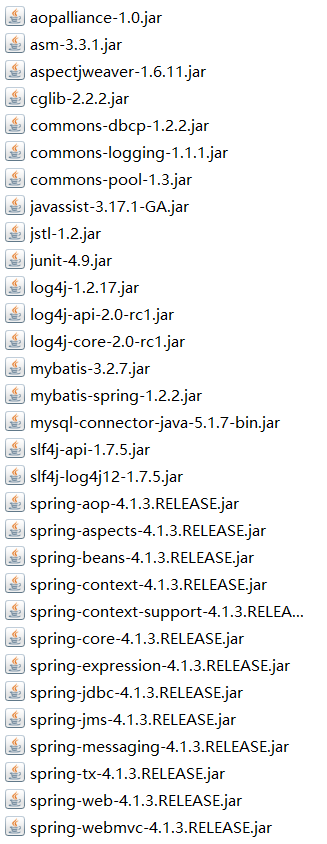
新建lib文件夹放入jar包,Build Path-->Add To Build Path之后:
原始Dao开发示例:
src下:新建核心配置文件sqlMapConfig.xml:
<?xml version="1.0" encoding="UTF-8" ?>

<!DOCTYPE configuration

PUBLIC "-//mybatis.org//DTD Config 3.0//EN"

"http://mybatis.org/dtd/mybatis-3-config.dtd">

<configuration>

    <!-- 设置别名 -->

    <typeAliases>

        <package name="org.dreamtech.mybatis.pojo" />

    </typeAliases>

    <!-- 设置扫描包 -->

    <mappers>

        <package name="org.dreamtech.mybatis.mapper"/>

    </mappers>

</configuration>
新建Spring核心配置文件:applicationContext.xml
<?xml version="1.0" encoding="UTF-8"?>

<beans xmlns="http://www.springframework.org/schema/beans"

    xmlns:context="http://www.springframework.org/schema/context" xmlns:p="http://www.springframework.org/schema/p"

    xmlns:aop="http://www.springframework.org/schema/aop" xmlns:tx="http://www.springframework.org/schema/tx"

    xmlns:xsi="http://www.w3.org/2001/XMLSchema-instance"

    xsi:schemaLocation="http://www.springframework.org/schema/beans http://www.springframework.org/schema/beans/spring-beans-4.0.xsd

    http://www.springframework.org/schema/context http://www.springframework.org/schema/context/spring-context-4.0.xsd

    http://www.springframework.org/schema/aop http://www.springframework.org/schema/aop/spring-aop-4.0.xsd http://www.springframework.org/schema/tx http://www.springframework.org/schema/tx/spring-tx-4.0.xsd

    http://www.springframework.org/schema/util http://www.springframework.org/schema/util/spring-util-4.0.xsd">

    <context:property-placeholder location="classpath:db.properties" />

    <!-- 数据库连接池 -->

    <bean id="dataSource" class="org.apache.commons.dbcp.BasicDataSource"

        destroy-method="close">

        <property name="driverClassName" value="${jdbc.driver}" />

        <property name="url" value="${jdbc.url}" />

        <property name="username" value="${jdbc.username}" />

        <property name="password" value="${jdbc.password}" />

        <property name="maxActive" value="10" />

        <property name="maxIdle" value="5" />

    </bean>

    <!-- Mybatis的工厂 -->

    <bean id="sqlSessionFactoryBean" class="org.mybatis.spring.SqlSessionFactoryBean">

        <property name="dataSource" ref="dataSource" />

        <!-- 核心配置文件的位置 -->

        <property name="configLocation" value="classpath:sqlMapConfig.xml" />

    </bean>

    <!-- Dao原始Dao -->

    <bean id="userDao" class="org.dreamtech.mybatis.dao.UserDaoImpl">

        <property name="sqlSessionFactory" ref="sqlSessionFactoryBean" />

    </bean>

</beans>
新建数据库配置文件:db.properties
jdbc.driver=com.mysql.jdbc.Driver

jdbc.url=jdbc:mysql://localhost:3306/mybatis?characterEncoding=utf-8

jdbc.username=root

jdbc.password=12345
log4j配置文件(非必须):
# Global logging configuration

log4j.rootLogger=DEBUG, stdout

# Console output...

log4j.appender.stdout=org.apache.log4j.ConsoleAppender

log4j.appender.stdout.layout=org.apache.log4j.PatternLayout

log4j.appender.stdout.layout.ConversionPattern=%5p [%t] - %m%n
接口:
package org.dreamtech.mybatis.dao;

public interface UserDao {

    public void insertUser();

}
实现类:
package org.dreamtech.mybatis.dao;

import org.mybatis.spring.support.SqlSessionDaoSupport;

/**

 * 原始Dao开发

 *

 * @author YiQing

 *

 */

public class UserDaoImpl extends SqlSessionDaoSupport implements UserDao {

    //添加用户(代码省略)

    public void insertUser() {

        //this.getSqlSession().insert();

    }

}
Mapper动态代理开发:
新建包,类,映射文件:
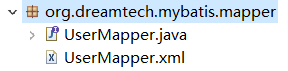
applicationContext.xml配置如下:
    <!-- Mapper动态代理开发 -->

    <bean id="userMapper" class="org.mybatis.spring.mapper.MapperFactoryBean">

        <property name="sqlSessionFactory" ref="sqlSessionFactoryBean" />

        <property name="mapperInterface" value="org.dreamtech.mybatis.mapper.UserMapper" />

    </bean>
UserMapper:
package org.dreamtech.mybatis.mapper;

import org.dreamtech.mybatis.pojo.User;

public interface UserMapper {

    // 通过ID查询一个用户

    public User findUserById(Integer id);

}
UserMapper.xml:
<?xml version="1.0" encoding="UTF-8" ?>

<!DOCTYPE mapper

PUBLIC "-//mybatis.org//DTD Mapper 3.0//EN"

"http://mybatis.org/dtd/mybatis-3-mapper.dtd">

<mapper namespace="org.dreamtech.mybatis.mapper.UserMapper">

    <!-- 通过ID查询一个用户 -->

    <select id="findUserById" parameterType="Integer" resultType="User">

        select * from user where id = #{v}

    </select>

</mapper>
测试类:
package org.dreamtech.mybatis.junit;

import org.dreamtech.mybatis.mapper.UserMapper;

import org.dreamtech.mybatis.pojo.User;

import org.junit.Test;

import org.springframework.context.ApplicationContext;

import org.springframework.context.support.ClassPathXmlApplicationContext;

public class JunitTest {

    @Test

    public void testMapper() {

        ApplicationContext ac = new ClassPathXmlApplicationContext("applicationContext.xml");

        UserMapper mapper = (UserMapper) ac.getBean("userMapper");

        User user = mapper.findUserById(10);

        System.out.println(user.getUsername());

    }

}
POJO:User类
package org.dreamtech.mybatis.pojo;

import java.io.Serializable;

public class User implements Serializable {

    private static final long serialVersionUID = 1L;

    private Integer id;

    private String username;

    public Integer getId() {

        return id;

    }

    public void setId(Integer id) {

        this.id = id;

    }

    public String getUsername() {

        return username;

    }

    public void setUsername(String username) {

        this.username = username;

    }

}
Mapper动态代理扫描开发:
这种方式是Mapper动态代理开发的增强版:
Mapper动态代理开发存在弊端:Mapper过多时,配置文件繁琐
于是,想到,能否自动扫描一个包?
applicationContext.xml配置如下:
    <!-- Mapper动态代理开发 扫描 -->

    <bean class="org.mybatis.spring.mapper.MapperScannerConfigurer">

        <!-- 基本包 -->

        <property name="basePackage" value="org.dreamtech.mybatis.mapper" />

    </bean>
注意:不需要再次注入工厂
测试类稍作改动即可:
由于没有ID,直接换成UserMapper类
package org.dreamtech.mybatis.junit;

import org.dreamtech.mybatis.mapper.UserMapper;

import org.dreamtech.mybatis.pojo.User;

import org.junit.Test;

import org.springframework.context.ApplicationContext;

import org.springframework.context.support.ClassPathXmlApplicationContext;

public class JunitTest {

    @Test

    public void testMapper() {

        ApplicationContext ac = new ClassPathXmlApplicationContext("applicationContext.xml");

        UserMapper mapper = ac.getBean(UserMapper.class);

        User user = mapper.findUserById(10);

        System.out.println(user.getUsername());

    }

}
总结:通常我们选用第三种,不过也不能不会前两种
Mybatis框架七:三种方式整合Spring的更多相关文章
- 开发工具:Mybatis.Plus.插件三种方式的逆向工程
本文源码:GitHub·点这里 || GitEE·点这里 一.逆向工程简介 在Java开发中,持久层最常用的框架就是mybatis,该框架需要编写sql语句,mybatis官方提供逆向工程,可以把数据 ...
- @Autowired注解和启动自动扫描的三种方式(spring bean配置自动扫描功能的三种方式)
前言: @Autowired注解代码定义 @Target({ElementType.CONSTRUCTOR, ElementType.FIELD, ElementType.METHOD, Elemen ...
- mybatis查询的三种方式
查询最需要关注的问题:①resultType自动映射,②方法返回值: interface EmpSelectMapper: package com.atguigu.mapper; import ja ...
- springboot与dubbo整合入门(三种方式)
Springboot与Dubbo整合三种方式详解 整合环境: jdk:8.0 dubbo:2.6.2 springboot:2.1.5 项目结构: 1.搭建项目环境: (1)创建父项目与三个子项目,创 ...
- spring学习(03)之bean实例化的三种方式
bean实体例化的三种方式 在spring中有三中实例化bean的方式: 一.使用构造器实例化:(通常使用的一个方法,重点) 二.使用静态工厂方法实例化: 三.使用实例化工厂方法实例化 第一种.使用构 ...
- Spring 循环依赖的三种方式(三级缓存解决Set循环依赖问题)
本篇文章解决以下问题: [1] . Spring循环依赖指的是什么? [2] . Spring能解决哪种情况的循环依赖?不能解决哪种情况? [3] . Spring能解决的循环依赖原理(三级缓存) 一 ...
- java:struts框架2(方法的动态和静态调用,获取Servlet API三种方式(推荐IOC(控制反转)),拦截器,静态代理和动态代理(Spring AOP))
1.方法的静态和动态调用: struts.xml: <?xml version="1.0" encoding="UTF-8"?> <!DOCT ...
- 精进 Spring Boot 03:Spring Boot 的配置文件和配置管理,以及用三种方式读取配置文件
精进 Spring Boot 03:Spring Boot 的配置文件和配置管理,以及用三种方式读取配置文件 内容简介:本文介绍 Spring Boot 的配置文件和配置管理,以及介绍了三种读取配置文 ...
- Linux就这个范儿 第15章 七种武器 linux 同步IO: sync、fsync与fdatasync Linux中的内存大页面huge page/large page David Cutler Linux读写内存数据的三种方式
Linux就这个范儿 第15章 七种武器 linux 同步IO: sync.fsync与fdatasync Linux中的内存大页面huge page/large page David Cut ...
随机推荐
- Android中竖线随内容高度变化而变化的问题和解决办法
项目中要求显示竖线,并且竖线高度不确定,竖线的高度要随着内容的变化而变化.不能使用match_parent 充满,也不能在布局中写死,此时使用 android:layout_height=" ...
- Git merge 不同的branch
Git的优势是可以创建不同的branch,然后在每个branch上开发.那么问题是:如果不同的branch之间需要做同步,比如sourceBranch上做的修改也需要同步到targetBranch,改 ...
- 常用Linux VPS/服务器SSH连接工具 - Xshell下载与使用
我们很多网友可能初次接触Linux VPS.服务器,所以在购买完毕VPS主机不知道如何登录.有些网友甚至直接类似WIN系统一样直接在桌面远程连接工具连接,可想而知肯定是无法连接的.因为如果我们购买的是 ...
- mysql的初次使用操作
一.mysql 登录 mysql 参数 mysql -uroot -p123 -P3306 -h127.0.0.1 127.0.0.1本地回环地址 二.mysql退出 mysql >exit; ...
- 某app的安全性分析过程
交互过程如下,可以发现问题很多 http://www.ixxxx.com//api/index/app图片验证码:{"data":{"imgCode":&quo ...
- js跳转到页面指定元素
var scrollDistance = $("#设置了的overflow元素").scrollTop() + $('#' + 当前屏幕元素).offset().top; $(&q ...
- SpringBoot处理日期转换问题
前台传一个datetime类型的数据即yyyy-MM-dd HH:mm:ss格式的数据黑后台controller,结果发现接收到的对象为yyyy-MM-dd 00:00:00,处理这个问题可以在con ...
- python语法之函数2
高阶函数: def f(n): return n*n def foo(a,b,func): func(a)+func(b) ret=func(a)+func(b) return ret foo(1,2 ...
- SAS 分组与排序
SAS 分组与排序 SAS对数据集进行操作时,经常需要在SET.MERGE.MODIFY或 UPDATE语句中使用分组数据.使用分组数据最基本的方法是使用BY 语句,其基本形式如下: BY 变量列表; ...
- eclipse和sublime3打开freemarker(.ftl)文件
1.eclipse如何打开freemarker? https://jingyan.baidu.com/article/49ad8bce5ea95d5834d8fa9e.html 2.sublime3如 ...