
Eclipse打包出错——提示GC overhead limit exceeded
版权声明:本文为博主原创文章,未经博主允许不得转载。
在Eclipse开发环境中打包发布apk安装包的时候,有时候会出现下面的错误:
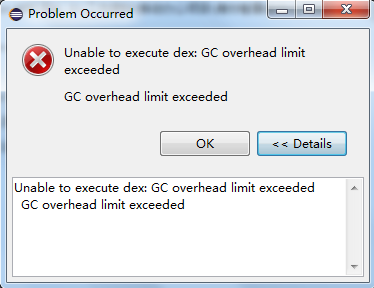
原因
在打包的时候,Eclipse占用的内存会增大,当分配给Eclipse的运行内存过小的时候,就会出现打包失败的情况。
解决方案
加大分配给Eclipse的内存。方法是修改Eclipse安装路径/eclipse.ini文件中的-Xms和-Xmx的值。
-startup

plugins/org.eclipse.equinox.launcher_1.3.0.v20140415-2008.jar

--launcher.library

plugins/org.eclipse.equinox.launcher.win32.win32.x86_64_1.1.200.v20150204-1316

-product

org.eclipse.epp.package.java.product

--launcher.defaultAction

openFile

--launcher.XXMaxPermSize

256M

-showsplash

org.eclipse.platform

--launcher.XXMaxPermSize

256m

--launcher.defaultAction

openFile

--launcher.appendVmargs

-vmargs

-Dosgi.requiredJavaVersion=1.6

-Xms40m

-Xmx512m
修改后如下:
-startup

plugins/org.eclipse.equinox.launcher_1.3.0.v20140415-2008.jar

--launcher.library

plugins/org.eclipse.equinox.launcher.win32.win32.x86_64_1.1.200.v20150204-1316

-product

org.eclipse.epp.package.java.product

--launcher.defaultAction

openFile

--launcher.XXMaxPermSize

256M

-showsplash

org.eclipse.platform

--launcher.XXMaxPermSize

256m

--launcher.defaultAction

openFile

--launcher.appendVmargs

-vmargs

-Dosgi.requiredJavaVersion=1.6

-Xms512m

-Xmx1024m
如果还不行,则可以继续加大内存。
参考资料
eclipse打包出错 GC overhead limite execteeded
Eclipse打包出错——提示GC overhead limit exceeded的更多相关文章
- eclipse 报错:GC overhead limit exceeded
还是eclipse内存问题 修改eclipse.ini -Xms512m -Xmx1024m 必要的情况下, 添加 -XX:MaxPermSize=1024M 表示在编译文件时一直占有最大内存
- gc overhead limit exceeded
eclipse-- gc overhead limit exceeded 修改内存不足的方法如下: Eclipse报错:gc overhead limit exceeded eclipse 原因是Ec ...
- gc overhead limit exceeded eclipse错误解决方式
在Eclipse打包的时候报错:gc overhead limit exceeded eclipse 原因是Eclipse默认配置内存太小须要更改安装Eclipse目录下的eclipse.ini文件. ...
- eclipse:An internal error occurred during: "Build Project". GC overhead limit exceeded
在使用Eclipse的Build Project功能时,提示以下错误: An internal error occurred during: "Build Project". GC ...
- myeclipse中解决 java heap space/gc overhead limit exceeded eclipse 的方法
在Eclipse打包的时候报错:gc overhead limit exceeded eclipse 原因是Eclipse默认配置内存太小须要更改安装Eclipse目录下的eclipse.ini文件. ...
- fix eclipse gc overhead limit exceeded in mac
fix eclipse gc overhead limit exceeded: 在mac上找不到eclipse.ini文件编辑内存限制,在eclipse安装目录右击eclipse程序,选“显示包内容” ...
- eclipse一直报An internal error occurred during: "Building workspace". GC overhead limit exceeded
最近导入到eclipse里的工程挺大的,每次eclipse启动之后都回update workspace,然后就一直报: An internal error occurred during: " ...
- eclipse错误GC overhead limit exceeded
1.eclipse以外关闭后打开错误如下图: 2.具体详情: 3.An internal error occurred during: "Building workspace". ...
- Unable to execute dex: GC overhead limit exceeded
Android打包时下面的错误: Unable to execute dex: GC overhead limit exceeded GC overhead limit exceeded 解决的方法: ...
随机推荐
- Koa源码分析(三) -- middleware机制的实现
Abstract 本系列是关于Koa框架的文章,目前关注版本是Koa v1.主要分为以下几个方面: Koa源码分析(一) -- generator Koa源码分析(二) -- co的实现 Koa源码分 ...
- PIL: 建立一个GIF图
PIL: 建立一个GIF图 一.下载PIL库: PIL库的下载是:pip install pillow(pillow就是PIL函数了) 二.采用以下代码(有注释): import PIL.Imag ...
- iOS模拟器:Undefined symbols for architecture x86_64
描述:为了适配iPhone 5s的64位处理器,在编译选项中加入了arm64架构.但是发现工程在真机上可以编译通过但是在模拟器上却未编过. 问题解决:经研究在编译选项中再加入x86_64架构,重新编译 ...
- SpringBoot+Mybatis配置Pagehelper分页插件实现自动分页
SpringBoot+Mybatis配置Pagehelper分页插件实现自动分页 **SpringBoot+Mybatis使用Pagehelper分页插件自动分页,非常好用,不用在自己去计算和组装了. ...
- spring boot + vue + element-ui全栈开发入门
今天想弄弄element-ui 然后就在网上找了个例子 感觉还是可以用的 第一步是完成了 果断 拿过来 放到我这里这 下面直接是连接 点进去 就可以用啊 本想着不用vue 直接导入连接 ...
- Greenplum 日常维护手册 (汇总、点评、备查)
1. 数据库启动:gpstart常用可参数: -a : 直接启动,不提示终端用户输入确认-m:只启动master 实例,主要在故障处理时使用2. 数据库停止:gpstop:常用可参数:-a:直接停止, ...
- <笔记>TP5的分页传递额外参数
默认生成的分页只有page一个参数,若需要提供额外的参数才能访问分页(例如查询结果的分页,需要传入查询关键字的参数才能显示结果),则需要设置额外参数query
- Django积木块三——静态文件和上传文件
静态文件和上传的文件 # 静态文件 STATIC_URL = '/static/' STATICFILES_DIRS = ( os.path.join(BASE_DIR, 'static'), ) # ...
- requestium
chrome浏览器的安装版或绿色便携版要加.exe,chromedriver驱动无.exe. 不显示……测试软件的控制.无头同在[]内,插件等新版,无图用{}:CentBrowser的Chrome内核 ...
- JavaScript(变量、作用域和内存问题)
JavaScript是一个变量松散型的语言.(不像Java一样强类型语言.) JavaScript变量包括两种:基本类型(简单的数据段)和引用类型(对象). 一.基本数据类型(5种) Undefine ...