
MYSQL Innodb逻辑存储结构
这几天在读《MySQL技术内幕 InnoDB存储引擎》,对 Innodb逻辑存储结构有了些了解,顺便也记录一下;
从InnoDB存储引擎的逻辑存储结构看,所有数据都被逻辑地存放在一个空间中,称之为表空间(tablespace)。表空间又由段(segment)、区(extent)、页(page)组成。页在一些文档中有时也称为(block),InnoDB存储引擎的逻辑存储结构大致如图:
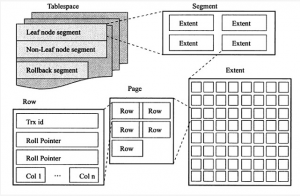
一、表空间
表空间可以看做是InnoDB存储引擎逻辑结构的最高层,所有的数据都存放在表空间中。默认情况下InnoDB存储引擎有一个共享表空间ibdata1,即所有数据都存放在这个表空间内。如果用户启动了innodb_file_per_table,则每个表内的数据可以单独放到一个表空间内,但要注意的是每张表的表空间内存放的只是数据、索引和插入缓存Bitmap页,而其他类的数据,如回滚(undo)信息,插入缓存索引页、系统事务信息、二次写缓存(Double write buffer)等还是存放在原来的共享表空间内。
现在想说明一个问题的就是,即使设置了innodb_file_per_table为ON了,共享表空间还是会不断地增加其大小,以下做个实验来验证下:
(1)下面看看初始共享表空间的大小
- root@localhost [wjqtest]>show variables like 'innodb_file_per_table';
- +-----------------------+-------+
- | Variable_name | Value |
- +-----------------------+-------+
- | innodb_file_per_table | ON |
- +-----------------------+-------+
- 1 row in set (0.11 sec)
- root@localhost [wjqtest]>system ls -lh /data/mysql/mysql_3306/data/ibdata*
- -rw-r----- 1 mysql mysql 76M Jul 28 17:43 /data/mysql/mysql_3306/data/ibdata1
可以看到:共享表空间的大小ibdata1的大小为76M,接着模拟undo的操作,利用mytest1数据表,并把其存储引擎更改为innodb,执行结果如下所示:
(2)首选将自动提交设置为off,即用户需要显示的提交事务
- root@localhost [wjqtest]>show variables like 'autocommit';
- +---------------+-------+
- | Variable_name | Value |
- +---------------+-------+
- | autocommit | ON |
- +---------------+-------+
- 1 row in set (0.03 sec)
- root@localhost [wjqtest]>set autocommit=0;
- Query OK, 0 rows affected (0.10 sec)
- root@localhost [wjqtest]>show variables like 'autocommit';
- +---------------+-------+
- | Variable_name | Value |
- +---------------+-------+
- | autocommit | OFF |
- +---------------+-------+
- 1 row in set (0.00 sec)
(3)下面的更新操作并没有执行commit或rollback,该操作会产生大量的undo,然后在观察共享表空间的大小
- root@localhost [wjqtest]>update mytest1 set salary=0;
- Query OK, 2621440 rows affected (16.68 sec)
- Rows matched: 2621440 Changed: 2621440 Warnings: 0
(4)发现ibdata1由原来的76M增长到了140M,这足以说明共享表空间中还包含undo的信息
- root@localhost [wjqtest]>system ls -lh /data/mysql/mysql_3306/data/ibdata*
- -rw-r----- 1 mysql mysql 140M Jul 28 17:46 /data/mysql/mysql_3306/data/ibdata1
(5)由于上面的事务没有提交,那么执行回滚操作,ibdata1表空间的大小是不是会将到原来的大小呢?
- root@localhost [wjqtest]>rollback;
- Query OK, 0 rows affected (53.65 sec)
- root@localhost [wjqtest]>system ls -lh /data/mysql/mysql_3306/data/ibdata*
- -rw-r----- 1 mysql mysql 140M Jul 28 17:56 /data/mysql/mysql_3306/data/ibdata1
通过上面的实验测试发现:共享表空间的大小依旧是140M,即说明innodb存储引擎不会再执行rollback的时候去收缩共享表空间的大小;虽然innodb不会回收这些空间,但是会自动判断这些undo信息是否还需要,如果不需要,则会将这些空间标记为可用空间,供下次undo使用;
二、段
上图中显示了表空间是由各个段组成的,常见的段有数据段、索引段、回滚段等。InnoDB存储引擎表是索引组织的(index organized),因此数据即索引,索引即数据。那么数据段即为B+树的页节点(上图的leaf node segment),索引段即为B+树的非索引节点(上图的non-leaf node segment)。
与Oracle不同的是,InnoDB存储引擎对于段的管理是由引擎本身完成,这和Oracle的自动段空间管理(ASSM)类似,没有手动段空间管理(MSSM)的方式,这从一定程度上简化了DBA的管理。
需要注意的是,并不是每个对象都有段。因此更准确地说,表空间是由分散的页和段组成。
三、区
区是由连续的页组成的空间,在任何的情况下每一个区的大小都是1M。为了保证区中页的连续性,innodb存储引擎一次从磁盘申请4~5个区。默认的情况下,innodb存储引擎也的大小为16K,即一个区中一共有64个连续的页。
Innodb1.2.X版本新增了参数innodb_page_size,通过该参数可以将默认的页的大小设置为4K、8K,但是页中的数据是不压缩的。总之,不论页的大小如何的变化,区的大小总是1M;
在我们启用了参数innodb_file_per_talbe后,创建的表默认大小是96KB。区是64个连续的页,那创建的表的大小至少是1MB才对啊?其实这是因为在每个段开始时,先有32个页大小的碎片页(fragment page)来存放数据,当这些页使用完之后才是64个连续页的申请。这样做的目的是,对于一些小表,或undo这类的段,可以在开始时申请较少的空间,节省磁盘容量的开销。
下面通过一个小的实验来显示innodb存储引擎对于区的申请方式:
(1)创建测试表t1
- root@localhost [wjqtest]>create table t1(col1 int not null auto_increment primary key,col2 varchar(7000));
- Query OK, 0 rows affected (0.26 sec)
- root@localhost [wjqtest]>system ls -lh /data/mysql/mysql_3306/data/wjqtest/t1.ibd;
- -rw-r----- 1 mysql mysql 96K Jul 28 18:26 /data/mysql/mysql_3306/data/wjqtest/t1.ibd
创建了t1表,col2字段设为varchar(7000),这样能保证一个页中可以存放2条记录。可以看到,初始创建完t1后表空间默认大小为96KB.
(2)接着插入两条数据,根据之前对表的定义,这两条记录应该位于同一个页中,然后通过py_innodb_page_info.py工具来查看表空间
- root@localhost [wjqtest]>insert t1 select null,repeat('a',7000);
- Query OK, 1 row affected (0.19 sec)
- Records: 1 Duplicates: 0 Warnings: 0
- root@localhost [wjqtest]>insert t1 select null,repeat('a',7000);
- Query OK, 1 row affected (0.03 sec)
- Records: 1 Duplicates: 0 Warnings: 0
- root@localhost [wjqtest]>system ls -lh /data/mysql/mysql_3306/data/wjqtest/t1.ibd;
- -rw-r----- 1 mysql mysql 96K Jul 28 18:31 /data/mysql/mysql_3306/data/wjqtest/t1.ibd
下面使用py_innodb_page_info小工具(py_innodb_page_info小工具),用来查看表空间中各页的类型和信息。
- [root@VM_35_215_centos py_innodb_page_type]# python py_innodb_page_info.py -v /data/mysql/mysql_3306/data/wjqtest/t1.ibd
- page offset 00000000, page type
- page offset 00000001, page type
- page offset 00000002, page type
- page offset 00000003, page type , page level <0000>
- page offset 00000000, page type
- page offset 00000000, page type
- Total number of page: 6:
- Freshly Allocated Page: 2
- Insert Buffer Bitmap: 1
- File Space Header: 1
- B-tree Node: 1
- File Segment inode: 1
如上结果,这次用-v来查看详细的表空间的内容,注意到了page offset为3的页,这个就是数据页。Page level表示所在的索引层,0表示叶子节点。因为当前所有就都在一个页中,因此没有非叶子节点。但是如果这是用户在插入一条记录,就会产生一个非叶节点:
- root@localhost [wjqtest]>insert t1 select null,repeat('a',7000);
- Query OK, 1 row affected (0.05 sec)
- Records: 1 Duplicates: 0 Warnings: 0
- root@localhost [wjqtest]>system ls -lh /data/mysql/mysql_3306/data/wjqtest/t1.ibd;
- -rw-r----- 1 mysql mysql 96K Jul 28 18:35 /data/mysql/mysql_3306/data/wjqtest/t1.ibd
- [root@VM_35_215_centos py_innodb_page_type]# python py_innodb_page_info.py -v /data/mysql/mysql_3306/data/wjqtest/t1.ibd
- page offset 00000000, page type
- page offset 00000001, page type
- page offset 00000002, page type
- page offset 00000003, page type , page level <0001>
- page offset 00000004, page type , page level <0000>
- page offset 00000005, page type , page level <0000>
- Total number of page: 6:
- Insert Buffer Bitmap: 1
- File Space Header: 1
- B-tree Node: 3
- File Segment inode: 1
如上执行结果,现在可以看到page offset为3的页的page level由之前的0变成了1,这时虽然新插入的记录导致B+树的分裂操作,但是这个页的类型还是B-tree Node。
接着继续上述同样的操作,在插入60条记录,也就是说当前t1中共有63条记录,32个页。为了导入的方便,在这之前先建立一个导入的存储过程:
- root@localhost [wjqtest]>delimiter //
- root@localhost [wjqtest]>
- root@localhost [wjqtest]>create procedure load_t1(count int unsigned)
- -> begin
- -> declare s int unsigned default 1;
- -> declare c varchar(7000) default repeat('a',7000);
- -> while s <= count do -> insert into t1 select null,c;
- -> set s=s+1;
- -> end while;
- -> end;
- -> //
- delimiter ;Query OK, 0 rows affected (0.48 sec)
- root@localhost [wjqtest]>delimiter ;
- root@localhost [wjqtest]>call load_t1(60);
- Query OK, 1 row affected (0.34 sec)
- root@localhost [wjqtest]>select count(*) from t1;
- +----------+
- | count(*) |
- +----------+
- | 63 |
- +----------+
- 1 row in set (0.00 sec)
- root@localhost [wjqtest]>system ls -lh /data/mysql/mysql_3306/data/wjqtest/t1.ibd;
- -rw-r----- 1 mysql mysql 592K Jul 28 18:46 /data/mysql/mysql_3306/data/wjqtest/t1.ibd
由上面的执行结果可以看到,在导入了63条数据后,表空间的大小还是小于1M,即表示数据空间的申请还是通过碎片页,而不是通过64个连续页的区。这时候在通过py_innodb_page_info.py工具来观察一下表空间t1.ibd
- [root@VM_35_215_centos py_innodb_page_type]# python py_innodb_page_info.py -v /data/mysql/mysql_3306/data/wjqtest/t1.ibd
- page offset 00000000, page type
- page offset 00000001, page type
- page offset 00000002, page type
- page offset 00000003, page type , page level <0001>
- page offset 00000004, page type , page level <0000>
- page offset 00000005, page type , page level <0000>
- page offset 00000006, page type , page level <0000>
- page offset 00000007, page type , page level <0000>
- page offset 00000008, page type , page level <0000>
- page offset 00000009, page type , page level <0000>
- page offset 0000000a, page type , page level <0000>
- page offset 0000000b, page type , page level <0000>
- page offset 0000000c, page type , page level <0000>
- page offset 0000000d, page type , page level <0000>
- page offset 0000000e, page type , page level <0000>
- page offset 0000000f, page type , page level <0000>
- page offset 00000010, page type , page level <0000>
- page offset 00000011, page type , page level <0000>
- page offset 00000012, page type , page level <0000>
- page offset 00000013, page type , page level <0000>
- page offset 00000014, page type , page level <0000>
- page offset 00000015, page type , page level <0000>
- page offset 00000016, page type , page level <0000>
- page offset 00000017, page type , page level <0000>
- page offset 00000018, page type , page level <0000>
- page offset 00000019, page type , page level <0000>
- page offset 0000001a, page type , page level <0000>
- page offset 0000001b, page type , page level <0000>
- page offset 0000001c, page type , page level <0000>
- page offset 0000001d, page type , page level <0000>
- page offset 0000001e, page type , page level <0000>
- page offset 0000001f, page type , page level <0000>
- page offset 00000020, page type , page level <0000>
- page offset 00000021, page type , page level <0000>
- page offset 00000022, page type , page level <0000>
- page offset 00000023, page type , page level <0000>
- page offset 00000000, page type
- Total number of page: 37:
- Freshly Allocated Page: 1
- Insert Buffer Bitmap: 1
- File Space Header: 1
- B-tree Node: 33
- File Segment inode: 1
如上的执行结果:可以看到B-tree node页一共有33个,除去一个page level为1的非叶节点叶,一共有32个page level为0的页,也就是说,对于数据段,已经有32个碎片页了。之所以用户在申请空间,则表空间按连接64个页的大小开始增长了
接下来,在插入一条数据,查看插入之后表空间的大小
- root@localhost [wjqtest]>call load_t1(1);
- Query OK, 1 row affected (0.02 sec)
- root@localhost [wjqtest]>system ls -lh /data/mysql/mysql_3306/data/wjqtest/t1.ibd;
- -rw-r----- 1 mysql mysql 2.0M Jul 28 18:52 /data/mysql/mysql_3306/data/wjqtest/t1.ibd
因为已经用完了32个碎片页,新的页会采用区的方式进行空间的申请,如果此时用户在使用py_innodb_page_info.py工具开查看表空间文件t1.ibd,应该可以看到很多类型为Freshly Allocated Page的页,如下所示:
- [root@VM_35_215_centos py_innodb_page_type]# python py_innodb_page_info.py -v /data/mysql/mysql_3306/data/wjqtest/t1.ibd
- page offset 00000000, page type
- page offset 00000001, page type
- page offset 00000002, page type
- page offset 00000003, page type , page level <0001>
- page offset 00000004, page type , page level <0000>
- page offset 00000005, page type , page level <0000>
- page offset 00000006, page type , page level <0000>
- page offset 00000007, page type , page level <0000>
- page offset 00000008, page type , page level <0000>
- page offset 00000009, page type , page level <0000>
- page offset 0000000a, page type , page level <0000>
- page offset 0000000b, page type , page level <0000>
- page offset 0000000c, page type , page level <0000>
- page offset 0000000d, page type , page level <0000>
- page offset 0000000e, page type , page level <0000>
- page offset 0000000f, page type , page level <0000>
- page offset 00000010, page type , page level <0000>
- page offset 00000011, page type , page level <0000>
- page offset 00000012, page type , page level <0000>
- page offset 00000013, page type , page level <0000>
- page offset 00000014, page type , page level <0000>
- page offset 00000015, page type , page level <0000>
- page offset 00000016, page type , page level <0000>
- page offset 00000017, page type , page level <0000>
- page offset 00000018, page type , page level <0000>
- page offset 00000019, page type , page level <0000>
- page offset 0000001a, page type , page level <0000>
- page offset 0000001b, page type , page level <0000>
- page offset 0000001c, page type , page level <0000>
- page offset 0000001d, page type , page level <0000>
- page offset 0000001e, page type , page level <0000>
- page offset 0000001f, page type , page level <0000>
- page offset 00000020, page type , page level <0000>
- page offset 00000021, page type , page level <0000>
- page offset 00000022, page type , page level <0000>
- page offset 00000023, page type , page level <0000>
- page offset 00000000, page type
- page offset 00000000, page type
- page offset 00000000, page type
- page offset 00000000, page type
- page offset 00000000, page type
- page offset 00000000, page type
- page offset 00000000, page type
- page offset 00000000, page type
- page offset 00000000, page type
- page offset 00000000, page type
- page offset 00000000, page type
- page offset 00000000, page type
- page offset 00000000, page type
- page offset 00000000, page type
- page offset 00000000, page type
- page offset 00000000, page type
- page offset 00000000, page type
- page offset 00000000, page type
- page offset 00000000, page type
- page offset 00000000, page type
- page offset 00000000, page type
- page offset 00000000, page type
- page offset 00000000, page type
- page offset 00000000, page type
- page offset 00000000, page type
- page offset 00000000, page type
- page offset 00000000, page type
- page offset 00000000, page type
- page offset 00000040, page type , page level <0000>
- page offset 00000000, page type
- page offset 00000000, page type
- page offset 00000000, page type
- page offset 00000000, page type
- page offset 00000000, page type
- page offset 00000000, page type
- page offset 00000000, page type
- page offset 00000000, page type
- page offset 00000000, page type
- page offset 00000000, page type
- page offset 00000000, page type
- page offset 00000000, page type
- page offset 00000000, page type
- page offset 00000000, page type
- page offset 00000000, page type
- page offset 00000000, page type
- page offset 00000000, page type
- page offset 00000000, page type
- page offset 00000000, page type
- page offset 00000000, page type
- page offset 00000000, page type
- page offset 00000000, page type
- page offset 00000000, page type
- page offset 00000000, page type
- page offset 00000000, page type
- page offset 00000000, page type
- page offset 00000000, page type
- page offset 00000000, page type
- page offset 00000000, page type
- page offset 00000000, page type
- page offset 00000000, page type
- page offset 00000000, page type
- page offset 00000000, page type
- page offset 00000000, page type
- page offset 00000000, page type
- page offset 00000000, page type
- page offset 00000000, page type
- page offset 00000000, page type
- page offset 00000000, page type
- page offset 00000000, page type
- page offset 00000000, page type
- page offset 00000000, page type
- page offset 00000000, page type
- page offset 00000000, page type
- page offset 00000000, page type
- page offset 00000000, page type
- page offset 00000000, page type
- page offset 00000000, page type
- page offset 00000000, page type
- page offset 00000000, page type
- page offset 00000000, page type
- page offset 00000000, page type
- page offset 00000000, page type
- page offset 00000000, page type
- page offset 00000000, page type
- page offset 00000000, page type
- page offset 00000000, page type
- page offset 00000000, page type
- page offset 00000000, page type
- page offset 00000000, page type
- page offset 00000000, page type
- page offset 00000000, page type
- page offset 00000000, page type
- Total number of page: 128:
- Freshly Allocated Page: 91
- Insert Buffer Bitmap: 1
- File Space Header: 1
- B-tree Node: 34
- File Segment inode: 1
四、页
同大多数数据库一样,InnoDB有页(page)的概念(也可以称为块),页是InnoDB磁盘管理的最小单位。与Oracle类似的是,Microsoft SQL Server数据库默认每页大小为8KB,不同于InnoDB页的默认大小(16KB);innodb 1.2.X版本开始,可以通过参数innodb_page_size参数将页的大小设置为4K、8K、16K。若设置完成,则所有表中也的大小都是innodb_page_size,不可以对其再次进行修改;除非通过mysqldump导入导出的操作来产生新的库;
Innodb存储引擎中,常见的页类型有:
(1)数据页(B-tree Node)。
(2)Undo页(Undo Log Page)。
(3)系统页(System Page)。
(4)事务数据页(Transaction system Page)。
(5)插入缓冲位图页(Insert Buffer Bitmap)。
(6)插入缓冲空闲列表页(Insert Buffer Free List)。
(7)未压缩的二进制大对象页(Uncompressed BLOB Page)。
(8)压缩的二进制大对象页(Compressed BLOB Page)。
MYSQL Innodb逻辑存储结构的更多相关文章
- MySQL InnoDB 逻辑存储结构
MySQL InnoDB 逻辑存储结构 从InnoDB存储引擎的逻辑结构看,所有数据都被逻辑地存放在一个空间内,称为表空间,而表空间由段(sengment).区(extent).页(page)组成.p ...
- InnoDB 逻辑存储结构
本文同时发表在https://github.com/zhangyachen/zhangyachen.github.io/issues/80 如果创建表时没有显示的定义主键,mysql会按如下方式创建主 ...
- InnoDB逻辑存储结构
从InnoDB存储引擎的逻辑存储结构看,所有数据都被逻辑地存放在一个空间中,称之为表空间(tablespace).表空间又由段(segment).区(extent).页(page)组成.页在一些文档中 ...
- MySQL InnoDB的存储结构总结
从物理意义上来讲,InnoDB表由共享表空间.日志文件组(redo文件组).表结构定义文件组成.若将innodb_file_per_table设置为on,则系统将为每一个表单独的生成一个table_n ...
- InnoDB存储引擎介绍-(5) Innodb逻辑存储结构
如果创建表时没有显示的定义主键,mysql会按如下方式创建主键: 首先判断表中是否有非空的唯一索引,如果有,则该列为主键. 如果不符合上述条件,存储引擎会自动创建一个6字节大小的指针. 当表中有多个非 ...
- InnoDB存储引擎表的逻辑存储结构
1.索引组织表: 在InnoDB存储引擎中,表都是依照主键顺序组织存放的.这样的存储方式的表称为索引组织表,在innodb存储引擎表中,每张表都有主键.假设创建的时候没有显式定义主键,则Inn ...
- InnoDB的表类型,逻辑存储结构,物理存储结构
表类型 对比Oracle支持的各种表类型,InnoDB存储引擎表更像是Oracle中的索引组织表(index organized table).在InnoDB存储引擎表中,每张表都有个主键,如果在创建 ...
- Mysql+innodb数据存储逻辑
Mysql+innodb数据存储逻辑. 表空间由段,区,页组成 ibdata1:共享表空间.即所有的数据都存放在这个表空间内.如果用户启用了innodb_file_per_table,则每张表内的数据 ...
- Innodb页面存储结构-2
上一篇<Innodb页面存储结构-1>介绍了Innodb页面存储的总体结构,本文会介绍页面的详细内容,主要包括页头.页尾和记录的详细格式. 学习数据结构时都说程序等于数据结构+算法,而在i ...
随机推荐
- DBC格式解析(数据部分)
dbc格式说明:DBC Format 实战: 我们先来看一段数据 BO_ VOLTAGE01: BMS2 SG_ V01 : |@+ () [|] "" Vector__XXX ...
- linux用户、文件权限相关命令
root 现代操作系统一般属于多用户的操作系统,也就是说,同一台机器可以为多个用户建立账户,一般这些用户都是为普通用户,这些普通用户能同时登录这台计算机,计算机对这些用户分配一定的资源. 普通用户在所 ...
- 了解AutoCAD对象层次结构 —— 6 ——块表记录
块表记录是包裹实体对象的最后一层包装了,接下来让我们继续利用MgdDbg工具查看上一小节创建的块定义内的对象有哪些. 操作步骤如下:选择块表记录TestBlock,在右侧列表中找到“Entities ...
- rsync 服务器搭建遇到的问题
问题一: @ERROR: chroot failed rsync error: error starting client-server protocol (code 5) at main.c(152 ...
- 【CF891C】Envy(最小生成树)
[CF891C]Envy(最小生成树) 题面 Codeforces 洛谷 题解 考虑\(MST\)的构建过程,对于所有权值相同的边一起考虑. 显然最终他们连出来的结果是固定的. 把连边改为把联通块联通 ...
- 不是说记住rm -rf的教训就够了
不是说记住rm -rf的教训就够了 李阿玲· 12 天前 2013年,我在同步CTAN镜像的时候,在/home下我的文件夹里面操作了下面的命令: rsync -av --delete rsync:// ...
- GuGuFishtion HDU - 6390 (杭电多校7E)
啊啊啊啊...全在纸上 字丑...算了算了 然后除法部分都用逆元就好了 还有逆元打表....学到了...牛逼 #include<map> #include<set> #incl ...
- hdu 2609 How many(最小表示法)
Problem Description Give you n ( n < 10000) necklaces ,the length of necklace will not large than ...
- 搭建james邮件服务器
把james解压到任何一个非中文无空格目录下: lib下添加必要的jar文件: 运行run.bat命令服务器,使用期间不要关闭. 创建邮件数据库 创建配置文件:james-database.prope ...
- Linux下无法运行Color picker
➜ ~ com.github.ronnydo.colorpicker com.github.ronnydo.colorpicker: error while loading shared librar ...