
MyBatis-resultType 几种返回类型
一、返回集合
1.返回JavaBean集合
public List<MyUser> selectMyUserByNameLike(String name);
<!-- resultType 集合内的元素类型 -->

<select id="selectMyUserByNameLike" resultType="myUser" parameterType="string">

  select * from myuser where name like #{name}

</select>
测试方法
public static void main(String[] args) {

    SqlSession session = null;

    try {

        InputStream inputStream = Resources.getResourceAsStream("mybatis-config.xml");

        SqlSessionFactory sqlSessionFactory = new SqlSessionFactoryBuilder().build(inputStream);

        session = sqlSessionFactory.openSession();

        MyUserMapper mapper = session.getMapper(MyUserMapper.class);

        List<MyUser> myUsers = mapper.selectMyUserByNameLike("%a%");

        System.out.println(myUsers);

    } catch (IOException e) {

        e.printStackTrace();

    } finally {

        if (session != null) {

            session.close();

        }

    }

}

2.返回 Map 集合
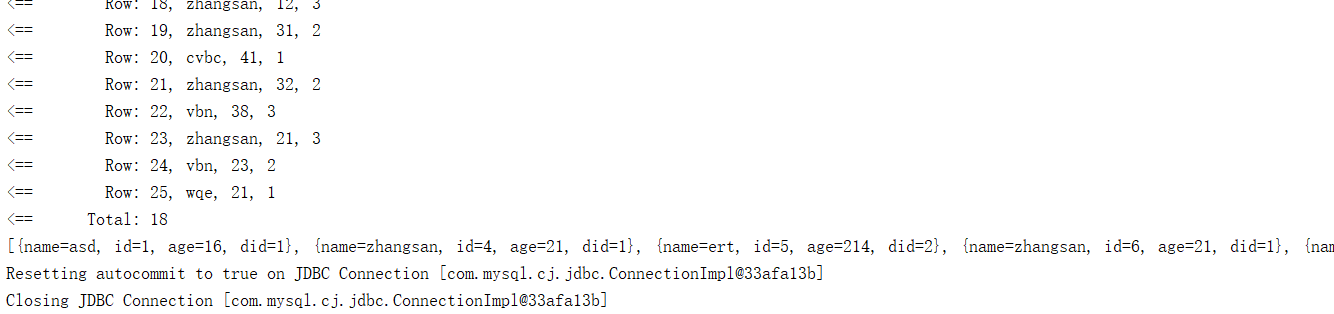
<!--public List<Map<String,Object>> getMyUser()-->

<select id="getMyUser" resultType="map">

  select * from myuser

</select>
二、返回 Map
1.一条记录
public Map<String,Object> selectMyUserById(Integer id);
<select id="selectMyUserById" resultType="map" parameterType="integer">

  select * from myuser where id = #{id}

</select>

2.多条记录,需要指定 Map 的 Key 和 Value 的类型
// 指定 Map 的 Key 从记录中的 id 列获取

@MapKey("id")

public Map<String,MyUser> selectMyUserByGtId(Integer id);
<!-- resultType Map 中 value 的类型 -->

<select id="selectMyUserByGtId" resultType="myUser" parameterType="integer">

  select * from myuser where id > #{id}

</select>

三、返回 resultMap 自定义结果集封装
关于自动映射封装的配置
<settings>

    <!-- 自动映射有三种模式,NONE、PARTIAL、FULL。NONE 不启用自动映射,PARTIAL 只对非嵌套的 resultMap 进行自动映射,FULL 表示对所有的 resultMap 都进行自动映射。默认为 PARTIAL -->

    <setting name="autoMappingBehavior" value="PARTIAL"/>

    <!-- 数据库字段下划线转Bean字段的驼峰命名 -->

    <setting name="mapUnderscoreToCamelCase" value="true"/>

    <!-- 控制台打印SQL -->

    <setting name="logImpl" value="STDOUT_LOGGING" />

</settings>
默认数据库字段与 JavaBean 对应不上时可开启驼峰命名或查询时使用别名
http://www.mybatis.org/mybatis-3/zh/sqlmap-xml.html#Auto-mapping
1.自定义 JavaBean 的封装
确认是否成功可以关掉 MyBatis 的自动映射
<setting name="autoMappingBehavior" value="NONE"/>
public MyUser selectMyUserById(Integer id);
<!-- 自定义某个 javaBean 的封装规则

    type:自定义规则中JavaBean类型的全路径,可用别名

    id:唯一id方便引用 -->

<resultMap type="myUser" id="myUserResultMap">

    <!-- 指定主键列的封装规则,用 id 标签定义主键会底层有优化

    column:指定哪一列

    property:指定对应的javaBean属性 -->

    <id column="id" property="id"/>

    <!-- 定义普通列封装规则 -->

    <result column="name" property="name"/>

    <!-- 其他不指定的列会自动封装:建议只要写 resultMap 就把全部的映射规则都写上 -->

    <result column="age" property="age"/>

</resultMap>

<!-- 使用 resultMap,不使用 resultType -->

<select id="selectMyUserById" resultMap="myUserResultMap" parameterType="integer">

  select * from myuser where id = #{id}

</select>

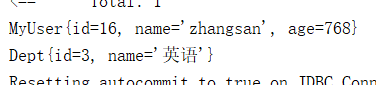
2.关联查询的封装,一对一,JavaBean 属性包含 JavaBean

public MyUser selectMyUserById(Integer id);
直接调用属性赋值
<resultMap type="myUser" id="myUserResultMap">

    <id column="id" property="id"/>

    <result column="name" property="name"/>

    <result column="age" property="age"/>

    <!--直接属性封装-->

    <result column="did" property="dept.id"/>

    <result column="dname" property="dept.name"/>

</resultMap>

<select id="selectMyUserById" resultMap="myUserResultMap" parameterType="integer">

  SELECT m.id, m.name, m.age, m.did, d.name AS dname FROM myuser m,dept d WHERE m.did = d.id AND m.id = #{id}

</select>
使用 association
<resultMap type="com.bean.MyUser" id="myUserResultMap">

    <id column="id" property="id"/>

    <result column="name" property="name"/>

    <result column="age" property="age"/>

    <!--  association 指定联合的 javaBean 对象

        property="dept":指定哪个属性是联合的对象

        javaType:指定这个属性对象的类型[不能省略] -->

    <association property="dept" javaType="com.bean.Dept">

        <id column="did" property="id"/>

        <result column="dname" property="name"/>

    </association>

</resultMap>

<select id="selectMyUserById" resultMap="myUserResultMap" parameterType="integer">

  SELECT m.id, m.name, m.age, m.did, d.name AS dname FROM myuser m,dept d WHERE m.did = d.id AND m.id = #{id}

</select>
使用 association 二次查询,即有两条 SQL
<resultMap id="myUserResultMap" type="com.bean.MyUser">

    <id column="id" property="id"/>

    <result column="name" property="name"/>

    <result column="age" property="age"/>

    <!-- association 定义关联对象的封装规则

        select:当前属性是调用 select 指定的方法查出的结果

        column:将哪一列的值传给这个方法 -->

    <association property="dept" select="com.dao.DeptMapper.selectDeptById" column="did"/>

</resultMap>

<select id="selectMyUserById" resultMap="myUserResultMap" parameterType="integer">

  SELECT * FROM myuser WHERE id = #{id}

</select>
<?xml version="1.0" encoding="UTF-8" ?>

<!DOCTYPE mapper

        PUBLIC "-//mybatis.org//DTD Mapper 3.0//EN"

        "http://mybatis.org/dtd/mybatis-3-mapper.dtd">

<!-- namespace 对应接口文件的全路径 -->

<mapper namespace="com.dao.DeptMapper">

    <select id="selectDeptById" resultType="dept" parameterType="string">

      select * from dept where id = #{id}

    </select>

</mapper>
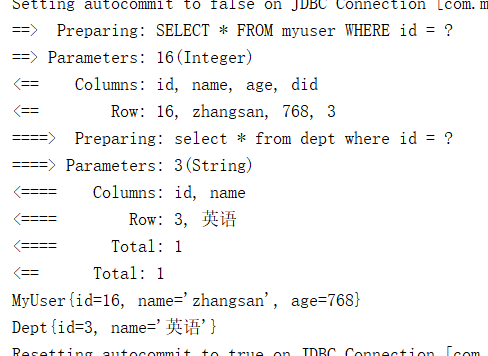
开启懒加载:在没有使用 Dept 的属性时,则只会加载 MyUser 的属性。即只会发送一条 SQL 语句,要使用 Dept 属性时才会发送第二条 SQL。不会一次性发送两条 SQL
<!-- 延迟加载的全局开关。当开启时,所有关联对象都会延迟加载。 特定关联关系中可通过设置fetchType属性来覆盖该项的开关状态。默认false -->

<setting name="lazyLoadingEnabled" value="true"/>

<!-- 当开启时,任何方法的调用都会加载该对象的所有属性。否则,每个属性会按需加载。默认false (true in ≤3.4.1) -->

<setting name="aggressiveLazyLoading" value="false"/>
3.关联查询的封装,一对多,JavaBean 属性包含 JavaBean 的集合
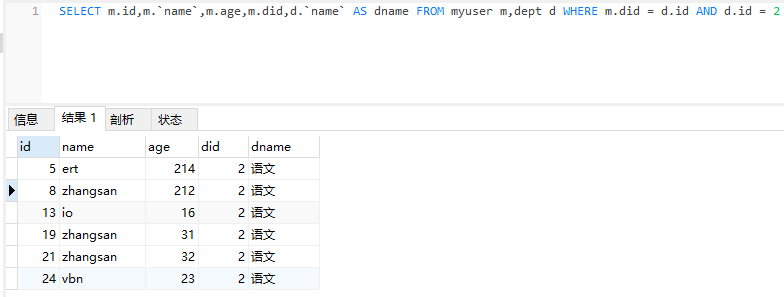
使用 association
public Dept getDeptById(Integer id);
<resultMap type="com.bean.Dept" id="MyDept">

    <id column="did" property="id"/>

    <result column="dname" property="name"/>

    <!-- collection 定义关联集合类型的属性封装规则

        ofType 指定集合里面元素的类型 -->

    <collection property="myUsers" ofType="com.bean.MyUser">

        <!-- 定义集合中元素的封装规则 -->

        <id column="id" property="id"/>

        <result column="name" property="name"/>

        <result column="age" property="age"/>

    </collection>

</resultMap>

<select id="getDeptById" resultMap="MyDept">

    SELECT m.id,m.name,m.age,m.did,d.name AS dname FROM myuser m,dept d WHERE m.did = d.id AND d.id = #{id}

</select>
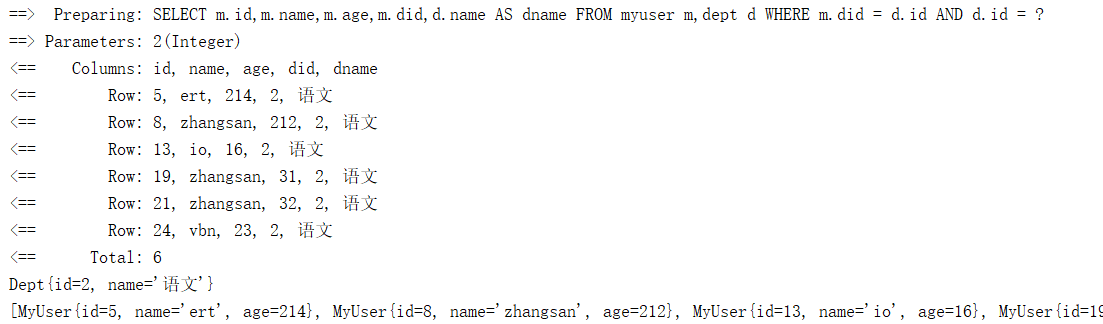
关闭懒加载,使用二次查询
public Dept getDeptByIdStep(Integer did);
<!-- Collection 分段查询 -->

<resultMap type="com.bean.Dept" id="MyDeptStep">

    <id column="id" property="id"/>

    <result column="name" property="name"/>

    <collection property="myUsers" select="com.dao.MyUserMapper.selectMyUserByDid"

                column="{did=id}" fetchType="eager"/>

    <!-- column 要处理复合主键或传递多个值过去:可以将多列的值封装 Map 传递,指定多个列名通过 column="{prop1=col1,prop2=col2}"

        语法来传递给嵌套查询语句。这会引起 prop1 和 prop2 以参数对象形式来设置给目标嵌套查询语句

        fetchType="lazy":是否延迟加载,优先级高于全局配置,lazy:延迟,eager:立即 -->

</resultMap>

<select id="getDeptByIdStep" resultMap="MyDeptStep">

    select * from dept where id = #{id}

</select>
public List<MyUser> selectMyUserByDid(Integer dId);
<select id="selectMyUserByDid" resultType="myUser">

  select * from myuser where dId = #{did}

</select>
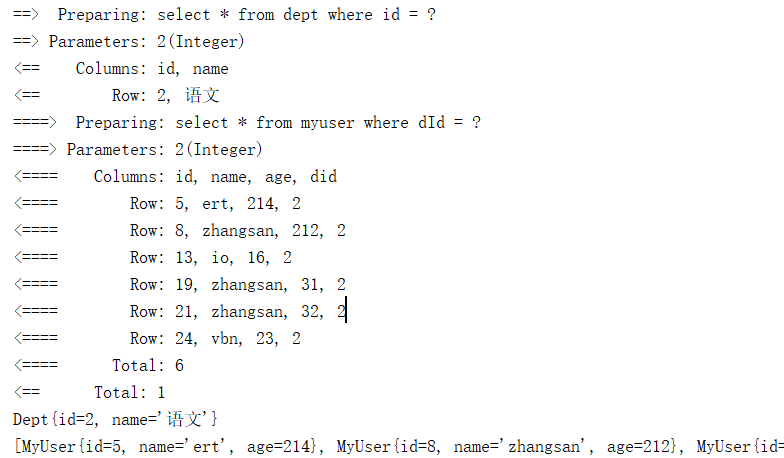
4.鉴别器 discriminator
<!--public MyUser selectMyUserById(Integer id);-->

<select id="selectMyUserById" resultMap="MyEmpDis" parameterType="integer">

  SELECT * FROM myuser WHERE id = #{id}

</select>

<resultMap id="MyEmpDis" type="com.bean.MyUser">

    <id column="id" property="id"/>

    <result column="name" property="name"/>

    <result column="age" property="age"/>

    <!-- column:指定判定的列名 javaType:列值对应的java类型  -->

    <discriminator javaType="integer" column="age">

        <!-- 21岁 封装课程至 JavaBean -->

        <case value="21" resultType="com.bean.MyUser">

            <association property="dept" select="com.dao.DeptMapper.selectDeptById" column="did"/>

        </case>

        <!-- 33岁 不封装课程至 JavaBean 且把 age 赋值给 id -->

        <case value="33" resultType="com.bean.MyUser">

            <result column="age" property="id"/>

        </case>

    </discriminator>

</resultMap>
<!--public Dept selectDeptById(Integer id);-->

<select id="selectDeptById" resultType="dept" parameterType="string">

  select * from dept where id = #{id}

</select>
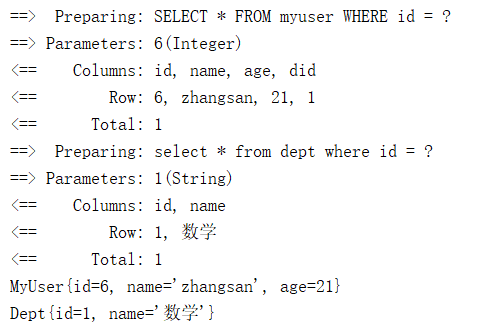
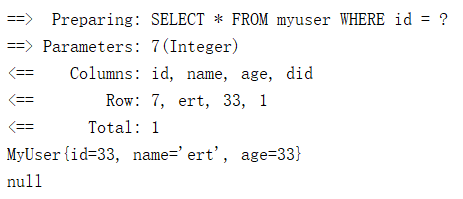
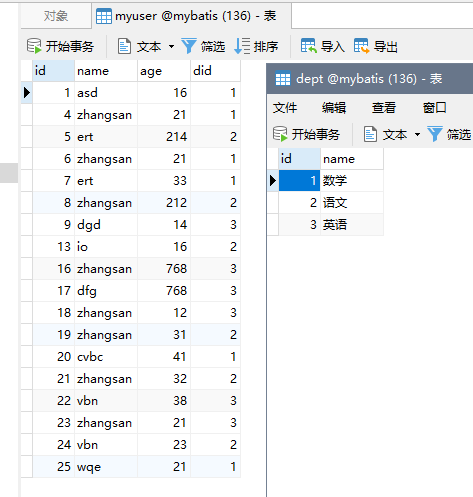
上面测试中使用的实体类与数据
public class Dept {

    private Integer id;

    private String name;

    private List<MyUser> myUsers;
public class MyUser {

    private Integer id;

    private String name;

    private Integer age;

    private Dept dept;
MyBatis-resultType 几种返回类型的更多相关文章
- springMVC中controller的几种返回类型
==网文1,还不错,感觉比较老旧springMVC中controller的几种返回类型 - CSDN博客http://blog.csdn.net/qq_16071145/article/details ...
- ajax 另外两种返回类型(json xml)
返回json类型(例子): <!DOCTYPE html PUBLIC "-//W3C//DTD XHTML 1.0 Transitional//EN" "http ...
- MyBatis resultType用Map 返回值中有NULL则缺少字段 返回值全NULL则map为null
这个问题我大概花了2个小时才找到结果 总共需要2个设置 这里是对应springboot中的配置写法 @select("select sum(a) a,sum(b) b from XXX wh ...
- mybatis中查询结果为空时不同返回类型对应返回值
今天在别人的代码基础上实现新需求,看到对于mybatis查询结果的判断不是很正确,如果查询结果为空就会异常,不知道大家有没有这样的疑惑:mybatis中resultType有多种返回类型,对于每种不同 ...
- asp.net mvc 3.0 知识点整理 ----- (2).Controller中几种Action返回类型对比
通过学习,我们可以发现,在Controller中提供了很多不同的Action返回类型.那么具体他们是有什么作用呢?它们的用法和区别是什么呢?通过资料书上的介绍和网上资料的查询,这里就来给大家列举和大致 ...
- mybatis默认返回类型
在mybatis中,无论你指定还是不指定返回类型,mybatis都会默认的先将查询回的值放入一个hashMap中(如果返回的值不止一条就是一个包含hashMap的list).这其中的区别在于,如果你指 ...
- [C#] async 的三大返回类型
async 的三大返回类型 序 博主简单数了下自己发布过的异步文章,已经断断续续 8 篇了,这次我想以 async 的返回类型为例,单独谈谈. 异步方法具有三个可让开发人员选择的返回类型:Task&l ...
- Ajax返回类型JSON,XML
Ajax的三种返回类型 **一.TEXT *二.JSON 数据显示页面代码: <!DOCTYPE html PUBLIC "-//W3C//DTD XHTML 1.0 Transiti ...
- Web API 2:Action的返回类型
Web API 2:Action的返回类型 Web API控制器中的Action方法有如下几种返回类型: void HttpResponseMessage IHttpActionResult 其它类型 ...
随机推荐
- python之旅第八篇--异常
判断类与对象关系 isinstance #判断对象obj是否是由cls类创建的 class Foo(object): pass obj = Foo() print isinstance(obj,Foo ...
- C - A Simple Problem with Integers POJ - 3468 线段树模版(区间查询区间修改)
参考qsc大佬的视频 太强惹 先膜一下 视频在b站 直接搜线段树即可 #include<cstdio> using namespace std; ; int n,a[maxn]; stru ...
- BZOJ4818 [SDOI2017] 序列计数 【矩阵快速幂】
题目分析: 一个很显然的同类项合并.注意到p的大小最大为100,考虑把模p意义下相同的求出来最后所有的减去没有质数的做矩阵快速幂即可. 代码: #include<bits/stdc++.h> ...
- 接口压测初识java GC
1.先用Spring Boot 搭建 web 服务,构建api 服务 @RequestMapping("/index") @ResponseBody public String i ...
- 【XSY2787】Mythological VII 贪心
题目描述 有两个指针\(l,r\),初始时\(l=r=k\) 给你\(a_1,\ldots,a_n\),你要移动\(l,r\),\(l\)只能每次向左移一个数,\(r\)只能向右移一个数,要求任意时刻 ...
- GitHub Desktop 出现“please upgrade your plan to create a new private repository”的解决办法
转:https://blog.csdn.net/qq_38584262/article/details/82386805 解决办法:去掉最下面的勾
- 【BZOJ4832】抵制克苏恩(矩阵快速幂,动态规划)
[BZOJ4832]抵制克苏恩(矩阵快速幂,动态规划) 题面 BZOJ 题解 一模一样 #include<iostream> #include<cstdio> using na ...
- PyCharmMarkdown插件的方法
arkdown是一种可以使用普通文本编辑器编写的标记语言,通过简单的标记语法,它可以使普通文本内容具有一定的格式. 从github下载的代码一般都会带有README.md文件,该文件是一个Markdo ...
- 【原创】POJ 3259 Wormholes(Bellman-Ford) && 简介Bellman-Ford算法
[原创] 题目大意 John有N个农场,一共有M条边,在农场上出现了W个虫洞(W是一条边),其中M是双向普通边,W是单向虫洞边.John穿行于农场之间每经过一条边(S到E)的时间为+T,每经过虫洞会时 ...
- Centos 7下下载和安装docker
sudo yum install -y device-mapper sudo modprobe dm_mod ls -l /sys/class/misc/device-mapper sudo rpm ...