
Android实战--短信发送器
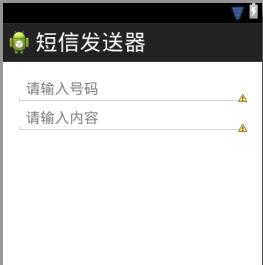
首先设计界面
<LinearLayout xmlns:android="http://schemas.android.com/apk/res/android"

    xmlns:tools="http://schemas.android.com/tools"

    android:layout_width="match_parent"

    android:layout_height="match_parent"

    android:paddingBottom="@dimen/activity_vertical_margin"

    android:paddingLeft="@dimen/activity_horizontal_margin"

    android:paddingRight="@dimen/activity_horizontal_margin"

    android:paddingTop="@dimen/activity_vertical_margin"

    tools:context=".MainActivity"

    android:orientation="vertical"

    >

    <EditText

        android:layout_width="match_parent"

        android:layout_height="wrap_content"

        android:hint="请输入号码"

        />

     <EditText

        android:layout_width="match_parent"

        android:layout_height="wrap_content"

        android:hint="请输入内容"

        />

</LinearLayout>
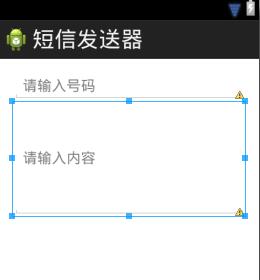
如果希望输入内容框变大变宽
可以设置
android:lines="6"
最后再添加button按钮
完整的代码:
<LinearLayout xmlns:android="http://schemas.android.com/apk/res/android"

    xmlns:tools="http://schemas.android.com/tools"

    android:layout_width="match_parent"

    android:layout_height="match_parent"

    android:paddingBottom="@dimen/activity_vertical_margin"

    android:paddingLeft="@dimen/activity_horizontal_margin"

    android:paddingRight="@dimen/activity_horizontal_margin"

    android:paddingTop="@dimen/activity_vertical_margin"

    tools:context=".MainActivity"

    android:orientation="vertical"

    >

    <EditText

        android:id="@+id/et_phone"

        android:layout_width="match_parent"

        android:layout_height="wrap_content"

        android:hint="请输入号码"

        />

     <EditText

         android:id="@+id/et_content"

        android:layout_width="match_parent"

        android:layout_height="wrap_content"

        android:hint="请输入内容"

        android:lines="6"

        />

     <Button

         android:layout_width="wrap_content"

         android:layout_height="wrap_content"

         android:onClick="send"

         android:text="发送"

         />

</LinearLayout>
界面如下:
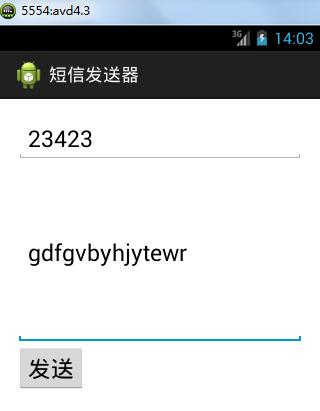
点击发送后会发现报错,权限没设置

再新建一个模拟器avd2.3(版本低,运行快)

同时启动两个模拟器
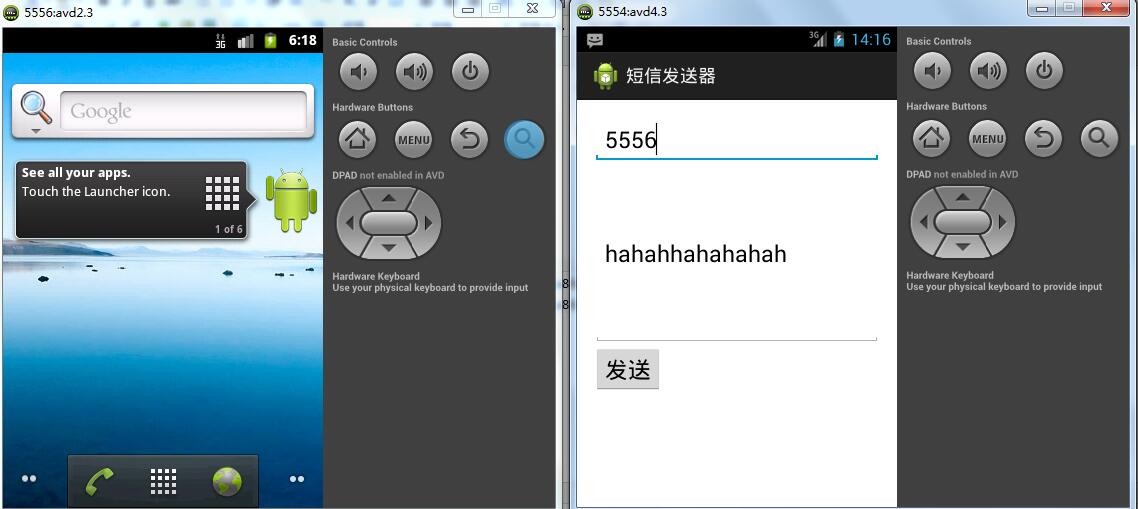
注意:短信发送器的号码为5556
以上就完成了简单的发送短信功能
但是上面的操作还是存在一个小问题,那就是当短信的长度超过运营商限制的长度的时候,短信发送不出去
修改代码如下:
package com.wuyudong.smssender;

import java.util.List;

import android.os.Bundle;

import android.app.Activity;

import android.telephony.SmsManager;

import android.view.Menu;

import android.view.View;

import android.widget.EditText;

public class MainActivity extends Activity {

    @Override

    protected void onCreate(Bundle savedInstanceState) {

        super.onCreate(savedInstanceState);

        setContentView(R.layout.activity_main);

    }

    public void send(View v) {

        EditText et_phone = (EditText) findViewById(R.id.et_phone);

        EditText et_content = (EditText) findViewById(R.id.et_content);

        String phone = et_phone.getText().toString();

        String content = et_content.getText().toString();

        // 获取短信管理器的对象

        SmsManager sm = SmsManager.getDefault();

        // 如果短信过长,分割短信,不能超过运营商限定的最长字符数

        List<String> smss = sm.divideMessage(content);

        for (String sms : smss) {

            // 发送短信

            // arg0:对方的号码

            // arg1:短信服务中心的号码,不要设置

            // arg2:短信内容

            sm.sendTextMessage(phone, null, sms, null, null);

        }

    }

}
搞定
Android实战--短信发送器的更多相关文章
- Android项目——短信发送器
因为应用要使用手机的短信服务,所以要在清单文件AndroidManifest.xml中添加短信服务权限: <?xml version="1.0" encoding=" ...
- Android(java)学习笔记99:android的短信发送器研究
1.第一种可以调用系统内部的短信程序. 之前我曾经出现过一个bug就是报错: android.content.ActivityNotFoundException: No Activity found ...
- 无废话Android之常见adb指令、电话拨号器、点击事件的4种写法、短信发送器、Android 中各种布局(1)
1.Android是什么 手机设备的软件栈,包括一个完整的操作系统.中间件.关键的应用程序,底层是linux内核,安全管理.内存管理.进程管理.电源管理.硬件驱动 2.Dalvik VM 和 JVM ...
- android开发学习---开发一个简易的短信发送器
一.需求: 开发一个简易的短信发送器,输入:对方手机号码,短信内容,点击发送按钮,短信发送成功,对方手机成功收到短信. 其中要求短信内容过长时可以自动拆分,长度英文是160个英文,中文是70个,中英混 ...
- Android短信发送器_08
1.string xml代码 <?xml version="1.0" encoding="utf-8"?> <resources> &l ...
- 初识安卓小程序(Android短信发送器)
首先,先创建一个安卓项目(我的版本号是4.4.2的),名字为"短信发送器" 然后在res目录下找到layout目录,找到activity_main.xml或fragment_mai ...
- Android短信发送器(2)
在上一篇的<Android短信发送器>当中.发送功能并不完好.当发送内容超过限定字数时,短信就会发送失败,此时就须要推断内容是否超过限制,假设不超过限制.就直接发送,反之.则对其进行处理再 ...
- Android学习4—短信发送器的实现
界面预览: 由图中可以看出,此APP需要的组件有:两个TextView,一个用于显示手机号码的标题,另一个用于显示短信内容的标题. ...
- Android_简易的短信发送器
这个随笔将介绍如何完成一个简单的第三方的短信发送器(不打开短信界面,调用android的api完成功能) 1.首先,我们来做布局 由于我这里写的是一个简易的,,短信发送,所以只是一个LinearLay ...
随机推荐
- 使用JavaScript判断用户是否为手机设备
最近在做微信服务号开发,其中遇到一个问题是微信服务号查看的个人的消息,如果点击在浏览器中查看(iOS中是在Safari中打开)应该是跳转到登录页面,因为页面需要从后台获取,因为需要服务端判断,如果是存 ...
- 【转载】dirs、pushd、popd指令
转载自:http://hi.baidu.com/linuxtrip/item/47a38c8eec00e98f4414cfb7 一.目录栈指令 目录栈是用户最近访问过的系统目录列表,并以堆栈的形式管理 ...
- shell的重定向
>file 将file文件重定向为输出源,新建模式,可以将正确的结果输出到file文件 >>file 将file文件重定向为输出源,追加模式 <file 将file文件重定 ...
- HMM 自学教程(二)生成模型
本系列文章摘自 52nlp(我爱自然语言处理: http://www.52nlp.cn/),原文链接在 HMM 学习最佳范例,这是针对 国外网站上一个 HMM 教程 的翻译,作者功底很深,翻译得很精彩 ...
- nginx的部署与发布
1.在http://nginx.org/en/download.html下载nginx.tar.gz包. 2.上传发送到服务器(wcp工具) 3.用tar -xf命令解压gz包 4.[配置安装变量]: ...
- 利用session做国际化引起的old区内存爆满及修复方法
题记:昨天加班打车回家,看见前面有辆路虎在高速上开的巨慢,挡住了我坐的出租车的路,于是就跟司机吐槽了一句:“前面这车怎么这么面啊?”,司机沉默了大概3秒,说了一句富含哲理性的话:“没有面车,只有面人” ...
- Spring应用——事务管理
事务基础:请参看:http://www.cnblogs.com/solverpeng/p/5720306.html 一.Spring 事务管理 1.前提:事务管理器 在使用 Spring 声明式事务管 ...
- 领域驱动设计(DDD)实现之路
2004年,当Eric Evans的那本<领域驱动设计——软件核心复杂性应对之道>(后文简称<领域驱动设计>)出版时,我还在念高中,接触到领域驱动设计(DDD)已经是8年后的事 ...
- R语言简单聚类分析
#以R基础包自带的鸢尾花(Iris)数据进行聚类分析iris data <- iris[,:] #系统聚类法(层次聚类法) distance <- dist(data) #计算距离 iri ...
- 移动端手势库Hammer.js学习
感觉移动端原生支持的 touch.tap.swipe 几个事件好像还不够用,某些时候还会用到诸如缩放.长按等其他功能. 近日学习了一个手势库 Hammer.js,它是一个轻量级的触屏设备手势库,能识别 ...