
gnuplot Python API
源文件
 #!/usr/bin/env python

 from os import popen

 class gnuplot_leon:

 # Author : Leon  Email: yangli0534@gmail.com

 # a gnuplot api of python

     def __init__(self):

         self.gnuplot = popen('gnuplot','w')

         self.write = self.gnuplot.write

         self.flush = self.gnuplot.flush

         self.close = self.gnuplot.close

         #return gp

     def set_plot_size(self,x=0.85,y=0.85):

         self.write(''.join(['set  size ',str(x),' ,',str(y),'\n']))

         #self.write(''.join(['set term png size ',str(x),' ',str(y),'\n']))

         #self.flush()

     def set_canvas_size(self,x=600,y=400):

         #self.write('set size 0.85, 0.85\n')

         self.write(''.join(['set term png size ',str(x),' ',str(y),'\n']))

     def set_title(self,title='gnuplot'):

         self.write(''.join(['set title "{/Times:Italic ',str(title), '}"\n']))

         self.write('set title  font ",10"  norotate tc rgb "white"\n')

     def set_gif(self):

         self.write('set terminal gif animate\n')

     def set_png(self):

         self.write('set terminal png\n')

     def set_file_name(self,filename='gnuplot.gif'):

         self.write(''.join(['set output ', '"',str(filename) ,'"','\n']))

     def set_tics_color(self,color='orange'):

         self.write(''.join(['set tics textcolor rgb ','"',str(color),'"','\n']))

     def set_border_color(self,color='orange'):

         self.write(''.join(['set border lc rgb ','"',str(color),'"','\n']))

     def set_grid_color(self,color='orange'):

         self.write(''.join(['set grid lc rgb ','"',str(color),'"','\n']))

     def set_bkgr_color(self,color='orange'):

         self.write(''.join(['set object 1 rectangle from screen 0,0 to screen 1,1 fc rgb ','"',str(color),'"',' behind\n']))

     def set_xlabel(self,text='x',color='white'):

         self.write(''.join(['set xlabel " {/Times:Italic distance: ', str(text) ,' } " tc rgb ','"',str(color),'"',' \n']))

     def set_ylabel(self,text='x',color='white'):

         self.write(''.join(['set ylabel " {/Times:Italic distance: ', str(text) ,' } " tc rgb ','"',str(color),'"',' \n']))

     def auto_scale_enable(self):

         self.write('set autoscale\n')

     def set_key(self,onoff='off ',text='gnuplot',color='white'):

         self.write('unset key\n')

         self.write(''.join(['set key ',str(onoff),' title "',str(text),'" textcolor rgbcolor "',str(color),'"\n']))

         #self.write('show key\n')

     def set_x_range(self,start,end):

         self.write(''.join(['set xrange [ ',str(start),':',str(end),']\n']))

     def set_y_range(self,start,end):

         self.write(''.join(['set yrange [ ',str(start),':',str(end),']\n']))

     def set_frame_start(self,linestype = 'l',linewidth=3,l_color='green,'):

         #self.write('plot "-" w l  lw 1.5 lc rgb "green"\n')

         self.write(''.join(['plot "-"  notitle w ',str(linestype),' lw ', str(linewidth), ' lc rgb ', '"', str(l_color),'" \n']))

     def update_point(self,x,y):

         self.write(''.join([str(x),' ',str(y),'\n']))

     def set_frame_end(self):

         self.write('e\n')

     def set_output_valid(self):

         self.write('set output\n')

     def close(self):

         self.close()
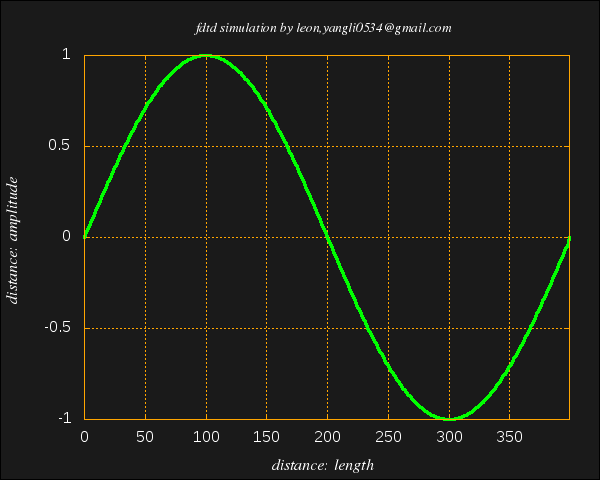
例'1
 #!/usr/bin/env python

 import sys

 import math

 import os

 from gnuplot_leon import *

 # Author : Leon  Email: yangli0534@gmail.com

 # fdtd simulation , plotting with gnuplot, writting in python

 # perl and gnuplot software packages should be installed before running this program

 # 1d fdtd with absorbing boundary and TFSF boundary between [49] and [50]

 # lossy dielectric material localted at > ez[150]

 gp = gnuplot_leon()

 gp.set_plot_size(1,1)

 gp.set_canvas_size(600,800)

 gp.set_title('fdtd simulation by leon : gnuplot class test')

 title = 'fdtd simulation by leon,yangli0534\\\\@gmail.com'

 #gp.write('set terminal gif animate\n')

 gp.set_title(title)

 #gp.set_gif()

 gp.set_png()

 gp.set_file_name('demo1.png')

 gp.set_tics_color('white')

 gp.set_border_color('orange')

 gp.set_grid_color('orange')

 gp.set_bkgr_color('gray10')

 gp.set_xlabel('length','white')

 gp.set_ylabel('amplitude','white')

 gp.auto_scale_enable()

 gp.set_key('off','sin(x)','white')

 size = 400#physical distance

 sinwave=size * [0.00]#

 cnt = 0

 elem = 0.00000

 pi = 3.14159265358979323846

 #gp.write(''.join(['set xrange [0:',str(size),'-1]\n']));

 gp.set_x_range(0,size-1)

 #for i in range(0,size):

 #    sinwave[i] = 0.0

 for mm in range(0, size-1):

     sinwave[mm] = math.sin(2*pi*mm/size)

 gp.set_frame_start('l', 3, 'green')

 cnt = 0

 for elem in sinwave:

     gp.update_point(cnt,elem)

     #print ''.join([str(cnt),':',str(elem),'\n'])

     cnt +=  1

 gp.set_frame_end()

 gp.set_key('off','sin(x)','white')

 gp.set_output_valid()

 gp.close()
例2
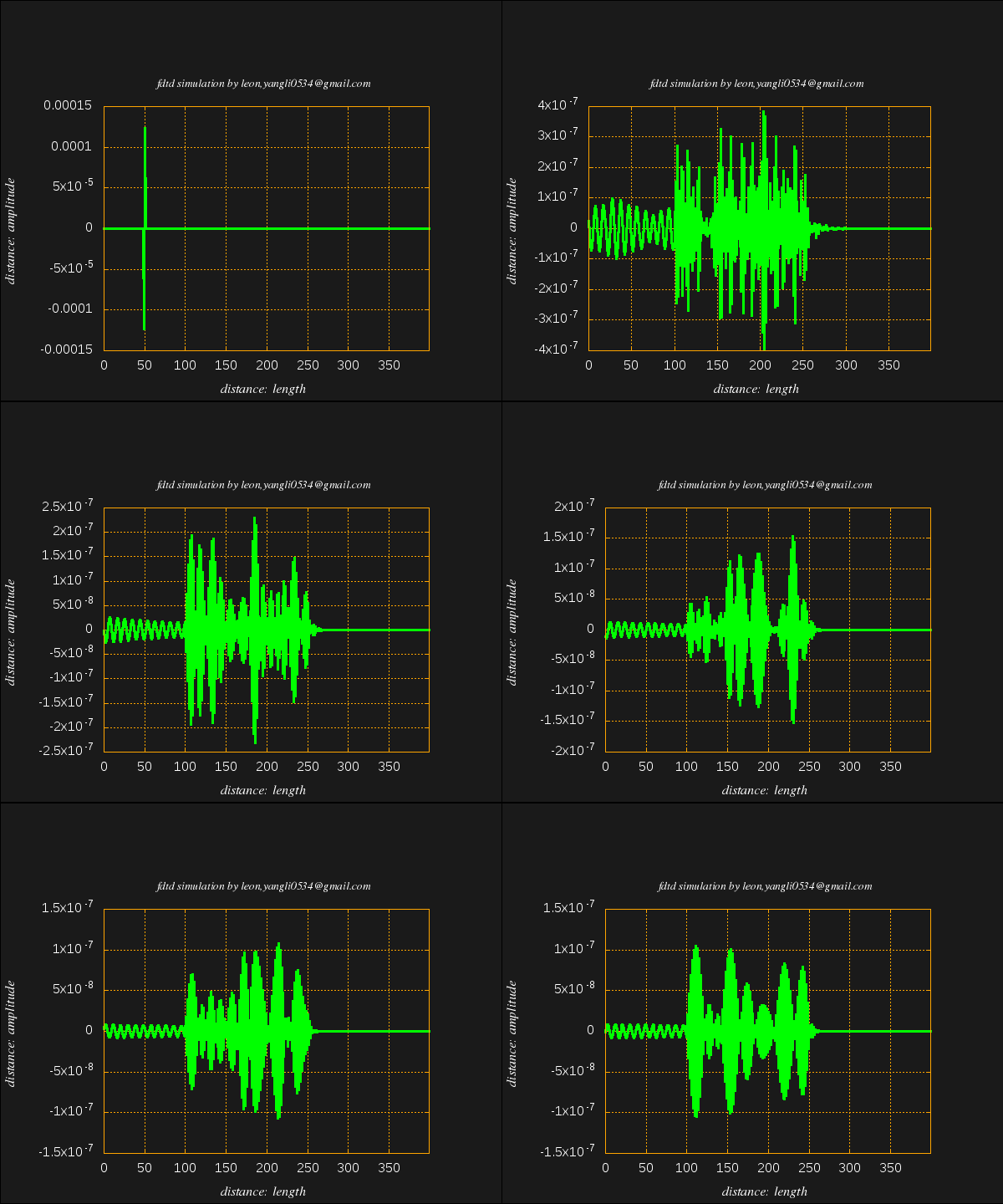
 #!/usr/bin/env python

 import sys

 import math

 import os

 from gnuplot_leon import *

 # Author : Leon  Email: yangli0534@gmail.com

 # fdtd simulation , plotting with gnuplot, writting in python

 # perl and gnuplot software packages should be installed before running this program

 # 1d fdtd with absorbing boundary and TFSF boundary between [49] and [50]

 # lossy dielectric material localted at > ez[150]

 gp = gnuplot_leon()

 gp.set_plot_size(0.85,0.85)

 gp.set_canvas_size(600,400)

 #gp.set_title('fdtd simulation by leon : gnuplot class test')

 title = 'fdtd simulation by leon,yangli0534\\\\@gmail.com'

 gp.set_title(title)

 gp.set_gif()

 #gp.set_png()

 gp.set_file_name('demo2.gif')

 gp.set_tics_color('white')

 gp.set_border_color('orange')

 gp.set_grid_color('orange')

 gp.set_bkgr_color('gray10')

 gp.set_xlabel('length','white')

 gp.set_ylabel('amplitude','white')

 gp.auto_scale_enable()

 gp.set_key('off','sin(x)','white')

 size = 400#physical distance

 ez=size * [0.00]#electric field

 hy=size * [0.00]#magnetic field

 ceze=size * [0.00]#

 cezh=size * [0.00]#

 chye=size * [0.00]#

 chyh=size * [0.00]#

 #sinwave=size * [0.00]#

 imp0 = 377.00

 LOSS = 0.01

 LOSS_LAYER = 250

 MaxTime = 18000

 cnt = 0

 elem = 0.00000

 gp.set_x_range(0,size-1)

 for i in range(0,size):

     ez[i] = 0.0

     hy[i] = 0.0

     #sinwave[i] = 0.0

     if (i < 100):

         #$epsR[$i] = 1.0;

         ceze[i] = 1.0

         cezh[i] = imp0

     elif(i < LOSS_LAYER):

         #$epsR[$i] = 1.0;

         ceze[i] = 1.0

         cezh[i] = imp0/9.0

     else :

         #$epsR[$i] = 9.0;

         ceze[i] = (1.0-LOSS)/(1.0+LOSS)

         cezh[i] = imp0 / 9 /(1.0+LOSS)

     if( i < LOSS_LAYER):

         chye[i] = 1.0/imp0

         chyh[i] = 1.0

     else:

         chye[i] = 1.0/imp0/(1.0+LOSS)

         chyh[i] = (1.0-LOSS)/(1.0+LOSS)

 for qTime in range(0, MaxTime):

     # update magnetic field

     for mm in range(0, size-1):

         hy[mm] = hy[mm]*chyh[mm] + (ez[mm+1]-ez[mm])*chye[mm]

         #sinwave[mm] = math.sin(mm/size*2*pi)

     hy[49] = hy[49]-math.exp(-(qTime - 30.0)*(qTime - 30.0)/100.0)/imp0

     # update electric field

     ez[0] = ez[1]#abc

     #$ez[$size-1] = $ez[$size-2];

     for mm in range(1, size-1):

         ez[mm] = ez[mm]*ceze[mm] + (hy[mm] - hy[mm-1])*cezh[mm]

     if(qTime % 30 == 0):

         gp.set_frame_start('l', 3, 'green')

         cnt = 0

         for elem in ez:

             gp.update_point(cnt,elem)

             cnt +=  1

         gp.set_frame_end()

     ez[50] =  ez[50]+math.exp(-(qTime +0.5-(-0.5)- 30.0)*(qTime +0.5-(-0.5)- 30.0)/100.0);

 #gp.write('set output\n')

 #gp.close()

 gp.set_output_valid()

 gp.close()
gnuplot Python API的更多相关文章
- Appium python API 总结
Appium python api 根据testerhome的文章,再补充一些文章里面没有提及的API [TOC] [1]find element driver 的方法 注意:这几个方法只能通过sel ...
- The novaclient Python API
The novaclient Python API Usage First create a client instance with your credentials: >>> f ...
- Openstack python api 学习文档 api创建虚拟机
Openstack python api 学习文档 转载请注明http://www.cnblogs.com/juandx/p/4953191.html 因为需要学习使用api接口调用openstack ...
- BotVS开发基础—Python API
代码 import json def main(): # python API列表 https://www.botvs.com/bbs-topic/443 #状态信息 LogStatus(" ...
- 《Spark Python API 官方文档中文版》 之 pyspark.sql (一)
摘要:在Spark开发中,由于需要用Python实现,发现API与Scala的略有不同,而Python API的中文资料相对很少.每次去查英文版API的说明相对比较慢,还是中文版比较容易get到所需, ...
- 《Spark Python API 官方文档中文版》 之 pyspark.sql (二)
摘要:在Spark开发中,由于需要用Python实现,发现API与Scala的略有不同,而Python API的中文资料相对很少.每次去查英文版API的说明相对比较慢,还是中文版比较容易get到所需, ...
- HBase Python API
HBase Python API HBase通过thrift机制可以实现多语言编程,信息通过端口传递,因此Python是个不错的选择 吐槽 博主在Mac上配置HBase,奈何Zoomkeeper一直报 ...
- 二、Blender/Python API总览
原文:https://docs.blender.org/api/blender_python_api_current/info_overview.html Python in Blender Ble ...
- Appium+python自动化8-Appium Python API
Appium+python自动化8-AppiumPython API 前言: Appium Python API全集,不知道哪个大神整理的,这里贴出来分享给大家. 1.contexts conte ...
随机推荐
- 重新想象 Windows 8.1 Store Apps (77) - 控件增强: 文本类控件的增强, 部分控件增加了 Header 属性和 HeaderTemplate 属性, 部分控件增加了 PlaceholderText 属性
[源码下载] 重新想象 Windows 8.1 Store Apps (77) - 控件增强: 文本类控件的增强, 部分控件增加了 Header 属性和 HeaderTemplate 属性, 部分控件 ...
- spring中的DisposableBean和InitializingBean,ApplicationContextAware的用法
在spring容器初始化bean和销毁bean的以前的操作有很多种, 目前我知道的有:在xml中定义的时候用init-method和destory-method,还有一种就是定义bean的时候实现Di ...
- Java集合框架之Collection接口
Java是一门面向对象的语言,那么我们写程序的时候最经常操作的便是对象了,为此,Java提供了一些专门用来处理对象的类库,这些类库的集合我们称之为集合框架.Java集合工具包位于Java.util包下 ...
- IBatis 配置一对多
-------说明-------- IBatis 版本2.0 配置一对多 namespace = testDao ------------------ /** *班级的resultMap *Class ...
- 关于谷歌浏览器不能播放背景音乐的问题(与IE的不同之处)
第一篇博文 忍受寂寞,抵制诱惑,持之以恒. 开发时,以下代码在IE浏览器上能顺利播放背景音乐,可在谷歌浏览器上却没有动静. <html> <body> <bgsound ...
- JavaScript this特性,静态方法 和实例方法,prototype
<script type="text/javascript"> function logs(str) { document.write(str + "< ...
- 【读书笔记】iOS网络-HTTP-URL百分号编码
代码: - (void)viewDidLoad { [super viewDidLoad]; // Do any additional setup after loading the view, ty ...
- Android Activity使用拾遗
一.onWindowFocusChanged 有时我们需要测量一个Activity多长时间才能显示出来,那么在代码中打点计时的时机选在哪儿呢?在onCreate和onResume执行完成后,Activ ...
- android创建自定义控件
新建一个布局title.xml <?xml version="1.0" encoding="utf-8"?> <LinearLayout xm ...
- 关于IOS多线程的好的技术博客
点击图片就能跳转链接到目标网页. 1.GCD<本人已阅,写的非常好>