
Enabling CORS in WCF
Introduction
This is an intermediate example of WCF as REST based solution and enabling CORS access, so that this WCF service can be consumed from other domains without having cross-domain issues. I will explain more on CORS in latter section, so hold on , read through problem and solution. While developing this similar solution, I have faced issues, and did not find any helpful working article/blog, so i am posting this. Hope this will be helpful.
Background
We develop WCF service as REST service and consume that using javascript and jquery calls. This is good to start with single page application or purely javascript based application. You will never face any issue as long as wcf service hosted domain remains same as the domain where you have consumer service. The issue arises when, you started allowing other companies to consume WCF service as REST service. For e.g. you have some reporting service and exposed as REST service. You have a web portal , where this is consumed. And since this purely REST based, you want to allow 3rd party companies to consumer REST based service and show same reporting in their website. NOTE: In this case, JS used to consume WCF service will be sitting at client's domain, but WCF domain will be your domain. And this different domain will cause cross domain issue, i.e. WCF will throw error while invoking.
Using the code
Before jumping straight into code, I want to formally introduce what is REST and CORS issue.
Representational state transfer (REST) is an abstraction of the architecture of the World Wide Web; more precisely, REST is an architectural style consisting of a coordinated set of architectural constraints applied to components, connectors, and data elements, within a distributed hypermedia system. REST ignores the details of component implementation and protocol syntax in order to focus on the roles of components, the constraints upon their interaction with other components, and their interpretation of significant data elements.-- http://en.wikipedia.org/wiki/Representational_state_transfer#Framework_implementations
Cross-origin resource sharing- User agents commonly apply same-origin restrictions to network requests. These restrictions prevent a client-side Web application running from one origin from obtaining data retrieved from another origin, and also limit unsafe HTTP requests that can be automatically launched toward destinations that differ from the running application's origin. - http://www.w3.org/TR/cors/#introduction
In this example, I will use sample WCF service , that Visual studio provides. First, we will create a WCF REST service, which can accept POST request with parameter as an object. Write a simple JS based APP to consume that. And WCF service will simply return the some prefix + received object value. As we are mainly focusing to enable CORS, I have kept this very basic.
Then I will show you , where exactly error happens. After that, solution for overcoming CORS issue.
Step#1. Lets create a WCF service project, create service contract and operation contract as shown below.
[ServiceContract]

public interface IService1

{

    [OperationContract]

    [WebInvoke(UriTemplate = "/TestMethod", Method = "POST", BodyStyle = WebMessageBodyStyle.Bare, RequestFormat = WebMessageFormat.Json

      )]

    string TestMethod(CompositeType value);

}
Step#2 Definition of CompositeType is -
[DataContract]

public class CompositeType

{

    bool boolValue = true;

    string stringValue = "Hello ";

    [DataMember]

    public bool BoolValue

    {

        get { return boolValue; }

        set { boolValue = value; }

    }

    [DataMember]

    public string StringValue

    {

        get { return stringValue; }

        set { stringValue = value; }

    }

}
Step#3 Then, create service class. Following is the code for this.
public class Service1 : IService1

{

    public string TestMethod(CompositeType value)

    {

        return string.Format("You entered: {0}", value.StringValue);

    }

}
Step#4 Assume it is hosted somewhere ( www.example1.com ) and test with fiddler whether it works. Following is the result.
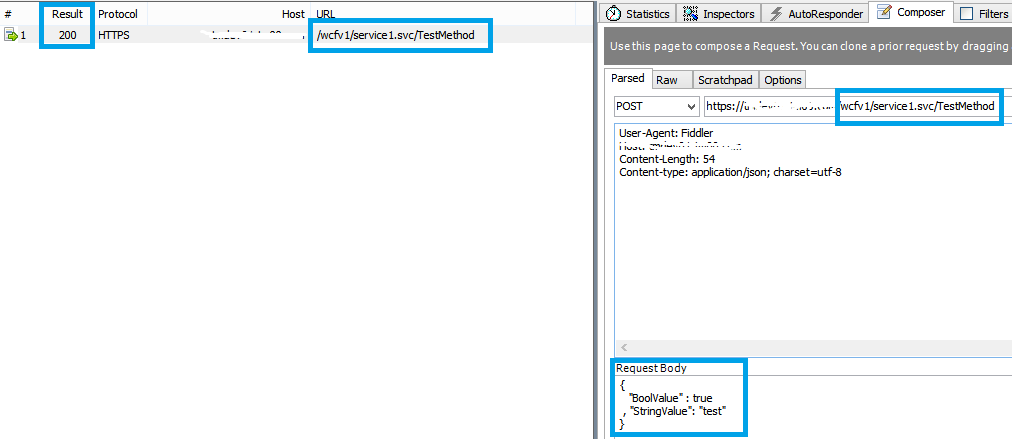
Hurray!, it is working fine, see Result - 200 status.
Step#5 I have a simple javascript ( this will be in a HTML file) to invoke this REST based method. The html file is hosted in - http://localhost Source code for javascript part in html file.
$(document).ready(function () {

	$("button").click(function () {

		alert("clicked");

		var data = $("#txt").val();

		var postdata = {};

		var data_obj = {"BoolValue" : "true" , "StringValue": data}

		postdata["value"] =  data_obj;

		var url = "https://tmdev01.tm00.com/testwcf/service1.svc/TestMethod";

		$.ajax({

			type: "POST",

			url: url,

			contentType: "application/json; charset=utf-8",

			data: JSON.stringify(postdata),

			dataType: "json",

			success: function(data) {console.log(data);},

			error: function(a,b,c) {console.log(a);}

		});

	});

});
-----------------HTML Part-------------
Enter something <input id="txt" type="text" /><button>Get WCF data</button>
Now, when i execute this javascript it will throw error. Following is the error message from browser console.
Quote:OPTIONS https://www.example.com/wcfv1/service1.svc/TestMethod
test1.html:1 XMLHttpRequest cannot load https://www.example1.com/wcfv1/service1.svc/TestMethod. No 'Access-Control-Allow-Origin' header is present on the requested resource. Origin 'http://localhost' is therefore not allowed access. The response had HTTP status code 405.
Following is the browser request payload info.
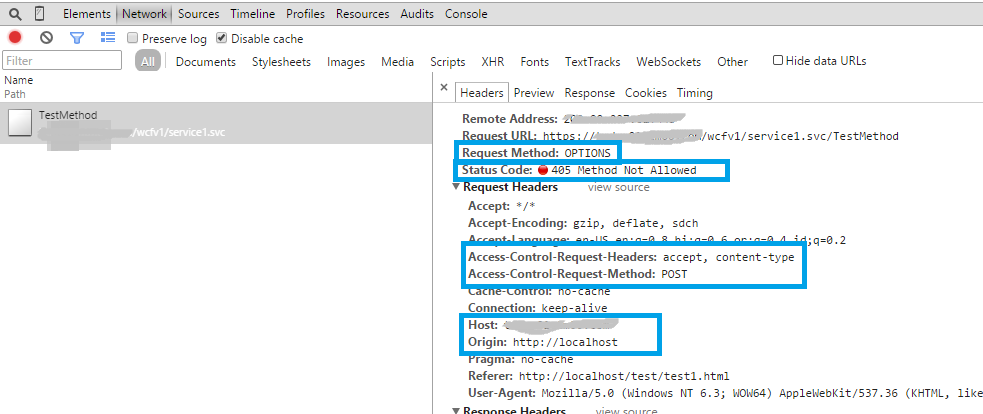
And it is not working anymore with other domain javascript call  .
.
If you closely look into this - we are invoking WCF with "POST" request , but it shows request method as "OPTIONS". This is because, POST, PUT, DELETE methods are unsafe methods and cross domain requests first makes a preflight request i.e. OPTIONS request to see if that succeeds means server responds/sends OK signal to that , then only it will again make actual POST request.
Also, note that it sends various request headers such as "Access-Control-Request-Headers", "Access-Control-Request-Method".
What it means? - We as wcf service developer need to responds to that OPTIONS http request.
How to do that? - Add global.asax file and add following code to Application_BeginRequest. Following is the code snippet.
protected void Application_BeginRequest(object sender, EventArgs e)

{

    HttpContext.Current.Response.AddHeader("Access-Control-Allow-Origin", "http://localhost");

    if (HttpContext.Current.Request.HttpMethod == "OPTIONS")

    {

        HttpContext.Current.Response.AddHeader("Access-Control-Allow-Methods", "POST, PUT, DELETE");

        HttpContext.Current.Response.AddHeader("Access-Control-Allow-Headers", "Content-Type, Accept");

        HttpContext.Current.Response.AddHeader("Access-Control-Max-Age", "1728000");

        HttpContext.Current.Response.End();

    }

}
As you can see from above, i am allowing origin to "http://localhost", so that if javascript is placed in this domain and that is making call to WCF, then it will be allowed. Also i have added request response header that we should send as part of OPTIONS Request header.
This is extremely important decision : You can always use "*" for Access-Control-Allow-Origin, but for security reason that is discouraged. Because you are opening access to all to invoke your WCF server as REST Service from anywhere. Whereas you should know, to whom you are providing access for CORS and put those domains here only.
This is basic thing i am doing here, you can make those thing configurable.
So we are done with this setup, and i am going to deploy this solution, see if that helps.
Conclusion:
Now, i am using same javascript as above , and just hosted changed WCF code into some other virtual directory(testwcf). So when i issue ajax request, see that it has made 2 requests - OPTIONS, POST. Refer below screenshot.

We will analyse both request details, so first, see what is OPTIONS request's response and how that is different from 1st attempt with non-CORS WCF.
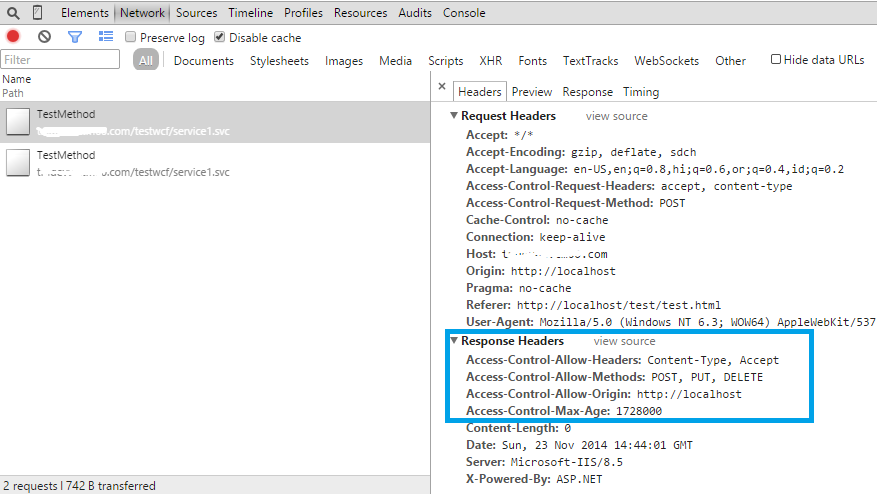
As you can see that, now our WCF service responded with all required response headers such as "access-control-allow-* " . - Note: we have done these in global.asax.
So when this request succeed , then browser made 2nd request i.e. actual POST . Lets check the details of that.
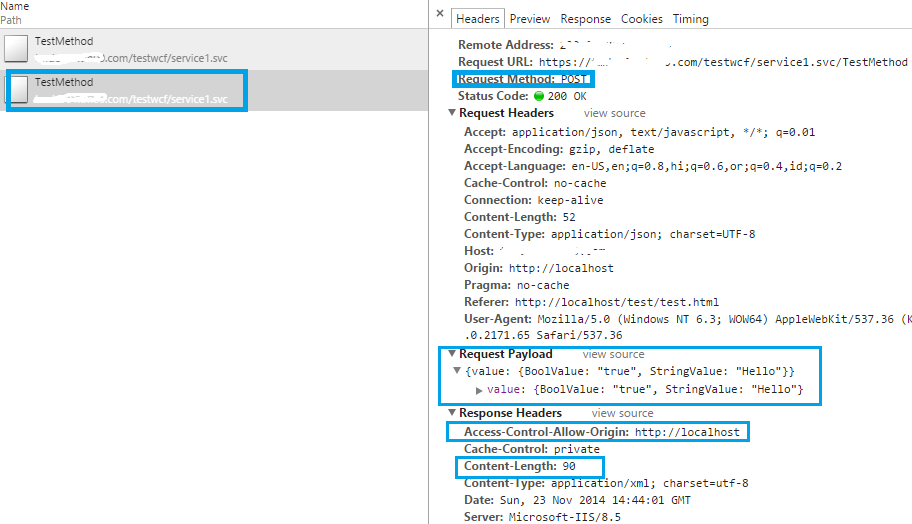
Now, you can see that, it actually made request payload and see that response header ( see Status code- 200 OK), it succeed and has some content-length.
Enabling CORS in WCF的更多相关文章
- WCF SOA --- AJAX 跨域请求处理 CORS for WCF
一.问题 跨域请求无法处理的问题,由于为了阻止恶意的网站通过JS脚本来窃取正常网站受保护的资源.所由所有的浏览器的默认策略是阻止XmlHttpRequest的跨域的异步请求. 但是对于一 ...
- SpringBoot入门教程(十三)CORS方式实现跨域
什么是跨域?浏览器从一个域名的网页去请求另一个域名的资源时,域名.端口.协议任一不同,都是跨域 . 跨域资源访问是经常会遇到的场景,当一个资源从与该资源本身所在的服务器不同的域或端口请求一个资源时,资 ...
- CORS support for ASP.NET Web API (转载)
CORS support for ASP.NET Web API Overview Cross-origin resource sharing (CORS) is a standard that al ...
- 配置CORS解决跨域调用—反思思考问题的方式
导读:最近都在用一套完整的Java EE的体系做系统,之前都是用spring框架,现在弄这个Java EE,觉得新鲜又刺激.但,由于之前没有过多的研究和使用,在应用的过程中,也出现了不少的问题.累积了 ...
- CORS support in Spring Framework--官方
原文地址:https://spring.io/blog/2015/06/08/cors-support-in-spring-framework For security reasons, browse ...
- 开源的Owin 的身份验证支持 和跨域支持
http://identitymodel.codeplex.com/ https://identityserver.github.io/ Windows Identity Foundation 6.1 ...
- pouchdb 安装使用
1. 安装: If you are on a Debian flavor of Linux (Ubuntu, Mint, etc.), you can install CouchDB with: $ ...
- LESS文档
less官方介绍文档(http://lesscss.org/#docs) Getting Started Less is a CSS pre-processor, meaning that it ex ...
- Spring cloud zuul跨域(二)
使用 CorsFilter 解决ajax跨域问题 直接在zuul的main下面,创建corsFilter就可以了. @SpringBootApplication @EnableZuulProxy ...
随机推荐
- iOS 准确计算某个时间点距现在的时间差的代码 如"几分钟,几小时,几秒之前" ,
利用时间戳来进行计算 ,需要给它一个时间: NSString *countTime = [self intervalSinceNow:@"2015-10-29 17:00:00" ...
- iOS之UI--Quartz2D的入门应用--重绘下载圆形进度条
*:first-child { margin-top: 0 !important; } body > *:last-child { margin-bottom: 0 !important; } ...
- myeclipse10安装findbugs
尝试过myeclipse10环境下,在线安装findbugs,插件包是能下载到指定目录下,可是由于版本问题,findbugs插件是不能使用的.所以才有了下面的离线安装 离线安装findbugs 操作系 ...
- javascripts 实习自动提交表单 onsubmit
html: <form id="formwb" onsubmit="return setPassword();"> <script> d ...
- Effective Java 36 Consistently use the Override annotation
Principle Use the Override annotation on every method declaration that you believe to override a sup ...
- 使用TRACE时 输出 _CrtDbgReport: String too long or IO Error
在VS2010中使用MFC,使用UNICODE 调用TRACE,输出_CrtDbgReport: String too long or IO Error 可尝试使用OutputDebugString函 ...
- spring mvc 和junit 4集成的注意点
常规步骤: 1.导入jar包,主要有两个,spring-test 和 junit4,主要用maven管理,直接依赖即可.可以在这个网站上进行查找或下载:http://mvnrepository.com ...
- 用Qemu模拟vexpress-a9 (三)--- 实现用u-boot引导Linux内核
环境介绍 Win7 64 + Vmware 11 + ubuntu14.04 32 u-boot 版本:u-boot-2015-04 Linux kernel版本:linux-3.16.y busyb ...
- 【Android UI设计与开发】6.底部菜单栏(三)使用Fragment+PopupWindow仿QQ空间最新版底部菜单栏
直接看栗子吧,效果基本实现,界面微调和弹窗的优化,去做的话会很耗时说,暂时就酱紫了.上传效果动态图太大了,直接手机截图的效果图如下: 至于代码的实现主要就是自定义的菜单栏,和用 PopupWindow ...
- 边工作边刷题:70天一遍leetcode: day 75-2
Strobogrammatic Number I/II/III 要点:记题,注意轴对称和点对称的区别.这题就是几个固定digit之间的palindrome I https://repl.it/CqLu ...