
Asp.Net Web API 2第九课——自承载Web API
前言
阅读本文之前,您也可以到Asp.Net Web API 2 系列导航进行查看 http://www.cnblogs.com/aehyok/p/3446289.html
Asp.Net Web API可以需要IIS。你可以在你自己的主机上来承载一个Web API。
本教程来展示在控制台应用程序中来承载一个Web API。使用的开发工具为VS2013。
本文示例代码下载链接http://pan.baidu.com/s/1d56zf
创建一个控制台应用程序
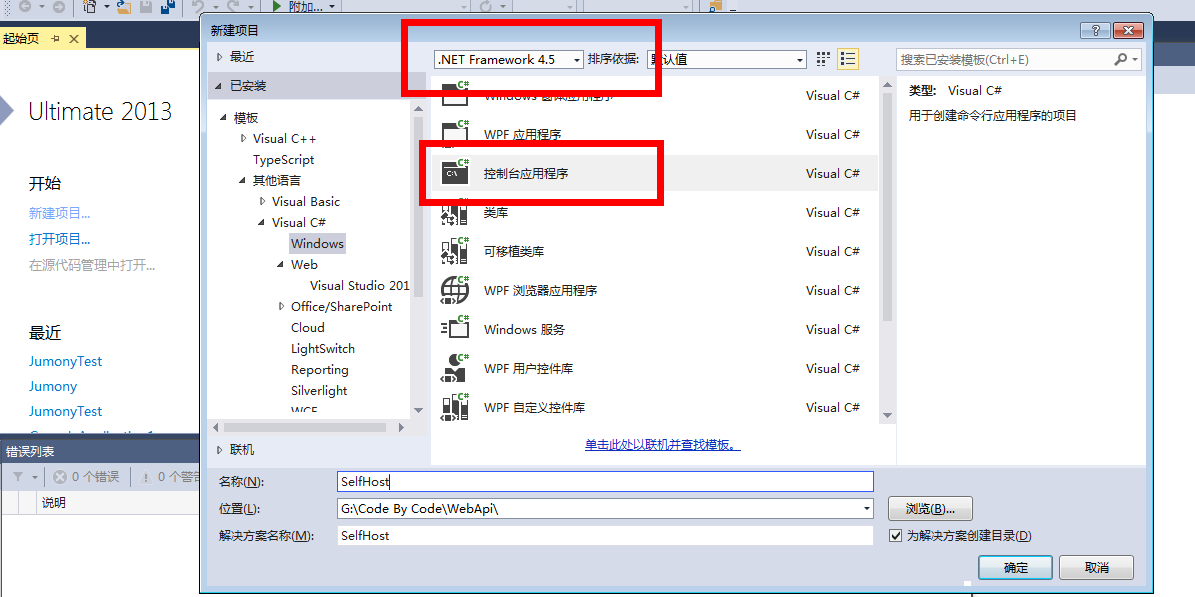
这里我默认的Framework版本为4.5的。然后通过Nuget来下载安装Microsoft.AspNet.WebApi.SelfHost。

创建Model和Controller
首先添加一个public公共类Product。
    public class Product

    {

        public int Id { get; set; }

        public string Name { get; set; }

        public string Category { get; set; }

        public decimal Price { get; set; }

    }
然后添加一个public公共类ProductsController,并且这个类继承自System.Web.Http.ApiController。记得添加扩展引用System.Web.Http。
using System;

using System.Collections.Generic;

using System.Linq;

using System.Net;

using System.Text;

using System.Threading.Tasks;

using System.Web.Http;

namespace SelfHost

{

    public class ProductsController:ApiController

    {

        Product[] products = new Product[]

        {

            new Product { Id = , Name = "Tomato Soup", Category = "Groceries", Price =  },

            new Product { Id = , Name = "Yo-yo", Category = "Toys", Price = 3.75M },

            new Product { Id = , Name = "Hammer", Category = "Hardware", Price = 16.99M }

        };

        public IEnumerable<Product> GetAllProducts()

        {

            return products;

        }

        public Product GetProductById(int id)

        {

            var product = products.FirstOrDefault((p) => p.Id == id);

            if (product == null)

            {

                throw new HttpResponseException(HttpStatusCode.NotFound);

            }

            return product;

        }

        public IEnumerable<Product> GetProductsByCategory(string category)

        {

            return products.Where(p => string.Equals(p.Category, category,

                    StringComparison.OrdinalIgnoreCase));

        }

    }

}
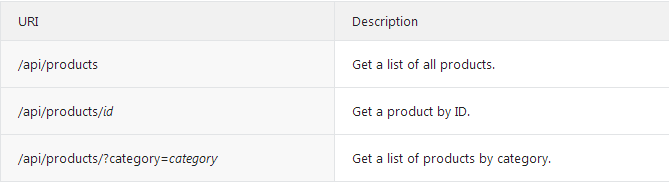
这个控制器定义了三个Get方法:
承载Web API
打开Program.cs,然后添加如下使用语句:
using System.Web.Http;

using System.Web.Http.SelfHost;
当然如果你没有引用,还是先要添加引用的(另外还有System.Net.Http)。然后添加如下代码到Program.cs里:
var config = new HttpSelfHostConfiguration("http://localhost:8080");

config.Routes.MapHttpRoute(

    "API Default", "api/{controller}/{id}",

    new { id = RouteParameter.Optional });

using (HttpSelfHostServer server = new HttpSelfHostServer(config))

{

    server.OpenAsync().Wait();

    Console.WriteLine("Press Enter to quit.");

    Console.ReadLine();

}
现在你可以运行控制台程序了。

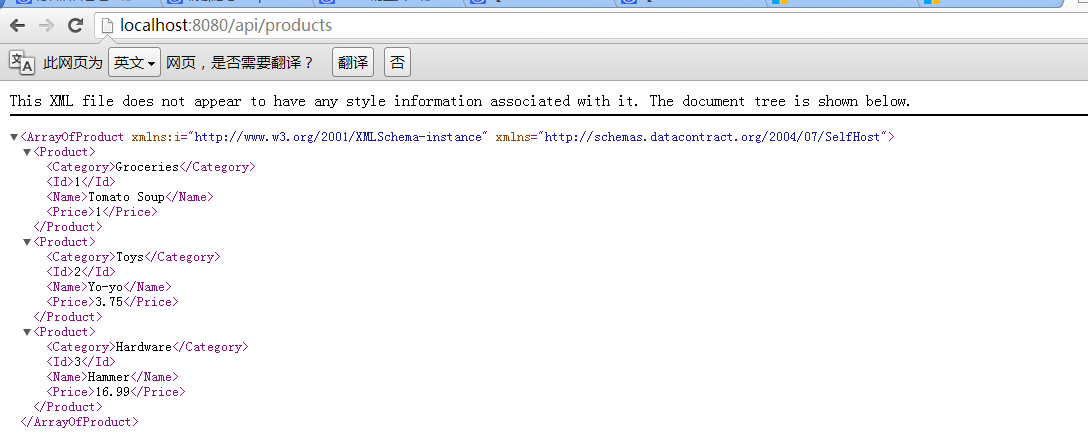
现在可以通过URI来简单测试Web API的正确性。
(可选的)添加一个HTTP URL命名空间保留(没遇到这个问题,暂未测试)
这个应用程序侦听到"http://localhost:8080"。在默认情况下,侦听一个特殊的HTTP URL是需要管理员权限的。当你运行上面的控制台应用程序的时候,你可能会得到这样的一个错误:"HTTP could not register URL http://+:8080",这儿有两种方式去避免这个错误:
1.以管理员身份运行Visual Studio。
2.使用Netsh.exe给与你的账号权限去保留这个URL。
若要使用Netsh.exe,以管理员身份打开命令提示框,并键入以下命令:
netsh http add urlacl url=http://+:8080/ user=machine\username
其中machine\username是您的用户帐户。
当你使用完自托管的时候,最好是确定删除这个保留的URL。
netsh http delete urlacl url=http://+:8080/
通过客户端应用程序来调用Web API
让我们来写一个简单的控制台应用程序来调用Web API。
添加一个控制台应用程序,并命名为"ClientApp"。
同样的通过Nuget来添加Microsoft.AspNet.WebApi.Client。
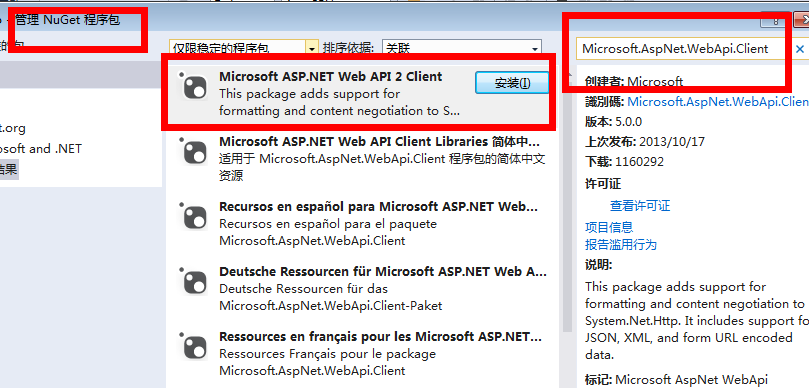
当然还需要应用SelfHost这个项目。
打开ClientApp项目的Program.cs文件,添加如下using语句
using System.Net.Http;
添加一个静态的HttpClient实例:
namespace ClientApp

{

    class Program

    {

        static HttpClient client = new HttpClient();

        static void Main(string[] args)

        {

        }

    }

}
添加三个方法 获得所有产品列表信息,通过ID获得指定产品信息,通过目录获得产品列表信息。
static void ListAllProducts()

{

    HttpResponseMessage resp = client.GetAsync("api/products").Result;

    resp.EnsureSuccessStatusCode();

    var products = resp.Content.ReadAsAsync<IEnumerable<SelfHost.Product>>().Result;

    foreach (var p in products)

    {

        Console.WriteLine("{0} {1} {2} ({3})", p.Id, p.Name, p.Price, p.Category);

    }

}

static void ListProduct(int id)

{

    var resp = client.GetAsync(string.Format("api/products/{0}", id)).Result;

    resp.EnsureSuccessStatusCode();

    var product = resp.Content.ReadAsAsync<SelfHost.Product>().Result;

    Console.WriteLine("ID {0}: {1}", id, product.Name);

}

static void ListProducts(string category)

{

    Console.WriteLine("Products in '{0}':", category);

    string query = string.Format("api/products?category={0}", category);

    var resp = client.GetAsync(query).Result;

    resp.EnsureSuccessStatusCode();

    var products = resp.Content.ReadAsAsync<IEnumerable<SelfHost.Product>>().Result;

    foreach (var product in products)

    {

        Console.WriteLine(product.Name);

    }

}
每个方法遵循相同的模式:
1.调用HttpClient.GetAsync来发送一个HTTP Get请求到适当的URI。
2.调用HttpResponseMessage.EnsureSuccessStatusCode ,如果HTTP响应状态是一个错误码,那么这个方法将抛出一个异常。
3.调用ReadAsAsync<T> 反序列化一个来自HTTP响应的CLR类型。 这个方法是一个扩展方法,被定义在System.Net.Http.HttpContentExtensions。
GetAsync 和ReadAsAsync 这两个方法都是异步方法。它们通过返回Task 对象来代表异步操作。获取Result属性阻止线程,直到操作完成。
在调用这些方法之前, BaseAddress 上的属性设置为"http://localhost:8080"的 HttpClient 实例。例如:
static void Main(string[] args)

{

    client.BaseAddress = new Uri("http://localhost:8080");

    ListAllProducts();

    ListProduct();

    ListProducts("toys");

    Console.WriteLine("Press Enter to quit.");

    Console.ReadLine();

}
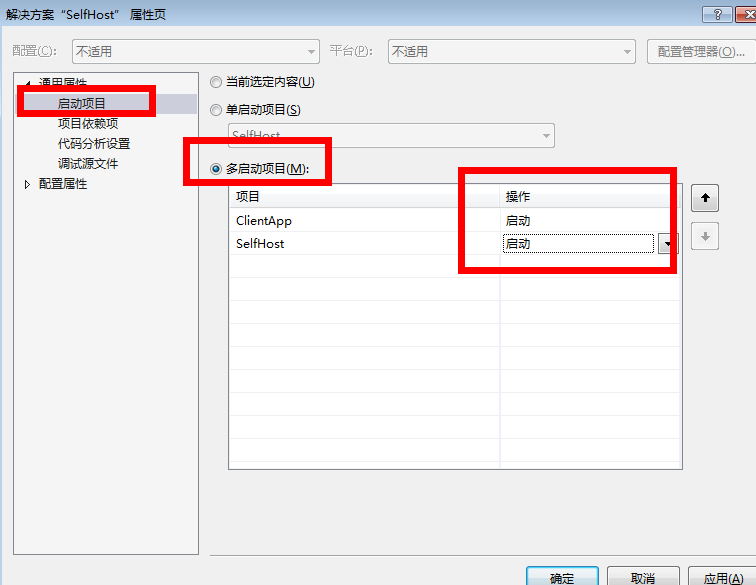
接下来,进行测试。设置启动项目。
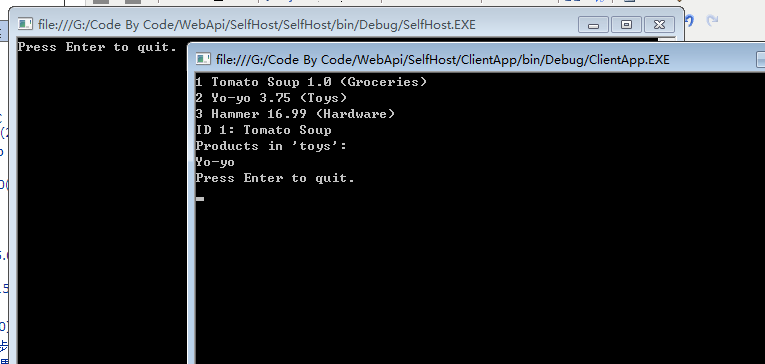
预测输出内容,应该会输出以下内容:
 Tomato Soup 1.0 (Groceries)

 Yo-yo 3.75 (Toys)

 Hammer 16.99 (Hardware)

ID : Tomato Soup

Products in 'toys':

Yo-yo

Press Enter to quit.
运行程序,查看结果
总结
感觉还是比较简单的吧,就这样一步一步的下来还是没什么阻碍的。
本文的参考链接http://www.asp.net/web-api/overview/hosting-aspnet-web-api/self-host-a-web-api
本文已同步到Web API系列导航 http://www.cnblogs.com/aehyok/p/3446289.html
本文示例代码下载链接http://pan.baidu.com/s/1d56zf
Asp.Net Web API 2第九课——自承载Web API的更多相关文章
- 【ASP.NET Web API教程】2.4 创建Web API的帮助页面
原文:[ASP.NET Web API教程]2.4 创建Web API的帮助页面 注:本文是[ASP.NET Web API系列教程]的一部分,如果您是第一次看本博客文章,请先看前面的内容. 2.4 ...
- 【ASP.NET Web API教程】2 创建各种Web API
原文 [ASP.NET Web API教程]2 创建各种Web API Chapter 2: Creating Web APIs第2章 创建各种Web API 本文引自:http://www.asp. ...
- 【翻译】在Visual Studio中使用Asp.Net Core MVC创建你的第一个Web API应用(一)
HTTP is not just for serving up web pages. It's also a powerful platform for building APIs that expo ...
- [转]【翻译】在Visual Studio中使用Asp.Net Core MVC创建你的第一个Web API应用(一)
本文转自:https://www.cnblogs.com/inday/p/6288707.html HTTP is not just for serving up web pages. It’s al ...
- 【ASP.NET Web API教程】2.4 创建Web API的帮助页面[转]
注:本文是[ASP.NET Web API系列教程]的一部分,如果您是第一次看本博客文章,请先看前面的内容. 2.4 Creating a Help Page for a Web API2.4 创建W ...
- ASP.NET Web API 2系列(一):初识Web API及手动搭建基本框架
1.导言 随着Web技术的发展,现在各种框架,前端的,后端的,数不胜数.全栈工程师的压力越来越大. PC端,pad端,移动端App(安卓/IOS)的发展,使得前后端一体的开发模式十分笨重.因此,前后端 ...
- 《ASP.NET SignalR系列》第一课 认识SignalR
从现在开始相关文章请到: http://lko2o.com/moon 一.概述 ASP.NET signalr对ASP.NET开发者来说是一个新的程序库,它能让我们更加容易便捷地开发实时通信功能; s ...
- 《ASP.NET SignalR系列》第二课 SignalR的使用说明
从现在开始相关文章请到: http://lko2o.com/moon 接续上一篇:<ASP.NET SignalR系列>第一课 认识SignalR (还没有看的话,建议您先看看) 一.指定 ...
- ASP.NET SignalR 与 LayIM2.0 配合轻松实现Web聊天室(四) 之 用户搜索(Elasticsearch),加好友流程(1)。
前面几篇基本已经实现了大部分即时通讯功能:聊天,群聊,发送文件,图片,消息.不过这些业务都是比较粗犷的.下面我们就把业务细化,之前用的是死数据,那我们就从加好友开始吧.加好友,首先你得知道你要加谁.L ...
随机推荐
- java的InputStream和OutputStream的理解【转】
1.在java中stream代表一种数据流(源),javaio的底层数据元,---(想像成水龙头)2.任何有能力产生数据流(源)的javaio对象就可以看作是一个InputStream对象既然它能产生 ...
- web.xml的首页调用struts2的action解决方法
1,首先在struts.xml里添加如下代码:注意位置 <constant name="struts.action.extension" value="do,act ...
- PostgreSQL用户角色及其属性介绍
1.CREATE ROLE创建的用户默认不带LOGIN属性,而CREATE USER创建的用户默认带有LOGIN属性,如下: postgres=# CREATE ROLE pg_test_user_1 ...
- CF(协同过滤算法)
1 集体智慧和协同过滤 1.1 什么是集体智慧(社会计算)? 集体智慧 (Collective Intelligence) 并不是 Web2.0 时代特有的,只是在 Web2.0 时代,大家在 Web ...
- Spring MVC Web框架
1. Spring MVC简介 Spring MVC是java EE平台请求驱动类型的轻量级Web框架,使用了MVC设计模式的思想,spring框架的主要优势之一就是分层架构,分层架构允许选择使用 ...
- 自动布局之autoresizingMask
UIViewAutoresizing是一个枚举类型,默认是UIViewAutoresizingNone,也就是不做任何处理. 1 2 3 4 5 6 7 8 9 typedef NS_OPTIONS( ...
- JS事件冒泡
JavaSciprt事件中有两个很重要的特性:事件冒泡以及目标元素. 事件冒泡: 当一个元素上的事件被触发的时候,比如说鼠标点击了一个按钮,同样的事件将会在那个元素的所有祖先元素中被触发.这 一过程被 ...
- mysql 大小写 整理
mysql字段的值默认不区分大小写,如果有主键的表,主键列就不能插入重复的值(大小写不同) 实验 默认方式创建 CREATE TABLE `t1` ( `ID` varchar(40) CHARACT ...
- [python] 线程锁
参考:http://blog.csdn.net/kobeyan/article/details/44039831 1. 锁的概念 在python中,存在GIL,也就是全局解释器锁,能够保证同一时刻只有 ...
- android4.3 Bluetooth(le)分析之startLeScan分析
BluetoothAdapter.java中有low enery(le)的一些方法,android提供了这些方法,但源码中并未找到这些方法的调用之处.本文档主要分析这类方法的执行流程,来了解下le到底 ...