
PIX防火墙配置A/S故障切换
PIX防火墙配置A/S故障切换
1、基本命令
failover

show failover

failover lan enable

failover lan interface zwish e2

failover interface ip zwish 172.17.9.1 255.255.255.0 standby 172.17.9.2

failover lan unit primary

failover lan unit secondary
2、示例
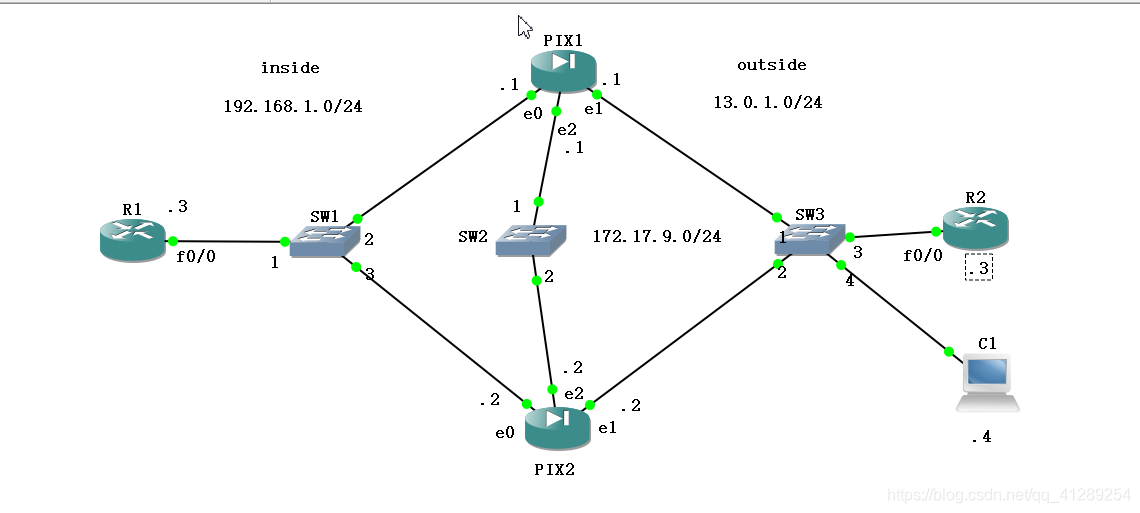
拓扑:
1)配置命令
PIX1主防火墙配置:
    pixfirewall> en

    Password:

    pixfirewall# show mode

    Security context mode: single

    pixfirewall# show version

    Cisco PIX Security Appliance Software Version 7.2(2)

    Compiled on Wed 22-Nov-06 14:16 by builders

    System image file is "Unknown, monitor mode tftp booted image"

    Config file at boot was "startup-config"

    pixfirewall up 20 secs

    Hardware:   PIX-525, 128 MB RAM, CPU Pentium II 1 MHz

    Flash E28F128J3 @ 0xfff00000, 16MB

    BIOS Flash AM29F400B @ 0xfffd8000, 32KB

     0: Ext: Ethernet0           : address is 00ab.bffb.c400, irq 9

     1: Ext: Ethernet1           : address is 00ab.bffb.c401, irq 11

     2: Ext: Ethernet2           : address is 00ab.bffb.c402, irq 11

     3: Ext: Ethernet3           : address is 0000.abfe.0f03, irq 11

     4: Ext: Ethernet4           : address is 0000.ab52.1504, irq 11

    The Running Activation Key is not valid, using default settings:

    Licensed features for this platform:

    Maximum Physical Interfaces : 6

    Maximum VLANs               : 25

    Inside Hosts                : Unlimited

    Failover                    : Disabled

    VPN-DES                     : Disabled

    VPN-3DES-AES                : Disabled

    Cut-through Proxy           : Enabled

    Guards                      : Enabled

    URL Filtering               : Enabled

    Security Contexts           : 0

    GTP/GPRS                    : Disabled

    #发现这里没有激活防火墙,不支持failover

    pixfirewall# activ

    pixfirewall# activation-key 0xd2390d2c 0x9fc4b36d 0x98442d99 0xeef7d8b1

    The following features available in flash activation key are NOT

    available in new activation key:

    Failover is different.

       flash activation key: Restricted(R)

       new activation key: Unrestricted(UR)

    Proceed with update flash activation key? [confirm]

    The following features available in running activation key are NOT

    available in new activation key:

    Failover is different.

       running activation key: Restricted(R)

       new activation key: Unrestricted(UR)

    WARNING: The running activation key was not updated with the requested key.

    The flash activation key was updated with the requested key, and will

    become active after the next reload.

    #激活后开始配置pix1主防火墙,(这里做的时候没有使用hostname命名,不过最好有这么一步后面才有对比)

    pixfirewall# conf t

    pixfirewall(config)# int e0

    pixfirewall(config-if)# nameif inside

    INFO: Security level for "inside" set to 100 by default.

    pixfirewall(config-if)# ip address 192.168.1.1 255.255.255.0

    pixfirewall(config-if)# no sh

    pixfirewall(config-if)# int e1

    pixfirewall(config-if)# nameif outside

    INFO: Security level for "outside" set to 0 by default.

    pixfirewall(config-if)# ip address 13.0.1.1 255.255.255.0

    pixfirewall(config-if)# no sh

    pixfirewall(config-if)# int e2

    pixfirewall(config-if)# ip address 172.17.9.1 255.255.255.0

    pixfirewall(config-if)# no sh

    pixfirewall(config-if)# exit

    pixfirewall(config)# static (inside,outside) 13.0.1.10 192.168.1.3

    #允许13.0.1.3 telnet 13.0.1.10(192.168.1.3)

    pixfirewall(config)# access-list test1 permit tcp host 13.0.1.3 host 13.0.1.10 eq telnet

    pixfirewall(config)# access-group test1 in int outside

    ###后面发现使用telnet对比主备防火墙切换不明显,就想换一下ping来对比,这是额外添加的规则###

    pixfirewall(config)# access-list test1 extended permit icmp host 13.0.1.10 host 13.0.1.4 echo-reply

    pixfirewall(config)# access-list test1 extended permit icmp host 13.0.1.4 host 13.0.1.10 echo

    #设置故障切换ip的步骤,这里其实可以与上面的配置接口ip一起做了

    pixfirewall(config-if)# int e0

    pixfirewall(config-if)# ip address 192.168.1.1 255.255.255.0 standby 192.168.1$

    pixfirewall(config-if)# int e1

    pixfirewall(config-if)# ip address 13.0.1.1 255.255.255.0 standby 13.0.1.2

    pixfirewall(config-if)# exit

    pixfirewall(config)# failover lan enable

    pixfirewall(config)# failo

    pixfirewall(config)# failover lan interface zwish e2

    INFO: Non-failover interface config is cleared on Ethernet2 and its sub-interfaces

    pixfirewall(config)# failover interface ip zwish 172.17.9.1 255.255.255.0 standby 172.17.9.2

    pixfirewall(config)# failover lan unit

    pixfirewall(config)# failover lan unit pri

    pixfirewall(config)# failover lan unit primary

    pixfirewall(config)# failover

    pixfirewall(config)# show failover

    Failover On

    Cable status: N/A - LAN-based failover enabled

    Failover unit Primary

    Failover LAN Interface: zwish Ethernet2 (up)

    Unit Poll frequency 15 seconds, holdtime 45 seconds

    Interface Poll frequency 5 seconds, holdtime 25 seconds

    Interface Policy 1

    Monitored Interfaces 2 of 250 maximum

    Version: Ours 7.2(2), Mate Unknown

    Last Failover at: 07:26:16 UTC Apr 24 2020

            This host: Primary - Negotiation

                    Active time: 0 (sec)

                      Interface inside (192.168.1.1): Normal (Waiting)

                      Interface outside (13.0.1.1): Normal (Waiting)

            Other host: Secondary - Not Detected

                    Active time: 0 (sec)

                      Interface inside (192.168.1.2): Unknown (Waiting)

                      Interface outside (13.0.1.2): Unknown (Waiting)

    Stateful Failover Logical Update Statistics

            Link : Unconfigured.

    pixfirewall(config)# .

            No Response from Mate

    Failover LAN Failed

    No switchover

    Failover LAN became OK

    Switchover enabled

    Beginning configuration replication: Sending to mate.

    End Configuration Replication to mate

    #这里可能需要等一下,再来一次show failover,可以看到主防火墙配置成功

    pixfirewall(config)# show failover

    Failover On

    Cable status: N/A - LAN-based failover enabled

    Failover unit Primary

    Failover LAN Interface: zwish Ethernet2 (up)

    Unit Poll frequency 15 seconds, holdtime 45 seconds

    Interface Poll frequency 5 seconds, holdtime 25 seconds

    Interface Policy 1

    Monitored Interfaces 2 of 250 maximum

    Version: Ours 7.2(2), Mate 7.2(2)

    Last Failover at: 07:46:05 UTC Apr 24 2020

            This host: Primary - Active

                    Active time: 135 (sec)

                      Interface inside (192.168.1.1): Normal

                      Interface outside (13.0.1.1): Normal

            Other host: Secondary - Standby Ready

                    Active time: 0 (sec)

                      Interface inside (192.168.1.2): Normal

                      Interface outside (13.0.1.2): Normal

    Stateful Failover Logical Update Statistics

            Link : Unconfigured.

    pixfirewall(config)#
PIX2备份防火墙配置:
    pixfirewall> en

    Password:

    pixfirewall# conf t

    pixfirewall(config)# int e0

    pixfirewall(config-if)# nameif inside

    INFO: Security level for "inside" set to 100 by default.

    pixfirewall(config-if)# ip address 192.168.1.2 255.255.255.0

    pixfirewall(config-if)# no sh

    pixfirewall(config-if)# int e1

    pixfirewall(config-if)# nameif outside

    INFO: Security level for "outside" set to 0 by default.

    pixfirewall(config-if)# ip address 13.0.1.2 255.255.255.0

    pixfirewall(config-if)# no sh

    pixfirewall(config-if)# int e2

    pixfirewall(config-if)# ip address 172.17.9.2 255.255.255.0

    pixfirewall(config-if)# no sh

    pixfirewall(config-if)# exit

    pixfirewall(config)# failover lan enable

    pixfirewall(config)# failover lan interface zwish e2

    INFO: Non-failover interface config is cleared on Ethernet2 and its sub-interfaces

    pixfirewall(config)# failover interface ip zwish 172.17.9.1 255.255.255.0 stan$

    pixfirewall(config)# failover lan unit sec

    pixfirewall(config)# failover lan unit secondary

    pixfirewall(config)# failover

    pixfirewall(config)# show failover

    Failover On

    Cable status: N/A - LAN-based failover enabled

    Failover unit Secondary

    Failover LAN Interface: zwish Ethernet2 (up)

    Unit Poll frequency 15 seconds, holdtime 45 seconds

    Interface Poll frequency 5 seconds, holdtime 25 seconds

    Interface Policy 1

    Monitored Interfaces 2 of 250 maximum

    Version: Ours 7.2(2), Mate 7.2(2)

    Last Failover at: 07:40:21 UTC Apr 24 2020

            This host: Secondary - Negotiation

                    Active time: 0 (sec)

                      Interface inside (192.168.1.2): No Link (Waiting)

                      Interface outside (13.0.1.2): No Link (Waiting)

            Other host: Primary - Active

                    Active time: 0 (sec)

                      Interface inside (0.0.0.0): Unknown (Waiting)

                      Interface outside (0.0.0.0): Unknown (Waiting)

    Stateful Failover Logical Update Statistics

            Link : Unconfigured.

    pixfirewall(config)# .

            Detected an Active mate

    Beginning configuration replication from mate.

    End configuration replication from mate.

    pixfirewall(config)# show failover

    Failover On

    Cable status: N/A - LAN-based failover enabled

    Failover unit Secondary

    Failover LAN Interface: zwish Ethernet2 (up)

    Unit Poll frequency 15 seconds, holdtime 45 seconds

    Interface Poll frequency 5 seconds, holdtime 25 seconds

    Interface Policy 1

    Monitored Interfaces 2 of 250 maximum

    Version: Ours 7.2(2), Mate 7.2(2)

    Last Failover at: 07:40:21 UTC Apr 24 2020

            This host: Secondary - Standby Ready

                    Active time: 0 (sec)

                      Interface inside (192.168.1.2): Normal

                      Interface outside (13.0.1.2): Normal

            Other host: Primary - Active

                    Active time: 90 (sec)

                      Interface inside (192.168.1.1): Normal

                      Interface outside (13.0.1.1): Normal

    Stateful Failover Logical Update Statistics

            Link : Unconfigured.

    pixfirewall(config)#
原本是打算用R2 telnet R1的,但发现对比不明显,所以临时在拓扑中加了一个PC(ip为13.0.1.4,为了简单,和不打乱前面的配置,就直接接在了交换机)
2)测试
故障切换前主防火墙和备份防火墙的故障切换配置在上面的命令行中
然后用PC ping R1,设置为50次,然后把主防火墙断电(这里应该还可以使用shutdown关闭接口)
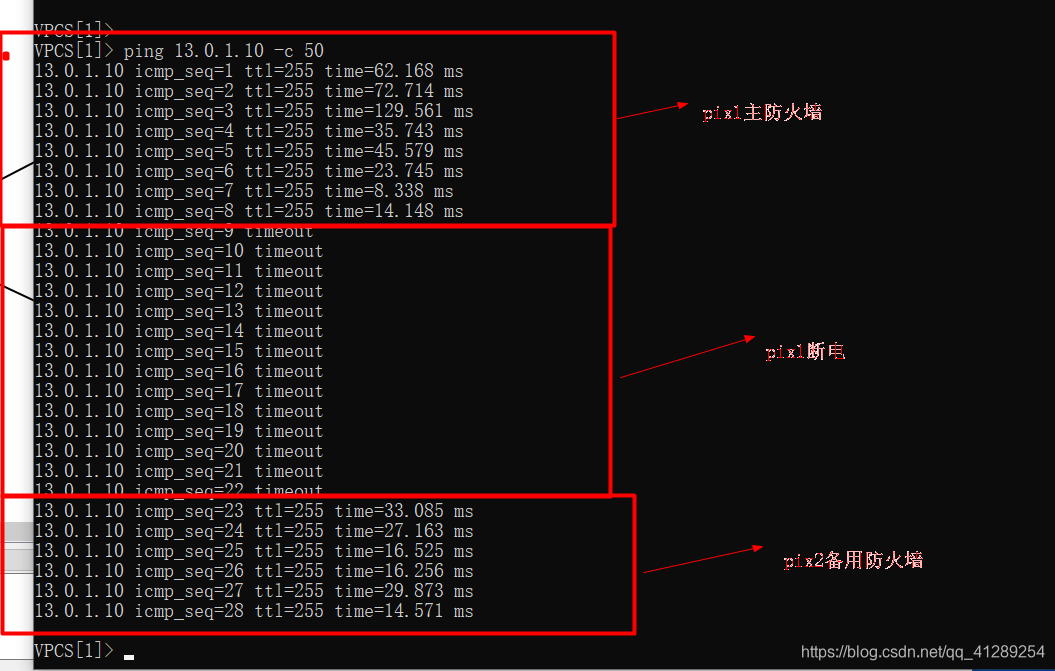
从ping的情况可以看出切换成功了
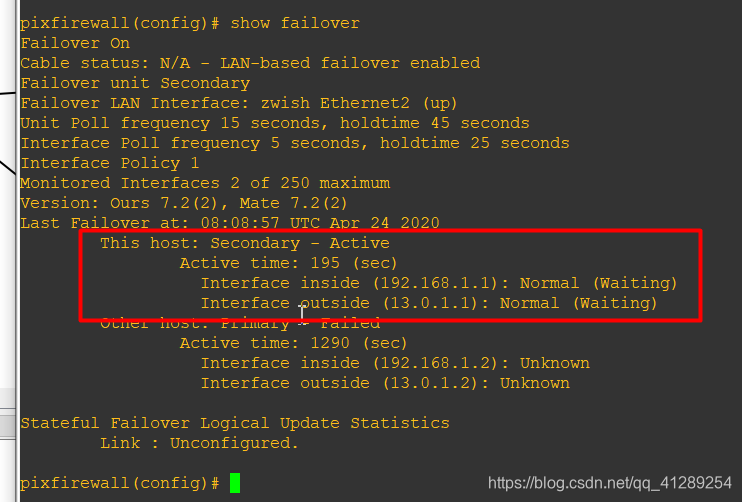
看一下切换后的PIX2,发现状态为Active,inside和outside的ip是原来主防火墙PIX1,证明试验成功:
PIX防火墙配置A/S故障切换的更多相关文章
- PIX 防火墙
---恢复内容开始--- 一 , PIX 防火墙的认识 PIX 是cisco 的硬件防火墙 硬件防火墙的工作速度快,使用方便. PIX 有很多型号,并发连接数是PIX防火墙的重要参数 PIX 25 ...
- Cisco PIX防火墙PPPoE拨号配置视频教学
Cisco PIX防火墙PPPoE拨号配置视频教学 本文出自 "李晨光原创技术博客" 博客,请务必保留此出处http://chenguang.blog.51cto.com/35 ...
- 6. Samba服务和防火墙配置笔记
Samba文件服务器 (一)简介 内网文件服务器 windows-windows 文件共享服务 网络邻居linux-linux NFS windows-linux Samba (二)端口 smbd: ...
- CentOS7下Firewall防火墙配置用法详解
官方文档地址: https://access.redhat.com/documentation/en-US/Red_Hat_Enterprise_Linux/7/html/Security_Guide ...
- [转] Linux下防火墙iptables用法规则详及其防火墙配置
from: http://www.cnblogs.com/yi-meng/p/3213925.html 备注: 排版还不错,建议看以上的链接. iptables规则 规则--顾名思义就是规矩和原则,和 ...
- Linux 学习之防火墙配置
1.安装iptables防火墙 yum install iptables 2. 清除已有的iptables规则 iptables -F iptables -X iptables -Z 3.显 ...
- Linux防火墙配置—SNAT2
1.实验目标 以实验"Linux防火墙配置-SNAT1"为基础,为网关增加外网IP地址,为eth1创建虚拟接口,使外网测试主机在Wireshark中捕获到的地址为eth1虚拟接口的 ...
- Linux防火墙配置—SNAT1
1.实验目标 以实验"防火墙配置-访问外网WEB"为基础,在WEB服务器上安装Wireshark,设置Wireshark的过滤条件为捕获HTTP报文,在Wireshark中开启捕获 ...
- CentOSv6.8 修改防火墙配置、修改SSH端口
查看防火墙目前使用状况: service iptables status 修改防火墙配置: vi /etc/sysconfig/iptables 重启防火墙,让刚才修改的配置生效: service i ...
随机推荐
- NLP(二十九)一步一步,理解Self-Attention
本文大部分内容翻译自Illustrated Self-Attention, Step-by-step guide to self-attention with illustrations and ...
- 利用vue-cli + vant搭建一个移动端开发模板
本文系原创,转载请附带作者信息.项目地址: https://github.com/momozjm/vant-project.git 前言 在项目开发过程中,一个新的项目需要我们从零开始搭建框架,这个时 ...
- Collections集合工具类常用的方法
java.utils.Collections //是集合工具类,用来对集合进行操作.部分方法如下: public static <T> boolean addAll(Collection& ...
- (二)Redis在Mac下的安装与SpringBoot中的配置
1 下载Redis 官网下载,下载 stable 版本,稳定版本. 2 本地安装 解压:tar zxvf redis-6.0.1.tar.gz 移动到: sudo mv redis-6.0.1 /us ...
- mac下使用xampp中php显示1044/1045/1046(卸载xampp)
问题描述 在mac下使用xampp,访问http://192.168.64.3/phpmyadmin/可以正常显示php页面,当创建数据库时提示1044也就是普通用户没有权限 问题猜测 猜测在使用xa ...
- webpack搭建环境步骤
一.初始化 1.创建文件夹 2.npm init -y 二.安装webpack 和webpack-cli 1.yarn add webpack webpack-cli@3.3.10 -D (这里指定 ...
- javaScript 添加和移除class类名的几种方法
添加类属性: // 一次只能设置一个类值,如果当前属性本身存在类值,会被替换 element.className = '类名'; /* * .setAttribute 用来设置自定义属性和值的 * 自 ...
- 【matlab 基础篇 01】快速开始第一个程序(详细图文+文末资源)
快速入门matlab,系统地整理一遍,如何你和我一样是一个新手,那么此文很适合你: 文章目录 1 软件安装 2 打开软件 3 编写程序 3.1 基础步骤 3.2 添加PATH 3.3 命令行模式 4 ...
- python小游戏-pygame模块
一.tkinter模块的GUI 基本上使用tkinter来开发GUI应用需要以下5个步骤: 导入tkinter模块中我们需要的东西. 创建一个顶层窗口对象并用它来承载整个GUI应用. 在顶层窗口对象上 ...
- JS理论:编码习惯
1.声明变量,你只会var吗?那你真的是JS小鲜肉 如果要声明3个变量,你要var 三下吗? 不用: let [a,b,c] = ['name',18,'ddd'] console.log(a,b,c ...