
【Android】家庭记账本手机版开发报告一
一、说在前面
| 昨天 | 学习了数据库的一些简单操作 |
| 今天 | 使用数据库,完成对记账本的账单记录的增删 |
| 问题 | 没有 |
二、数据库
1、账单表的结构
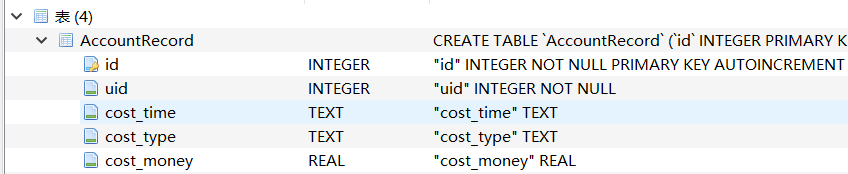

(注 id:账单的唯一标识,uid:记录账单的用户的id,cost_time:记录账单的时间,cost_type:账单类型,cost_money:账单金额。)
2、Entity:AccountRecord.java
package com.me.familybookkeepingbook;

import androidx.room.ColumnInfo;

import androidx.room.Entity;

import androidx.room.PrimaryKey;

@Entity

public class AccountRecord {

    @PrimaryKey(autoGenerate = true)

    private int id;

    @ColumnInfo(name = "uid")

    private int uid;

    @ColumnInfo(name = "cost_time")

    private String costTime;

    @ColumnInfo(name = "cost_type")

    private String costType;

    @ColumnInfo(name = "cost_money")

    private Double costMoney;

    public AccountRecord(int uid, String costTime, String costType, Double costMoney) {

        this.uid = uid;

        this.costTime = costTime;

        this.costType = costType;

        this.costMoney = costMoney;

    }

    public int getId() {

        return id;

    }

    public void setId(int id) {

        this.id = id;

    }

    public int getUid() {

        return uid;

    }

    public void setUid(int uid) {

        this.uid = uid;

    }

    public String getCostTime() {

        return costTime;

    }

    public void setCostTime(String costTime) {

        this.costTime = costTime;

    }

    public String getCostType() {

        return costType;

    }

    public void setCostType(String costType) {

        this.costType = costType;

    }

    public Double getCostMoney() {

        return costMoney;

    }

    public void setCostMoney(Double costMoney) {

        this.costMoney = costMoney;

    }

}
3、对数据库的操作:AccountRecordDao.java
package com.me.familybookkeepingbook;

import androidx.room.Dao;

import androidx.room.Delete;

import androidx.room.Insert;

import androidx.room.Query;

import androidx.room.Update;

import java.util.List;

@Dao

public interface AccountRecordDao {

    @Insert

    void insertAccountRecord (AccountRecord ... AccountRecords);

    @Update

    void updateAccountRecord (AccountRecord ... AccountRecords);

    @Delete

    void deleteAccountRecord (AccountRecord ... AccountRecords);

    @Query("DELETE From ACCOUNTRECORD")

    void deleteAllAccountRecord ();

    @Query("SELECT * From ACCOUNTRECORD ORDER BY ID DESC")

    List<AccountRecord> getAllAccountRecord ();

}
AccountRecordDatabase.java
package com.me.familybookkeepingbook;

import androidx.room.Database;

import androidx.room.RoomDatabase;

@Database(entities = {AccountRecord.class },version = 1,exportSchema = false)

public abstract class AccountRecordDatabase extends RoomDatabase {

    public abstract AccountRecordDao getAccountRecordDao();

}
三、界面布局
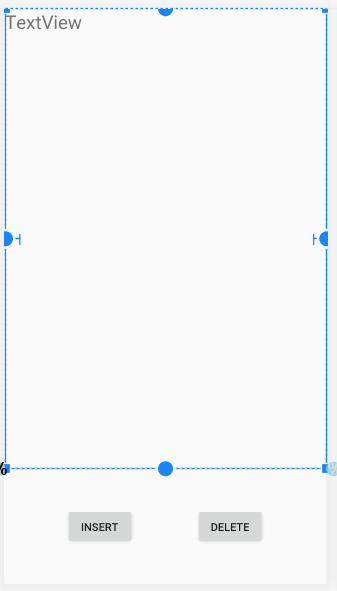
<?xml version="1.0" encoding="utf-8"?>

<androidx.constraintlayout.widget.ConstraintLayout xmlns:android="http://schemas.android.com/apk/res/android"

    xmlns:app="http://schemas.android.com/apk/res-auto"

    xmlns:tools="http://schemas.android.com/tools"

    android:layout_width="match_parent"

    android:layout_height="match_parent"

    tools:context=".MainActivity">

    <androidx.constraintlayout.widget.Guideline

        android:id="@+id/guideline"

        android:layout_width="wrap_content"

        android:layout_height="wrap_content"

        android:orientation="horizontal"

        app:layout_constraintGuide_percent="0.8" />

    <ScrollView

        android:layout_width="0dp"

        android:layout_height="0dp"

        android:layout_marginStart="1dp"

        android:layout_marginLeft="1dp"

        android:layout_marginEnd="1dp"

        android:layout_marginRight="1dp"

        app:layout_constraintBottom_toTopOf="@+id/guideline"

        app:layout_constraintEnd_toEndOf="parent"

        app:layout_constraintHorizontal_bias="0.0"

        app:layout_constraintStart_toStartOf="parent"

        app:layout_constraintTop_toTopOf="parent">

        <TextView

            android:id="@+id/textView"

            android:layout_width="match_parent"

            android:layout_height="wrap_content"

            android:text="@string/textview"

            android:textSize="24sp" />

    </ScrollView>

    <Button

        android:id="@+id/buttonInsert"

        android:layout_width="wrap_content"

        android:layout_height="wrap_content"

        android:text="@string/buttonInsert"

        app:layout_constraintBottom_toBottomOf="parent"

        app:layout_constraintEnd_toStartOf="@+id/buttonDelete"

        app:layout_constraintHorizontal_bias="0.5"

        app:layout_constraintStart_toStartOf="parent"

        app:layout_constraintTop_toTopOf="@+id/guideline" />

    <Button

        android:id="@+id/buttonDelete"

        android:layout_width="wrap_content"

        android:layout_height="wrap_content"

        android:text="@string/buttonDalete"

        app:layout_constraintBottom_toBottomOf="@+id/buttonInsert"

        app:layout_constraintEnd_toEndOf="parent"

        app:layout_constraintHorizontal_bias="0.5"

        app:layout_constraintStart_toEndOf="@+id/buttonInsert"

        app:layout_constraintTop_toTopOf="@+id/buttonInsert" />

</androidx.constraintlayout.widget.ConstraintLayout>
四、界面和数据的绑定
1、界面的更新
void updateView(){

        List<AccountRecord> list = accountRecordDao.getAllAccountRecord();

        String text = "";

        for (int i=0;i<list.size();i++){

            AccountRecord accountRecord = list.get(i);

            text += accountRecord.getId() + "   " + accountRecord.getCostType() + "   "+accountRecord.getCostTime() +"   "+

                    accountRecord.getCostMoney() +"\n";

        }

        textView.setText(text);

    }
2、按键的监听
 buttonInsert.setOnClickListener(new View.OnClickListener() {

            @Override

            public void onClick(View v) {

                AccountRecord accountRecord = new AccountRecord(1,"2020-01-26","学习",100.0);

                accountRecordDao.insertAccountRecord(accountRecord);

                updateView();

            }

        });

        buttonDelete.setOnClickListener(new View.OnClickListener() {

            @Override

            public void onClick(View v) {

                accountRecordDao.deleteAllAccountRecord();

                updateView();

            }

        });
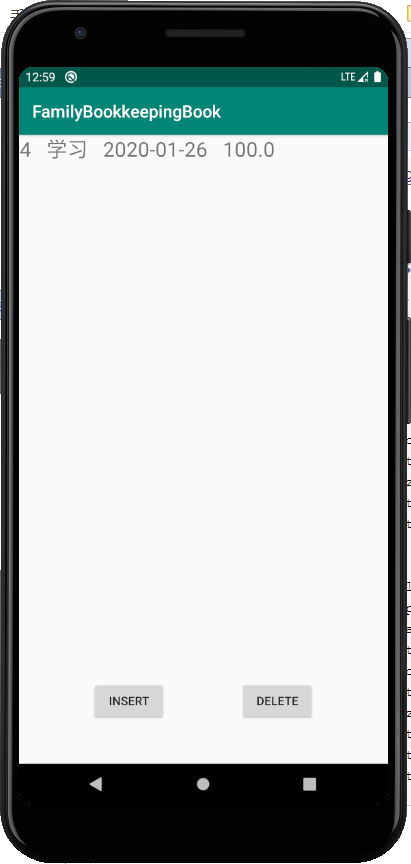
五、运行测试
1、插入:
2、删除

【Android】家庭记账本手机版开发报告一的更多相关文章
- 【Android】家庭记账本手机版开发报告五
一.说在前面 昨天 1.添加菜单(查询.清除所有等)2.使用滑动删除 今天 1.创建登入和注册界面 2.向数据库添加一张用户表 问题 做完后在登入时有bug(未解决) 二.界面的搭建 1 ...
- 【Android】家庭记账本手机版开发报告二
一.说在前面 昨天 完成了对记账本的账单的增删 今天 完善昨天的框架结构( 1.引入ViewModel管理数据.使MainActive 只管理界面.不再管数据了 2.引入AsyncTask.后台执行. ...
- 【Android】家庭记账本手机版开发报告七
一.说在前面 昨天 实现了账单的图标显示 今天 本地化,测试APP,将工程源码放到github上 源码:https://github.com/xiaotian12-call/Android_Boo ...
- 【Android】家庭记账本手机版开发报告六
一.说在前面 昨天 1.创建登入和注册界面:2.向数据库添加一张用户表 今天 用图标显示账单情况 问题 1.使用第三方库 hellochart,时添加依赖构建失败 2.在 chertFragmen ...
- 【Android】家庭记账本手机版开发报告四
一.说在前面 昨天 对界面显示和逻辑结构进行完善 今天 1.添加菜单(查询.清除所有等) 2.使用滑动删除 问题 1.在做查询时获取SearchView时引 入包错误经过长时间的尝试后才修正 2.滑动 ...
- 【Android】家庭记账本手机版开发报告三
一.说在前面 昨天 对第一天的框架结构进行了四方面的完善 今天 对界面显示和逻辑结构进行完善 问题 无 二.界面展示完善 1.使用可回收的列表recyclerView展示账单的信息,并设置数据项为卡片 ...
- WPS Office手机版调用接口代码指导帖之一(Android)
经常会有一些喜欢开发鼓捣的童鞋问我们,WPS Office手机版是否提供调用接口,希望在android中使用一个调用命令,直接调用WPS手机版来打开指定的DOC文件,而不用弹出一个程序可选列表(如果用 ...
- 手机版WEB开发经验分享,手机版网站开发注意事项,网站自适应,手机版网站自适应,移动安卓APP自适应
转自 http://my.oschina.net/cart/blog/282477 做前端开发不短了,用过jQuery Mobile jqMobi 也纯手工写过.. 最后总结如下: jQuery Mo ...
- Android实战项目——家庭记账本设计思路
经过三周左右的Android学习,实感只有上手开发才能有所提高.在此打算做一个家庭记账APP,同时巩固一下学到的东西并且弥补漏洞. 概述 记账是自古以来人类必不可少的一件事,从古代的算盘,到手写账本, ...
随机推荐
- Kubernetes 二进制部署(二)集群部署(多 Master 节点通过 Nginx 负载均衡)
0. 前言 紧接上一篇,本篇文章我们尝试学习多节点部署 kubernetes 集群 并通过 haproxy+keepalived 实现 Master 节点的负载均衡 1. 实验环境 实验环境主要为 5 ...
- 开源Web测试工具介绍
HtmlUnitHtmlUnit 是 JUnit 的扩展测试框架之一.HtmlUnit 将返回文档模拟成 HTML,这样您便可以直接处理这些文档了.HtmlUnit 使用例如 table.form 等 ...
- Django(十八)后台管理:列表页选项、编辑页选项、自定义后台页面
[参考]https://blog.csdn.net/u010132177/article/details/103814357 [参考]https://docs.djangoproject.com/zh ...
- Matplotlib 教程
Matplotlib是python中最流行的数据绘图库,使用matplotlib,您可以绘制任何类型的图形. 本教程的目标是让您轻松学会使用matplotlib绘制复杂的图形. 预备知识 熟悉Pyth ...
- RNN、LSTM、Seq2Seq、Attention、Teacher forcing、Skip thought模型总结
RNN RNN的发源: 单层的神经网络(只有一个细胞,f(wx+b),只有输入,没有输出和hidden state) 多个神经细胞(增加细胞个数和hidden state,hidden是f(wx+b) ...
- CodeForces - 869B The Eternal Immortality
题意:已知a,b,求的最后一位. 分析: 1.若b-a>=5,则尾数一定为0,因为连续5个数的尾数要么同时包括一个5和一个偶数,要么包括一个0. 2.若b-a<5,直接暴力求即可. #in ...
- TCP为什么三次握手四次挥手
TCP概述: 它提供面向连接的服务,在传送数据之前必须先建立连接,数据传送完成后要释放连接.因此TCP是一种可靠的的运输服务,也正因为这样,不可避免的增加了许多额外的开销,比如确认,流量控制等.对应的 ...
- 第1节 IMPALA:6、yum源制作过程
impala的安装:第一步:下载5个G的安装包,并且上传linux,解压第二步:安装httpd的服务,并启动,访问httpd就是访问我们linux的 /var/www/html这个路径下面的东西第三步 ...
- css文字实例锦集
在画布上创建向上的3D拉影文字 <canvas id="myCanvas" width="410" height="130">& ...
- Day8 - C - Another Problem on Strings CodeForces - 165C
A string is binary, if it consists only of characters "0" and "1". String v is a ...