
Springboot:thymeleaf模板(八)
存放位置:resources\templates
访问方式:通过Controller请求访问,不可直接访问(相当于web项目的WEB-INF目录)
环境依赖:
<!--thymeleaf模板支持-->

<dependency>

    <groupId>org.springframework.boot</groupId>

    <artifactId>spring-boot-starter-thymeleaf</artifactId>

</dependency>
命名空间:
<html lang="en" xmlns:th="http://www.thymeleaf.org">
相关配置:
#thymeleaf 配置

spring:

  thymeleaf:

    cache: false #开发时关闭缓存,不然没法看到实时页面

    prefix: classpath:/templates/ #文件存放路径

    suffix: .html  #文件后缀

    encoding: utf-8

    mode: HTML5

    servlet:

      content-type: text/html

  mvc:

    static-path-pattern: /** #静态资源加载路径
相关参考:
https://www.cnblogs.com/itdragon/archive/2018/04/13/8724291.html
1、th:text:文本显示标签
controller设置变量值:
model.addAttribute("msg1","<h1>我是h1变量</h1>");
thymeleaf标签取值:
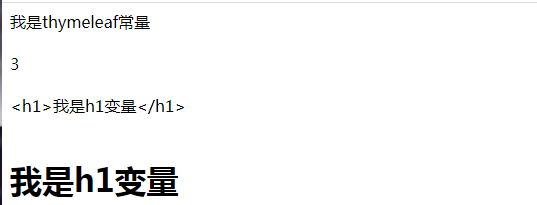
<!--th:text: 文本显示常量-->

<span th:text="'我是thymeleaf常量'"></span> <br /><br />

<!--th:text: 可以直接写运算表达式-->

<span th:text="1+2"></span> <br /><br />

<!--th:text: 文本显示controller中的变量-->

<span th:text="${msg1}"></span> <br /><br />

<!--th:utext: 文本显示controller中的变量(转义)-->

<span th:utext="${msg1}"></span> <br /><br />
打印结果:
2、th:value:value显示标签
controller设置变量值:
model.addAttribute("msg","我是thymeleaf变量");
thymeleaf标签取值:
<!--th:value: value显示controller中的变量-->

<input type="text" th:value="${msg}"> <br /><br />
打印结果:

3、对象取值
controller设置变量值:
/*java bean*/

User user = new User("king",33);

/*map*/

Map<String,Object> mp = new HashMap<>();

mp.put("mpkey","mapValue");

model.addAttribute("user",user);

model.addAttribute("mp",mp);
thymeleaf标签取值:
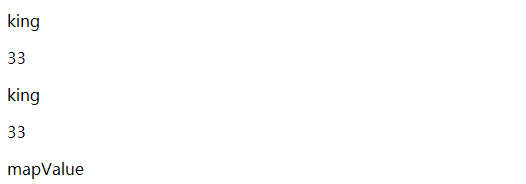
<!--对象取值方式1 ${对象.属性}-->

<div>

    <p th:text="${user.name}"></p>

    <p th:text="${user.age}"></p>

</div>

<!--对象取值方式2  th:object-->

<div th:object="${user}">

    <p th:text="*{name}"></p>

    <p th:text="*{age}"></p>

</div>

<!--map取值-->

<p th:text="${mp.get('mpkey')}"></p>
打印结果:
4、IF 判断
controller设置变量值:
/*List集合*/

List<User> lists = new ArrayList<>();

for (int i = 1; i <=4 ; i++) {

    User u = new User("king"+i,i);

    lists.add(u);

}

model.addAttribute("lists",lists);

model.addAttribute("gender","男");
thymeleaf标签取值:
<!--IF判断-->

<!--判断list集合为空-->

<div th:if="${#lists.isEmpty(lists)}" th:text="'list集合为空'"></div>

<!--判断list集合非空-->

<div th:if="${not #lists.isEmpty(lists)}" th:text="'list集合非空'"></div>

<!--判断变量等于一个值-->

<div th:if="${gender == '男'}" th:text="'我是男孩'"></div>
打印结果:

5、each循环
controller设置变量值:
/*List集合*/

List<User> lists = new ArrayList<>();

for (int i = 1; i <=4 ; i++) {

    User u = new User("king"+i,i);

    lists.add(u);

}

model.addAttribute("lists",lists);
thymeleaf标签取值:
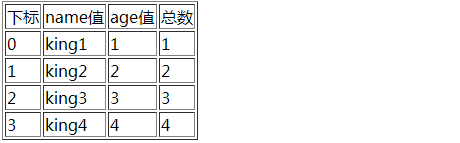
<!--list迭代-->

<table border="1">

    <tr >

        <td th:text="下标" ></td>

        <td th:text="name值"></td>

        <td th:text="age值"></td>

        <td th:text="总数"></td>

    </tr>

    <tr th:each="user,status: ${lists}">

        <td th:text="${status.index}" ></td> <!--获取下标-->

        <td th:text="${user.name}"></td>

        <td th:text="${user.age}"></td>

        <td th:text="${status.count}"></td> <!--获取数量-->

    </tr>

</table>
打印结果:
6、switch case
controller设置变量值:
model.addAttribute("gender","男");
thymeleaf标签取值:
<!--switch迭代-->

<div th:switch="${gender}">

    <p th:case="'男'">我是男孩</p>

    <p th:case="'女'">我是女孩</p>

    <p th:case="'*'">未知性别</p>

</div>
打印结果:

7、时间格式化
controller设置变量值:
model.addAttribute("nowDate",new Date());
thymeleaf标签取值:
<!--时间格式化-->

<p th:text="${#dates.format(nowDate,'yyyy-MM-dd HH:mm:ss')}"></p>
打印结果:

8、session
controller设置变量值:
session.setAttribute("userId","10010");
thymeleaf标签取值:
<!--从session获取值-->

<p th:text="${session.userId}"></p>
打印结果:

9、request
controller设置变量值:
request.setAttribute("rmsg","我是request");
thymeleaf标签取值:
<!--从request获取值-->

<p th:text="${#request.getAttribute('rmsg')}"></p>
打印结果:

10、代码块
语法推荐:~{templatename::fragmentname}

templatename:模版名,Thymeleaf会根据模版名解析完整路径:/resources/templates/templatename.html,要注意文件的路径。

fragmentname:片段名,Thymeleaf通过th:fragment声明定义代码块,即:th:fragment="fragmentname"

代码块表达式的使用

代码块表达式需要配合th属性(th:insert,th:replace,th:include)一起使用。

th:insert:将代码块片段整个插入到使用了th:insert的HTML标签中,

th:replace:将代码块片段整个替换使用了th:replace的HTML标签中,

th:include:将代码块片段包含的内容插入到使用了th:include的HTML标签中,
示例:
1:在templates下创建头部公共代码块header.html
<!DOCTYPE html>

<html lang="en" xmlns:th="http://www.thymeleaf.org">

<header th:fragment="head">

    <p>我是头部</p>

</header>

</html>
2:在templates下创建底部公共代码块header.html
<!DOCTYPE html>

<html lang="en" xmlns:th="http://www.thymeleaf.org">

<!--fragment可以传参数-->

<footer th:fragment="foot(value1,value2)">

    <p th:text="${value1} + '--' + ${value2} + ' 我是底部'"></p>

</footer>

</html>
3:在templates下创建主页面main.html,引入头部和底部
<!DOCTYPE html>

<html lang="en" xmlns:th="http://www.thymeleaf.org">

<head>

    <meta charset="UTF-8">

    <title>Title</title>

</head>

<body>

<!--引入头部-->

<div th:replace="header::head"></div>

<p th:text="'我是主内容'"></p>

<!--引入底部-->

<div th:replace="footer::foot('2019年','2020年')"></div>

</body>

</html>
4:运行效果

11、链接表达式
无参:@{/xxx}

有参:@{/xxx(k1=v1,k2=v2)} 对应url结构:xxx?k1=v1&k2=v2

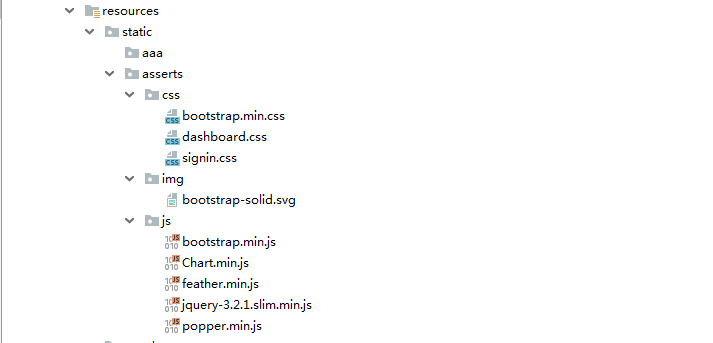
引入本地资源:@{/项目本地的资源路径}

引入外部资源:@{/webjars/资源在jar包中的路径}
资源路径:
示例:
<!DOCTYPE html>

<html lang="en" xmlns:th="http://www.thymeleaf.org">

<head>

    <meta charset="UTF-8">

    <title>Title</title>

    <!-- 加载css样式 -->

    <link th:href="@{/asserts/css/bootstrap.min.css}" rel="stylesheet">

    <!-- 加载js样式 -->

    <script type="text/javascript" th:src="@{asserts/js/bootstrap.min.js}"></script>

</head>

<body>

<!--图片-->

<img th:src="@{asserts/img/bootstrap-solid.svg}" alt="" width="72" height="72">

<!--超链接-->

<a th:href="@{/login.html(l='zh_CN')}" >中文</a>

<a th:href="@{/login.html(l='en_CN')}" >英文</a>

<!--form表单-->

<form th:action="@{/form.html}" th:method="post">

    <input type="text" name="username">

    <input type="submit" value="提交">

</form>

</body>

</html>
@RequestMapping("/login.html")

    public String login(String l){

        System.out.println(l);

        return "main";

    }

    @RequestMapping("/form.html")

    public String loginForm(String username){

        System.out.println(username);

        return "main";

    }
Springboot:thymeleaf模板(八)的更多相关文章
- SpringBoot thymeleaf模板页面没提示,SpringBoot thymeleaf模板插件安装
SpringBoot thymeleaf模板插件安装 SpringBoot thymeleaf模板Html页面没提示 SpringBoot thymeleaf模板页面没提示 SpringBoot t ...
- SpringBoot thymeleaf模板版本,thymeleaf模板更换版本
SpringBoot thymeleaf模板版本 thymeleaf模板更换版本 修改thymeleaf模板版本 ================================ ©Copyright ...
- springboot+thymeleaf 模板中传递参数误报错误 红色波浪线
在使用IDEA开发SpringBoot项目时,使用了Thymeleaf模板引擎,在使用动态传参数时,HTML页面的动态参数出现了红色波浪线,情况如下如: 解决办法: 选择 File -> Set ...
- JavaEE开发之SpringBoot整合MyBatis以及Thymeleaf模板引擎
上篇博客我们聊了<JavaEE开发之SpringBoot工程的创建.运行与配置>,从上篇博客的内容我们不难看出SpringBoot的便捷.本篇博客我们继续在上篇博客的基础上来看一下Spri ...
- (二)springboot整合thymeleaf模板
在我们平时的开发中,用了很久的jsp作view显示层,但是标签库和JSP缺乏良好格式的一个副作用就是它很少能够与其产生的HTML类似.所以,在Web浏览器或HTML编辑器中查看未经渲染的JSP模板是非 ...
- (二)SpringBoot基础篇- 静态资源的访问及Thymeleaf模板引擎的使用
一.描述 在应用系统开发的过程中,不可避免的需要使用静态资源(浏览器看的懂,他可以有变量,例:HTML页面,css样式文件,文本,属性文件,图片等): 并且SpringBoot内置了Thymeleaf ...
- 【Springboot】Springboot整合Thymeleaf模板引擎
Thymeleaf Thymeleaf是跟Velocity.FreeMarker类似的模板引擎,它可以完全替代JSP,相较与其他的模板引擎,它主要有以下几个特点: 1. Thymeleaf在有网络和无 ...
- SpringBoot系列——Thymeleaf模板
前言 thymeleaf是springboot官方推荐使用的java模板引擎,在springboot的参考指南里的第28.1.10 Template Engines中介绍并推荐使用thymeleaf, ...
- SpringBoot 之Thymeleaf模板.
一.前言 Thymeleaf 的出现是为了取代 JSP,虽然 JSP 存在了很长时间,并在 Java Web 开发中无处不在,但是它也存在一些缺陷: 1.JSP 最明显的问题在于它看起来像HTML或X ...
随机推荐
- git的cd命令
这个命令是进入某个文件夹的命令.进入文件夹后可以对文件夹中的文件进行一系列操作.
- 装numpy 环境:python3.4+ windows7 +64位系统
机器学习实战python 因为图像处理的原因,初步学习机器学习,选用语言python,参考书籍<机器学习实战> 环境:python3.4+ windows7 +64位系统 首先,今天解决的 ...
- 在Windows Python3.4 上安装NumPy、Matplotlib、SciPy和IPython
NumPy 下载地址: http://sourceforge.net/projects/numpy/files/NumPy/1.8.1/ SciPy 下载地址: http://sourceforge. ...
- (note)从小白到产品经理之路
学习了云课堂的产品课程,整理出部分笔记,以作备用参考,方便实际运用过程中查看巩固. 1.产品工具:Axure.mindmanager.viso.办公软件wps 2.产品人需要具备的品格 富有同理心,习 ...
- iOS isa 和 Class
一.Runtime 简介 Runtime 又叫运行时,是一套底层的 C 语言 API,是 iOS 系统的核心之一.开发者在编码过程中,可以给任意一个对象发送消息,在编译阶段只是确定了要向接收者发送这条 ...
- dyld
一.介绍 在 MacOS 和 iOS 上,可执行程序的启动依赖于 xnu 内核进程运作和动态链接加载器 dyld. dyld 全称 the dynamic link editor,即动态链接器,其本质 ...
- spring ioc源码简析
ClassPathXmlApplicationContext 首先我们先从平时启动spring常用的ClassPathXmlApplicationContext开始解析 ApplicationCont ...
- nginx代理图片上传以及访问
nginx代理图片上传 首先需要利用nginx代理图片访问参考 https://www.cnblogs.com/TJ21/p/12609017.html 编写接受文件的controller @Post ...
- vi文本编辑器的学习
vi文本编辑器的启动与退出 启动:快捷键Ctrl+Alt+t进入终端, 在系统提示符($或#)的提示下,输入vi <文件名称>,可以自动载入你要编辑的文件或者新建一个文件. 退出:在指令模 ...
- IE不支持sessionStorage问题
IE8及以上版本是支持的,如果你的项目在IE8及以上打开报错: 那是因为:页面要放在服务器上才能有效!!!!!!!!!!!!!!!!!!!!!!!!