
使用.Net Core编写命令行工具(CLI)
命令行工具(CLI)
命令行工具(CLI)是在图形用户界面得到普及之前使用最为广泛的用户界面,它通常不支持鼠标,用户通过键盘输入指令,计算机接收到指令后,予以执行。
通常认为,命令行工具(CLI)没有图形用户界面(GUI)那么方便用户操作。因为,命令行工具的软件通常需要用户记忆操作的命令,但是,由于其本身的特点,命令行工具要较图形用户界面节约计算机系统的资源。在熟记命令的前提下,使用命令行工具往往要较使用图形用户界面的操作速度要快。所以,图形用户界面的操作系统中,都保留着可选的命令行工具。
另外,命令行工具(CLI)应该是一个开箱即用的工具,不需要安装任何依赖。
一些熟悉的CLI工具如下:
1. dotnet cli
2. vue cli
3. angular cli
4. aws cli
5. azure cli
指令设计
本文将使用.Net Core(版本3.1.102)编写一个CLI工具,实现配置管理以及条目(item)管理(调用WebApi实现),详情如下:
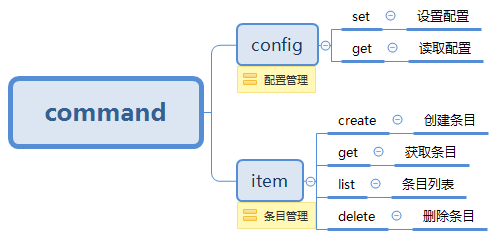
框架说明
编写CLI使用的主要框架是CommandLineUtils,它主要有以下优势:
1. 良好的语法设计
2. 支持依赖注入
3. 支持generic host
WebApi
提供api让cli调用,实现条目(item)的增删改查:
[Route("api/items")]

[ApiController]

public class ItemsController : ControllerBase

{

    private readonly IMemoryCache _cache;

    private readonly string _key = "items";

    public ItemsController(IMemoryCache memoryCache)

    {

        _cache = memoryCache;

    }

    [HttpGet]

    public IActionResult List()

    {

        var items = _cache.Get<List<Item>>(_key);

        return Ok(items);

    }

    [HttpGet("{id}")]

    public IActionResult Get(string id)

    {

        var item = _cache.Get<List<Item>>(_key).FirstOrDefault(n => n.Id == id);

        return Ok(item);

    }

    [HttpPost]

    public IActionResult Create(ItemForm form)

    {

        var items = _cache.Get<List<Item>>(_key) ?? new List<Item>();

        var item = new Item

        {

            Id = Guid.NewGuid().ToString("N"),

            Name = form.Name,

            Age = form.Age

        };

        items.Add(item);

        _cache.Set(_key, items);

        return Ok(item);

    }

    [HttpDelete("{id}")]

    public IActionResult Delete(string id)

    {

        var items = _cache.Get<List<Item>>(_key);

        var item = items?.SingleOrDefault(n => n.Id == id);

        if (item == null)

        {

            return NotFound();

        }

        items.Remove(item);

        _cache.Set(_key, items);

        return Ok();

    }

}
CLI
1. Program - 函数入口
[HelpOption(Inherited = true)] //显示指令帮助,并且让子指令也继承此设置

[Command(Description = "A tool to communicate with web api"), //指令描述

 Subcommand(typeof(ConfigCommand), typeof(ItemCommand))] //子指令

class Program

{

    public static int Main(string[] args)

    {
        //配置依赖注入

        var serviceCollection = new ServiceCollection();

        serviceCollection.AddSingleton(PhysicalConsole.Singleton);

        serviceCollection.AddSingleton<IConfigService, ConfigService>();

        serviceCollection.AddHttpClient<IItemClient, ItemClient>();

        var services = serviceCollection.BuildServiceProvider();

        var app = new CommandLineApplication<Program>();

        app.Conventions

            .UseDefaultConventions()

            .UseConstructorInjection(services);

        var console = (IConsole)services.GetService(typeof(IConsole));

        try

        {

            return app.Execute(args);

        }

        catch (UnrecognizedCommandParsingException ex) //处理未定义指令

        {

            console.WriteLine(ex.Message);

            return -;

        }

    }


    //指令逻辑

    private int OnExecute(CommandLineApplication app, IConsole console)

    {

        console.WriteLine("Please specify a command.");

        app.ShowHelp();

        return ;

    }

}
2. ConfigCommand和ItemCommand - 实现的功能比较简单,主要是指令描述以及指定对应的子指令
[Command("config", Description = "Manage config"),

 Subcommand(typeof(GetCommand), typeof(SetCommand))]

public class ConfigCommand

{

    private int OnExecute(CommandLineApplication app, IConsole console)

    {

        console.Error.WriteLine("Please submit a sub command.");

        app.ShowHelp();

        return ;

    }

}

[Command("item", Description = "Manage item"),

 Subcommand(typeof(CreateCommand), typeof(GetCommand), typeof(ListCommand), typeof(DeleteCommand))]

public class ItemCommand

{

    private int OnExecute(CommandLineApplication app, IConsole console)

    {

        console.Error.WriteLine("Please submit a sub command.");

        app.ShowHelp();

        return ;

    }

}
3. ConfigService - 配置管理的具体实现,主要是文件读写
public interface IConfigService

{

    void Set();

    Config Get();

}

public class ConfigService: IConfigService

{

    private readonly IConsole _console;

    private readonly string _directoryName;

    private readonly string _fileName;

    public ConfigService(IConsole console)

    {

        _console = console;

        _directoryName = ".api-cli";

        _fileName = "config.json";

    }

    public void Set()

    {

        var directory = Path.Combine(Environment.GetFolderPath(Environment.SpecialFolder.UserProfile), _directoryName);

        if (!Directory.Exists(directory))

        {

            Directory.CreateDirectory(directory);

        }

        var config = new Config

        {
            //弹出交互框,让用户输入,设置默认值为http://localhost:5000/

            Endpoint = Prompt.GetString("Specify the endpoint:", "http://localhost:5000/")

        };

        if (!config.Endpoint.EndsWith("/"))

        {

            config.Endpoint += "/";

        }

        var filePath = Path.Combine(directory, _fileName);

        using (var outputFile = new StreamWriter(filePath, false, Encoding.UTF8))

        {

            outputFile.WriteLine(JsonConvert.SerializeObject(config, Formatting.Indented));

        }

        _console.WriteLine($"Config saved in {filePath}.");

    }

    public Config Get()

    {

        var filePath = Path.Combine(Environment.GetFolderPath(Environment.SpecialFolder.UserProfile), _directoryName, _fileName);

        if (File.Exists(filePath))

        {

            var content = File.ReadAllText(filePath);

            try

            {

                var config = JsonConvert.DeserializeObject<Config>(content);

                return config;

            }

            catch

            {

                _console.WriteLine("The config is invalid, please use 'config set' command to reset one.");

            }

        }

        else

        {

            _console.WriteLine("Config is not existed, please use 'config set' command to set one.");

        }

        return null;

    }

}
4. ItemClient - 调用Web Api的具体实现,使用HttpClientFactory的方式
public interface IItemClient

{

    Task<string> Create(ItemForm form);

    Task<string> Get(string id);

    Task<string> List();

    Task<string> Delete(string id);

}

public class ItemClient : IItemClient

{

    public HttpClient Client { get; }

    public ItemClient(HttpClient client, IConfigService configService)

    {

        var config = configService.Get();

        if (config == null)

        {

            return;

        }

        client.BaseAddress = new Uri(config.Endpoint);

        Client = client;

    }

    public async Task<string> Create(ItemForm form)

    {

        var content = new StringContent(JsonConvert.SerializeObject(form), Encoding.UTF8, "application/json");

        var result = await Client.PostAsync("/api/items", content);

        if (result.IsSuccessStatusCode)

        {

            var stream = await result.Content.ReadAsStreamAsync();

            var item = Deserialize<Item>(stream);

            return $"Item created, info:{item}";

        }

        return "Error occur, please again later.";

    }

    public async Task<string> Get(string id)

    {

        var result = await Client.GetAsync($"/api/items/{id}");

        if (result.IsSuccessStatusCode)

        {

            var stream = await result.Content.ReadAsStreamAsync();

            var item = Deserialize<Item>(stream);

            var response = new StringBuilder();

            response.AppendLine($"{"Id".PadRight(40, ' ')}{"Name".PadRight(20, ' ')}Age");

            response.AppendLine($"{item.Id.PadRight(40, ' ')}{item.Name.PadRight(20, ' ')}{item.Age}");

            return response.ToString();

        }

        return "Error occur, please again later.";

    }

    public async Task<string> List()

    {

        var result = await Client.GetAsync($"/api/items");

        if (result.IsSuccessStatusCode)

        {

            var stream = await result.Content.ReadAsStreamAsync();

            var items = Deserialize<List<Item>>(stream);

            var response = new StringBuilder();

            response.AppendLine($"{"Id".PadRight(40, ' ')}{"Name".PadRight(20, ' ')}Age");

            if (items != null && items.Count > )

            {

                foreach (var item in items)

                {

                    response.AppendLine($"{item.Id.PadRight(40, ' ')}{item.Name.PadRight(20, ' ')}{item.Age}");

                }

            }

            return response.ToString();

        }

        return "Error occur, please again later.";

    }

    public async Task<string> Delete(string id)

    {

        var result = await Client.DeleteAsync($"/api/items/{id}");

        if (result.IsSuccessStatusCode)

        {

            return $"Item {id} deleted.";

        }

        if (result.StatusCode == HttpStatusCode.NotFound)

        {

            return $"Item {id} not found.";

        }

        return "Error occur, please again later.";

    }

    private static T Deserialize<T>(Stream stream)

    {

        using var reader = new JsonTextReader(new StreamReader(stream));

        var serializer = new JsonSerializer();

        return (T)serializer.Deserialize(reader, typeof(T));

    }

}
如何发布
在项目文件中设置发布程序的名称(AssemblyName):
  <PropertyGroup>

    <OutputType>Exe</OutputType>

    <TargetFramework>netcoreapp3.</TargetFramework>

    <AssemblyName>api-cli</AssemblyName>

  </PropertyGroup>
进入控制台程序目录:
cd src/NetCoreCLI
发布Linux使用版本:
dotnet publish -c Release -r linux-x64 /p:PublishSingleFile=true
发布Windows使用版本:
dotnet publish -c Release -r win-x64 /p:PublishSingleFile=true
发布MAC使用版本:
dotnet publish -c Release -r osx-x64 /p:PublishSingleFile=true
使用示例
这里使用Linux作为示例环境。
1. 以docker的方式启动web api

2. 虚拟机上没有安装.net core的环境
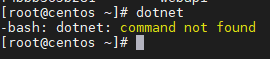
3. 把编译好的CLI工具拷贝到虚拟机上,授权并移动到PATH中(如果不移动,可以通过./api-cli的方式调用)
    sudo chmod +x api-cli #授权

    sudo mv ./api-cli /usr/local/bin/api-cli #移动到PATH
4. 设置配置文件:api-cli config set
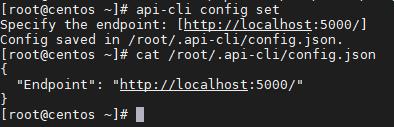
5. 查看配置文件:api-cli config get
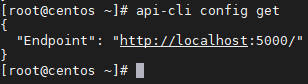
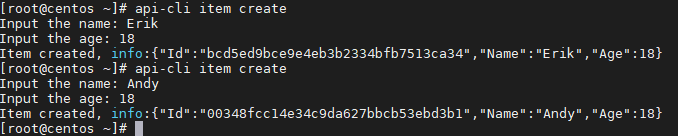
6. 创建条目:api-cli item create
7. 条目列表:api-cli item list

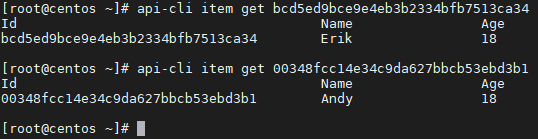
8. 获取条目:api-cli item get
9. 删除条目:api-cli item delete

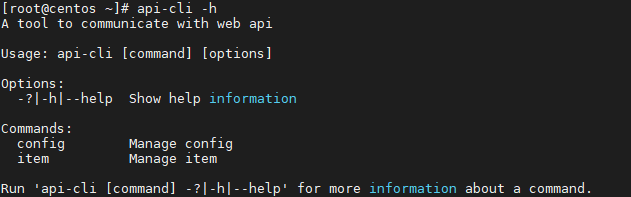
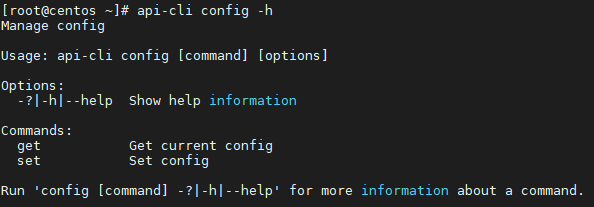
10. 指令帮助:api-cli -h, api-cli config -h, api-cli item -h
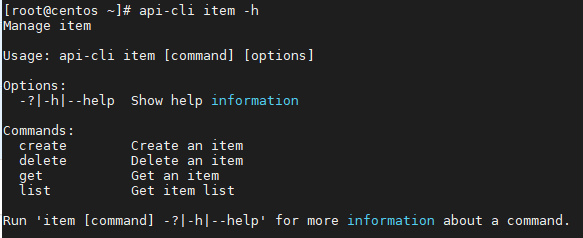
11. 错误指令:api-cli xxx

源码地址
https://github.com/ErikXu/NetCoreCLI
参考资料
https://medium.com/swlh/build-a-command-line-interface-cli-program-with-net-core-428c4c85221
使用.Net Core编写命令行工具(CLI)的更多相关文章
- commanderJs编写命令行工具(cli)
前言: 最近需要做一个内部的node cli来独立构建流程,对整个命令行工具实现流程有了大致了解,下面来解释一下如何实现一个cli,和如何使用 commander 库. 新手误区: 在开始实现之前 ...
- 如何用Node编写命令行工具
0. 命令行工具 当全局安装模块之后,我们可以在控制台下执行指定的命令来运行操作,如果npm一样.我把这样的模块称之为命令行工具模块(如理解有偏颇,欢迎指正) 1.用Node编写命令行工具 在Node ...
- vs for Mac中的启用Entity Framework Core .NET命令行工具
在vs for Mac的工具菜单中已没有了Package Manager Console. 我们可以通过以下方法使用Entity Framework Core .NET命令行工具: 1.添加Nuget ...
- 一个小时学会用 Go 编写命令行工具
前言 最近因为项目需要写了一段时间的 Go ,相对于 Java 来说语法简单同时又有着一些 Python 之类的语法糖,让人大呼"真香". 但现阶段相对来说还是 Python 写的 ...
- 如何用node编写命令行工具,附上一个ginit示例,并推荐好用的命令行工具
原文 手把手教你写一个 Node.js CLI 强大的 Node.js 除了能写传统的 Web 应用,其实还有更广泛的用途.微服务.REST API.各种工具……甚至还能开发物联网和桌面应用.Java ...
- golang开发:类库篇(三)命令行工具cli的使用
为什么要使用命令行 觉得这个问题不应该列出来,又觉得如果初次进行WEB开发的话,可能会觉得所有的东西都可以使用API去做,会觉得命令行没有必要. 其实,一个生产的项目命令行是绕不过去的.比如运营需要导 ...
- Flask内置命令行工具—CLI
应用发现 flask命令在Flask库安装后可使用,使用前需要正确配置FLASK_APP环境变量以告知用户程序所在位置.不同平台设置方式有所不同. Unix Bash (Linux, Mac, etc ...
- nodejs 编写(添加时间戳)命令行工具 timestamp
Nodejs除了编写服务器端程序还可以编写命令行工具,如gulp.js就是Nodejs编写的. 接下来我们来实现一个添加时间戳的命令: $ timestamp action https://www.n ...
- node命令行工具之实现项目工程自动初始化的标准流程
一.目的 传统的前端项目初始流程一般是这样: 可以看出,传统的初始化步骤,花费的时间并不少.而且,人工操作的情况下,总有改漏的情况出现.这个缺点有时很致命. 甚至有马大哈,没有更新项目仓库地址,导致提 ...
随机推荐
- docker E: Unable to locate package nginx
在使用docker容器时,有时候里边没有安装vim,敲vim命令时提示说:vim: command not found,这个时候就需要安装vim,可是当你敲apt-get install vim命令时 ...
- JVM 的内存布局
这是jdk7以后的版本 1. Heap(堆区) Heap OOM 障最主要的发源地, 它存储着几乎所有的实例对象, 堆由垃圾收集器自动回收, 堆区由各子线程共享使用.通常情况下 它占用的空间是所有内存 ...
- Python自动化之数据驱动(转载下自己的日常练习笔记)
一.execl数据驱动 1.xlutils简要说明 导包:pip3 install xlutils 注意⚠️:xlutils在介些Execl文件的时候,只识别.xls后缀的文件,如果是.xlsx后缀的 ...
- pycharm中无法导入pip安装的包
https://blog.csdn.net/mdxiaohu/article/details/82430060 2020.1.20 练习通过python操作数据库的时候需要导入一个包,因为看代码写的是 ...
- C++ 标准IO
标准输入 gets() 1 char * (char *str) gets() 主要是从标准输入流读取字符串并回显,读到换行符时退出,并会将换行符省去. 返回值为获得的字符串的首地址. 123 cha ...
- c++入门资源
http://www.cnblogs.com/jackyyang7/articles/2479482.htmlvs2010编译器的使用 https://www.cnblogs.com/me115/ar ...
- 张益肇:AI 医疗,微软有哪些布局?
编者按:近几年来,医疗和人工智能碰撞出了相当多的火花,大量资金短期投入到医疗领域当中.然而在微软亚洲研究院副院长张益肇博士看来,人工智能医疗是一场持久战,大家一定要沉下心多调研.多思考.多学习. 人工 ...
- RxJava学习笔记(操作符)
前言 上一篇文章介绍了RxJava的基础知识和简单实现,篇幅已经比较多了,所以把操作符(Operators)相关的内容放在这一篇.有了上一篇文章的基础,相信会比较容易理解操作符相关的内容了. 操作符( ...
- 用 Python 读写 Excel 表格
Python 可以读写 Excel 表格吗? 当然可以. Python 下有很多类库可以做到, openpyxl 就是其中的佼佼者. openpyxl 的设计非常漂亮 ,你一定会喜欢它!不信请往下看: ...
- OpenCV使用:加载图片时报错 0x00007FFC1084A839 处(位于 test1.exe 中)有未经处理的异常: Microsoft C++ 异常: cv::Exception,位于内存位置 0x00000026ABAFF1A8 处。
加载图片代码为: #include<iostream> #include <opencv2/core/core.hpp> #include <opencv2/highgu ...