
【转载】Linux升级NTPD服务器-编译安装ntp-4.2.8p12与配置
【转载】Linux升级NTPD服务器-编译安装ntp-4.2.8p12与配置
1. 系统与软件版本
1.1 系统版本
rhel6.4(Red Hat Enterprise Linux Server release 6.4 (Santiago))
1.2 ntpd软件版本
ntp-4.2.8p12.tar.gz
1.3 下载地址
官方下载地址:http://support.ntp.org/bin/view/Main/SoftwareDownloads
参考文档:http://www.linuxfromscratch.org/blfs/view/svn/basicnet/ntp.html
2. 安装前提
2.1 安装依赖包
# 特别注意:先用命令rpm -qa | grep "gcc/gcc-c++/openssl-devel/ libstdc++* /libcap*"查看本系统是否已经安装有这些软件包,有的话就不需要再次安装!
[root@ntpserver ~]# yum install gcc gcc-c++ openssl-devel libstdc++* libcap*
一般显示输出的话就代表已经安装此软件包了!


2.2 备份旧版本的配置文件
[root@ntpserver ~]# cp -ar /etc/ntp /etc/ntp.bak
[root@ntpserver ~]# cp /etc/ntp.conf /etc/ntp.conf.bak
[root@ntpserver ~]# cp /etc/init.d/ntpd /etc/init.d/ntpd.bak
[root@ntpserver ~]# cp /etc/sysconfig/ntpd /etc/sysconfig/ntpd.bak
[root@ntpserver ~]# cp /etc/sysconfig/ntpdate /etc/sysconfig/ntpdate.bak
2.3 卸载yum安装的ntpd服务
[root@ntpserver ~]# yum erase ntp ntpdate
3. 编译安装ntp-4.2.8p9
3.1 创建/var/lib/ntp目录
[root@ntpserver ~]# install -v -m710 -o ntp -g ntp -d /var/lib/ntp
3.2 编译安装ntpd
# 这里要特别注意编译安装的命令格式:
[root@ntpserver ntp-4.2.8p9]# ./configure \--prefix=/usr \--bindir=/usr/sbin \--sysconfdir=/etc \--enable-linuxcaps \--with-lineeditlibs=readline \--docdir=/usr/share/doc/ntp-4.2.8p9 \--enable-all-clocks \--enable-parse-clocks \--enable-clockctl
[root@ntpserver ntp-4.2.8p9]# make && make install
4. 创建配置文件
[root@ntpserver ~]# cp /etc/init.d/ntpd.bak /etc/init.d/ntpd
[root@ntpserver ~]# cp /etc/sysconfig/ntpd.bak /etc/sysconfig/ntpd
[root@ntpserver ~]# cp /etc/sysconfig/ntpdate.bak /etc/sysconfig/ntpdate
[root@ntpserver ~]# mv /etc/ntp.bak /etc/ntp
[root@ntpserver ~]# cp /etc/ntp.conf.bak /etc/ntp.conf
5. 配置ntp.conf
在/etc/ntp.conf配置文件添加以下参数
server 127.127.1.0 # 这里以自己为ntpserver测试
fudge 127.127.1.0 stratum 10
下面是实际生产中的例子:

启动/重启ntpd服务
[root@ntpserver ~]# service ntpd start/restart
检查ntp服务是否开机启动,将其设置为开机启动。
[root@localhost ~]# chkconfig --list ntpd
ntpd 0:off 1:off 2:off 3:off 4:off 5:off 6:off
[root@localhost ~]# runlevel
N 3
[root@localhost ~]# chkconfig ntpd on #在运行级别2、3、4、5上设置为自动运行
[root@localhost ~]# chkconfig --list ntpd
ntpd 0:off 1:off 2:on 3:on 4:on 5:on 6:off
# 最后查看ntpd的版本,重启系统,验证服务:
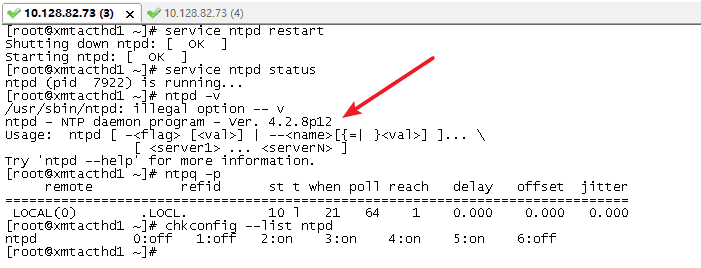
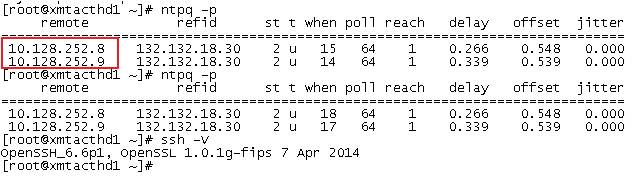
6. 客户端配置
[root@localhost ~]# date
Sat Aug 8 08:08:13 CST 2015
/etc/ntp.conf添加服务端IP地址
server 10.17.83.106
[root@localhost ~]# ntpq -p
remote refid st t when poll reach delay offset jitter
==============================================================================
10.17.83.106 10.17.82.25 12 u 3 64 1 0.628 4279381 0.001
等待几分钟,ntpd客户端自动去同步服务端的时间
[root@localhost ~]# date
Sat Aug 8 08:11:10 CST 2015
[root@localhost ~]# dat
Thu Dec 15 15:28:41 CST 2016
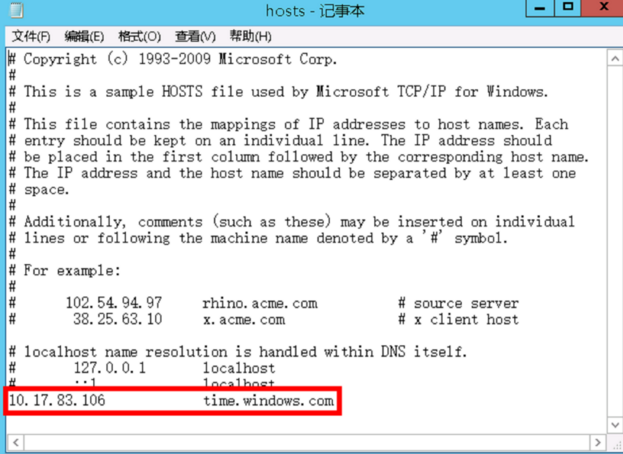
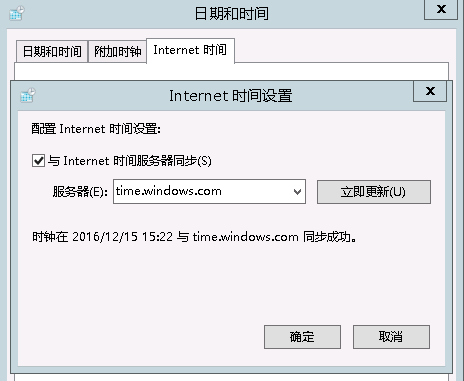
Windows客户端配置

【转载】Linux升级NTPD服务器-编译安装ntp-4.2.8p12与配置的更多相关文章
- Linux下指定版本编译安装LAMP
说明: 操作系统:CentOS 6.5 64位 需求: 编译安装LAMP运行环境 各软件版本如下: MySQL:mysql-5.1.73 Apache:httpd-2.2.31 PHP:php-5.2 ...
- Linux 从源码编译安装 OpenSSH
https://blog.csdn.net/bytxl/article/details/46639073 Linux 从源码编译安装 OpenSSH以及各问题解决 2015年06月25日 17:37: ...
- Linux 从源码编译安装 Nginx
Nginx 是一个高性能的 HTTP 和 反向代理服务器,也是一个 IMAP/POP3/SMTP 代理服务器.Nginx 编译安装比较简单,难点在于配置.下面是 Nignx 0.8.54 编译安装和简 ...
- PCL库在Linux环境下的编译安装
PCL库在Linux环境下的编译安装 PCL库的源码库:https://github.com/PointCloudLibrary/pcl 下载完了之后解压下来 编译库的几个步骤 mkdir build ...
- linux下源码编译安装mysql
1.安装依赖的包: yum install -y gdb cmake ncurses-devel bison bison-devel 2.创建mysql安装目录和数据文件目录 mkdir -p /us ...
- 2020ubuntu1804server编译安装redis5笔记(二)配置redis
前一篇笔记记录了ubuntu1804server编译安装redis5,接下来要配置redis5了 网址:https://www.cnblogs.com/qumogu/p/12435694.html 第 ...
- linux软件管理之------编译安装nginx服务器并手动编写自动化运行脚本
红帽系列的 linux软件管理分为三类:1. rpm 安装软件.2. yum 安装软件.3. 源码包编译安装.前面两种会在相关专题给出详细讲解.源码包的编译安装是非常关键的,我们知道linux的相关版 ...
- Linux 下源码编译安装 vim 8.1
前言 目前 linux 的各个发行版基本上都是带了一个 vi 编辑器的,而本文要说的 vim 编辑器对 vi 做了一些优化升级,更好用.当我们需要远程操作一台 linux 服务器的时候,只能使用命令行 ...
- 在Linux下源码编译安装GreatSQL/MySQL
欢迎来到 GreatSQL社区分享的MySQL技术文章,如有疑问或想学习的内容,可以在下方评论区留言,看到后会进行解答 GreatSQL社区原创内容未经授权不得随意使用,转载请联系小编并注明来源. 本 ...
随机推荐
- MySQL提升课程 全面讲解MySQL架构设计-索引
索引是什么? 索引是帮助MySQL高效获取数据的数据结构. 索引能干什么? 提高数据查询的效率. 索引:排好序的快速查找数据结构!索引会影响where后面的查找,和order by 后面的排序. 一. ...
- Python3集成安装xadmin
Python3集成安装xadmin1:创建虚拟环境C:\Users\Adminstrator>mkvirtualenv -p C:\Python34\python.exe MyDjango如果提 ...
- Python学习——01Linux基础之常用基本命令
做Linux要知道两件事: 首先知道自己处在什么位置(桌面……) 区分大小写 pwd:查看当前所在目录 “/”代表:根目录 Cd: cd( ...
- jdbc学习笔记02
数据库连接池 DBCP DataBase Conection Pool:数据库连接池 如果没有数据库连接池,每一次业务都需要服务器和数据库服务器建立一次连接,业务处理完连接断开,如果有1万次业务处理, ...
- Spark-源码-TaskScheduler初始化过程, ClientActor向Master发送注册任务信息过程
Spark版本 1.3 Spark源码 Spark.createTaskScheduler TaskScheduler初始化过程 1.// SparkContext中 /** * Create a t ...
- 数据分析处理库Pandas——索引进阶
Series结构 筛选数据 指定值 备注:查找出指定数值的索引和数值. 逻辑运算 备注:查找出值大于2的数据. 复合索引 DataFrame结构 显示指定列 筛选显示 备注:值小于0的显示原值,否则显 ...
- sorted() ,filter() ,map()的用法
sorted() 排序函数. 语法: sorted(Iterable, key=None, reverse=False) Iterable: 可迭代对象 key: 排序规则(排序函数), 在sorte ...
- 关于mysql连接时候出现"error 2003: can't connect to mysql server on 'localhost'(10061)问题的解决
天,在使用navicat Premium 连接数据库时,出现了一个弹出窗口显示: "error 2003: can't connect to mysql server on 'localho ...
- 初识python 字符串 列表 字典相关操作
python基础(一): 运算符: 算术运算: 除了基本的+ - * / 以外,还需要知道 : // 为取整除 返回的市商的整数部分 例如: 9 // 2 ---> 4 , 9.0 // ...
- Kubernetes-深入分析集群安全机制(3.6)
集群的安全性主要考虑以下几个方面: 容器与所在宿主机的隔离: 限制容器给基础设施及其他容器带来消极影响的能力: 最小权限原则--合理限制所有组件的权限,确保组件只执行它被授权的行为,通过限制单个组件的 ...