
C#创建一个Window服务
Window服务介绍
Microsoft Windows 服务能够创建在它们自己的 Windows 会话中可长时间运行的可执行应用程序。这些服务可以在计算机启动时自动启动,可以暂停和重新启动而且不显示任何用户界面。这使服务非常适合在服务器上使用,或任何时候,为了不影响在同一台计算机上工作的其他用户,需要长时间运行功能时使用。还可以在不同于登录用户的特定用户帐户或默认计算机帐户的安全上下文中运行服务。本文就向大家介绍如何运用Visual C#来一步一步创建一个文件监视的Windows服务程序,然后介绍如何安装、测试和调试该Windows服务程序。
1.创建window服务
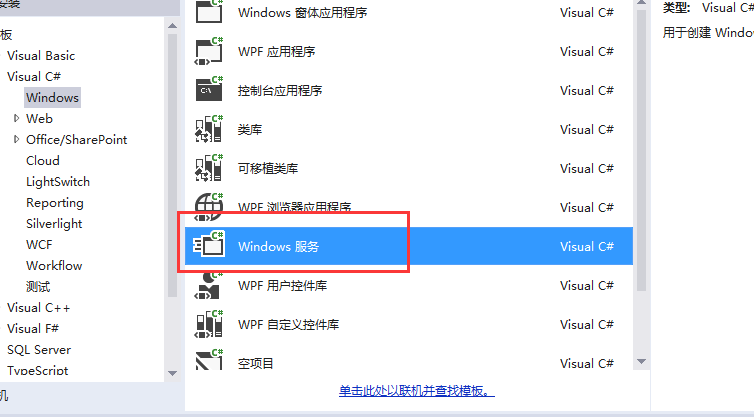
创建完成后发现此应用程序的入口
 static void Main()

        {

            ServiceBase[] ServicesToRun;

            ServicesToRun = new ServiceBase[]

            {

                new callmeyhzService()

            };

            ServiceBase.Run(ServicesToRun);

        }
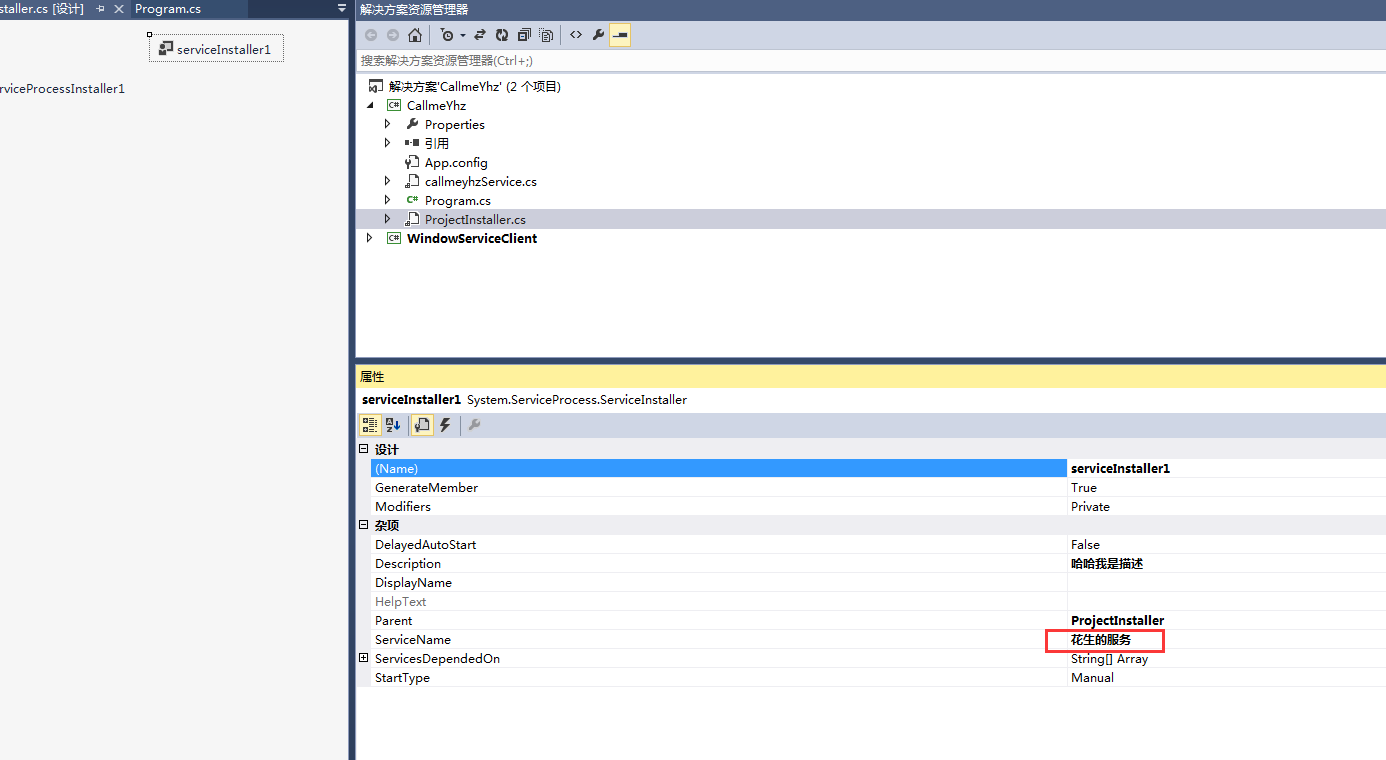
修改服务名称
编写服务代码
  public partial class callmeyhzService : ServiceBase

    {

        public callmeyhzService()

        {

            InitializeComponent();

        }

        string filePath = @"D:\MyServiceLog.txt";

        protected override void OnStart(string[] args)

        {

            using (FileStream stream = new FileStream(filePath,FileMode.Append))

            using (StreamWriter writer = new StreamWriter(stream))

            {

                writer.WriteLine(DateTime.Now.ToString("yyyyMMdd HH:mm:ss" + "服务启动!"));

            }

        }

        protected override void OnStop()

        {

             using (FileStream stream = new FileStream(filePath, FileMode.Append))

            using (StreamWriter writer = new StreamWriter(stream))

            {

                writer.WriteLine(DateTime.Now.ToString("yyyyMMdd HH:mm:ss" + "服务停止!"));

            }

        }

    }
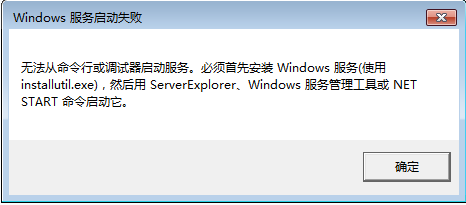
此时如果直接执行服务是无法安装的
2.写一个桌面应用程序管理服务
最终我们希望window服务应该在service.msc中存在

编写一个winform就放4个按钮

上代码
using System;

using System.Collections;

using System.Windows.Forms;

using System.ServiceProcess;

using System.Configuration.Install;

namespace WindowServiceClient

{

    public partial class Form1 : Form

    {

        public Form1()

        {

            InitializeComponent();

        }

        string serviceFilePath = Application.StartupPath + @"\CallmeYhz.exe";

        string serviceName = "花生的服务";

        //判断服务是否存在

        private bool IsServiceExisted(string serviceName)

        {

            ServiceController[] services = ServiceController.GetServices();

            foreach (ServiceController sc in services)

            {

                if (sc.ServiceName.ToLower() == serviceName.ToLower())

                {

                    return true;

                }

            }

            return false;

        }

        //卸载服务

        private void UninstallService(string serviceFilePath)

        {

            using (AssemblyInstaller installer = new AssemblyInstaller())

            {

                installer.UseNewContext = true;

                installer.Path = serviceFilePath;

                installer.Uninstall(null);

            }

        }

        //安装服务

        private void InstallService(string serviceFilePath)

        {

            using (AssemblyInstaller installer = new AssemblyInstaller())

            {

                installer.UseNewContext = true;

                installer.Path = serviceFilePath;

                IDictionary savedState = new Hashtable();

                installer.Install(savedState);

                installer.Commit(savedState);

            }

        }

        //启动服务

        private void ServiceStart(string serviceName)

        {

            using (ServiceController control = new ServiceController(serviceName))

            {

                if (control.Status == ServiceControllerStatus.Stopped)

                {

                    control.Start();

                }

            }

        }

        //停止服务

        private void ServiceStop(string serviceName)

        {

            using (ServiceController control = new ServiceController(serviceName))

            {

                if (control.Status == ServiceControllerStatus.Running)

                {

                    control.Stop();

                }

            }

        }

        /// <summary>

        /// 窗体加载事件

        /// </summary>

        /// <param name="sender"></param>

        /// <param name="e"></param>

        private void Form1_Load(object sender, EventArgs e)

        {

        }

        #region 按钮事件

        /// <summary>

        /// 安装服务按钮

        /// </summary>

        /// <param name="sender"></param>

        /// <param name="e"></param>

        private void Setep_Click(object sender, EventArgs e)

        {

            if (this.IsServiceExisted(serviceName)) this.UninstallService(serviceName);

            this.InstallService(serviceFilePath);

        }

        /// <summary>

        /// 启动按钮

        /// </summary>

        /// <param name="sender"></param>

        /// <param name="e"></param>

        private void start_Click(object sender, EventArgs e)

        {

            if (this.IsServiceExisted(serviceName)) this.ServiceStart(serviceName);

        }

        /// <summary>

        /// 停止按钮

        /// </summary>

        /// <param name="sender"></param>

        /// <param name="e"></param>

        private void stop_Click(object sender, EventArgs e)

        {

            if (this.IsServiceExisted(serviceName)) this.ServiceStop(serviceName);

        }

        /// <summary>

        /// 卸载按钮

        /// </summary>

        /// <param name="sender"></param>

        /// <param name="e"></param>

        private void Union_Click(object sender, EventArgs e)

        {

            if (this.IsServiceExisted(serviceName))

            {

                this.ServiceStop(serviceName);

                this.UninstallService(serviceFilePath);

            }

        }

        #endregion

    }

}
先安装服务再运行服务再停止服务再写在服务
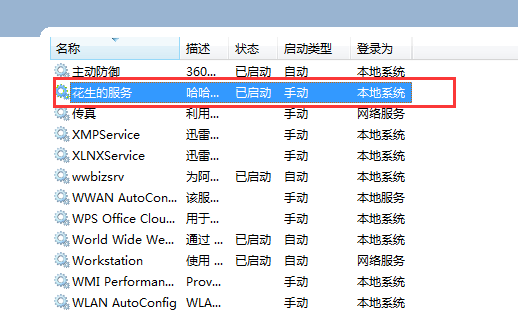
服务已经成功安装并且启动:
观察日志

说明本次小demo圆满完成
C#创建一个Window服务的更多相关文章
- 为MongoDB创建一个Windows服务
一:选型,根据机器的操作系统类型来选择合适的版本,使用下面的命令行查询机器的操作系统版本 wmic os get osarchitecture 二:下载并安装 附上下载链接 点击安装包,我这里是把文件 ...
- 【LINUX】——linux如何使用Python创建一个web服务
问:linux如何使用Python创建一个web服务? 答:一句话,Python! 一句代码: /usr/local/bin/python -m SimpleHTTPServer 8686 > ...
- ng 通过factory方法来创建一个心跳服务
<!DOCTYPE html> <html ng-app="myApp"> <head lang="en"> <met ...
- C# 创建一个WCF服务
做代码统计,方便以后使用: app.config配置文件设置: <configuration> <system.serviceModel> <bindings> & ...
- 使用PHP创建一个socket服务端
与常规web开发不同,使用socket开发可以摆脱http的限制.可自定义协议,使用长连接.PHP代码常驻内存等.学习资料来源于workerman官方视频与文档. 通常创建一个socket服务包括这几 ...
- 在windows下创建一个Mongo服务
首先需要下载mongo的安装包 cmd.exe 这个需要用管理员权限打开 进入到mongo的安装目录 首先到C盘根据下面的命令手动创建一个 Data 文件夹 在Data 里面创建一个db文件夹一个lo ...
- tomcat创建一个windows服务
具体步骤如下: 1.把JDK解压到C:\Program Files\Java下,Tomcat解压到D:\tomcat下 2.配置环境变量 JAVA_HOME:C:\Program Files\Java ...
- [翻译] 使用 .NET Core 3.0 创建一个 Windows 服务
原文: .NET Core Workers as Windows Services 在 .NET Core 3.0 中,我们引入了一种名为 Worker Service 的新型应用程序模板.此模板旨在 ...
- 使用PHP来简单的创建一个RPC服务
RPC全称为Remote Procedure Call,翻译过来为"远程过程调用".主要应用于不同的系统之间的远程通信和相互调用. 比如有两个系统,一个是PHP写的,一个是JAVA ...
随机推荐
- Dart基础
dartpad在线调试 :https://dartpad.dartlang.org 运行需要用墙 vscode执行dart 安装 安装dart插件 下载安装dart 配置环境变量 vscode新建 ...
- ACM数论-欧几里得与拓展欧几里得算法
欧几里德算法又称辗转相除法,用于计算两个整数a,b的最大公约数. 基本算法:设a=qb+r,其中a,b,q,r都是整数,则gcd(a,b)=gcd(b,r),即gcd(a,b)=gcd(b,a%b). ...
- HDU 1106 排序(排序)
输入一行数字,如果我们把这行数字中的‘5’都看成空格,那么就得到一行用空格分割的若干非负整数(可能有些整数以‘0’开头,这些头部的‘0’应该被忽略掉,除非这个整数就是由若干个‘0’组成的,这时这个整数 ...
- AMQ学习笔记 - 03. 消息的接收方式
概述 消息有两种接收方式:同步接收和异步接收. 同步接收:主线程阻塞式等待下一个消息的到来,可以设置timeout,超时则返回null. 异步接收:主线程设置MessageListener,然后继续做 ...
- 【NOIP2007】字符串展开解题报告
描述 Description 在初赛普及组的“阅读程序写结果”的问题中,我们曾给出一个字符串展开的例子:如果在输入的字符串中,含有类似于“d-h”或“4-8”的子串,我们就把它当作一种简写,输出时,用 ...
- 设计模式-工厂模式(Factory Pattern)
本文由@呆代待殆原创,转载请注明出处. 工厂模式遵循的设计原则之一:找出代码中常变化的部分,并把这一部分分离出来.(Dependency Inversion Principle) 工厂模式简述 当我们 ...
- 【dfs序】【树状数组】bzoj1103 [POI2007]大都市meg
预处理出每个点到根节点的土路数,插到一个树状数组里,然后每次修改只会对子树中的节点造成影响,于是相当于区间修改.点查询了. #include<cstdio> using namespace ...
- 【kmp算法】bzoj1355 [Baltic2009]Radio Transmission
引用题解:http://blog.csdn.net/wyfcyx_forever/article/details/40347425 #include<cstdio> #include< ...
- [CF915F]Imbalance Value of a Tree
[CF915F]Imbalance Value of a Tree 题目大意: 一棵\(n(n\le10^6)\)个结点的树,每个结点有一个权值\(w_i\).定义\(I(i,j)\)为\(i\)到\ ...
- 使用MR求解多个矩阵的乘积之后
首先介绍涉及到的知识点,如下: 1)value的类型是IntArrayWritable,将整型数组值取出的方法有两种. a.其一,就是使用value的toArray()方法,返回值是一个Object ...