
eclispe中使用 maven build启动maven项目和打包项目
1.右键项目2.点击run as按钮 3.点击run configurations 4.配置如下: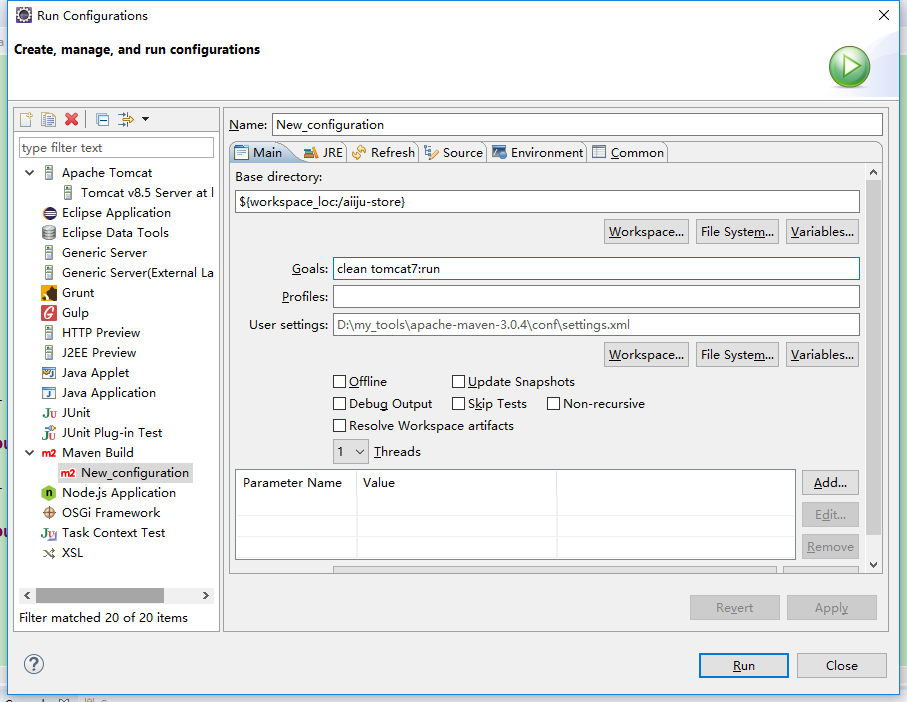
=============================加油加油加油加油加油加油====================
目的:在Eclipse中配置Maven build打包
- 项目右击-->Run As-->Run Configurations
- 在左侧Maven Build下选中自己的工程名
- 然后在右侧Goals输入框中输入“clean package”
- 点击Apply完成配置,如图

- [INFO] BUILD FAILURE
- [INFO] ------------------------------------------------------------------------
- [INFO] Total time: 1.622 s
- [INFO] Finished at: 2016-05-04T10:42:01+08:00
- [INFO] Final Memory: 12M/219M
- [INFO] ------------------------------------------------------------------------
- [ERROR] Failed to execute goal org.apache.maven.plugins:maven-compiler-plugin:3.1:compile (default-compile) on project hys-api: Compilation failure
- [ERROR] No compiler is provided in this environment. Perhaps you are running on a JRE rather than a JDK?
- [ERROR] -> [Help 1]
- [ERROR]
- [ERROR] To see the full stack trace of the errors, re-run Maven with the -e switch.
- [ERROR] Re-run Maven using the -X switch to enable full debug logging.
- [ERROR]
- [ERROR] For more information about the errors and possible solutions, please read the following articles:
- [ERROR] [Help 1] http://cwiki.apache.org/confluence/display/MAVEN/MojoFailureException

=======================================加油加油加油==================================
<build>
<!-- 配置插件 -->
<plugins>
<plugin>
<groupId>org.apache.maven.plugins</groupId>
<artifactId>maven-surefire-plugin</artifactId>
<version>2.18.1</version>
<configuration>
<skipTests>true</skipTests>
</configuration>
</plugin>
<plugin>
<groupId>org.apache.tomcat.maven</groupId>
<artifactId>tomcat7-maven-plugin</artifactId>
<configuration>
<port>8080</port>
<path>/</path>
<url>http:/127.0.0.1:8080/manager/text</url>
<username>tomcat</username>
<password>tomcat</password>
</configuration>
</plugin>
</plugins>
</build>
eclispe中使用 maven build启动maven项目和打包项目的更多相关文章
- eclipse中的maven build、maven clean、maven install和maven test的区别
eclipse中的maven build.maven clean.maven install和maven test的区别 https://www.cnblogs.com/Marydon20170307 ...
- 转:eclipse maven build、maven install 等区别
原文地址:eclipse maven build.maven install 等区别
- eclipse maven build、maven clean、maven install和maven test的区别 精析
1.情景展示 选中maven项目,右键-->Run As或Debug As-->maven buid,maven install,maven test有什么区别? 2.区别说明 ...
- cocos2d-x 2.1.4 使用create_project.py脚本创建项目+ant打包项目
1.创建项目:执行create_project.py脚本,进入Doc界面输入下面的命令: cd D:\cocos2d-x-2.1.4\cocos2d-x-2.1.4\tools\project-cre ...
- vue-cli run dev 和 run build 出现的问题(运行项目、打包项目)
前些天做项目,过程中遇到了一个比较奇怪的问题:npm run dev 和 npm run build 的时候,出现了错误,导致项目无法启动.打包无法成功.报了一堆错误: 错误展示: 找了一下解决方案, ...
- Eclipse中 Run as --->Maven build 命令详解
Maven Build Goals: clean 清除编译,compile 编译,test 编译并测试,install 打包并发送到本地仓库,package 只是打成jar包,并不会发送到本地 ...
- Maven项目的打包发布到Nexus私服和服务器
1.编写pom文件如下: <build> <plugins> <plugin> <groupId>org.apache.maven.plugins< ...
- Eclipse上进行java web项目的打包
以下是一个基于maven搭建的Spring Boot项目的目录结构 版权声明:本文为博主原创文章,未经博主允许不得转载. 原文地址: https://www.cnblogs.com/poterliu/ ...
- Vue项目根据不同运行环境打包项目
前提 项目是直接通过 vue-cli脚手架 生成的: 假设在项目开发中,分为三个环境 -- · 测试环境· 预生产环境· 生产环境 每个环境的接口地址都是不同的,而 vue-cli 给出的环境只有 d ...
随机推荐
- 插叙LTE-2
LTE TDD与LTE FDD技术简介和比较 标签: 频分双工(FDD) 时分双工(TDD) LTE 摘要:UTRA 的长期演进(Long Term Evolution ,LTE) 技术存在LTE ...
- 我的Android进阶之旅------>Android中通过adb shell input来模拟滑动、按键、点击事件
今天在维护公司的一个小项目的时候,发现按公司手机的某个物理按键,激活相应的Service后,会在屏幕上模拟的点击了屏幕的某个坐标点.好家伙,原来是之前该项目的版本是按这个物理按键后,会弹出一个对话框, ...
- unknown facet type would you like to ignore facet from module
去idea plugin 里面把红色的插件 重新勾选一下,点apply 重启就可以了
- [Idea]安装avtiviti插件以及 插件中文乱码
安装插件 打开IDEA,按ctrl+alt+S,打开Pluging 乱码问题 idea 安转activiti插件后,编辑流程图发现保存后中文乱码,并且idea的字符集(Settings—>Edi ...
- 常用mongo语句
只列出指定字段db.getCollection('PUBLICACCOUNTS').find({},{NickName:1,UserName:1,FID:1,_id:0})获取微信公众号列表db.ge ...
- Ensemble learning(集成学习)
定义 集成学习是一种机器学习范式,其中多个学习器被训练来解决相同的问题. 这与试图从训练数据中学习一个假设的普通机器学习方法相反,集成方法尝试构造一组假设并将它们结合使用. 一个集合包含一些通常被称为 ...
- vim tabs
:tabnew 增加一个标签:tabc 关闭当前的tab:tabo 关闭所有其他的tab:tabs 查看所有打开的tab:tabp 或gT 前一个:tabn 或gt 后一个:tabfirst或:tab ...
- CSS中input输入框点击时去掉外边框方法【outline:medium;】----CSS学习
CSS 中添加 outline:medium; JS 控制焦点: $("#CUSTOM_PHONE").focus(function(event){ // this.attr(&q ...
- c# 如何设置透明画刷
使用solidBrush新建画刷,定义画刷的颜色为透明色 Brush b = new SolidBrush(Color.FromArgb(50, Color.Green)); 这里的50是透明度的设置 ...
- 大道至简(第五i章)读后感
大道至简(第五章)读后感 再一次在不想看的情况下读大道至简第五章,一个项目的实现中,“过程”与“工程”是同一个概念吗?答案自然是否定的.“过程”是一个确定的模板,而“工程”是有一个目的的实现在里面. ...