
布局之按钮的图片分辨率--Android Studio
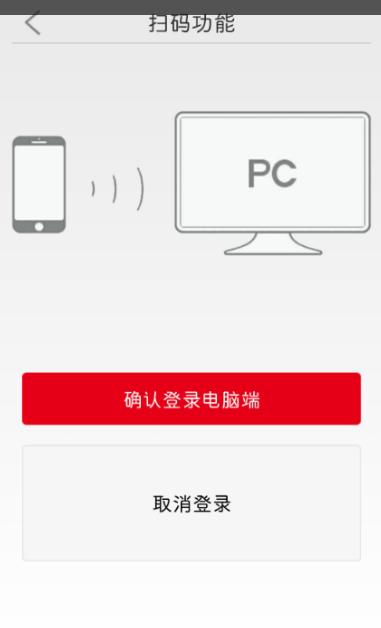
在布局页面,想把取消按钮和确认钮大小一致,刚开始想法是错的,不用在控制层设置,也不用在布局层压缩图片,有两个方法法:
1.直接用美图秀秀“尺寸”功能,修改成另一按钮一样的分辨率。
2.设置按钮相同高度,android:layout_height="50dp"。
用第二种比较好,不改变图片,方便其它布局引用,附本页面布局代码:
<FrameLayout
android:id="@+id/FrameLayout1"
android:layout_width="match_parent"
android:layout_height="40dp" >
<ImageView
android:id="@+id/back"
android:layout_width="25dp"
android:layout_height="25dp"
android:layout_gravity="center_vertical"
android:layout_marginLeft="8dp"
android:src="@drawable/back" />
<LinearLayout
android:layout_width="match_parent"
android:layout_height="wrap_content"
android:layout_gravity="center_vertical"
android:gravity="center_horizontal"
android:orientation="horizontal" >
<TextView
android:layout_width="wrap_content"
android:layout_height="wrap_content"
android:text="扫码登录"
android:textSize="22sp" />
</LinearLayout>
</FrameLayout>
<View
android:layout_width="match_parent"
android:layout_height="1dp"
android:background="#cccccc" />
<LinearLayout
android:layout_width="match_parent"
android:layout_height="wrap_content"
> <ImageView
android:id="@+id/image_view"
android:layout_width="match_parent"
android:layout_height="280dp"
android:src="@drawable/pc" />
</LinearLayout>
<LinearLayout
android:id="@+id/ll_guiji"
android:layout_width="match_parent"
android:layout_height="match_parent"
android:layout_marginLeft="10dp"
android:layout_marginRight="10dp"
android:orientation="vertical" >
<Button
android:id="@+id/btn_queding"
android:layout_width="match_parent"
android:layout_height="wrap_content"
android:layout_gravity="bottom"
android:layout_marginBottom="10dp"
android:layout_marginTop="50dp"
android:background="@drawable/xiayibu"
android:text="确认登录电脑端"
android:textColor="#FFF" />
<Button
android:id="@+id/btn_quxiao"
android:layout_width="wrap_content"
android:layout_height="50dp"
android:layout_gravity="bottom"
android:layout_marginBottom="10dp"
android:layout_marginTop="10dp"
android:text="取消登录"
android:background="@drawable/aa"
/>
</LinearLayout>

布局之按钮的图片分辨率--Android Studio的更多相关文章
- Android ImageView 不显示JPEG图片 及 Android Studio中怎样引用图片资源
Android ImageView 不显示JPEG图片 今天在写一个小实例,ImageView在xml里面设置的是INVISIBLE,在代码里须要设置成setVisibility(View.VISIB ...
- 【转】你所不知道的Android Studio调试技巧
这篇写Android studio debug技巧个人觉得写得不错,转自:http://www.jianshu.com/p/011eb88f4e0d# Android Studio目前已经成为开发An ...
- 你所不知道的Android Studio调试技巧
转载:http://www.jianshu.com/p/011eb88f4e0d Android Studio目前已经成为开发Android的主要工具,用熟了可谓相当顺手.作为开发者,调试并发现bug ...
- 【Android Studio安装部署系列】二十六、Android studio录制屏幕并生成gif文件
版权声明:本文为HaiyuKing原创文章,转载请注明出处! 概述 Android Studio自带录制屏幕功能,那么就可以很方便地将手机上的屏幕操作录制成视频.然后借助一些软件或者网站转换成gif文 ...
- 第一篇:安装Android Studio问题及其解决方案
ubuntu18.04配置android studio3.2.1环境 1.JDK安装与配置:https://www.cnblogs.com/yuanbo123/p/5819564.html(按照文档操 ...
- Android Studio代码调试大全
http://blog.csdn.net/dd864140130/article/details/51560664 Android Studio目前已经成为开发android的主要工具,用熟了可谓相当 ...
- Android Studio 之生成正式签名的 APK 文件
生成 APK 文件 •步骤 点击 Build -> Generate Signed...... : 来到如下界面: 选择 APK 选项,点击 Next 来到如下界面: 如果你电脑上没有一个正式 ...
- 设置Android Studio启动时可选最近打开过的工程
Android Studio启动时,默认会打开最近关闭的工程. 如果想Android Studio在启动时,打开欢迎界面(Welcome to Android Studio界面),则可以通过设置Set ...
- Android Studio 集成 TFS,实现安卓移动开发的持续集成和交付(DevOps)
目录 1 集成TFS系统.... 1.1 概述.... 1.2 安装TFS插件.... 1.2.1 在线安装方式.... 1.2.2 离线安装方案.... 1.3 常见操作.... 1.3.1 新建G ...
随机推荐
- MalformedByteSequenceException: Invalid byte 1 of 1-byte
修改了线上程序的xml配置文件,重启后报如下错误: MalformedByteSequenceException: Invalid byte 1 of 1-byte 百度了下大体的意思是说文件的编码错 ...
- UVALive 4998 Simple Encryption --DFS
题意: 给出K1,求一个12位数(不含前导0)K2,使得K1^K2 mod (10^12) = K2. 解法: 求不动点问题. 有一个性质: 如果12位数K2满足如上式子的话,那么K2%1,K2%10 ...
- DFA 最小化
NDFA.εNDFA 确定化的细节这里就不总结了,这里说一说DFA最小化的算法. 关于DFA最小化,
- What is a RaycastHit normal?
The normal is the direction pointing away from the collider it hits. http://answers.unity3d.com/ques ...
- BroadcastReceiver详解
详解 2014-08-20 19:42 13492人阅读 评论(8) 收藏 举报 分类: 5.andriod开发(148) 版权声明:本文为博主原创文章,未经博主允许不得转载. 目录(?)[+] ...
- Win10 VC++6 无法启动此程序,因为计算机中丢失mfc42d.dll 需要提升
亲测可用 1.无法启动此程序,因为计算机中丢失mfc42d.dll 我也遇到了这个问题,并且顺利解决了!按一下流程搞定的: “工程-设置-常规-microsoft基础类,(选择使用MFC作为静态链接库 ...
- 3942: [Usaco2015 Feb]Censoring [KMP]
3942: [Usaco2015 Feb]Censoring Time Limit: 10 Sec Memory Limit: 128 MBSubmit: 375 Solved: 206[Subm ...
- node基础09:第2个node web服务器
1.同时输出文字与图片 在前几个小课程中,我会学会了 从服务器中读取文字字符,并且向浏览器中输出 从服务器中读取图片文件,并且向浏览器中输出 这节课中,我学会了同时向浏览器输出文字,图片.对此,我感到 ...
- 百度数据可视化图表套件echart实战
最近我一直在做数据可视化的前端工作,我用的最多的绘图工具是d3.d3有点像photoshop,功能很强大,例子也很多,但是学习成本也不低,做项目是需要较大人力投入的.3月底由在亚马逊工作的同学介绍下使 ...
- CentOS 6.5 PPTPD VPN服务器安装,解决807等问题。
需要两个组件: ppp pptpd 需要配置的地方有三处: /etc/pptpd.conf /etc/ppp/options.pptpd /etc/ppp/chap-secrets 需要开启IP转发: ...