
布局之按钮的图片分辨率--Android Studio
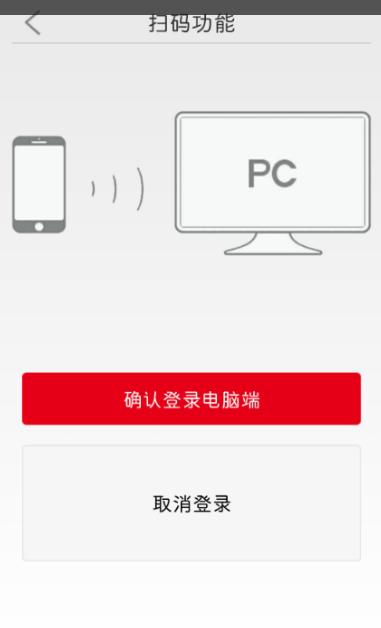
在布局页面,想把取消按钮和确认钮大小一致,刚开始想法是错的,不用在控制层设置,也不用在布局层压缩图片,有两个方法法:
1.直接用美图秀秀“尺寸”功能,修改成另一按钮一样的分辨率。
2.设置按钮相同高度,android:layout_height="50dp"。
用第二种比较好,不改变图片,方便其它布局引用,附本页面布局代码:
<FrameLayout
android:id="@+id/FrameLayout1"
android:layout_width="match_parent"
android:layout_height="40dp" >
<ImageView
android:id="@+id/back"
android:layout_width="25dp"
android:layout_height="25dp"
android:layout_gravity="center_vertical"
android:layout_marginLeft="8dp"
android:src="@drawable/back" />
<LinearLayout
android:layout_width="match_parent"
android:layout_height="wrap_content"
android:layout_gravity="center_vertical"
android:gravity="center_horizontal"
android:orientation="horizontal" >
<TextView
android:layout_width="wrap_content"
android:layout_height="wrap_content"
android:text="扫码登录"
android:textSize="22sp" />
</LinearLayout>
</FrameLayout>
<View
android:layout_width="match_parent"
android:layout_height="1dp"
android:background="#cccccc" />
<LinearLayout
android:layout_width="match_parent"
android:layout_height="wrap_content"
> <ImageView
android:id="@+id/image_view"
android:layout_width="match_parent"
android:layout_height="280dp"
android:src="@drawable/pc" />
</LinearLayout>
<LinearLayout
android:id="@+id/ll_guiji"
android:layout_width="match_parent"
android:layout_height="match_parent"
android:layout_marginLeft="10dp"
android:layout_marginRight="10dp"
android:orientation="vertical" >
<Button
android:id="@+id/btn_queding"
android:layout_width="match_parent"
android:layout_height="wrap_content"
android:layout_gravity="bottom"
android:layout_marginBottom="10dp"
android:layout_marginTop="50dp"
android:background="@drawable/xiayibu"
android:text="确认登录电脑端"
android:textColor="#FFF" />
<Button
android:id="@+id/btn_quxiao"
android:layout_width="wrap_content"
android:layout_height="50dp"
android:layout_gravity="bottom"
android:layout_marginBottom="10dp"
android:layout_marginTop="10dp"
android:text="取消登录"
android:background="@drawable/aa"
/>
</LinearLayout>

布局之按钮的图片分辨率--Android Studio的更多相关文章
- Android ImageView 不显示JPEG图片 及 Android Studio中怎样引用图片资源
Android ImageView 不显示JPEG图片 今天在写一个小实例,ImageView在xml里面设置的是INVISIBLE,在代码里须要设置成setVisibility(View.VISIB ...
- 【转】你所不知道的Android Studio调试技巧
这篇写Android studio debug技巧个人觉得写得不错,转自:http://www.jianshu.com/p/011eb88f4e0d# Android Studio目前已经成为开发An ...
- 你所不知道的Android Studio调试技巧
转载:http://www.jianshu.com/p/011eb88f4e0d Android Studio目前已经成为开发Android的主要工具,用熟了可谓相当顺手.作为开发者,调试并发现bug ...
- 【Android Studio安装部署系列】二十六、Android studio录制屏幕并生成gif文件
版权声明:本文为HaiyuKing原创文章,转载请注明出处! 概述 Android Studio自带录制屏幕功能,那么就可以很方便地将手机上的屏幕操作录制成视频.然后借助一些软件或者网站转换成gif文 ...
- 第一篇:安装Android Studio问题及其解决方案
ubuntu18.04配置android studio3.2.1环境 1.JDK安装与配置:https://www.cnblogs.com/yuanbo123/p/5819564.html(按照文档操 ...
- Android Studio代码调试大全
http://blog.csdn.net/dd864140130/article/details/51560664 Android Studio目前已经成为开发android的主要工具,用熟了可谓相当 ...
- Android Studio 之生成正式签名的 APK 文件
生成 APK 文件 •步骤 点击 Build -> Generate Signed...... : 来到如下界面: 选择 APK 选项,点击 Next 来到如下界面: 如果你电脑上没有一个正式 ...
- 设置Android Studio启动时可选最近打开过的工程
Android Studio启动时,默认会打开最近关闭的工程. 如果想Android Studio在启动时,打开欢迎界面(Welcome to Android Studio界面),则可以通过设置Set ...
- Android Studio 集成 TFS,实现安卓移动开发的持续集成和交付(DevOps)
目录 1 集成TFS系统.... 1.1 概述.... 1.2 安装TFS插件.... 1.2.1 在线安装方式.... 1.2.2 离线安装方案.... 1.3 常见操作.... 1.3.1 新建G ...
随机推荐
- linux命令之tail
tail用于输出文件末尾部分.一个比较有用的功能是tail + grep实现类似于安卓开发时调试使用的logcat,具体操作是: 一般我是用SecureCRT连接linux,然后使用SecureCRT ...
- 匈牙利算法——S.B.S.
匈牙利算法是由匈牙利数学家Edmonds于1965年提出,因而得名.匈牙利算法是基于Hall定理中充分性证明的思想,它是部图匹配最常见的算法,该算法的核心就是寻找增广路径,它是一种用增广路径求二分图最 ...
- Struts2 使用jQuery实现Ajax
在jQuery中将Ajax相关的操作进行封装,使用时只需在合适的地方调用Ajax相关的方法即可,相比而言,使用jQuery实现Ajax更加简洁,方便 1.$.Ajax()可以通过发送Http请求加载远 ...
- Unity新功能|全息模拟器
http://forum.china.unity3d.com/thread-21539-1-1.html
- [No00006A]Js的addEventListener()及attachEvent()区别分析【js中的事件监听】
1.添加时间监听: Chrom中: addEventListener的使用方式: target.addEventListener(type, listener, useCapture); target ...
-  非法字符 原因 以及解决办法
模板文件生成html文件之后会在body开头处加入一个可见的控制符 // 如果是Windows系统,修改为:$WIN = 1; $WIN = 0; ?> <!DOCTYPE html P ...
- VMware三种上网模型
今天捣鼓了一会虚拟机,对上网方式又学习了一遍,之前摆弄过,现在又捡起来了,主要自己整理一下,方面后面复习.主要有三种网络模型:桥接.仅主机(Host-Only).NAT.自己亲测了这三种方式,都可以上 ...
- SQL Server 常用关键字
SQL 建库 建表 --1.创建一个数据库 create database School; --删除数据库 drop database School; --创建数据库的时候指定一些选项. create ...
- 【OpenJudge 1665】完美覆盖
http://noi.openjudge.cn/ch0405/1665/?lang=zh_CN 状压水题,手动转移 #include<cstdio> #include<cstring ...
- js兼容获取元素的样式
js获取元素的样式的兼容性处理: function getStyle(obj,attr){ return obj.currentStyle?obj.currentStyle[attr]:getComp ...