
使用微软分布式缓存服务Velocity(Windows Server AppFabric Caching Service)
概述
配置模型
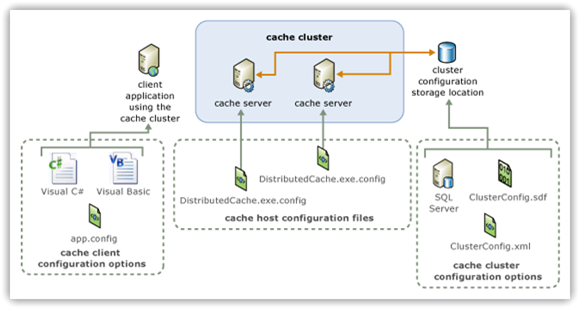
<?xml version="1.0" encoding="utf-8"?>
<configuration>
  <configSections>
    <section name="dcache" type="System.Data.Caching.DCacheSection,
             CacheBaseLibrary, Version=1.0.0.0, Culture=neutral,
             PublicKeyToken=89845dcd8080cc91" />
  </configSections>
  <dcache cluster="localhost" size="Small">
    <caches>
      <cache type="partitioned" consistency="strong" name="default">
        <policy>
          <eviction type="lru" />
          <expiration defaultTTL="10" isExpirable="true" />
        </policy>
      </cache>
      <cache type="partitioned" consistency="strong" name="other">
        <policy>
          <eviction type="lru" />
          <expiration defaultTTL="10" isExpirable="true" />
        </policy>
      </cache>
    </caches>
    <hosts>
      <host clusterPort="22234" hostId="1319514812" size="1024" quorumHost="true"
          name="TERRYLEE-PC" cacheHostName="DistributedCacheService"
          cachePort="22233" />
    </hosts>
    <advancedProperties>
      <partitionStoreConnectionSettings providerName="System.Data.SqlServerCe.3.5"
          connectionString="D:\CacheShare\ConfigStore.sdf" />
    </advancedProperties>
  </dcache>
</configuration>
<section name="dcacheClient"
type="System.Data.Caching.DCacheSection,
      CacheBaseLibrary, Version=1.0.0.0,
      Culture=neutral, PublicKeyToken=89845dcd8080cc91"/>
<dcacheClient>
  <localCache isEnabled="true" sync="TTLBased" ttlValue="300" />
  <hosts>
    <host name="localhost" cachePort="22233"
          cacheHostName="DistributedCacheService"/>
  </hosts>
</dcacheClient>
缓存复杂数据类型
[Serializable]
public class Customer
{
    public String ID { get; set; }
    public String FirstName { get; set; }
    public String LastName { get; set; }
    public int Age { get; set; }
    public String Email { get; set; }
}
Cache cache = GetCurrentCache();
Customer customer = new Customer()
{
    ID = "C20081117002",
    FirstName = "Terry",
    LastName = "Lee",
    Age = 25,
    Email = "lhj_cauc[#AT#]163.com"
};
cache.Add(customer.ID, customer);
Cache cache = GetCurrentCache();
Customer customer = cache.Get("C20081117002") as Customer;
Cache cache = GetCurrentCache();
cache.Remove("C20081117002");
Cache cache = GetCurrentCache();
Customer customer = new Customer()
{
    ID = "C20081117002",
    FirstName = "Huijui",
    LastName = "Li",
    Age = 26,
    Email = "lhj_cauc[#AT#]163.com"
};
cache["C20081117002"] = customer;
Cache cache = GetCurrentCache();
Customer customer = new Customer()
{
    ID = "C20081117002",
    FirstName = "Huijui",
    LastName = "Li",
    Age = 26,
    Email = "lhj_cauc[#AT#]163.com"
};
cache.Put(customer.ID, customer);
使用分区
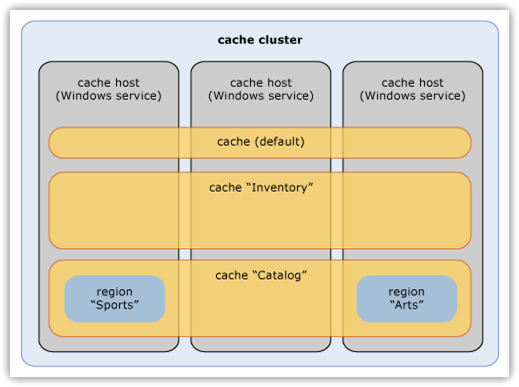
public void ClearRegion(string region);
public bool CreateRegion(string region, bool evictable);
public bool RemoveRegion(string region);
Cache cache = GetCurrentCache();
string regionName = "Customers";
cache.CreateRegion(regionName, false);
Customer customer = new Customer()
{
    ID = "C20081117003",
    FirstName = "Terry",
    LastName = "Lee",
    Age = 25,
    Email = "lhj_cauc[#AT#]163.com"
};
cache.Add(regionName, customer.ID, customer);
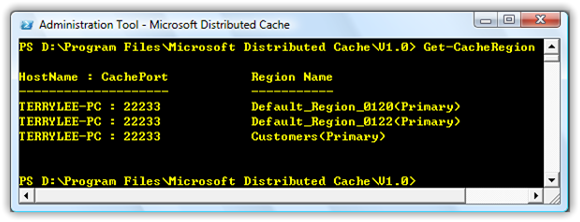
使用标签
Cache cache = GetCurrentCache();
string regionName = "Customers";
Customer customer1 = new Customer()
{
    ID = "C20081117004",
    FirstName = "Terry",
    LastName = "Lee",
    Age = 25,
    Email = "lhj_cauc[#AT#]163.com"
};
Customer customer2 = new Customer()
{
    ID = "C20081117005",
    FirstName = "Terry",
    LastName = "Lee",
    Age = 25,
    Email = "lhj_cauc[#AT#]163.com"
};
Tag tag1 = new Tag("Beijing");
Tag tag2 = new Tag("Tianjin");
cache.Add(regionName, customer1.ID, customer1, new Tag[] { tag1, tag2 });
cache.Add(regionName, customer2.ID, customer2, new Tag[] { tag2 });
GetAllMatchingTags(string region, Tag[] tags)
GetAnyMatchingTag(string region, Tag[] tags)
GetByTag(string region, Tag tag)
string regionName = "Customers";
Tag[] tags = new Tag[] { new Tag("Beijing"),
           new Tag("Tianjin")};
List<KeyValuePair<string, object>> result
    = cache.GetAllMatchingTags(regionName, tags);
ASP.NET SessionState提供者
<section name="dcacheClient"
         type="System.Data.Caching.DCacheSection,
         CacheBaseLibrary, Version=1.0.0.0,
         Culture=neutral, PublicKeyToken=89845dcd8080cc91"/>
<dcacheClient>
  <localCache isEnabled="true" sync="TTLBased" ttlValue="300" />
  <hosts>
    <host name="localhost" cachePort="22233"
          cacheHostName="DistributedCacheService"/>
  </hosts>
</dcacheClient>
<sessionState mode="Custom" customProvider="Velocity">
  <providers>
    <add name="Velocity"
         type="System.Data.Caching.SessionStoreProvider,ClientLibrary"
         cacheName="default"/>
  </providers>
</sessionState>
总结
本文出自 “TerryLee技术专栏” 博客,请务必保留此出处http://terrylee.blog.51cto.com/342737/151964
使用微软分布式缓存服务Velocity(Windows Server AppFabric Caching Service)的更多相关文章
- Windows Server AppFabric分布式缓存研究
分享一则先前对Windows Server AppFabric分布式缓存的技术研究. 一. AppFabric 技术架构和原理 AppFabric与Memcached类似,采用C/S的模式,在 ser ...
- 如何用分布式缓存服务实现Redis内存优化
Redis是一种支持Key-Value等多种数据结构的存储系统,其数据特性是“ALL IN MEMORY”,因此优化内存十分重要.在对Redis进行内存优化时,先要掌握Redis内存存储的特性比如字符 ...
- 误解了Windows Server AppFabric
想为自己的流程引擎找一个宿主,选择了几套方案,想先从AppFabric开始,原因主要出于以下几点: 1. 自己用过Windows Service或Form作为一些定时任务等应用的宿主,但苦于学艺不精, ...
- Windows Server AppFabric 安装文档
安装指南 入门标题页 3 Windows Server AppFabric 安装和配置指南 3 版权 3 版权所有 3 简介 3 清单:规划安装 4 硬件要求 4 使计算机作好安装准备 5 本节内容 ...
- 浅谈Windows Server APPFABRIC
hi,everyone !真的是好久好久没有update blog了,因为最近忙着备考,没有时间对<数据结构与算法>进行研究学习了.所以,blog一直未更新.today is Friday ...
- SharePoint 2013 必备组件之 Windows Server AppFabric 安装错误
1.如下图,在使用SharePoint2013产品准备工具的时候,网上下载安装Windows Server AppFabric的时候,报错,点击完成重启计算机,重新安装依然报错. 2.无奈之下,只有选 ...
- Windows Server AppFabric
文章:Windows Server AppFabric简介 介绍了AppFabric强大的功能.
- 微软分布式缓存 appfabric
appfabric为微软自家产的分布式缓存解决方案,随dotnet4.0一起发布.目前版本为1.1
- 华为云分布式缓存服务DCS与开源服务差异对比
华为云分布式缓存DCS提供单机.主备.集群等丰富的实例类型,满足用户高读写性能及快速数据访问的业务诉求.支持丰富的实例管理操作,帮助用户省去运维烦恼.用户可以聚焦于业务逻辑本身,而无需过多考虑部署.监 ...
随机推荐
- Java基础知识强化之IO流笔记77:NIO之 Selector
Selector(选择器)是Java NIO中能够检测一到多个NIO通道,并能够知晓通道是否为诸如读写事件做好准备的组件.这样,一个单独的线程可以管理多个channel,从而管理多个网络连接. 1. ...
- LineNumberReader类的使用
package com.lk.C; import java.io.IOException; import java.io.LineNumberReader; import java.io.PrintW ...
- iOS - UI - UISwitch
UISwitch //开关 不用设置宽高 有默认宽高 UISwitch * sw = [[UISwitch alloc] initWithFrame:CGRectMake(100, 100, ...
- 【Linux】gdb调试core文件
编写服务器端程序,很容易遇到Crash问题,比较幸运的是Linux提供了core file,保留了Crash的现场.有时候,根据当前的调用栈,并且打印出当前栈的变量就可以分析出crash的原因,但是, ...
- codeforces 675C C. Money Transfers(贪心)
题目链接: C. Money Transfers time limit per test 1 second memory limit per test 256 megabytes input stan ...
- http header详解
HTTP(HyperTextTransferProtocol)即超文本传输协议,目前网页传输的的通用协议.HTTP协议采用了请求/响应模 型,浏览器或其他客户端发出请求,服务器给与响应.就整个网络资源 ...
- 数组去重算法,quickSort
function removeRepeat(arr) { var arr2 = [] ,obj = {}; for (var i = 0; i<arr.length; i++) { var nu ...
- JsonHelper类(序列化和反序列化辅助类)
1: using System; 2: using System.Collections.Generic; 3: using System.Linq; 4: using System.Web; ...
- swift创建对象use of undeclared type 自己的类
在swift项目中,引用自己创建的类,编译会成功的,但是会出现红色感叹号,类似报错,如:swift创建对象use of undeclared type 自己的类,或者 use of unresolv ...
- swift 闭包简写实际参数名$0、$1等理解
Swift 自动对行内闭包提供简写实际参数名,你也可以通过 $0 , $1 , $2 等名字来引用闭包的实际参数值. 如果你在闭包表达式中使用这些简写实际参数名,那么你可以在闭包的实际参数列表中忽略对 ...