
ItemsControl 使用Grid布局
ItemsControl控件经常用到,在ItemsPanel里大多是StackPanel,WrapPanel,以下项目演示如何使用Grid用于ItemsControl布局
1.先看运行效果
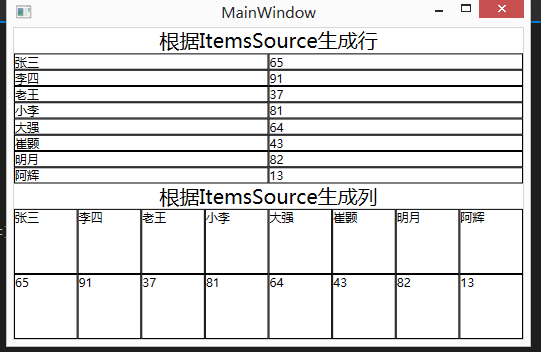
2.xaml代码如下
 <Window x:Class="GridHelperDemo.MainWindow"

         xmlns="http://schemas.microsoft.com/winfx/2006/xaml/presentation"

         xmlns:x="http://schemas.microsoft.com/winfx/2006/xaml"

         xmlns:GridHelperDemo="clr-namespace:GridHelperDemo"

         Title="MainWindow"

         Height=""

         Width="">

     <Window.DataContext>

         <GridHelperDemo:StatisticItemList>

             <GridHelperDemo:StatisticItem Index=""

                                           Name="张三"

                                           Value="" />

             <GridHelperDemo:StatisticItem  Index=""

                                            Name="李四"

                                            Value="" />

             <GridHelperDemo:StatisticItem Index=""

                                           Name="老王"

                                           Value="" />

             <GridHelperDemo:StatisticItem  Index=""

                                            Name="小李"

                                            Value="" />

             <GridHelperDemo:StatisticItem  Index=""

                                            Name="大强"

                                            Value="" />

             <GridHelperDemo:StatisticItem Index=""

                                           Name="崔颢"

                                           Value="" />

             <GridHelperDemo:StatisticItem  Index=""

                                            Name="明月"

                                            Value="" />

             <GridHelperDemo:StatisticItem  Index=""

                                            Name="阿辉"

                                            Value="" />

         </GridHelperDemo:StatisticItemList>

     </Window.DataContext>

     <Grid>

         <Grid.RowDefinitions>

             <RowDefinition Height="auto" />

             <RowDefinition />

             <RowDefinition Height="auto" />

             <RowDefinition />

         </Grid.RowDefinitions>

         <TextBlock HorizontalAlignment="Center"

                    FontSize=""

                    Text="根据ItemsSource生成行" />

         <!--根据ItemsSource生成行-->

         <ItemsControl ItemsSource="{Binding}"

                       Grid.Row="">

             <ItemsControl.ItemsPanel>

                 <ItemsPanelTemplate>

 51                     <Grid GridHelperDemo:GridHelper.RowsCount="{Binding Count}">

 52                     </Grid>

                 </ItemsPanelTemplate>

             </ItemsControl.ItemsPanel>

             <ItemsControl.ItemTemplate>

                 <DataTemplate>

                     <Grid>

                         <Grid.ColumnDefinitions>

                             <ColumnDefinition />

                             <ColumnDefinition />

                         </Grid.ColumnDefinitions>

                         <Border BorderBrush="Black"

                                 BorderThickness="">

                             <TextBlock Text="{Binding Name}" />

                         </Border>

                         <Border BorderBrush="Black"

                                 BorderThickness=""

                                 Grid.Column="">

                             <TextBlock Text="{Binding Value}" />

                         </Border>

                     </Grid>

                 </DataTemplate>

             </ItemsControl.ItemTemplate>

 76             <ItemsControl.ItemContainerStyle>

 77                 <Style>

 78                     <Setter Property="Grid.Row"

 79                             Value="{Binding Index}" />

 80                 </Style>

 81             </ItemsControl.ItemContainerStyle>


         </ItemsControl>

         <TextBlock HorizontalAlignment="Center"

                    FontSize=""

                    Grid.Row=""

                    Text="根据ItemsSource生成列" />

         <!--根据ItemsSource生成列-->

         <ItemsControl ItemsSource="{Binding}"

                       Grid.Row="">

             <ItemsControl.ItemsPanel>

                 <ItemsPanelTemplate>

 94                     <Grid GridHelperDemo:GridHelper.ColumnsCount="{Binding Count}">

 95                     </Grid>

                 </ItemsPanelTemplate>

             </ItemsControl.ItemsPanel>

             <ItemsControl.ItemTemplate>

                 <DataTemplate>

                     <Grid>

                         <Grid.RowDefinitions>

                             <RowDefinition />

                             <RowDefinition />

                         </Grid.RowDefinitions>

                         <Border BorderBrush="Black"

                                 BorderThickness="">

                             <TextBlock Text="{Binding Name}" />

                         </Border>

                         <Border BorderBrush="Black"

                                 BorderThickness=""

                                 Grid.Row="">

                             <TextBlock Text="{Binding Value}" />

                         </Border>

                     </Grid>

                 </DataTemplate>

             </ItemsControl.ItemTemplate>

119             <ItemsControl.ItemContainerStyle>

120                 <Style>

121                     <Setter Property="Grid.Column"

122                             Value="{Binding Index}" />

123                 </Style>

124             </ItemsControl.ItemContainerStyle>


         </ItemsControl>

     </Grid>

 </Window>
3 .cs代码如下
    /// <summary>

    /// Interaction logic for MainWindow.xaml

    /// </summary>

    public partial class MainWindow : Window

    {

        public MainWindow()

        {

            InitializeComponent();

        }

    }

    /// <summary>

    /// 统计项

    /// </summary>

    public class StatisticItem

    {

        public int Index { get; set; }

        public string Name { get; set; }

        public int Value { get; set; }

    }

    /// <summary>

    /// 统计项列表

    /// </summary>

    public class StatisticItemList : List<StatisticItem>

    {

    }
4.GridHelper.Cs定义
    public class GridHelper

    {

        #region RowsCount 附加属性

        public static readonly DependencyProperty RowsCountProperty =

            DependencyProperty.RegisterAttached("RowsCount", typeof(int), typeof(GridHelper), new PropertyMetadata(1, RowsCountPropertyChangedCallback));

        public static void SetRowsCount(UIElement element, int value)

        {

            element.SetValue(RowsCountProperty, value);

        }

        public static int GetRowsCount(UIElement element)

        {

            return (int)element.GetValue(RowsCountProperty);

        }

        public static void RowsCountPropertyChangedCallback(DependencyObject sender, DependencyPropertyChangedEventArgs e)

        {

            int count = Convert.ToInt32(e.NewValue);

            if (sender is Grid && count > 0)

            {

                Grid g = sender as Grid;

                g.RowDefinitions.Clear();

                for (int i = 0; i < count; i++)

                {

                    g.RowDefinitions.Add(new RowDefinition());

                }

            }

        }

        #endregion

        #region ColumnsCount 附加属性

        public static readonly DependencyProperty ColumnsCountProperty =

            DependencyProperty.RegisterAttached("ColumnsCount", typeof(int), typeof(GridHelper), new PropertyMetadata(1, ClumnsCountPropertyChangedCallback));

        public static void SetColumnsCount(UIElement element, int value)

        {

            element.SetValue(ColumnsCountProperty, value);

        }

        public static int GetColumnsCount(UIElement element)

        {

            return (int)element.GetValue(ColumnsCountProperty);

        }

        public static void ClumnsCountPropertyChangedCallback(DependencyObject sender, DependencyPropertyChangedEventArgs e)

        {

            int count = Convert.ToInt32(e.NewValue);

            if (sender is Grid)

            {

                Grid g = sender as Grid;

                g.ColumnDefinitions.Clear();

                for (int i = 0; i < count; i++)

                {

                    g.ColumnDefinitions.Add(new ColumnDefinition());

                }

            }

        }

        #endregion

    }
ItemsControl 使用Grid布局的更多相关文章
- WPF中Grid布局
WPF中Grid布局XMAl与后台更改,最普通的登录界面为例. <Grid Width="200" Height="100" > <!--定义 ...
- [转]使用CSS3 Grid布局实现内容优先
使用CSS3 Grid布局实现内容优先 http://www.w3cplus.com/css3/css3-grid-layout-module.html 本文由大漠根据Rachel Andrew的& ...
- wpf后置代码中的Grid布局以及图片路径的设置
之前用Grid练习连连看布局时,遇到了几个困惑.此次就把当时的一些收获写出来,供以后翻看. 图片路径可能比较常用,所以就写在第一个了. 在xaml中,设置图片非常简单,只要把图片拷贝到资源目录(这里假 ...
- css grid布局的首次使用
首先来看一下效果图 接下来废话不多说,先上代码 <!DOCTYPE html> <html lang="en"> <head> <meta ...
- 学习ExtJS的grid布局
这是之前学习ExtJS布局的时候我导师让我重点熟悉的内容.之后会发一个最近写的结合MVC项目的grid布局的案例. 上一篇关于ExtJS的学习资料什么的都已经更在上一篇了,这里只是对一些代码的记录. ...
- CSS字体渐变 & 隐藏浏览器滚动条 & grid布局(转载)
字体渐变 https://www.zhangxinxu.com/study/201104/css3-text-gradient-2.html 隐藏浏览器滚动条 https://blog.csdn. ...
- CSS Grid 布局完全指南(图解 Grid 详细教程)
CSS Grid 布局是 CSS 中最强大的布局系统.与 flexbox 的一维布局系统不同,CSS Grid 布局是一个二维布局系统,也就意味着它可以同时处理列和行.通过将 CSS 规则应用于 父元 ...
- 快速使用CSS Grid布局,实现响应式设计
常用Grid布局属性介绍 下面从一个简单Grid布局例子说起. CSS Grid 布局由两个核心组成部分是 wrapper(父元素)和 items(子元素). wrapper 是实际的 grid(网格 ...
- 补发————grid布局
CSS Grid布局是CSS中最强大的布局系统.与flexbox的一位布局不同的是CSS Grid布局是一个二维布局系统,即它可以同时处理列和行.通过将CSS规则应用于父元素和其子元素,就可以轻松使用 ...
随机推荐
- python解决SNIMissingWarning和InsecurePlatformWarning警告
在想要获取https站点的资源时,会报出SNIMissingWarning和InsecurePlatformWarning警告 SNIMissingWarning: An HTTPS request ...
- C#中,为什么结构体也可以设置构造函数?
结构体派生自ValueType,ValueType派生自Object,可访问Object的方法.结构体是一种缩小版的类.结构体不能继承.结构体总是有一个无参数的默认构造函数,不允许替换.结构体可指定字 ...
- EXTJS 常用控件的使用
重要按钮配置项 handler: renderTo: 取得控件及其值 var memo = form.findById('memo');//取得输入控件 alert(memo.getValue()); ...
- Toad for Oracle 12.1下载地址
32 位版: http://us-downloads.quest.com/Repository/support.quest.com/Toad for Oracle/12.1/Software/Toad ...
- PLS-00201: 必须声明标识符 'UTL_FILE'
解决办法: 用sysdba身份 把UTL_FILE包的执行权限给这个用户. 举例: 1.C:\Users\Anakin>sqlplus /nolog2.SQL> connect /as s ...
- Jedis操作Redis数据库
添加Maven依赖: <dependencies> <!-- 单元测试 --> <dependency> <groupId>junit</grou ...
- 纯CSS制作“跳动的心”demo
<!DOCTYPE html><html lang="en"><head> <meta charset="UTF-8&qu ...
- JS 截取字符串函数
一.函数:split() 功能:使用一个指定的分隔符把一个字符串分割存储到数组 例子: str=”jpg|bmp|gif|ico|png”; arr=theString.split(”|”); //a ...
- 采用HttpModules来重写URLS
首先写一个处理URLs重写的类,并且这个类必须继承IHttpHandler接口,以博客园的程序为例: public class UrlReWriteModule : System.Web.IHttpM ...
- springMVC学习篇 - 搭建环境及关键点
springMVC是spring家族中一个重要的组件,和struts一样作为一套前台框架被广泛的应用于各种项目. 之前在很多项目组都用到springMVC,只感觉很强大,但是对这套框架的知识了解比较少 ...