
ASP.NET MVC 4 (一)路径映射
正如ASP.NET MVC名字所揭示的一样,是以模型-视图-控制设计模式构建在ASP.NET基础之上的WEB应用程序,我们需要创建相应的程序类来协调处理,完成从客户端请求到结果相应的整个过程:

VS2012中一个典型的MVC工程结构是这样的:
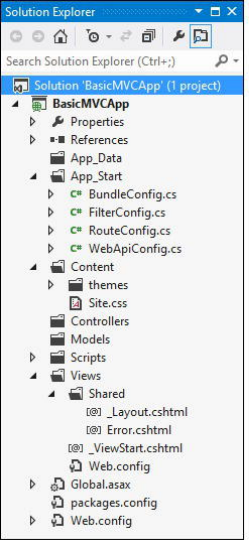
Controllers文件夹下存放控制类,Models文件下是业务数据模型类,Views文件下则是类似于aspx的视图文件。在传统ASP.NET form的应用程序中,客户端的请求最后都映射到磁盘上对应路径的一个aspx的页面文件,而MVC程序中所有的网络请求映射到控制类的某一个方法,我们就从控制类说起,而在讲控制类前,必须要讲的是URL路由。
注册URL路由
我们在浏览器中请求链接 http://mysite.com/Home/Index,MVC认为是这样的URL模式(默认路径映射):
{controller}/{action}
也就是说上面的请求会被映射到Home控制类的Index方法,MVC命名规则中控制类必须以Controller结尾,所以Home控制类应该是HomeController:
public class HomeController : Controller

    {

        public ActionResult Index()

        {

            return View();

        }

    }
MVC是根据什么将上面的请求映射到控制类的相应方法的呢?答案就是路由表,Global.asax在应用程序启动时会调用路由配置类来注册路径映射:
public class MvcApplication : System.Web.HttpApplication

    {

        protected void Application_Start()

        {

            AreaRegistration.RegisterAllAreas();

            WebApiConfig.Register(GlobalConfiguration.Configuration);

            FilterConfig.RegisterGlobalFilters(GlobalFilters.Filters);

            RouteConfig.RegisterRoutes(RouteTable.Routes);

            BundleConfig.RegisterBundles(BundleTable.Bundles);

        }

    }
路径映射的配置类则在App_Start目录下:
public class RouteConfig

    {

        public static void RegisterRoutes(RouteCollection routes)

        {

            routes.IgnoreRoute("{resource}.axd/{*pathInfo}");

            routes.MapRoute(

                name: "Default",

                url: "{controller}/{action}/{id}",

                defaults: new { controller = "Home", action = "Index", id = UrlParameter.Optional }

            );

        }

    }
routes.MapRoute()添加了一个URL路由到路由表中,URL的映射模式是"{controller}/{action}/{id}",controller和action我们已经清楚,id则是请求中额外的参数,比如我们的请求可以是 http://mysite.com/Home/Index/3,对应的action方法可以是:
public ActionResult Index(int id=)

{

  return View();

}
在传递到Index方法时参数id会被赋值3(保存在RouteData.Values["id"]),MVC足够智能来解析参数并转化为需要的类型,MVC称之为模型绑定(后续具体来看)。上面注册路由时使用了默认参数:defaults: new { controller = "Home", action = "Index", id = UrlParameter.Optional },如果我们在请求URL没有指定某些参数,defaults参数会被用作默认值,比如:
mydomain.com = mydomain.com/home/index

mydomain.com/home = mydomain/home/index

mydomain.com/customer = mydomain/customer/index
id为可选参数,可以不包括在URL请求中,所以上面注册的路径可以映射的URL有:
mydomain.com

mydomain.com/home

mydomain.com/home/list

mydomain.com/customer/list/
除此之外不能映射的请求都会得到404错误,比如mydomain.com/customer/list/4/5,这里参数过多不能被映射。
RouteCollection.MapRoute()等同于:
Route myRoute = new Route("{controller}/{action}", new MvcRouteHandler());

routes.Add("MyRoute", myRoute);
这里直接向Routes表添加一个Route对象。
其他一些URL映射的例子:
routes.MapRoute("", "Public/{controller}/{action}",new { controller = "Home", action = "Index" }); //URL可以包含静态的部分,这里的public

routes.MapRoute("", "X{controller}/{action}"); //所有以X开头的控制器路径,比如mydomain.com/xhome/index映射到home控制器

routes.MapRoute("ShopSchema", "Shop/{action}",new { controller = "Home" }); //URL可以不包含控制器部分,使用这里的默认Home控制器

routes.MapRoute("ShopSchema2", "Shop/OldAction",new { controller = "Home", action = "Index" }); //URL可以是全静态的,这里mydomain.com/shop/oldaction传递到home控制器的index方法
一个比较特殊的例子:
routes.MapRoute("MyRoute", "{controller}/{action}/{id}/{*catchall}", new { controller = "Home", action = "Index", id = UrlParameter.Optional });
这可以映射任意多的URL分段,id后的所有内容都被赋值到cathall参数,比如/Customer/List/All/Delete/Perm,catchall = Delete/Perm。
需要注意的是路径表的注册是有先后顺序的,按照注册路径的先后顺序在搜索到匹配的映射后搜索将停止。
命名空间优先级
MVC根据{controller}在应用程序集中搜索同名控制类,如果在不同命名空间下有同名的控制类,MVC会给出多个同名控制类的异常,我们可以在注册路由的时候指定搜索的命令空间:
routes.MapRoute("MyRoute", "{controller}/{action}/{id}/{*catchall}",

new { controller = "Home", action = "Index", id = UrlParameter.Optional ,

new[] { "URLsAndRoutes.AdditionalControllers" });
这里表示我们将在"URLsAndRoutes.AdditionalControllers"命名空间搜索控制类,可以添加多个命名空间,比如:
routes.MapRoute("MyRoute", "{controller}/{action}/{id}/{*catchall}",

new { controller = "Home", action = "Index", id = UrlParameter.Optional },

new[] { "URLsAndRoutes.AdditionalControllers", "UrlsAndRoutes.Controllers"});
"URLsAndRoutes.AdditionalControllers", "UrlsAndRoutes.Controllers"两个命名空间是等同处理没有优先级的区分,如果这两个空间里有重名的控制类一样导致错误,这种情况可以分开注册多条映射:
routes.MapRoute("AddContollerRoute", "Home/{action}/{id}/{*catchall}",

new { controller = "Home", action = "Index", id = UrlParameter.Optional },

new[] { "URLsAndRoutes.AdditionalControllers" });

routes.MapRoute("MyRoute", "{controller}/{action}/{id}/{*catchall}",

new { controller = "Home", action = "Index", id = UrlParameter.Optional },

new[] { "URLsAndRoutes.Controllers" });
路由限制
除了在注册路由映射时可以指定控制器搜索命名空间,还可以使用正则表达式限制路由的应用范围,比如:
routes.MapRoute("MyRoute", "{controller}/{action}/{id}/{*catchall}",

new { controller = "Home", action = "Index", id = UrlParameter.Optional },

new { controller = "^H.*", action = "^Index$|^About$", httpMethod = new HttpMethodConstraint("GET")},

new[] { "URLsAndRoutes.Controllers" });
这里限制MyRoute路由仅用于映射所有H开头的控制类、且action为Index或者About、且HTTP请求方法为GET的客户端请求。
如果标准的路由限制不能满足要求,可以从IRouteConstraint接口扩展自己的路由限制类:
public class UserAgentConstraint : IRouteConstraint {

        private string requiredUserAgent;

        public UserAgentConstraint(string agentParam) {

            requiredUserAgent = agentParam;

        }

        public bool Match(HttpContextBase httpContext, Route route, string parameterName,

                          RouteValueDictionary values, RouteDirection routeDirection) {

            return httpContext.Request.UserAgent != null &&httpContext.Request.UserAgent.Contains(requiredUserAgent);

        }

    }
在注册路由时这样使用:
    routes.MapRoute("ChromeRoute", "{*catchall}",

        new { controller = "Home", action = "Index" },

        new { customConstraint = new UserAgentConstraint("Chrome")},

        new[] { "UrlsAndRoutes.AdditionalControllers" });
这表示我们限制路由仅为浏览器Agent为Chrome的请求时使用。
路由到磁盘文件
除了控制器方法,我们也需要返回一些静态内容比如HTML、图片、脚本到客户端,默认情况下路由系统优先检查是否有和请求路径一致的磁盘文件存在,如果有则不再从路由表中匹配路径。我们可以通过配置颠倒这个顺序:
public static void RegisterRoutes(RouteCollection routes) {

routes.RouteExistingFiles = true;

... ....
还需要修改web配置文件:
<add name="UrlRoutingModule-4.0" type="System.Web.Routing.UrlRoutingModule" preCondition=""/>
这里设置preCondition为空。如果我们再请求一些静态内容比如~/Content/StaticContent.html时会优先从路径表中匹配。
而如果我们又需要忽略某些路径的路由匹配,可以:
...

public static void RegisterRoutes(RouteCollection routes) {

routes.RouteExistingFiles = true;

routes.IgnoreRoute("Content/{filename}.html");
...
它会在RouteCollection中添加一个route handler为StopRoutingHandler的路由对象,在匹配到content路径下的后缀为html的文件时停止继续搜索路径表,转而匹配磁盘文件。
生成对外路径
路径表注册不仅影响到来自于客户端的URL映射,也影响到我们在视图中使用HTML帮助函数生成对外路径,比如我们注册了这样的映射
public class RouteConfig {

public static void RegisterRoutes(RouteCollection routes) {

routes.MapRoute("MyRoute", "{controller}/{action}/{id}", new { controller = "Home", action = "Index", id = UrlParameter.Optional });

}

...
在视图中调用Html.ActionLink生成一个对外路径:
<div>

@Html.ActionLink("This is an outgoing URL", "CustomVariable")

</div>
根据我们当前的请求链接,http://localhost:5081/home,生成的outgoing链接为:
<a href="/Home/CustomVariable">This is an outgoing URL</a>
而如果我们调整路径表为:
...

public static void RegisterRoutes(RouteCollection routes) {

routes.MapRoute("NewRoute", "App/Do{action}", new { controller = "Home" });

routes.MapRoute("MyRoute", "{controller}/{action}/{id}", new { controller = "Home", action = "Index", id = UrlParameter.Optional });

}

...
“@Html.ActionLink("This is an outgoing URL", "CustomVariable") ”得到的结果是:
<a href="/App/DoCustomVariable">This is an outgoing URL</a>
它将使用在路径表中找到的第一条匹配的记录来生成相应的链接路径。
Html.ActionLink()有多个重载,可以多中方式生成URL链接:
@Html.ActionLink("This targets another controller", "Index", "Admin") //生成到Admin控制器Index方法的链接

@Html.ActionLink("This is an outgoing URL",

"CustomVariable", new { id = "Hello" }) //生成额外参数的链接,比如上面的路径配置下结果为“href="/App/DoCustomVariable?id=Hello"”;如果路径映射为 "{controller}/{action}/{id}",结果为href="/Home/CustomVariable/Hello"

@Html.ActionLink("This is an outgoing URL", "Index", "Home", null, new {id = "myAnchorID", @class = "myCSSClass"}) //设定生成A标签的属性,结果类似“<a class="myCSSClass"href="/" id="myAnchorID">This is an outgoing URL</a> ”
参数最多的调用方式是:
@Html.ActionLink("This is an outgoing URL", "Index", "Home",

"https", "myserver.mydomain.com", " myFragmentName",

new { id = "MyId"},

new { id = "myAnchorID", @class = "myCSSClass"})
得到的结果是:
<a class="myCSSClass" href="https://myserver.mydomain.com/Home/Index/MyId#myFragmentName" id="myAnchorID">This is an outgoing URL</a>
Html.ActionLink方法生成的结果中带有HTML的<a>标签,而如果只是需要URL,可以使用Html.Action(),比如:
@Url.Action("Index", "Home", new { id = "MyId" }) //结果为单纯的/home/index/myid
如果需要在生成URL指定所用的路径记录,可以:
@Html.RouteLink("Click me", "MyOtherRoute","Index", "Customer") //指定使用路径注册表中的MyOtherRoute记录
上面讲的都是在Razor引擎视图中生成对外URL,如果是在控制器类中我们可以:
string myActionUrl = Url.Action("Index", new { id = "MyID" });

string myRouteUrl = Url.RouteUrl(new { controller = "Home", action = "Index" });
更多的情况是在控制类方法中需要转到其他的Action,我们可以:
...

public RedirectToRouteResultMyActionMethod() {

  return RedirectToAction("Index");

}

...

public RedirectToRouteResult MyActionMethod() {

  return RedirectToRoute(new { controller = "Home", action = "Index", id = "MyID" });

}

...
创建自定义ROUTE类
除了使用MVC自带的Route类,我们可以从RouteBase扩展自己的Route类来实现自定义的路径映射:
public class LegacyRoute : RouteBase

    {

        private string[] urls;

        public LegacyRoute(params string[] targetUrls)

        {

            urls = targetUrls;

        }

        public override RouteData GetRouteData(HttpContextBase httpContext)

        {

            RouteData result = null;

            string requestedURL = httpContext.Request.AppRelativeCurrentExecutionFilePath;

            if (urls.Contains(requestedURL, StringComparer.OrdinalIgnoreCase))

            {

                result = new RouteData(this, new MvcRouteHandler());

                result.Values.Add("controller", "Legacy");

                result.Values.Add("action", "GetLegacyURL");

                result.Values.Add("legacyURL", requestedURL);

            }

            return result;

        }

        public override VirtualPathData GetVirtualPath(RequestContext requestContext,

            RouteValueDictionary values)

        {

            VirtualPathData result = null;

            if (values.ContainsKey("legacyURL") &&

                urls.Contains((string)values["legacyURL"], StringComparer.OrdinalIgnoreCase))

            {

                result = new VirtualPathData(this,

                    new UrlHelper(requestContext)

                        .Content((string)values["legacyURL"]).Substring());

            }

            return result;

        }

    }
GetRouteData()函数用于处理URL请求映射,我们可以这样注册路径映射:
routes.Add(new LegacyRoute(

"~/articles/Windows_3.1_Overview.html",

"~/old/.NET_1.0_Class_Library"));
上面的例子中如果我们请求"~/articles/Windows_3.1_Overview.html"将被映射到Legacy控制器的GetLegacyURL方法。
GetVirtualPath()方法则是用于生成对外链接,在视图中使用:
@Html.ActionLink("Click me", "GetLegacyURL", new { legacyURL = "~/articles/Windows_3.1_Overview.html" })
生成对外链接时得到的结果是:
<a href="/articles/Windows_3.1_Overview.html">Click me</a>
创建自定义ROUTE Handler
除了可以创建自定义的Route类,还可以创建自定义的Route handler类:
public class CustomRouteHandler : IRouteHandler {

        public IHttpHandler GetHttpHandler(RequestContext requestContext) {

            return new CustomHttpHandler();

        }

    }

    public class CustomHttpHandler : IHttpHandler {

        public bool IsReusable {

            get { return false; }

        }

        public void ProcessRequest(HttpContext context) {

            context.Response.Write("Hello");

        }

    }
注册路径时使用自定义的Route handler:
routes.Add(new Route("SayHello", new CustomRouteHandler()));
其效果就是针对链接 /SayHello的访问得到的结果就是“Hello”。
使用Area
大型的Web应用可能分为不同的子系统(比如销售、采购、管理等)以方便管理,可以在MVC中创建不同的Area来划分这些子系统,在VS中右键点击Solution exploer->Add->Area可以添加我们想要的区域,在Solution exploer会生成Areas/<区域名称>的文件夹,其下包含Models、Views、Controllers三个目录,同时生成一个AreaRegistration的子类,比如我们创建一个名为Admin的区域,会自动生成名为AdminAreaRegistration的类:
namespace UrlsAndRoutes.Areas.Admin {

    public class AdminAreaRegistration : AreaRegistration {

        public override string AreaName {

            get {

                return "Admin";

            }

        }

        public override void RegisterArea(AreaRegistrationContext context) {

            context.MapRoute(

                "Admin_default",

                "Admin/{controller}/{action}/{id}",

                new { action = "Index", id = UrlParameter.Optional }

            );

        }

    }

}
它的主要作用是注册一个到Admin/{controller}/{action}/{id}路径映射,在global.asax中会通过AreaRegistration.RegisterAllAreas()来调用到这里的RegisterArea()来注册区域自己的路径映射。
在Area下创建Controller、视图同整个工程下创建是相同的,需要注意的是可能遇到控制器重名的问题,具体解决参见命名空间优先级一节。
如果在视图中我们需要生成到特定Area的链接,可以在参数中指定Area:
@Html.ActionLink("Click me to go to another area", "Index", new { area = "Support" })
如果需要得到顶级控制器的链接area=""留空即可。
以上为对《Apress Pro ASP.NET MVC 4》第四版相关内容的总结,不详之处参见原版 http://www.apress.com/9781430242369。
ASP.NET MVC 4 (一)路径映射的更多相关文章
- ASP.NET MVC 5 Web编程2 -- URL映射(路由原理)
本章将讲述ASP.NET MVC5 的路由原理,即URL映射机制. 简单点就是解释:为什么MVC在浏览器输入地址就能访问到类(或类中的方法)?这是怎么做到的?我自己可以通过.NET写出一个自己的MVC ...
- asp.net mvc 中"未找到路径“/favicon.ico”的控制器或该控制器未实现 IController。"
FavIcon.ico是一个特殊的文件,它是浏览器请求一个网站时出现的.某些浏览器在书签和收藏夹中使用这个图标.在与这些图标相关的网站被打开时,某些浏览器也在标题栏或浏览器标签中中显示这个图标. 当一 ...
- [转]剖析ASP.Net MVC Application
http://www.cnblogs.com/errorif/archive/2009/02/13/1389927.html 为了完全了解Asp.net MVC是怎样工作的,我将从零开始创建一个MVC ...
- C# 6 与 .NET Core 1.0 高级编程 - 41 ASP.NET MVC(上)
译文,个人原创,转载请注明出处(C# 6 与 .NET Core 1.0 高级编程 - 41 ASP.NET MVC(上)),不对的地方欢迎指出与交流. 章节出自<Professional C# ...
- ASP.NET MVC 4 (十二) Web API
Web API属于ASP.NET核心平台的一部分,它利用MVC框架的底层功能方便我们快速的开发部署WEB服务.我们可以在常规MVC应用通过添加API控制器来创建web api服务,普通MVC应用程序控 ...
- ASP.NET MVC 4入门
一.MVC设计模式将Web应用分解成三个部分:模型(Models).试图(Views)和控制器(Controllers),这三部分分别完成不同的功能以实现Web应用. 视图(View)代表用户交互界面 ...
- 5、ASP.NET MVC入门到精通——NHibernate代码映射
本系列目录:ASP.NET MVC4入门到精通系列目录汇总 上一篇NHibernate学习笔记—使用 NHibernate构建一个ASP.NET MVC应用程序 使用的是xml进行orm映射,那么这一 ...
- [Buffalo]ASP.NET MVC路由映射
Asp.Net的路由系统旨在通过注册URl模版与物理文件之间的映射进而实现请求地址与文件路径之间的分离,但对于Asp.Net Mvc应用来说,请求的目标却是定义在某个Controller类型中的Act ...
- asp.net 运行时,"未能映射路径"
asp.net 站点出现:未能映射路径,解决方案之一:发现原来是iis 应用程序池中设置了.net framework 版本为4.0了,而且VS中站点的版本为2.0引起的. 解决方案是把VS 中的站点 ...
随机推荐
- 拥抱ARM妹纸第二季 之 第二次 约会需要浪漫,这么大灯泡怎么弄?
终于轮到俺的小穆出场啦.有请能让太阳也为之暗淡的小穆闪亮登场-,鼓掌吧,欢呼吧!-- ♪♪ We can burn brighter Than the sun ~~~ ♪♪ “谢谢---“ 唱的太棒啦 ...
- Ubuntu首次开启root用户
最近一直在学习linux,选择ubuntu作为联系的操作系统.然后一直发现自己所创建的用户和root用户不是一个概念,执行好多命令的时候都提示没有权限.这样,最后终于发现原来是ubuntu是默认关闭r ...
- wap_supplicant介绍
目前可以使用wireless-tools 或wpa_supplicant工具来配置无线网络.请记住重要的一点是,对无线网络的配置是全局性的,而非针对具体的接口. wpa_supplicant是一个较好 ...
- 【Ajax】脑补一下 ajax 的options
问题是因为粉红色部分引起的 ,想搞明白 put delete 的应用场景,发现ajax的一些属性也没有完全用过. 参数名 类型 描述 url String (默认: 当前页地址) 发送请求的地址. t ...
- ThinkPHP/Common/extend.php
<?php // +---------------------------------------------------------------------- // | ThinkPHP [ ...
- [原]项目进阶 之 持续构建环境搭建(四)Jenkins环境搭建
在之前的几篇文章中,我给大家分别介绍了这次的持续化构建环境搭建的相关前提内容.如果说前面的文章都是小菜的话,那么今天的这篇文章就是我们这个系列文章的主菜. 1.前提 安装jenkins需要安装JDK. ...
- Java枚举常见7种用法
DK1.5引入了新的类型——枚举.在 Java 中它虽然算个“小”功能,却给我的开发带来了“大”方便.用法一:常量在JDK1.5 之前,我们定义常量都是: publicstaticfianl…… .现 ...
- OpenWrt刷机后LAN口无法连通的问题
[路由器开发板硬件固件配置] MTK双频:MT7620a + MT7612e 内存:256 MB 闪存:16 MB 固件:MTK自带SDK中的OpenWrt固件(mtksdk-openwrt-2.6. ...
- 初见IOS的UI之:UI控件的属性frame bounds center 和transform
这些属性,内部都是结构体:CGRect CGPoint CGFloat 背景知识:所有的控件都是view的子类,屏幕就是一个大的view:每个view都有个viewController,它是view的 ...
- 实用项目管理前台框架:EasyUI,ExtJs
EasyUI项目管理框架,如图: 项目名称:微信管理平台 项目地址:http://www.cnblogs.com/hanyinglong/p/3236966.html#3007557 托管地址:htt ...