
Yii CActiveForm
http://blog.sina.com.cn/s/blog_685213e70101mo4i.html
文档:
http://www.yiiframework.com/doc/api/1.1/CActiveForm
All these validations share the same set of validation rules declared in the associated model class. CActiveForm is designed in such a way that all these validations will lead to the same user interface changes and error message content.
To ensure data validity, server-side validation is always performed. By setting enableAjaxValidation to true, one can enable AJAX-based validation; and by setting enableClientValidation to true, one can enable client-side validation. Note that in order to make the latter two validations work, the user's browser must has its JavaScript enabled. If not, only the server-side validation will be performed.
The AJAX-based validation and client-side validation may be used together or separately. For example, in a user registration form, one may use AJAX-based validation to check if the user has picked a unique username, and use client-side validation to ensure all required fields are entered with data. Because the AJAX-based validation may bring extra workload on the server, if possible, one should mainly use client-side validation.
The AJAX-based validation has a few limitations. First, it does not work with file upload fields. Second, it should not be used to perform validations that may cause server-side state changes. Third, it is not designed to work with tabular data input for the moment.
Login.php:
yii刷新页面验证码不变修改
原因:
每次刷新页面的时候都会调用CCaptcha这个widget的run方法来运行这个助手:
/**
* Renders the widget.
*/
public function run()
{
if(self::checkRequirements())
{
$this->renderImage(); //生成验证码图片
$this->registerClientScript();
}
else
throw new CException(Yii::t('yii','GD and FreeType PHP extensions are required.'));
}
/**
* Renders the CAPTCHA image.
*/
protected function renderImage()
{
if(!isset($this->imageOptions['id']))
$this->imageOptions['id']=$this->getId();
   //生成验证码图片链接src地址,这个是生成图片的关键,指向action为 $captchaAction='captcha'的方法,即调
用CCaptchaAction这个方法来生成验证码图片
$url=$this->getController()->createUrl($this->captchaAction,array('v'=>uniqid()));
$alt=isset($this->imageOptions['alt'])?$this->imageOptions['alt']:'';
echo CHtml::image($url,$alt,$this->imageOptions);
}
CCaptchaAction中的执行流程:
/**
* Runs the action.
*/
public function run()
{
if(isset($_GET[self::REFRESH_GET_VAR])) // AJAX request for regenerating code
{
$code=$this->getVerifyCode(true);
echo CJSON::encode(array(
'hash1'=>$this->generateValidationHash($code),
'hash2'=>$this->generateValidationHash(strtolower($code)),
// we add a random 'v' parameter so that FireFox can refresh the image
// when src attribute of image tag is changed
'url'=>$this->getController()->createUrl($this->getId(),array('v' => uniqid())),
));
}
else
        $this->renderImage($this->getVerifyCode());  //刷新页面时会调用这个,问题就出现在这,他调用
这个方法的时候没有传递参数true
Yii::app()->end();
}
/**
* Gets the verification code.
* @param boolean $regenerate whether the verification code should be regenerated.
* @return string the verification code.
*/
public function getVerifyCode($regenerate=false) //从这个参数可以看出 如果$regenerate为true,则会
重新生成验证码图片
{
if($this->fixedVerifyCode !== null)
return $this->fixedVerifyCode;
$session = Yii::app()->session;
$session->open();
$name = $this->getSessionKey();
if($session[$name] === null || $regenerate)
{
$session[$name] = $this->generateVerifyCode();
$session[$name . 'count'] = 1;
}
return $session[$name];
}

解决办法:

一:根据getVerifyCode这个方法中的这段代码来修改,这段代码是用于验证的,如果设定了fixedVerifyCode,则每次
生成时都会生成一个固定的验证码,我们所要做的是把这个固定的变成动态的。

if($this->fixedVerifyCode !== null)

        return $this->fixedVerifyCode;

修改控制器中生成验证码的配置:
/**

 * Declares class-based actions.

 */

public function actions()

{

    return array(

        // captcha action renders the CAPTCHA image displayed on the register page

        'captcha'=>array(

            'class'=>'CCaptchaAction',

            'fixedVerifyCode' => substr(md5(time()),0,4),

            'foreColor' => 0x55FF00,

            'testLimit' => 0,  //不限制相同验证码出现的次数

            'offset' => 5,

            'minLength' => 4,

            'maxLength' => 4,

            'transparent' => true,

        ),

    );

}

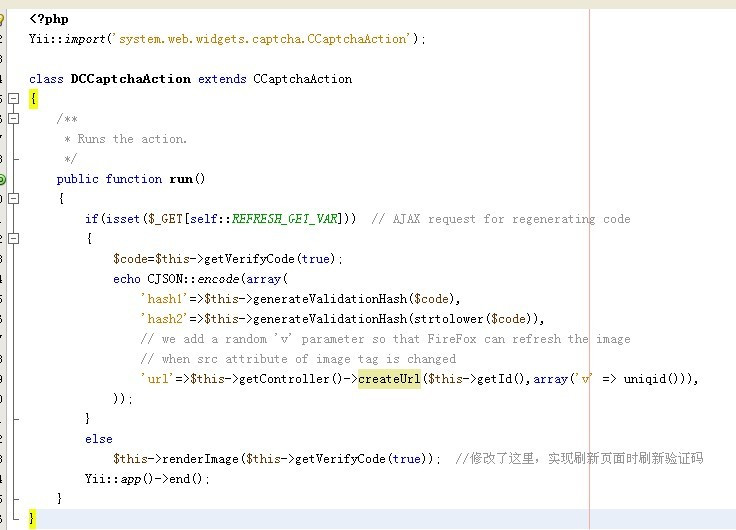
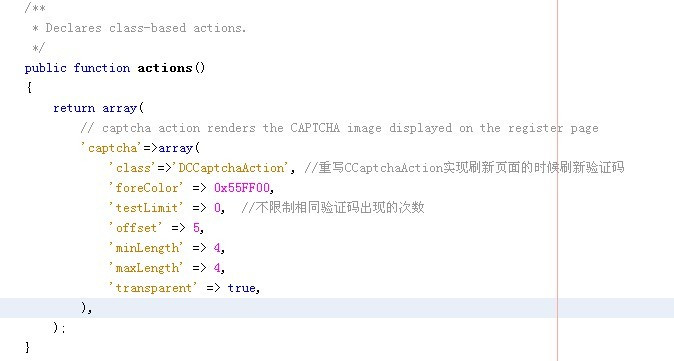
二、继承CCaptchaAction这个类,修改 run()方法中的 $this->renderImage($this->getVerifyCode())这句为
$this->renderImage($this->getVerifyCode(true)),其他不变

缺点:这种方法在CActiveForm开启enableClientValidation=true时,总是报验证码不正确,
enableAjaxValidation开启没事,待解决。。。

代码如下:
继承的类DCCaptchaAction.php
Yii验证码总是不正确原因
http://blog.163.com/wangzhenbo85@126/blog/static/1013632822013230315743/?suggestedreading&wumii
Yii CActiveForm的更多相关文章
- Yii CActiveForm 客户端验证(enableClientValidation)和自定义验证
使用Yii的CActiveForm默认使用服务器端模型(model)的rules规则验证数据. 但这会导致无谓的请求提交,比较好的方式是为了用户体验在客户端也验证,而为了安全性,在服务器端和数据库也做 ...
- 使用Yii框架自带的CActiveForm实现ajax提交表单
Php代码: <div class="form"> <?php $form=$this->beginWidget('CActiveForm', array ...
- 最为简易的yii 教程(一)
了解目录的框架结构 framework主要有 base 框架核心组件 caching 缓存组件 db 数据库组件 gii ...
- CSRF token 无法被验证. ----Yii连接数据库后数据库错误日志报错
CSRF token 无法被验证. 我使用的是mongodb+ yii1.1 What is CSRF, please see the details here. http://en.wikiped ...
- yii-mail yii 发送邮件
参考网址:http://shoukii0721.iteye.com/blog/1576225 有很多时候我们需要给用户发送邮件,作留言,或者是激活邮件.等用途. 需要注意的是,设置发送的邮件得有SMT ...
- yii弹出层
Yii弹出层,包装了JQuery的JDialog,使用很方便.Yii组件功能太强大,强大到无法自拔 $this->beginWidget('zii.widgets.jui.CJuiDialog' ...
- yii表单
yii 的dropdownlist,用yii的session可以记下选中的状态 $form = $this->beginWidget('CActiveForm',array('action'= ...
- YII开发技巧分享——模型(models)中rules自定义验证规则
YII的models中的rules部分是一些表单的验证规则,对于表单验证十分有用,在相应的视图(views)里面添加了表单,在表单被提交之前程序都会自动先来这里面的规则里验证,只有通过对其有效的限制规 ...
- Yii框架学习笔记(二)将html前端模板整合到框架中
选择Yii 2.0版本框架的7个理由 http://blog.chedushi.com/archives/8988 刚接触Yii谈一下对Yii框架的看法和感受 http://bbs.csdn.net/ ...
随机推荐
- WinSCP列出’/’目录项出错
无法获得目录列表 如图所示,使用百度云虚拟机时,FTP连接服务器,出现错提示,官方给出的说法是使用其他的FTP进行连接,但是之前成功连接过,查找资料后说是打开过png,mp3等媒体文件,切换路径时出错 ...
- 如何查看Oracle的用户权限
ORACLE数据字典视图的种类分别为:USER,ALL 和 DBA. USER_*:有关用户所拥有的对象信息,即用户自己创建的对象信息 ALL_*:有关用户可以访问的对象的信息,即用户自己创建的对象的 ...
- 指针之 *((volatile unsigned long *)(x))解析
今天重新温习了一下C语言的指针部分,突然想到了经常会碰见的一种宏定义:#define PGAS (*((volatile unsinged long *)(x))) 在解析该宏定义前,先看看指针变量的 ...
- Mysql Java type mapping
MySQL Type Java Type ---------- --------- CHAR String VARCHAR String LONGVARCHAR String NUMERIC java ...
- php中封装的curl函数(抓取数据)
介绍一个封闭好的函数,封闭了curl函数的常用步骤,方便抓取数据. 代码如下: <?php /** * 封闭好的 curl函数 * 用途:抓取数据 * edit by www.jbxue.com ...
- ECSHOP 支付宝发货确认接口,记录支付宝返回的交易号
1,在order_info 数据表尾添加trade_no 字段 数据表尾怎么添加trade_no 字段 ECSHOP为了支付宝发货确认接口,需要记录支付宝返回的交易号 1,在order_info 数据 ...
- CorelDRAW 文件实用工具 CDRTools 2
随着 CorelDRAW 更新脚步越来越频繁,版本之间兼容性问题越来越突出,特别是跨版本之间打开会有很多问题,比如:文字跑位.透镜变向.位图出错.颜色改变,甚至会造成文件损坏.最好的办法就是哪一个版本 ...
- Python入门二:函数
一.函数的定义和使用 1.基本结构: def 函数名(参数): """ 文档字符串 """ 函数体 返回值 2.函数名: 和变量名命名规则一 ...
- C语言宏定义取得两数的最大值和最小值
/*本程序时为了验证用宏来做 * 两个数的大小比较的写法*/#include<stdio.h>#define MAX(x,y) ((x)<(y)?(y):(x))#define MI ...
- ajax的post用法
<button>点击之后,显示ajax返回的数据</button> 首先在页面上新建了一个按钮,点击这个按钮后,执行ajax操作,并将返回的字符串显示在按钮上. 下面是ajax ...