
[ Python - 10 ] 练习:批量管理主机工具
需求:
- 主机分组
- 登录后显示主机分组,选择分组后查看主机列表
- 可批量执行命令、发送文件,结果实时返回
- 主机用户名密码可以不同
流程图:
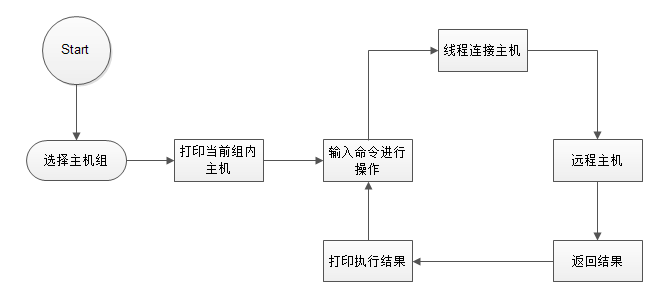
说明:
## 需求:
- 主机分组
- 登录后显示主机分组,选择分组后查看主机列表
- 可批量执行命令、发送文件,结果实时返回
- 主机用户名密码可以不同
## 目录结构
  batch-manage
    bin/
      start.py   # 启动主程序
    conf/
      setting.py   # 远程主机配置文件
    core/
      control.py   # RemoteControl类,用于远程主机执行命令及上传
      local.py    # 本地数据处理

## 说明
  目前实现可批量执行命令,上传文件功能。

## 运行环境
  windows
  python3.0+

代码下载地址:https://github.com/hukeyy/batch-manage
bin/
start.py
#!_*_coding:utf-8_*_

# Author: hkey

import threading, os, sys

base_dir = os.path.dirname(os.path.dirname(os.path.abspath(__file__)))

sys.path.append(base_dir)

from core import control

from core import local

from conf import setting

if __name__ == '__main__':

    for host in setting.hosts.keys():

        host_tuple = local.options()

        print('\33[42;1m[put file or inter system command.]\33[0m')

        while True:

            cmd = input('>>>').strip()

            if len(cmd) == 0: continue

            t_list = []

            for host in host_tuple:

                remote_control = control.RemoteControl(cmd, *host)

                t = threading.Thread(target=remote_control.run,)

                t.setDaemon(True)

                t.start()

                t_list.append(t)

            for t in t_list:

                t.join()
conf/
  setting.py
#!_*_coding:utf-8_*_

# Author: hkey


## 元组在python中是不可变对象,保存序列时,应当尽量采用这种方式

hosts = {'测试系统':(('10.0.0.11', 22, 'root', ''),

                     ('10.0.0.12', 22, 'root', ''),

                    ),

          '生产系统':(('10.0.0.12', 22, 'root', ''),

                    ),

          }
core/
  control.py
#!_*_coding:utf-8_*_

# Author: hkey

import  paramiko

class RemoteControl(object):
    '''远程主机操作类'''

    def __init__(self, cmd, *kw):

        self.hostname = kw[0]

        self.port = kw[1]

        self.username = kw[2]

        self.password = kw[3]

        self.cmd = cmd

    def run(self):
       '''通过反射功能将程序解耦'''

        cmd = self.cmd.split()[0]

        if hasattr(self, cmd):

            getattr(self, cmd)()

        else:

            setattr(self, cmd, self.command)

            getattr(self, cmd)()

    def put(self):

        '''上传文件'''

        # try:

        transport = paramiko.Transport(self.hostname, self.port)

        transport.connect(username=self.username, password=self.password)

        sftp = paramiko.SFTPClient.from_transport(transport)

        sftp.put(self.cmd.split()[1], self.cmd.split()[2])

        transport.close()

        print('\33[32;1m【%s】上传文件【%s】成功!' %(self.hostname, self.cmd.split()[1]))

        # except Exception as e:

        #     print('\33[31;1m错误:【%s】: 【%s】\33[0m' %(self.hostname, e))

    def command(self):

        '''执行系统静态命令'''

        ssh = paramiko.SSHClient()

        ssh.set_missing_host_key_policy(paramiko.AutoAddPolicy())

        ssh.connect(hostname=self.hostname, port=self.port, username=self.username,

                    password=self.password)

        stdin, stdout, stderr = ssh.exec_command(self.cmd)

        res, err = stdout.read(), stderr.read()

        result = res if res else err

        print('\33[32;1m%s\33[0m'.center(50, '-') % self.hostname)

        print(result.decode())

        ssh.close()
core/
local.py
#!_*_coding:utf-8_*_

# Author: hkey

import os, sys

base_dir = os.path.dirname(os.path.dirname(os.path.abspath(__file__)))

sys.path.append(base_dir)

from conf import setting

def options():
    '''通过配置文件setting.py,用户选择主机组并通过用户选择的组获取到主机的信息'''

    for host in setting.hosts.keys():

        print(host)

    while True:

        choice = input('please choice groupname:')

        if len(choice) ==0: continue

        if choice in setting.hosts.keys():

            for host in setting.hosts[choice]:

                print(host[0])

            return setting.hosts[choice]

        else:

            print('groupname not exist.')

            break
[ Python - 10 ] 练习:批量管理主机工具的更多相关文章
- 【Python】JBOSS-JMX-EJB-InvokerServlet批量检测工具
一.说明 在JBoss服务器上部署web应用程序,有很多不同的方式,诸如:JMX Console.Remote Method Invocation(RMI).JMXInvokerServlet.Htt ...
- Python简单主机批量管理工具
一.程序介绍 需求: 简单主机批量管理工具 需求: 1.主机分组 2.主机信息使用配置文件 3.可批量执行命令.发送文件,结果实时返回 4.主机用户名密码.端口可以不同 5.执行远程命令使用param ...
- python 简单主机批量管理工具
需求: 主机分组 主机信息配置文件用configparser解析 可批量执行命令.发送文件,结果实时返回,执行格式如下 batch_run -h h1,h2,h3 -g web_cluster ...
- 【Python之旅】第六篇(七):开发简易主机批量管理工具
[Python之旅]第六篇(七):开发简易主机批量管理工具 python 软件开发 Paramiko模块 批量主机管理 摘要: 通过前面对Paramiko模块的学习与使用,以及Python中多线程与多 ...
- python运维之使用python进行批量管理主机
1. python运维之paramiko 2. FABRIC 一个与多台服务器远程交互的PYTHON库和工具 3. SSH连接与自动化部署工具paramiko与Fabric 4. Python批量管理 ...
- Python开发程序:简单主机批量管理工具
题目:简单主机批量管理工具 需求: 主机分组 登录后显示主机分组,选择分组后查看主机列表 可批量执行命令.发送文件,结果实时返回 主机用户名密码可以不同 流程图: 说明: ### 作者介绍: * au ...
- MySQL通用批量写入工具(Python)
背景 平台目前的分析任务主要以Hive为主,分析后的结果存储在HDFS,用户通过REST API或者Rsync的方式获取分析结果,这样的方式带来以下几个问题: (1)任务执行结束时间未知,用户 ...
- Linux系统——Ansible批量管理工具
批量管理工具: (1)ansible 操作简单(适用于500台以下服务器) (2)saltstack 比较复杂(一般适用于1000-4w台服务器) (3)puppet超级复杂 systemctl(统一 ...
- 简单主机批量管理工具(这里实现了paramiko 用su切换到root用户)
项目名:简单主机批量管理工具 一.需求 1.主机分组 2.可批量执行命令.发送文件,结果实时返回,执行格式如下 batch_run -h h1,h2,h3 -g web_clusters,db_ ...
随机推荐
- wpa_supplicant 初始化
几个重要的结构体介绍: 1. struct wpa_interface --- Parameters for wpa_supplicant_add_iface(). wpa_interface对应网络 ...
- [boost-3] 函数对象
boost库学习: 函数对象,成为‘高阶函数’,可以呗传入到其他函数或者从其他函数返回的一类函数. Boost.Bind可替换来自c++标准中的std::bind1st()和std::bind2dn( ...
- MySQL 初识01
最近开始学习MySQL 所以将这两天所学习到的知识简单小结一下 1.status 显示数据库信息 2.数据类型: a.字符串: char(m):固定长度的字符,最多255个字符: varchar(m) ...
- 编程练习:寻找发帖"水王"扩展问题一
回顾 寻找发帖水王的问题总结起来就是在一个数组中某一个元素出现次数超过了数组长度的一半,那么可以很顺利的找到这个元素,实现见"编程练习:寻找发帖水王" 扩展 上面的问题中,强调了某 ...
- Redis的高级应用——数据安全
Redis的数据保存在内存中,速度十分快.这也就意味着,一个恶意破解redis数据库密码的用户,可以在一秒钟进行更多的尝试.如果用户密码级别较低或更换频率过长,就会造成致命的危害. 1.设置用户 Re ...
- Storm ui 显示异常
今天安装storm集群的时候,各个进程也都起来,却发现Storm ui界面下无法观察Storm集群的状态 有很多地方处理不当都会造成这种现象: 1.storm.yaml配置不当 2.防火墙的问题 3. ...
- BZOJ4591 SHOI2015超能粒子炮·改(卢卡斯定理+数位dp)
注意到模数很小,容易想到使用卢卡斯定理,即变成一个2333进制数各位组合数的乘积.对于k的限制容易想到数位dp.可以预处理一发2333以内的组合数及组合数前缀和,然后设f[i][0/1]为前i位是否卡 ...
- 51nod 1680区间求和 (dp+树状数组/线段树)
不妨考虑已知一个区间[l,r]的k=1.k=2....k=r-l+1这些数的答案ans(只是这一个区间,不包含子区间) 那么如果加入一个新的数字a[i](i = r+1) 则新区间[l, i]的答案为 ...
- 【NOIP2017 D1 T1 小凯的疑惑】
题目描述 小凯手中有两种面值的金币,两种面值均为正整数且彼此互素.每种金币小凯都有 无数个.在不找零的情况下,仅凭这两种金币,有些物品他是无法准确支付的.现在小 凯想知道在无法准确支付的物品中,最贵的 ...
- 判断当前系统当前浏览器是否安装启用 Adobe Flash Player,检查在chrome中的状态
一.判断当前所在系统 let sUserAgent = navigator.userAgent;let isWin = (navigator.platform == "Win32" ...