
identityservice4使用案例
一 使用缘由
最近写微服务的blog,研读了o’reilly出的 《building Microservices With Asp.net Core》,其中使用的微服务分布式权限组件是microsoft.aspnetcore.authentication.jwtbearer,那最近identityserver4这么流行,就决定替换掉它。
二 开始
1 认证流程:
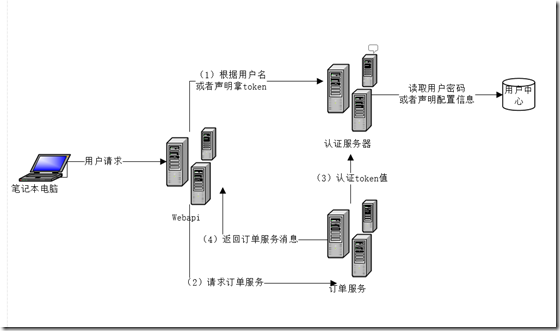
2 开发
认证服务器:
(1) 首先一个空的asp.net core 项目,在nuget包中安装identityserver4 包
(2) 项目组织,会增加Config.cs的文件。
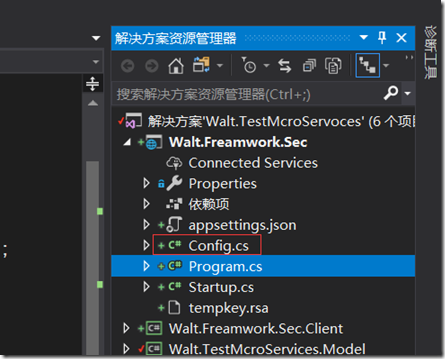
相关代码:
using IdentityServer4.Models;

using System;

using System.Collections.Generic;

using System.Linq;

using System.Threading.Tasks;

namespace Walt.Freamwork.Sec

{

    public class Config

    {

        public static IEnumerable<ApiResource> GetApiResources()

        {

            return new List<ApiResource>

                {

                    new ApiResource("api1", "My API")

                };

        }

        public static IEnumerable<Client> GetClients()

        {

            return new List<Client>

                    {

                        new Client

                        {

                            ClientId = "client",

                            // no interactive user, use the clientid/secret for authentication

                            AllowedGrantTypes = GrantTypes.ClientCredentials,

                            // secret for authentication

                            ClientSecrets =

                            {

                                new Secret("secret".Sha256())

                            },
                            // scopes that client has access to

                            AllowedScopes = { "api1" }

                        }

                    };

        }

    }

}
 public void ConfigureServices(IServiceCollection services)

        {

            // configure identity server with in-memory stores, keys, clients and resources

            services.AddIdentityServer()

                .AddDeveloperSigningCredential()

                .AddInMemoryApiResources(Config.GetApiResources())

                .AddInMemoryClients(Config.GetClients());

            services.AddMvc();

        }

public void Configure(IApplicationBuilder app, IHostingEnvironment env)

        {

            if (env.IsDevelopment())

            {

                app.UseDeveloperExceptionPage();

            }

            app.UseIdentityServer();

            app.UseMvc((route) => {

                route.MapRoute("default", "{controller=Home}/{action=Index}/{id?}");

            });

        }
被请求资源服务器
(1)为webapi增加identityserver4.accesstokenvalidation包
(2) 配置
 public void ConfigureServices(IServiceCollection services)

        {

            services.AddMvc().SetCompatibilityVersion(CompatibilityVersion.Version_2_1);

            services.AddAuthorization();

            services.AddAuthentication("Bearer")

          .AddIdentityServerAuthentication(options =>

          {

              options.Authority = "http://localhost:64433"; //授权服务器

              options.RequireHttpsMetadata = false;

              options.ApiName = "api1";

          });

        }

 public void Configure(IApplicationBuilder app, IHostingEnvironment env)

        {

           var log=     LoggerFac.CreateLogger<Startup>();

            log.LogInformation("infomation");

            if (env.IsDevelopment())

            {

                app.UseDeveloperExceptionPage();

            }

            else

            {

                app.UseHsts();

            }

            app.UseAuthentication();   //使用认证

             app.UseHttpsRedirection();

            app.UseMvc();

        }
客户端:从代码中可以看出,分两步,第一步获取token
,第二部根据token去访问需要的服务。
using System;

using System.Net.Http;

using IdentityModel.Client;

using IdentityServer4;

using Newtonsoft.Json.Linq;

namespace Walt.Freamwork.Sec.Client

{

    class Program

    {

        static  void Main(string[] args)

        {

            var disco =  DiscoveryClient.GetAsync("http://localhost:64433/").Result;

            if (disco.IsError)

            {

                Console.WriteLine(disco.Error);

                return;

            }

            // request token

            var tokenClient = new TokenClient(disco.TokenEndpoint, "client", "secret");

            var tokenResponse =  tokenClient.RequestClientCredentialsAsync("api1").Result;

            if (tokenResponse.IsError)

            {

                Console.WriteLine(tokenResponse.Error);

                return;

            }

            Console.WriteLine(tokenResponse.Json);

            // call api

            var client = new HttpClient();

            client.SetBearerToken(tokenResponse.AccessToken);

            var response =  client.GetAsync("http://localhost:50403/api/identity").Result;

            if (!response.IsSuccessStatusCode)

            {

                Console.WriteLine(response.StatusCode);

            }

            else

            {

                var content =  response.Content.ReadAsStringAsync().Result;

                Console.WriteLine(JArray.Parse(content));

            }

            Console.ReadKey();

        }

    }

}
运行情况:咱们为webapi定义一个api
using Microsoft.AspNetCore.Authorization;

using Microsoft.AspNetCore.Mvc;

using System;

using System.Collections.Generic;

using System.Linq;

using System.Threading.Tasks;

namespace Walt.Freamwork.Sec

{

    [Route("api/[controller]")]

    [ApiController]

    [Authorize]

    public class IdentityController : ControllerBase

    {

        [HttpGet]

        public IActionResult Get()

        {

            return new JsonResult(from c in User.Claims select new { c.Type, c.Value });

        }

    }

}
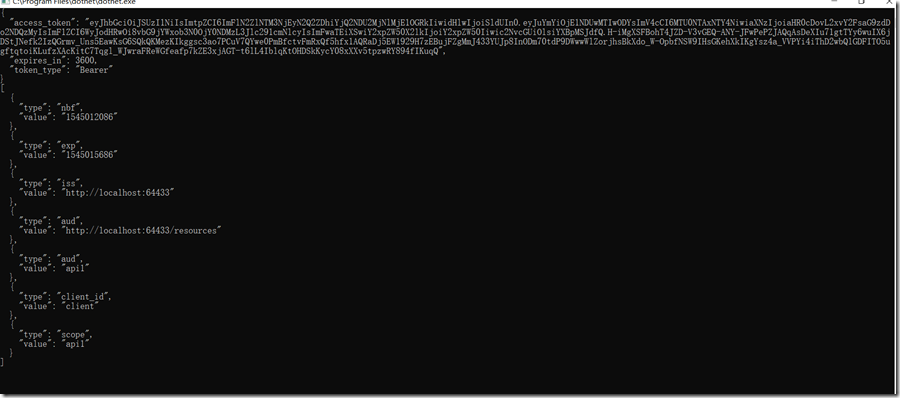
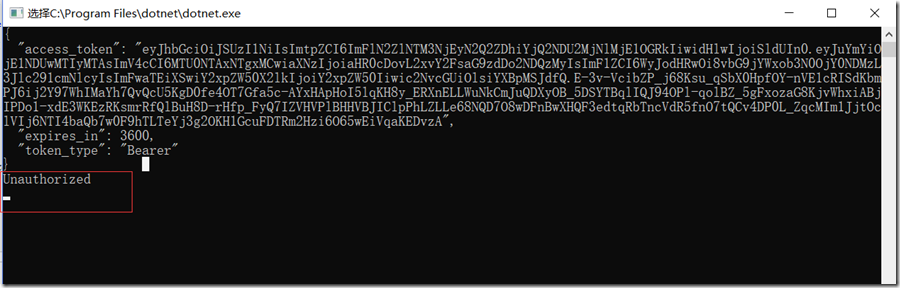
如果不带token
using System;

using System.Net.Http;

using IdentityModel.Client;

using IdentityServer4;

using Newtonsoft.Json.Linq;

namespace Walt.Freamwork.Sec.Client

{

    class Program

    {

        static  void Main(string[] args)

        {

            var disco =  DiscoveryClient.GetAsync("http://localhost:64433/").Result;

            if (disco.IsError)

            {

                Console.WriteLine(disco.Error);

                return;

            }

            // request token

            var tokenClient = new TokenClient(disco.TokenEndpoint, "client", "secret");

            var tokenResponse =  tokenClient.RequestClientCredentialsAsync("api1").Result;

            if (tokenResponse.IsError)

            {

                Console.WriteLine(tokenResponse.Error);

                return;

            }

            Console.WriteLine(tokenResponse.Json);

            // call api

            var client = new HttpClient();

           // client.SetBearerToken(tokenResponse.AccessToken);   这块注释掉了

            var response =  client.GetAsync("http://localhost:50403/api/identity").Result;

            if (!response.IsSuccessStatusCode)

            {

                Console.WriteLine(response.StatusCode);

            }

            else

            {

                var content =  response.Content.ReadAsStringAsync().Result;

                Console.WriteLine(JArray.Parse(content));

            }

            Console.ReadKey();

        }

    }

}
总结:本实例使用的是声明的方式认证,也可以使用用户名密码。 identityserver4是个功能强大但是使用很简洁的一个认证框架,
也支持OAUTH为外部认证提供支持,这里就不讨论了。
identityservice4使用案例的更多相关文章
- 在项目中自定义集成IdentityService4
OAuth2.0协议 在开始之前呢,需要我们对一些认证授权协议有一定的了解. OAuth 2.0 的一个简单解释 http://www.ruanyifeng.com/blog/2019/04/oaut ...
- 数据库优化案例——————某市中心医院HIS系统
记得在自己学习数据库知识的时候特别喜欢看案例,因为优化的手段是容易掌握的,但是整体的优化思想是很难学会的.这也是为什么自己特别喜欢看案例,今天也开始分享自己做的优化案例. 最近一直很忙,博客产出也少的 ...
- SQL Server内存遭遇操作系统进程压榨案例
场景: 最近一台DB服务器偶尔出现CPU报警,我的邮件报警阈(请读yù)值设置的是15%,开始时没当回事,以为是有什么统计类的查询,后来越来越频繁. 探索: 我决定来查一下,究竟是什么在作怪,我排查的 ...
- solr_架构案例【京东站内搜索】(附程序源代码)
注意事项:首先要保证部署solr服务的Tomcat容器和检索solr服务中数据的Tomcat容器,它们的端口号不能发生冲突,否则web程序是不可能运行起来的. 一:solr服务的端口号.我这里的sol ...
- Yeoman 官网教学案例:使用 Yeoman 构建 WebApp
STEP 1:设置开发环境 与yeoman的所有交互都是通过命令行.Mac系统使用terminal.app,Linux系统使用shell,windows系统可以使用cmder/PowerShell/c ...
- 了不起的 nodejs-TwitterWeb 案例 bug 解决
了不起的nodejs算是一本不错的入门书,不过书中个别案例存在bug,按照书中源码无法做出和书中相同效果,原本兴奋的心情掺杂着些许失落. 现在我们看一下第七章HTTP,一个Twitter Web客户端 ...
- 一个表缺失索引发的CPU资源瓶颈案例
背景 近几日,公司的应用团队反应业务系统突然变慢了,之前是一直比较正常.后与业务部门沟通了解详情,得知最近生意比较好,同时也在做大的促销活动,使得业务数据处理的量出现较大的增长,最终系统在处理时出现瓶 ...
- 【Machine Learning】决策树案例:基于python的商品购买能力预测系统
决策树在商品购买能力预测案例中的算法实现 作者:白宁超 2016年12月24日22:05:42 摘要:随着机器学习和深度学习的热潮,各种图书层出不穷.然而多数是基础理论知识介绍,缺乏实现的深入理解.本 ...
- Redis简单案例(二) 网站最近的访问用户
我们有时会在网站中看到最后的访问用户.最近的活跃用户等等诸如此类的一些信息.本文就以最后的访问用户为例, 用Redis来实现这个小功能.在这之前,我们可以先简单了解一下在oracle.sqlserve ...
随机推荐
- web测试点梳理
前言 前面一篇文章讲解了app测试一些功能点.那么相应的也梳理一下web测试相关的功能的测试点吧,此篇文章只是给你们一个思路,如果要涉及web端每个测试点,基本不可能实现的,所以只是提供一个设计的思路 ...
- Raspberry Pi开发之旅-发送邮件记录时间及IP
由于我使用树莓派的场景大多数是在没有显示器.只用terminal连接它的情况下,所以,它的IP地址有时会在重启之后变掉(DHCP的),导致我无法通过terminal连接上它.然后我又要很麻烦地登录路由 ...
- libhdfs的配置和使用
测试环境:centos6.10,hadoop2.7.3,jdk1.8 测试代码:HDFSCSample.c #include "hdfs.h" #include <strin ...
- Scrapy安装方法
Scrapy安装在Python2.7环境下 1.配置环境变量: 2.安装基础软件 4个(64位系统) 安装twisted: C:\Users\Administrator>pip install ...
- Ubuntu 15.10环境下安装Hive
1. 安装MySQL sudo tar -xzvf mysql-5.7.13-linux-glibc2.5-x86_64.tar.gz sudo mv mysql-5.7.13-linux-glibc ...
- 【bzoj2151】种树(堆/优先队列+双向链表)
题目传送门:http://www.lydsy.com/JudgeOnline/problem.php?id=2151 这道题因为优先队列不怎么会用,而且手写堆的代码也不长,也想复习一下手写堆的写法…… ...
- 先有Class还是先有Object?
先有Class还是先有Object? Java的对象模型中: 所有的类都是Class类的实例,Object是类,那么Object也是Class类的一个实例. 所有的类都最终继承自Object类,Cla ...
- json01-json简介和语法
JSON: JavaScript Object Notation(JavaScript 对象表示法) JSON 是存储和交换文本信息的语法.类似 XML,但比 XML 更小.更快,更易解析,是轻量级的 ...
- YII2笔记之三
activeform布局findAll等不能满足where, order by, limit,底层调用了findByConditioncol-md col-lg的使用 view的方法,前三个常用ren ...
- 关于谷歌浏览器(chrome)的一些好用的插件推荐
很多在测试时候都可以使用 第一部分: A:Adblock Plus for Google Chrome™https://chrome.google.com/webstore/detail/cfhdoj ...